Desert Online General Trading LLC
Dubai, United Arab Emirates
Desert Online General Trading LLC
Dubai, United Arab Emirates




🚀 Compact power printing that keeps your office ahead of the curve
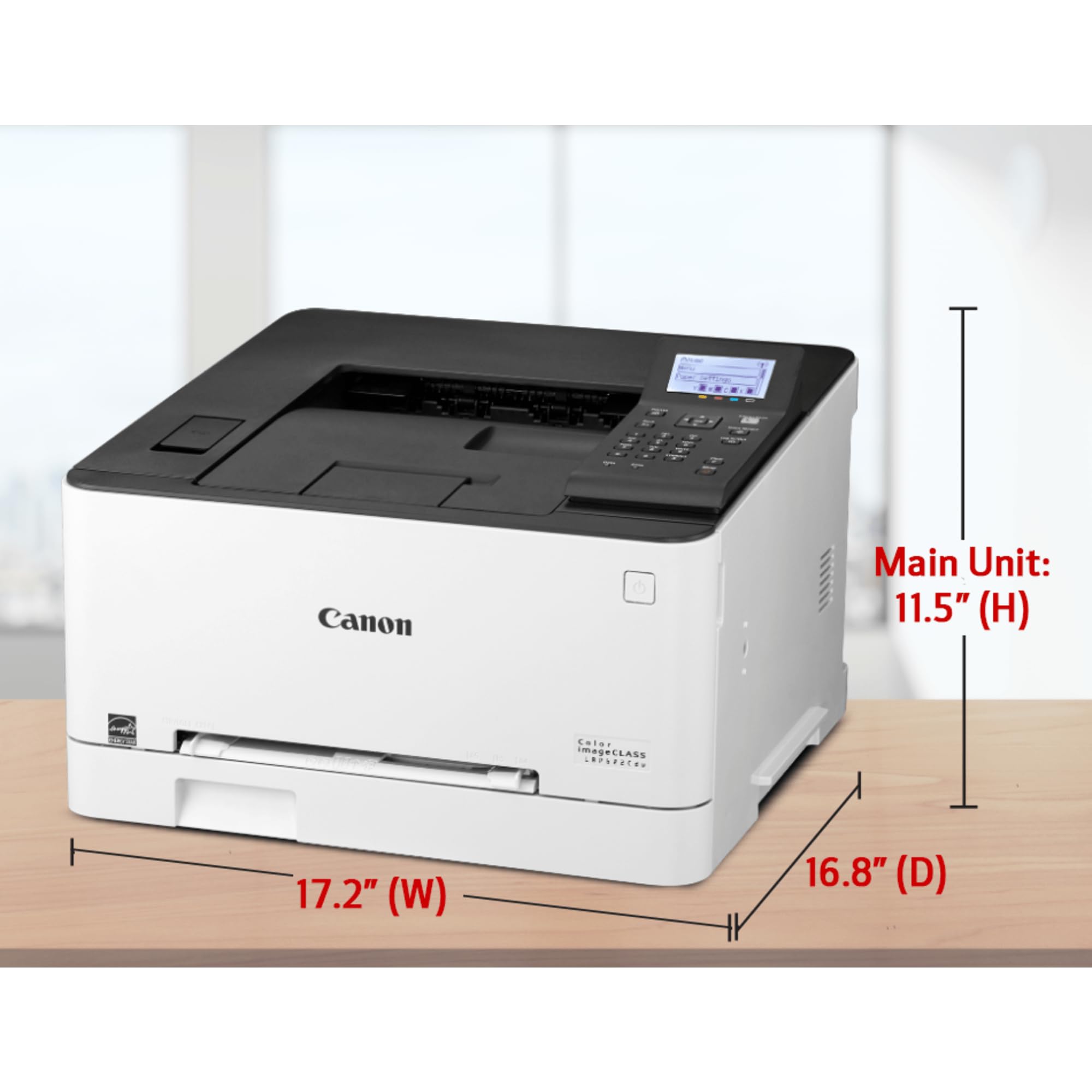
The Canon Color Image Class LBP622Cdw is a compact, wireless duplex laser printer designed for small to medium businesses. It features WiFi Direct for mobile printing without a router, fast first-page output in 10.3 seconds, and automatic double-sided printing to reduce paper waste. Built with Canon’s reliable engine technology and enhanced security settings, it ensures efficient, secure, and eco-friendly printing with minimal maintenance.


| Product Dimensions | 16.8"D x 17.2"W x 11.5"H |
| Controller Type | Android |
| Maximum Media Size | 8.5 x 14 inch |
| Power Consumption | 340 Watts |
| Included Components | LBP622Cdw Product, Cartridge 054 CMY Starter: 680 Page Yield, Black Starter: 910 Page Yield, Power Cord, Starter Guide, User Software DVD-ROM, Warranty Card |
| Print media | Paper (plain) |
| Scanner Type | Document |
| Max Input Sheet Capacity | 251 |
| Max Copy Speed (Black & White) | 22 ppm |
| Compatible Devices | Laptops, PC, Smartphones |
| Maximum Color Print Resolution | High |
| Sheet Size | 3 x 5, 8.5 x 14 |
| Warranty Type | limited warranty |
| Dual-sided printing | Yes |
| Maximum copies per run | 250 |
| Wattage | 340 watts |
| Max copy resolution color | 600 x 600 dpi |
| Max copy resolution black-white | 600 dpi |
| Duplex | Automatic |
| Hardware Interface | Ethernet |
| Ink Color | Cyan, Magenta, Yellow, Black |
| Additional Printer functions | All In One |
| Control Method | App |
| Number of Trays | 1 |
| Processor Count | 1 |
| Total Ethernet Ports | 1 |
| Model Series | iC |
| Specific Uses For Product | Office |
| UPC | 013803307665 |
| Global Trade Identification Number | 00013803307665 |
| Memory Storage Capacity | 64 MB |
| Manufacturer | Canon USA |
| Item Weight | 41.8 pounds |
| Item model number | LBP622Cdw |
| Is Discontinued By Manufacturer | No |
| Number of Items | 1 |
| Size | Compact Size |
| Manufacturer Part Number | 1497C004 |
S**.
I love this printer!
I’ve had this printer for about 8 months now so I feel I can write an honest review.First of all, I’ve always had inkjet printers and I was so sick of spending $100 on a printer and another $60 on ink just for the print heads to dry up and have a useless printer. I don’t print often so that was the main reason for the print heads drying up. I wanted a printer that wasn’t going to give me that same issue.After a lot of research, this printer seemed to be the best quality that had the best price. I also looked into toner refills as that was also a concern of my. You can buy a cheap printer and pay tons for the ink or toner refills.This printer prints fast and beautifully. I have printed photos as have my kids, documents, charts etc. I have yet to try photo paper but from my understanding, it will work but make sure you buy paper compatible with laser printers and not ink jet printers. Since laser printers use heat to melt the toner onto the page, you risk destroying your entire printer by using the wrong paper!Another thing I love is that myself and my kids can download the app and print whatever we want to the printer from our devices. They printed tons of pics of anime characters and their own art. Quality again is excellent.The toner cartridges aren’t an arm and a leg! I purchased two off brand boxes that contain all the colors for about $40-60. Considering the toner that comes in the printer to start with is still going strong (black is currently running low though ), I’d say it lasts a while! I believe it’s around 3,000 pages or so of prints that you get with a complete set of toner. We are on month 8 so I’d say that’s a good chunk of time without having to replace anything yet!!I did have a couple issues with the printer but nothing that makes me regret buying it.1. Once it’s done printing, it’s very noisy for about 30 seconds or so to re-adjust it’s self in preparation for the next time you use it. Not a big deal, but annoying.2. The printer it’s self is kind of loud. I didn’t realize how loud it was until I was on the phone and my kids used it as I was sitting right next to it. Again, annoying but not a deal breaker.3. I have had issues with it disconnecting from my Mac computer. I’m not sure why this happens and I saw other people complain about the wifi issue as well, so when it acts up, I simply remove and re add the printer to my computer (just a few clicks of a button) and then it seems fine. Could be a Mac issue or the printer software but it’s been fine as of lately.4. Lastly, (and this could be user error) I cannot figure out how to shrink the images I do print. I sell items on Poshmark sometimes and when I print the shipping label, it takes up an entire 8x11 piece of paper which is ridiculous. I’m sure there’s a way to change this but I don’t know how and haven’t figured it out.Overall, I’m so glad I bought this printer. I started working from home due to Covid and needed a way to print documents. I’ve been wanting to invest in a laser printer for years but just never made the jump. I’m soooo glad I finally did! I do with this printer had a scanner but I knew the price reflected that. If I wanted a scanned or fax or any of the other stuff, it would have definitely cost more money and those were features I was willing to go without. I highly recommend this printer for anyone wanting to invest but is scared of choosing the wrong one! Canon is a great brand and this printer is excellent quality!!
P**Y
It only does one thing Print - but it does it well!!
This printer works like a professional high end printer. The colors are bright and crisp, the text is clear and easy to read. It was easy to set up. I had a problem setting up the default paper type, and the instructions were not clear, so I called in to support. I had to wait 45 minutes to get someone (while I was on hold), but once I reached someone, he helped me update the drivers and set the defaults that I needed.This printer doesn't scan, copy, fax or anything else - it just prints. But that's all I needed it to do, and it does a great job of doing it. I have three complaints. First, this is really LOUD. I think that it's the loudest printer that I have ever purchased. Second, there is no secondary paper input. You can feed a single sheet in through the manual slot on the front, but if you want to print on cardstock or envelopes and want to stack a bunch of them in a secondary paper source, you can't. You need to reload the main paper tray. Third (and this might be picky, but) when the paper comes out, it lies flat on the top of the printer. there is no depression on the top of the printer that allows you to put your fingers under the paper to pick it up. The edge of the paper sits flush with the top of the printer, so you need to work to get your finger under the paper to pick it up. I've attached a picture to show you. A small thing, but a continuing annoyance.The printer handles paper of all thicknesses smoothly. I have printed two sided on card stock, and it handles it just fine. Unlike the inkjet printers that Canon makes, which feel very consumer, and are great for occasional printing, but feel all plastic and cheap, this printer looks, feels and acts like a professional, business class printer. Other than my small complaints, I'm glad that I bought it. for the $225 I paid, it's a solid workhorse.
TrustPilot
3 周前
2 个月前
4天前
1天前