We remain fully operational. Our teams are working around the clock to ensure your deliveries continue safely.

下载应用程序



⌨️ Elevate your workflow with the quiet power of ergonomic precision!
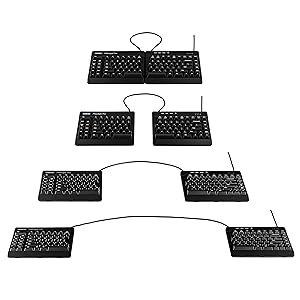
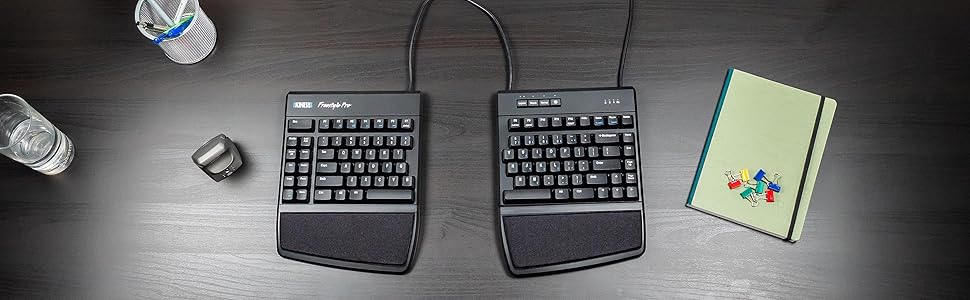
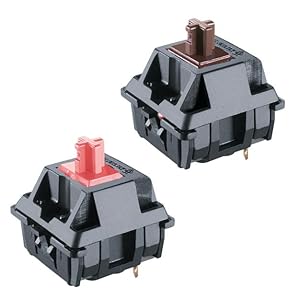
The KINESIS USB-A Freestyle Pro is a top-tier ergonomic split mechanical keyboard featuring Cherry MX Silent Red switches for quiet, smooth typing. Its award-winning adjustable split design reduces wrist strain, while onboard SmartSet programmability offers extensive customization without drivers. Compatible across major OS platforms and backed by a 2-year warranty, it’s engineered in the USA for durability and professional-grade performance.





| ASIN | B07J1ZJ6XR |
| Best Sellers Rank | #1,349 in Computer Keyboards |
| Customer Reviews | 4.2 4.2 out of 5 stars (592) |
| Date First Available | October 4, 2018 |
| Is Discontinued By Manufacturer | No |
| Item Weight | 2.6 pounds |
| Item model number | KB900-RDQ |
| Manufacturer | KINESIS |
| Product Dimensions | 7.25 x 15.5 x 1.25 inches |
J**Z
Great keyboard
I love this keyboard. It helps my hand posture by being split allowing it to be ergonomic. It does take time to train your muscle memory. At the time of this review, im still learning it's layout. One thing I suggest to the developer, keep in mind the muscle memory that we are most of us used too. The "ESC" key is too far and it wants to be where the F1 key is. Additionally, the left side shortcut keys are useful but perhaps try to see how will it work out if those where on the right side of the left keyboard. I feel that location will make ot easier to train our muscle memory. Designing around muscle memory can be very challenging but not impossible.
A**K
Very good ergonomic keyboard, still undecided on cherry red vs. brown
I have been using the kinesis maxim family of keyboards for over 2 decades, usually purchased by my employer and had to leave it behind when I changed jobs. However, I got to keep my last one and some of the membrane-style switches eventually gave out after about 7 years. The cherry mechanical switches should last much longer. I was hoping that my previous lifter from the standard Freestyle would fit the Pro, but they are different dimensions. I managed to make do for now but they don't fit very well. I am very good at adapting to different keyboard layouts, and the ability to separate my hands really decreases strain on my wrists compared to a flat keyboard. I wanted quiet, non-clicky, but tactile (office / WFH / speakerphone - touch typing and shortcut key navigating). After lots of analyzing I went ahead with the cherry red. Overall I like it. It does feel squishier than I expected, and at times I have held down a key without realizing it. So the feel is "linear" as advertised, in that you can't tell when a key has been actuated by feel. I wanted low actuation force but it is basically non-existent. It is so hard these days to find a place where you can actually test the different keyboard options before making a purchase, so hopefully my experience is helpful. Preference of switch type is very individualized, there is nothing wrong with the cherry red that I got, just that it is a different feel. The macro functionality is neat, though I haven't found much use for it yet. It's especially impressive that you can mount the drive on Linux and edit the configuration by hand, or you can program it on Windows using the GUI and bring it back to Linux. I kind of wish there was an extra key to run keyboard macros that didn't conflict with standard office shortcut keys (ctrl and alt key combos are already mostly taken). Maybe there is one and I just haven't found it yet.
N**K
Good ergo keyboard, spendy for what you get
Moved to this keyboard off of a 10+ year-old MS Ergo 4000. Compared to the MS keyboard, it is obviously much more flexible to position (especially with the VIP3 Pro kit - don't buy this keyboard without it or you just get a two-piece keyboard with no tilt adjustment or wrist pads), but the keys themselves are all square and not sloped or differently-sized for better ergonomics. So focus on this if positioning is where you need ergonomic support, but not if you also need a high degree of ergonomic adjustment for your hand/fingers. On the other hand, the mechanical keys do, as I hoped, feel great. I am certain that the strong key feedback makes my typing "crisper" so I hold my hands more appropriately, and my fingers literally are less tired when typing for extended times. The Cherry Red Quiet keys are fine for typing while on Zoom meetings, and the people I'm talking to do not report keyboard noise. There is, as mentioned in other reviews, a little reverberation as the keys hit the metal baseplate, which would be nice to have silenced, but I don't find it especially bothersome. The feel is good with no tacticle "click," which I'd assume you'd get on the Brown keys. This is NOT a clicky keyboard and if you want one, look elsewhere. Programmability is amazing, and I'd point you do the documentation on how wide it is. You have 3 layouts to customize, each with their own second "layer" by pressing the fn key. This means that in total you have 6 full keyboard layouts to work the way you want. The software to edit layouts is easy enough to use, and once you set things up, the layouts and macros are saved on the keyboard. So if you're using this with ChromeOS or Linux without native support, you can personalize on another machine and then use the full customizations on other computers. The VIP3 Pro accessory which, again, you just should buy to get the most of our the ergonomics of this keyboard, is cleverly built and gives you three different angles to tent your keyboard. I found myself tenting the left more than the right, and it's nice to have that option. It only does horizontal angling though, so you cannot tilt the keyboard vertically forwards or backwards. On the downsides, the rubber feet to keep the keyboard stable are not very sticky, and as a result, the tenting accessory ended up sliding around and sometimes flipping position on my very slick keyboard tray. I put some microsuction tape on the rubber feet and that resolved it. Overall I'm happy and can type comfortable and quickly on the keyboard. Took some getting used to with typing with my hands far apart, but once I got a few days' use under my belt, I was back up to my typical 100wpm, and my hands and wrists feel great after a long day of typing. If you cannot touch type, however, avoid this keyboard. Using a broadly split keyboard like this along with hunting and pecking would be incredibly frustrating. I'd also have a hard time endorsing this as a gaming keyboard for the same reasons (the same would be true of Kinesis' gaming version of this, which is the same except with fancy lights). Between the un-padded metal backplate, the lack of forwards/backwards tilting on the VIP3, and the slippery keyboard feet, the keyboard falls short of being a true best-of-the-best option, at at a little above $200 for the whole kit, that's a disappointment. But the options for ergonomic mechanical keyboards are limited, and I cannot fault the feel of the keyboard once I got it "just so."
K**L
Purchased in April 2021 as my first split mechanical keyboard, this ergonomic keyboard has provided a fantastic typing experience that encourages good posture and supports healthy typing habits.
L**S
El teclado estaba usado, me di cuenta porque traia una macro pregrabada que hablaba de una Janet, dos correos y algo de una visa DS160. Aparte de esto no traía las teclas de Mac ni la herramienta para reemplazarlas. Y venía "sellado".
A**N
I really like the Kinesis brand. This keyboard has been an upgrade from Kinesis Freestyle2 Blue. I have been using the split keyboard(s) from this brand for 6+ years, and I am very much used to the split-keyboard concept. Complementing this with programmable and silent mechanical switches simply boosts the experience, especially in open-office workplace environments. Being able to choose among different pre-configured layouts and program useful macros for different computer settings is a bonus. The only downside I could see (compared to Freestyle Edge) is that the VIP3 kit is excluded. The kit should have been included already in the package.
M**P
After one week of usage, one of the keys stopped working. I am very angry considering the cost of the keyboard.
C**Y
I work in an office where I am tasked with inputting lots of different spec sheets, some are the same and other have aspects which are the same. I bought this keyboard as the macro functions seemed to be something I could use. This keyboard has improved my productivity greatly, it has also relieved the mental stress of having to type the same data over and over again. The macros are recorded at whatever speed I type but played back at a much faster rate (which you can choose through the settings). All of this is done with no software on the company's computer, which they will not allow. It did take a while to get to grips with the keyboard but after a few weeks I can say my fingers have got used to the no. 6 being on the "wrong" side for me, also the American layout of the enter key. I do not suffer with any sort of RSI so I cannot vouch for it's ability to alleviate your pain. I do find though that it is very hard to use flat, so I have it propped up about 15mm by a small shelf which gives me the right angle. You can buy the stand but I haven't really seen the need yet. All in all after 6 months of use I can recommend it if you need the macros.