We remain fully operational. Our teams are working around the clock to ensure your deliveries continue safely.

下载应用程序


![Corel Dazzle Dvd Recorder Hd Video Capture Device + Video Editing Software [Pc Disc]](/_next/image?url=https%3A%2F%2Fm.media-amazon.com%2Fimages%2FI%2F61KdP%2BKMhJL.jpg&w=3840&q=75)



Buy anything from 5,000+ international stores. One checkout price. No surprise fees. Join 2M+ shoppers on Desertcart.
Desertcart purchases this item on your behalf and handles shipping, customs, and support to Malaysia.
🎥 Turn nostalgia into digital gold — don’t let your memories fade away!
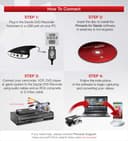
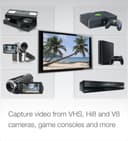
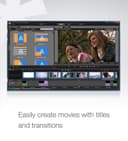
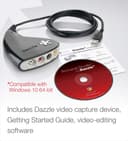
The Corel Dazzle DVD Recorder HD is a versatile USB video capture device paired with Pinnacle Studio editing software, designed to convert analog video sources like VHS, Hi8, V8 tapes, and game consoles into digital formats. It supports DVD burning and exporting to popular file types, enabling easy preservation and sharing of your treasured memories on modern devices. Compatible with 64-bit Windows 7 through 11, it offers an all-in-one solution for video capture and editing, ideal for professionals seeking to digitize legacy media with creative control.


| ASIN | B00EAS14KI |
| Best Sellers Rank | #483 in Software ( See Top 100 in Software ) #146 in DVD Players & Recorders #255 in Internal TV Tuner & Video Capture Cards #1,078 in Professional Video Accessories |
| Color | Black |
| Customer Reviews | 3.4 3.4 out of 5 stars (1,674) |
| Date First Available | August 2, 2013 |
| Global Trade Identification Number | 00735163141535 |
| Is Discontinued By Manufacturer | No |
| Item Dimensions LxWxH | 10.6 x 2.2 x 8 inches |
| Item Weight | 5.1 ounces |
| Item model number | DVCPTENAM |
| Manufacturer | Pinnacle Systems |
| National Stock Number | 7030-01-541-4627 |
| Product Dimensions | 10.6 x 2.2 x 8 inches |
| Publication Date | October 23, 2013 |
| Series | DVD Recorder |
| Software requirement minimum physical memory | 3 GB |
| Software requirement minimum ram | 2 GB |
| UPC | 735163141535 606485347335 |
C**E
Good tool for converting VCR tapes
I was initially hesitant to buy it because of the problems people reported with Windows 10. I made sure my Windows 10 installation was up to date and ran the Pinnacle install CD. When it completed, I rebooted the system and installed the Windows 10 patch you download from Pinnacle. I attached the Dazzle device and everything worked perfectly. The Pinnacle interface appears rather intimidating at first glance. There is a help manual that installs, and I recommend that first time users spend some time reading through it. In the manual there are links to some relatively short but informative videos that will help you get up to speed with the interface. Once you get the hang of it, it's easy to use. I had some very old VCR tapes that i wanted to put on my Plex server, and this did exactly what I wanted to do.
B**Y
READ THE 1-2 STAR REVIEWS FIRST
I had an old version of this product that I used years ago to transfer my old camcorder videos to a Windows XT computer. THAT one worked well. With today's technology I figured I'd see if I could get better quality transfers and opted for this new version that "works" with Windows 11. I have Windows 11 Pro, a new Dell with an 11th Gen Intel i7-1170 @ 2.5 GHz, 128 GB of RAM and an NVIDIA GeForce GTX 1660 Ti Video Graphics card. Far more than the minimum requirements for this item. The first thing that happened when I installed the software is that it failed because I had Core Isolation on and that was preventing the installation of some drivers. In order to install the software I had to turn this off. That should have been my first red flag, having to remove security in order for something to be installed. But installation apparently finished, so I launched the software and it worked. I checked for updates, and one was available, so I installed it. After that I launched the software again and was informed that I am not a registered user now (after the fact I read reviews of this product and saw that I am NOT the only one), and the app quit. So I uninstalled everything using the Uninstall feature. But that doesn't uninstall everything, I still had to go to Installed Apps and remove what it left behind. Against my better judgement, I turned off Core Isolation and reinstalled the software. After installation it asked if I wanted to install the update. Figuring the previous failure was the culprit of the registration issue, I did. Launching the app, I was no longer a registered user and the app quit. So, I uninstalled everything again, reinstalled and did NOT apply the update. The software then launched and I was able to start transferring the video. The video capture was nothing but choppy video and audio filled with static (NOT in the source tape). Unusable captures. It was then that I decided to just send it all back. After uninstalling everything to repack it, I turned Core Isolation back on and was informed that there were 5 or 6 incompatible drivers preventing me from turning this security feature back on. So the uninstall feature leaves behind the drivers that required Core Isolation to be turned off, so it could not be turned back on. Luckily the System Security app tells which drivers are incompatible, so I was able to find them in c:\windows\system32 and rename them so they would not load, and I was able to reactivate Core Isolation. So, at least with Windows 11, in order to use this software be prepared to turn off Core Isolation forever (or until you remove the software and the incompatible drivers), be prepared to never upgrade the software because you will no longer be a registered user (of course you can PURCHASE the newest software after having purchased this) and be prepared for unusable video/audio capture.
D**C
Works great for MiniDV from Sony HandyCam HC-42 to Dell PC Windows 10
I have a 15-year old Sony HandyCam HC-42 that doesn't record or work anymore. However, I also had a dozen family movies on MiniDV tapes that I wanted to convert to DVD or flashdrives to watch. I tried other products and connections...very frustrating. I bought the Dazzle converter...plugged it into a USB port on my Dell Windows 10 PC and used the Sony video cable that came with the camera (red, yellow, white plug on one end). The software is really good and this worked without any issue. I don't normally write reviews, but after being so frustrated by other products and firewire cables and PC boards, etc...this was like a 15-minute instant fix. The software also allows you to edit the movies and sharpen them. Again...very happy with this product and hope this helps someone else.
J**K
Works as Advertized and Easy to Use on Windows 8.1
The Dazzle video capture device uses a program named Pinnacle Studio for Dazzle to manage/monitor the capturing and saving of the video stream into a digital format. The Pinnacle program included with the device is a specialized (limited) version of Pinnacle Studio, and it can also be used to edit the videos after they have been converted to a digital format. The Dazzle installation DVD was produced before Windows 8.1 was introduced, and the Pinnacle program will not open after installation in a Windows 8.1 system until you install a patch downloaded from the website named Patch_for_PSD_Win 8.1.exe. Because of the need for a patch, after installing the device drivers and the Pinnacle program from the DVD, you will receive a message that there was an error installing the program. Ignore the message, close the installation notification box, and restart the computer. The program will be installed on the computer, but it will not open. Install the patch, and the Pinnacle program should open and run normally. After installing the patch, the Dazzle device and the Pinnacle program works as advertised. However, the Pinnacle program does not provide settings for choosing the codec or the quality of the captured video. There is one setting, and that is it. If this produces the quality of video you are happy with, you will love this system, because it is so easy to use. If not, you can use other programs (instead of Pinnacle) to choose the codec and quality of the video capture and to manage/monitor the capture of the video stream.
F**Z
He usado desde hace varios año este convertidor y no hay ninguno que se le compare en el mercado por relación calidad-precio. Si acaso Belkin tenía uno también de excelente calidad pero ya no fue compatible para Windows 7, 8 ni 10. El adaptador que venden en Steren es tal vez más económico pero contiene un chip de fabricante aleatorio lo cual convierte en un dolor de cabeza cuando se llega a extraviar el disco de instalación ya que es casi imposible saber qué chip contiene el adaptador y en más de una ocasión he visto cómo los desechan por esa razón. La entrega de Amazon fue, como casi siempre, expedita.
F**R
Je suis tres content de mon achat. Il fonctionne super bien. Il vient avec une version de base de Pinnacle mais si vous avez une version plus avancée de Pinnacle, vous pourrez utiliser Dazzle avec ce dernier aussi puisqu'il le reconnait automatiquement.
A**R
Works well with i5 intel generation 7 with upgrade to PinnacleStudio 24 No pdf manual with the PinnacleStudio 23 software supplied but once managed to access the support web site Pinnacle/Corel then able to obtain one. Manual's for both PinnacleStudio 24 and PinnacleStudio 23 well written and easy to follow once getting started.
K**L
Très bon produit et facile a utiliser
J**S
bien