
下载应用程序







⚡ Test Smarter, Not Harder — Power Up Your Battery Game!
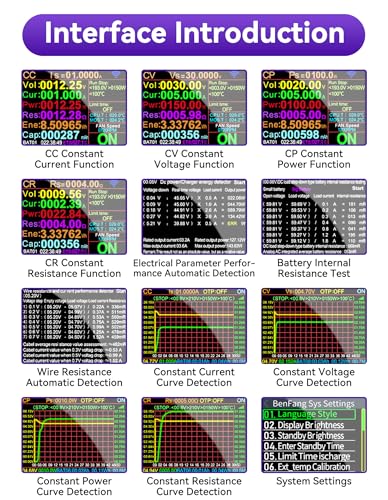
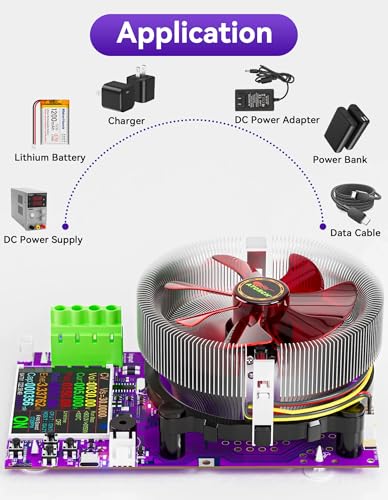
The MakerHawk Battery Load Tester is a professional-grade electronic load tester featuring a vibrant 2.4-inch color display, capable of delivering up to 150W power at 200V and 25A. Its advanced 4-wire system ensures ultra-precise voltage measurements, while multiple discharge modes and app compatibility provide versatile testing options. Designed with intelligent safety protections and an efficient cooling fan, it supports long-term battery capacity and aging tests for a wide range of devices, making it an essential tool for battery pack builders and tech professionals alike.


| ASIN | B0DHCZ1TFP |
| Brand | MakerHawk |
| Color | Purple |
| Date First Available | September 18, 2024 |
| Item Weight | 1.21 pounds |
| Item dimensions L x W x H | 7.87 x 4.13 x 7.28 inches |
| Item model number | 150W |
| Manufacturer | MakerHawk |
| Measurement Type | Multimeter |
| Power Source | Corded Electric |
| Product Dimensions | 7.87 x 4.13 x 7.28 inches |
| Specification Met | Ul 61010-1, Ce Marked |
| Style | 4-Wire System 4-Tube |
O**R
Works great, updated buttons and settings
I've only used it a few days, but it works great compared to the 4 resistor purple board version. That one lost the capacity when turned off and back on. This one remembers settings, capacities, also has several modes to discharge batteries. The early version had 2 dials and you had to adjust it often to pull 150 ish watts. This one has a constant power setting. Set it at 145 or so and it will pull that no matter what the voltage as the batteries drop. Wiring on the purple board units is a little strange. Look at the diagrams. All 4 terminals have to be attached. I do like the full color hi-res display. The 4 resistor purple board "said" color display. But it is definitely monochrome. It was returned if you can't tell. The full color unit actually had some instructions, which were a little criptic... But it was relatively easy to figure out. I do like the on off switch they added as well...
S**N
Does the job
I started making my own battery packs & rebuilding them too. This works well and connects to my phone for display… was a bit of learning to use it, but now I’m very happy with it! Great for smaller batteries! Will do bigger batteries just would take a while for results.
U**N
Nice unit but no power supply is included.
Value for money: The unit requires power and no power supply is included so you can't use it "out of the box". You have to supply a 12V @1 amp power supply or provide a USB C power brick. A USB cable is included but no power brick. It's a very capable unit that measures everything you can think of. Fine print on the display is hard to read under some light conditions. I ran it at 12V @ 10 amps for an extended time with no issues. I wouldn't use it with power sources over about 50 volts do to the shock hazard from exposed traces. Overall I like it and would recommend it.
H**S
UPDATE to 3 STARS - Tinkering Got it to Work, but Still Issues...
UPDATE - I am upping my review to 3 stars, and I am hoping for 4 before the end of the day. I got it to work after a few hours of experimenting. And although I am missing the hardware on the output monitor connections, I did find that the mounting holes are spaced 7.5mm and will fit any number of connectors. Unfortunately, the lack of clearance from the cooling fan and heat sink limit my options, but if I install this in a case and break the connections out, that's not a problem. Just route that out to a couple of banana plugs. Same for the 4 port inputs. I am still having a heck of a time finding software. Nothing I have tried has worked, with Windows 11 that is, and I am about to go after Linux with a Python environment. Using Nirsoft tools, I found the device when I plug it in. It's a HID device and no COM ports are added when plugged in. Bluetooth still looks to be non-existent. The board looks to be a solid build, and my tests placing a load on a power supply have been very useful. But I need to log my results over a number of load samples so getting it to work with my PC is important. If I can solve that, check calibration, and push it to the limits and have success, I'll up to maybe 4 or 5 stars, and I will come back to do that. PREVIOUSLY..... I am giving this 2 stars instead of one because it actually turns on, and I can navigate some menus. That is it though. There are so many differences with what I received and what is shown on this web page. For one, on what I got, there is no output jack (as shown in the images). There is also a few other missing components. I do not see a BlueTooth board, although there is a built in antennae. I never found a way to turn it on nor did I see the icon on the screen. There is also some module that goes in a slot, according to images, but it is empty on what I got. The screen menus and layouts are different than what is shown here. I have tried two manuals so far that say ATORCH DL24P and neither describes the menu button presses accurately. And is there a schematic anywhere? Where is the board version number? I realize this is Chinese and you live with the lack of documentation, but I am concerned I was short-changed on features, or worse, something critical with this board. On the fence about returning still.
N**S
Love the dynamically updating highly informative LCD screen
Plug in the 12v power supply to the back. Prepare your phone for the QR code to download the app if you want to monitor the settings remotely (you can operate the buttons from the app). I had to pair with specifically one of the two new bluetooth broadcasts. I believe one is for android, the other for iphone. The app will show some insane 600v measurement graph-- you can zoom in with finger gestures to get down to the typical 12V range. To test battery capacity: Screw down the fork leads to the front left green connector block. The black fork is closer to you- red closer to fan. Make sure you open the connector block first with flathead screwdriver otherwise you'll likely screw down the forks in reverse by a counterclockwise motion and the forks (or USB board) will dip up at an angle. Attach leads to battery (or cell). Set the cutoff voltage to your particular battery (or cell). You need to know this!!! For a 12V Lifepo4 battery capacity test above 15aH battery: make sure it is fully charged. set cutoff to 10.5V. clear data (this just clears the test metrics and gives clean slate). You'll want to use CC to test capacity. Set CC to max allowable: you will probably start at 13A and work up to the 14A range (if you're in no rush, set it lower). Keep note of the MOS temp range and don't exceed 99C. Don't even up that in the settings. You can get 14.3A+ if you prop up the tester and have a fan blowing under the heatsink and the mainboard. Try not to exceed 180W. This advice is for 75F ambient. Be more conservative with the amp settings if ambient is hotter, you'll burn up the MOSFET under the heatsink. If you trip the temp alarm too much it will stop the test. You can resume, but you need to lower the amp draw first or fix your cooling. Don't push it! You can test a 314Ah 12V battery in under 24hr with the above method.
TrustPilot
2 周前
2 周前