We remain fully operational. Our teams are working around the clock to ensure your deliveries continue safely.

下载应用程序


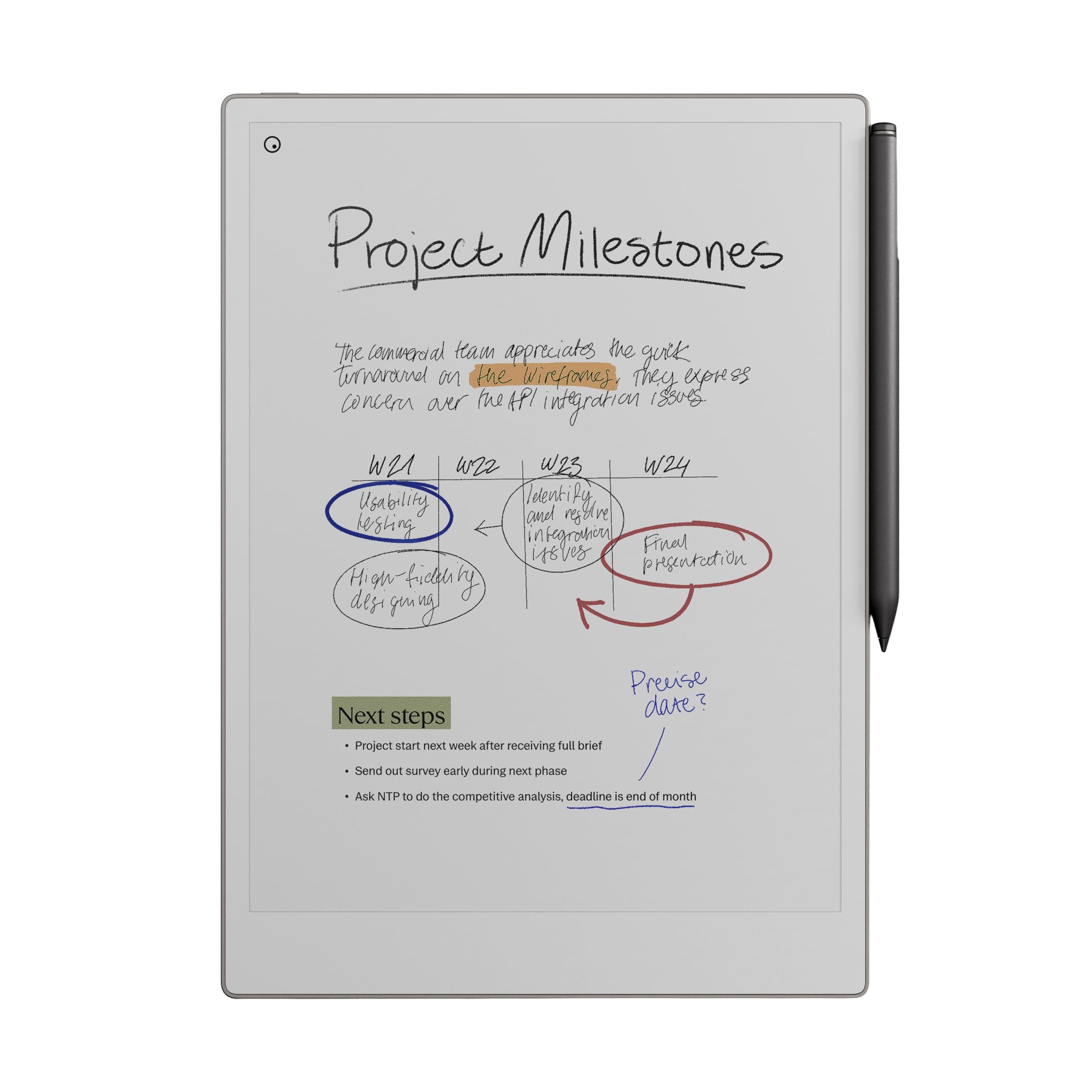
📝 Elevate your note-taking game — because your ideas deserve more than just paper.
The reMarkable Paper Pro Bundle combines an 11.8” ultra-slim color paper tablet with the Marker Plus pen featuring a built-in eraser, delivering a natural, paper-like writing experience. Designed for professionals who value focus and organization, it offers adjustable lighting, low-glare outdoor-readable display, and advanced note management including PDF annotation and handwriting-to-text conversion. With USB-C charging and included spare tips, it’s a premium digital notebook built to replace cluttered paper stacks and boost productivity.


| ASIN | B0DG9ZXWMK |
| Additional Features | Color Display;Paper-Like Writing Experience;Adjustable Reading Light;Built-in Eraser Pen;Spare Marker Tips;USB-C Connectivity;Low-Glare Display;Outdoor Readable;Night Reading Capability;Ultra-Slim Design;Portable |
| Best Sellers Rank | #911 in Electronics ( See Top 100 in Electronics ) #28 in Computer Tablets |
| Brand Name | reMarkable |
| Color | Gray |
| Customer Reviews | 4.2 4.2 out of 5 stars (939) |
| Frame Material | Plastic/Polymer |
| Included Components | reMarkable Paper Pro, Marker Plus, 6 spare Marker tips, USB-C cable |
| Item Weight | 1.16 Pounds |
| Manufacturer | reMarkable |
| Manufacturer Part Number | RM81C-1000NW |
| Material Type | Plastic/Polymer |
| Model Number | RM81C-1000NW |
| Number of Batteries | 1 Lithium Ion batteries required. (included) |
| Recommended Uses For Product | Office |
| Unit Count | 1.0 Count |
| Warranty Description | 1-Year Limited |
E**G
Spendy but Works Well
I debated whether to get this or an iPad. The decision was especially difficult because of the high cost of the ReMarkable Paper Pro and the fact that it has far less functionality than a similarly-priced (or even cheaper) tablet. With the ReMarkable there’s no surfing the Internet, no shopping at Amazon, and no watching movies. This is strictly a tool for taking notes. But I only needed something for taking notes. Reviews I read said ReMarkable had the best ‘feel’ when writing, and since nite writing was what I needed, I bought the ReMarkabke instead of a different brand (or a tablet). I’ve now been using the Remarkable for a couple months at work. The resistance when writing (the “feel”) is indeed fairly close to writing on paper with a pen. I really like having all of my notes in one place now, separated in different files and folders that I’ve created. It beats having stacks of papers lying around and unavailable when you need them. The ReMarkable has dozens of templates that come preloaded with it, including temples for music, grids, and three different week planners. Apparently, you can buy move if you can’t find what you need on the device, but I really only use two: a lined page and a blank page. The colors the Paper Pro provides are a nice option for highlighting important things. The colors are fairly muted on the screen, though, but they do allow you to add color to your pages when needed. I’ve not yet needed to transfer data from the ReMarkable to a computer. I just keep everything on the device itself. I’ve also not converted writing to text yet, which requires you to set up an account with ReMarkable. An account is needed for this function because it’s a cloud-based service and requires an Internet connection. Overall, the Paper Pro has filled all my needs well. I only wish I had bought it sooner so I wouldn’t have so many paper notes lying around. If you can live with its steep price, the Paper Pro a nice tool to have.
J**F
I Wish I Bought It Sooner!
I am someone who takes a lot of notes and makes a lot of lists. I have pads of paper and scraps of paper everywhere, both at home and in my office. I liked the idea of this electric notepad to always have a place to take as many notes as I want and to have plenty of room to make the list as long as it needs to be. I also like having them all in the same place as I won't lose them. I love being able to have a hand written list converted to text, though I believe you have to have a subscription to the reMarkable app for this to work. You get a short free trial, though I went ahead and committed to a year long subscription at a reduced cost (versus monthly) as I like the idea of being able to transfer my notes between my reMarkable and both my personal laptop and my business laptop (you are required to download the desk top app to do this).. Yes, this electronic notebook is expensive, especially for my primary use. But I have found it to be very worthwhile in the two weeks that I have had it. I am less concerned with the feel of the pen on the screen. That isn't a sensation that I necessarily needed to have. It feels fine but isn't why I purchased this. To me, there is no real noticeable lag in writing and the text appearing on the screen. If you erase something, yes, the screen refreshes but I don't find that to be a hindrance and it really only takes a moment for the page to refresh. Some of the features I absolutely love are illustrated in the short video I am posting with this review. The eraser is great to have for small changes. Being able to select a section and erase that larger area is fantastic. Then, being able to select a section and move it around the page is great, too. I have downloaded a couple of the templates, specifically the calendar templates but I have not yet explored other templates that may be helpful. I also have not yet imported a PDF to edit and look forward to trying that out. I haven't even read the getting started guide yet. As soon as I received it, I started playing around with it and I find it to be pretty intuitive to use. I will eventually read it. I chose to go with the color version because I wanted to have the option to use additional colors or highlighting. However, this is probably the one negative I will note with this in that the colors are not vibrant at all. This is a function of the type of screen that it has. You can barely tell the difference between black and blue or between red and magenta font colors. The highlighting feature does work when putting a brighter color over a dark font (magenta highlighting black, for example). So it is functional but have low expectations here. While it is more expensive than only the B&W reMarkable, I am glad I have the color options. It came with extra pen tips though I have not had to change one out yet so can't comment on how long they last. The battery life is OK. I use it a lot so I suppose I should not be surprised that I may have to charge it more often than others do. I also tend to keep it on, or forget to turn it off. Or, really, put it into "sleep" mode rather than turning it off altogether. But it isn't that hard to charge as it uses a USB-C charger, and I have plenty of those around. In short, yes, this is an extraordinarily expensive electronic notebook but I do find good value in having it. After reading the reviews and considering the potential of having problems, I chose to purchase Amazon's extended warranty. And while this is not an element of the reMarkable product, I have a Prime credit card and appreciated the option of amortizing the cost of this item over a longer period of time to help defray the cost somewhat. I do recommend purchasing a protective case for it. I thought the ones sold in bundles with the reMarkable were way too expensive (I don't need a leather case and their non-leather case was still a bit pricey) and purchased a CoBak case for it, especially to be able to protect the screen when the notebook is in my briefcase or backpack. I had good experiences with CoBak cases with my Kindles previously. I heartily recommend this product!
R**N
It really is Digital Paper and it rocks.
Amazing product. I was not expecting the screen to be so responsive given the early state of e-ink display tech. I feel like the closest parallel to the novelty of this thing is perhaps the old Macintosh Color Classic. It's perfectly designed for what it does. My only criticism is that the screen is rather greyer in dimlight, but if you're using e-ink you probably are using it in natural light anyway so that doesn't matter. Plus the backlight for dark time is nice on the eyes and fine. I suppose I could mention the backlight makes black a slight blue tone, which perhaps can be fixed in future versions, but you can't really notice it. I'm a bit of a linux hacker type so I do plan on modifying this thing to allow for typing but I just can't praise the writing and pdf support enough. Thoroughly satisfied with the product. Please, reMarkable people, you have to realize what you guys made here. You could easily make something of a desktop computer version of this machine by integrating it onto a stand of sorts and providing keyboard and mouse support with a simple speaker. You'd reinvent the Mackintosh Color Classic. Call it the reMac, or if you need better copyright protection, maybe the reBook or reDesk haha. It would be awesome if the high end products like the Paper Pro had a kind of pseudo-desktop environment. Maybe as a mode or something when needed. I know I can make my own on the provided customization tools. I might just do it! But you guys really made an amazing thing with this. Anyway, I really enjoy this product and have integrated it into my life very well. I plan to build a custom software for quickly emailing things to myself and getting newspapers on it. It's a wonderful thing you've made here.
M**G
The reMarkable Paper Pro delivers an exceptional writing and reading experience that truly lives up to its reputation as a “paper tablet.” The large 11.8-inch colour display feels natural on the eyes, and the integrated reading light makes it comfortable to use in any environment, day or night. Writing with the included Marker Plus pen is smooth and highly responsive, closely mimicking the feel of pen on paper, which makes note-taking, sketching, and annotating documents genuinely enjoyable. What sets the reMarkable Paper Pro apart is its focus and simplicity. Free from distractions, it’s ideal for professionals, students, and creatives who want to think, read, and write more clearly. The colour display adds real value for highlighting, diagrams, and PDFs, while the premium build quality makes it feel like a serious productivity tool rather than just another tablet. If you’re looking for a refined, purpose-built device that replaces notebooks and paper clutter, this is a standout choice.
P**O
increíble producto antes escribir en Goodnotes en el iPad y la verdad es que no tiene punto de comparación, es como escribir en papel increíble producto
S**.
The reMarkable Paper Pro is a wonderful device and thus far I am loving using it. I love the size of the device, one of the main reasons I opted for the reMarkable Paper Pro and that it is dedicated for note taking and organising into individual folders, tagging pages, etc. Although you need to download and install an individual app on the computer for reMarkable, it's fairly straight forward, and adding PDF files if you have any eBooks in that format or ePub you can easily drag and drop across. For that, it is pretty decent compatibility with eBooks, just not for many of the other formats, unfortunately, but I'm not overly fussed on that as I use my Kindle Paperwhite for reading use. You'll find that if you use the device on full brightness, it's a pretty decent amount of light, you'd see that in person rather than from videos. However, intensive use that I use it for taking down a lot of notes from videos for my language learning, the battery will go down over the course of a day. I've used it just using a normal light and the backlight of it set to zero and it worked great. I had also done research and you can use the device whilst plugged into the laptop whilst it charges, it doesn't have any effect on the life of the battery. So long as you use it from time to time mostly away from charging to allow the battery to recycle, you're fine. The device for functionality is straightforward; learning to draw straight lines you just draw a line and if you hold it, it'll do it automatically, same for circles. Learning the menus are pretty straightforward, and creating a new notebook, don't confuse it as a page, you can create pages within notebooks, check the three dots menu and you'll find it there. I've found the quality of the screen to be fantastic, the device is very professional looking, I haven't had any issue with the light bleeding as some may have complained, I think it looks fantastic, it's a very textured feeling with writing and drawing anything. Whilst it is not going to be exactly like paper, it's good enough and feels great to write with. The refreshing of the screen happens a lot, but you get used to it. As for the weight of the device, I've found it's fairly light, I haven't had any major issues, it fits nicely alongside my Macbook Pro 16" and is nice and thin, I certainly have no issues regarding weight and is very portable, it just requires the right bag for it. All in all, this device is targeted for note taking and is not for all the bells and whistles of other uses like some of the other devices. I love the size and ability to use colour for highlighting which I do a lot and looks very professional. When connected to the computer you can use the app you download and install to export to PDF which I love. I'm very pleased with the device.
C**U
Belle fabrication, jolie et solide. Très réactive à l'écriture et vraie sensation d'écrire sur du papier. Le bloc note parfait
I**.
The product was delivered after a bit of a mishap from Amazon but the product was worth the effort put to retrieve it.