


💿 Burn Bright, Connect More, Travel Light!
The Yaeonku 7-in-1 External Blu-ray Drive combines ultra-fast 5Gbps USB 3.0/Type-C transfer speeds with versatile multi-port connectivity, supporting up to 100GB Blu-ray discs. Its plug-and-play compatibility spans Windows, Mac, and Linux, while its ultra-slim, lightweight design makes it the perfect portable solution for professionals needing reliable, high-capacity optical storage and device expansion on the move.


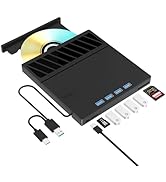
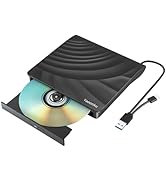


| ASIN | B0CN2QLBJT |
| Are Batteries Included | No |
| Best Sellers Rank | 14,524 in Computers & Accessories ( See Top 100 in Computers & Accessories ) 10 in External Blu-ray Drives |
| Brand | Yaeonku |
| Colour | black |
| Customer Reviews | 3.9 3.9 out of 5 stars (98) |
| Date First Available | 10 Nov. 2023 |
| Form Factor | Portable |
| Guaranteed software updates until | unknown |
| Hardware Platform | Laptop, PC |
| Item Weight | 330 g |
| Item model number | [INF] Yaeonku-BD-Player |
| Manufacturer | Yaeonku |
| Operating System | Linux, Windows XP, Windows 7, Windows 8.1, Windows 10, Windows 11, Mac OS |
| Product Dimensions | 15.7 x 2.4 x 18.7 cm; 330 g |
G**N
It does burn Blu Ray!
First class! I already had Blu Ray burning software on my pc. I got the unit, plugged it in, and put a blank BD-R in and burned a Blu Ray, from a file on my pc, in less than fifteen minutes. I spent a lot of time reading reviews and no one would actually say that it burns Blu Ray. IT DOES BURN BLU RAY. I haven't tried a DL disc yet but SL was no problem, and, I'm assuming DVD and CD would also be no trouble. I don't really care as I have another drive to do that anyway. It also ran from my power driven USB hub no problems. Also haven't tried the USB and other slots but I have what I want. A Blu Ray burner. Chuffed! Tried a dual layer Blu Ray and it burned on that too. A 43G file from my PC onto one disc. Brilliant!! In relation to the review below regarding time taken. Yes, it took about half an hour. When these burning times are given it is always stated "up to" the speed. Like broadband speeds it will vary, and there are a number of variants at large here. First of all, if your disc won't write at x6, then no matter what, you won't get x6. Then you have your computer processor, and the program used to burn. these will all vary and make a difference, and remember, you are actually "burning" the file, not transferring it to a hard disc drive. I'm still chuffed!! Still not tried the USB slots.
R**F
Great Drive - Needs Configuration
Drive attached to laptop and recognised driver installed and it's showing in explorer, drive identifies as Matshita UJ272, and don't forget it's not a UHD 4K drive but is full HD. Now the initial problems hit (this may not be required on your particular machine, did on my laptop and not on my workstation), started up VLC and put in a Blu-Ray video, try to play it and VLC errors - don't panic - copy the error message and paste it into a search engine and you'll find the fix, do that one and you'll get another error, same again and the fix is there. That can get frustrating but it's worth it, playing BD from it's menu needs an older version of Java and the new ones don't work, here it looses a star, but archived are available from other sites, simple BD playback is still available and high quality video and audio. It does recognise 25GB BD's haven't tried a full disk write yet, it also reports R/W to all disk types except DVD-RW (rewritable disks). I fell into the trap, power requirements. Easy test is see if you can eject the disk from windows explorer (right click - eject) if it errors there's not enough power, it will still do simple BD playback on a low powered port, the way my laptop is set up the port accessible just didn't have enough, plugged into the powered hub and away we go. It's got another plus, 4 x USB 3 ports and SD & CF memory card slots, making it a really good portable all-in-one. Even with the issues I came across would still recommend, just make sure your machine can supply enough power.
D**6
Great
Fantastic Great writer and reader and it writes to bluray blank discs
M**N
AVOID LIKE THE PLAGUE…
Avoid this, worked ok the few times I used it, bought end August, worked in September and died mid October… Complete waste of almost £70. Will never buy again and I recommend you not to.
S**N
Read speeds not accurate
I purchased this drive to make a copy of my Blu-Ray disc collection. This entails 'ripping' the CD's which can be a slow process when you are dealing with a 30GB+ file. So the appeal of x6 read speed of blu-ray was a deciding factor. But this is not the case. Over about 1.5 hors of transfer time, it maintains x2.1 speed - not as advertised. But on the plus, it is consistent and produced no errors.
M**S
Well made
Well made and works faultlessly. Windows 11 found it immediately
A**R
Disc player.
It works great and is stylish, nice build quality.
G**E
Great little R/W Drive!
I don’t have use for a CD/DVD/BLU-RAY burner as much any more, but once in a while… 🤷🏻♂️ I keep it in the original box, as it’s not much larger than the complete drive. It helped me copy archived books-in-PDF (many GB!) to my computer for use. It’s so silent I was doing it while watching movies at home. The permanently attached power/data cord is discretely tucked into a slot on the bottom of the case of the drive. When I’m done, out comes the disc, shut the drive, unplug, and tuck the cord back home into its slot. I couldn’t believe how well it worked for as little as I spent on it. It was an niche buy, but I can see it getting more use in the future.



