We remain fully operational. Our teams are working around the clock to ensure your deliveries continue safely.

下载应用程序


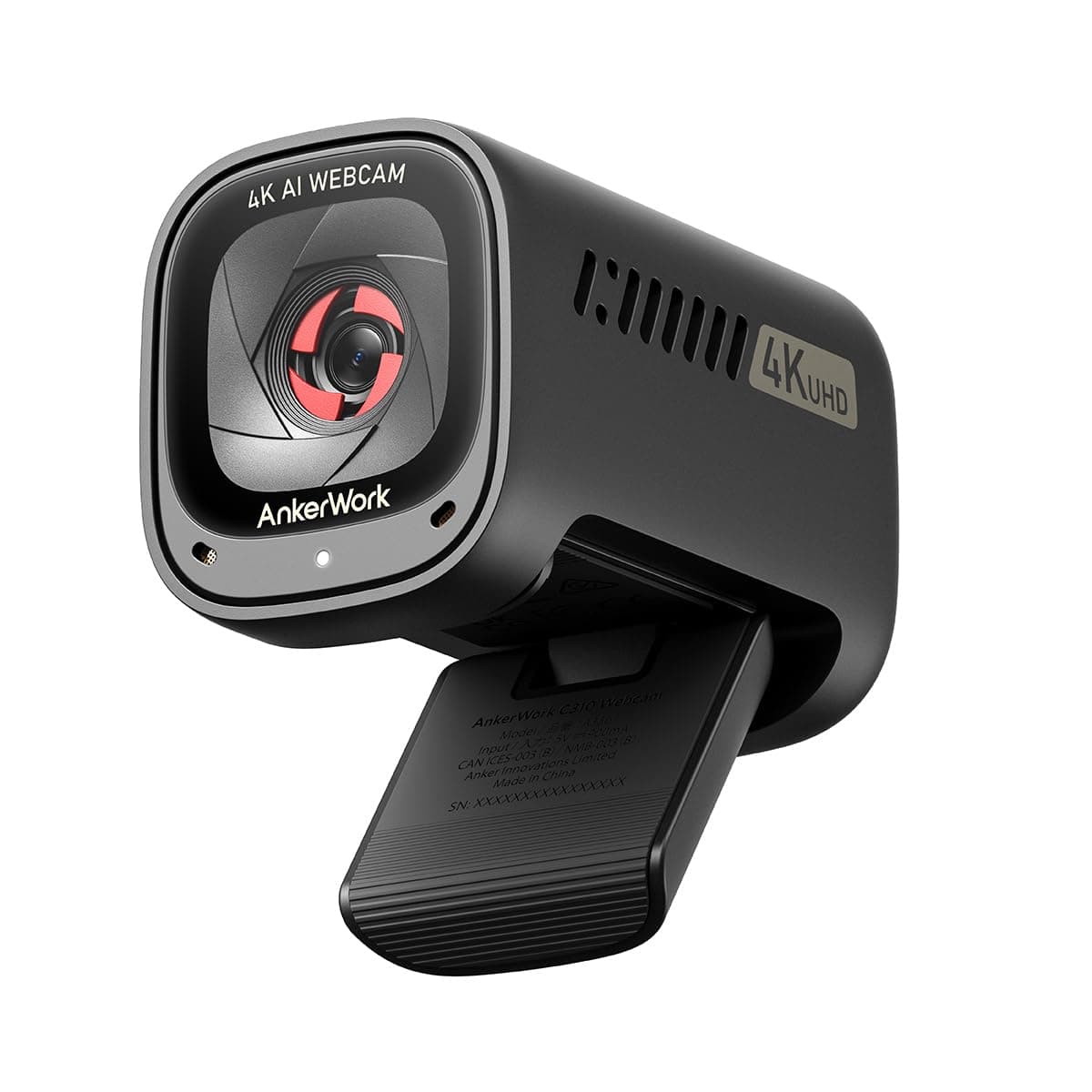
🎥 Elevate your video presence with AI-powered clarity and privacy.
The AnkerWork C310 is a professional-grade 4K webcam featuring a 12MP sensor, AI-driven autofocus, framing, and noise-canceling microphones. It supports ultra-smooth 1080p@60FPS streaming via USB 3.0, includes a built-in privacy cover, and adapts to lighting conditions with HDR imaging—perfect for high-impact video calls and livestreams.


| Package Dimensions L x W x H | 12.1 x 9.3 x 5.4 centimetres |
| Package Weight | 0.26 Kilograms |
| Product Dimensions L x W x H | 7.5 x 4.5 x 5.3 centimetres |
| Item Weight | 141 g |
| Brand | Anker |
| Colour | Black |
| Has image stabilisation | No |
| Included components | Privacy Cover |
| Max Focal Length | 3000 Millimetres |
| Min Focal Length | 200 Millimetres |
| Part number | A3367 |
| Water Resistance Level | Not Water Resistant |
| Zoom Type | Digital |
| Focus type | Auto Focus |
| Style | Minimalist |
| Effective still resolution | 12 MP |
| Guaranteed software updates until | unknown |
J**2
4.5 Stars: Great quality, great output, needs more flexible mounting
Note about the photo: I dismantled my previous webcam's mounting and added a 1/4" camera/tripod mountable screw to screw the Anker webcam to for one simple reason: The Anker cam itself does have the very useful screw thread to mount to a tripod mount (thank goodness!) but on its own foldable monitor clamp there no twist movement. Sure you can tilt it up and down physically with the built in clamp, but sometimes I need to twist the camera a little. Maybe it's just me, I don't know. It may be a tiny but important detail to others. So with my DIY addon, I can now have 2 axis of movement on a hanging monitor stand., rather than the one axis. For that detail I would rate this 4.5 stars. Other than that, what I like: - solid unit - small - quality build - you can detach and use your own USB C cable! This is amazing as many webcams don't allow for this and invariably the supplied cable is never quite long enough to reach monitor to tower case. Being able to put in my own 1m+ cable and keep the cabling tidy is a remarkably good addition and I can slide it along the full width of my ultra-wide screen if needed. This ALSO makes it much easier to pack in a bag if you need that - tripod mountable screw thread on the bottom of the foldable clamp arm (not the unit itself)! Also a great addition - built in privacy slider which is coloured bright red so you can't mistake whether it's open or not (great design touch!) - the slider it not at all fiddly to use - slider does actually turn the cam off, not just cover it (the little "on air" LED goes off) - Capture quality is just great. Makes you realise how bad the cheap webcams are, and even better quality HD ones! - included software DOES allow for a kind of virtual tilt and twist / pan on the output but I'm old school and like the physical flexibility - included software does a good job at altering low light conditions, or if you have my problem, an often bright window behind your head which results in a hard to control light / dark balance between face and window. I can now make it look less like I'm working in nerdy darkness. OBS adds more control but to be fair the Anker software is very helpful - autofocus is quick enough and definitely good enough For the money it does deliver. It's obviously not a cheap camera and you do get good results for the expense as would be expected. What I don't like: - I wish it had a mini ball head mount somehow so allow for slight rotation in all 3 axes. My old webcam did without taking up too much extra space - the "on air" LED is white which is very subtle if you want that but personally I like a bright red dot for something that potentially affects my privacy Honestly that's about it. If you want a quality display/recording for less than €100 and which offers flexible cabling and packability, go for it.
L**E
A great little webcam
I found myself needing a webcam after adding 2 screens to my MacBook pro. Having the camera at an angle was less than ideal, and the MBP camera is 720p and a little fussy being the older M1 spec. Initially, I ordered another camera but sent it back as it wasn't possible to turn off the flicker from our downlights, and I could not get it to sit securely on the top of my monitor. This came, and it was very easy to set up - just plug it in. It sits securely on the top of my middle monitor and has a privacy lens (not sure I need it, but it can't hurt). Added bonus the port is USB C so it can be used with another cable if I take it on my travels. After installing the software, I had a bunch of pretty neat features, including anti-flicker and auto-tracking. Whilst the tracking is very cool, I found it distracting on a Slack call - it seems Slack zooms in a little more, and I found my head bouncing around the video square. It was a very good clear video, and the sound quality was also improved.
S**Y
Very clear webcam
Excellent web cam. Easy to set up and crystal clear image. Great value
J**C
Camera works - but not recognised by the Ankerwork software on Win 10
The whole point of buying a camera like this is the features, such as zoom and AI tracking etc. So mine arrives and I download and install the Ankerwork Software and then plug in the camera. The software acknowledges the software model and starts 'connecting'. After a while it reports back "Initialization failed. Please unplug the camera and restart the software." Which I have done multiple times, using many USB 3.0 C to C or C to A cables into various USB ports on my PC. Same outcome everytime. A quick internet search reveals that this is a common problem, so clearly a shortcoming with the software/drivers on Windows 10. Windows recognises the camera generically, and the camera with microphone works in Microsoft Teams, but with about the same utility as a £20 cheap camera without the AnkerWork software contributing its value. Unless this sorts itself out it's going straight back to Amazon... a waste of £80!
I**N
Nice device, great picture
Great video quality and the Ankerwork app is actually quite simple but effective. This can be used with USB 2.0 but you'll be restricted to 1080p. Really impressed, would have been nice to have an ir camera included for Windows hello at this price point though.
A**W
Promising camera with inconsistent performance
The quality achievable with this camera can be very good, especially considering its price, but I've found the overall experience quite frustrating and inconsistent. Unfortunately the auto focus (including 'face focus') and exposure controls just don't seem to work correctly - in Slack & Teams in my case. The focus can randomly shift from my face to background objects every few seconds, even when I'm not really moving, and the image can often either be very over exposed or the light levels 'strobe' as if someone is adjusting a light switch. I have also experienced the camera malfunctioning twice, where I've had to disconnect it manually to solve the issue. I've kept the AnkerWork software and the camera's firmware up-to-date and installed the latest software whenever possible, but this seems to have had little actual impact on performance. It's a shame as occasionally the image quality does look excellent, but again it's a little too unreliable to wholeheartedly recommended in its current state. For reference I've used the C310 on two M1 Macs, both running MacOS 12 / Monterey.
J**K
Its great
Anker never seem to disappoint, they punch far above their weight pricewise. Great functionality and quality.
C**8
A bit big but powerful webcam for those that are needing more
Fantastic. I’ve been scouting for a new webcam for about 2 months and tested one camera, which I subsequently returned, and then finally came to this one. The box it came in was really small and I thought it odd, however the camera quality you can feel 100%. The camera is a little long so you may need a bit of space behind either your laptop monitor of external monitor if you’re mounting it there. There’s a section at the bottom that allows you to mount this on a tripod if you wish. 100% easy to use, as it’s simply plug and play. The wide angle is what I was looking for, if you’re wanting to show more then this is the camera for you. The AI features I don’t get to view as much as I use this camera for video calls but the feedback I get is that it skews everything crystal clear. Definitely recommend this webcam for anyone that’s looking for something better than their built in webcam.
TrustPilot
2 周前
5天前