We remain fully operational. Our teams are working around the clock to ensure your deliveries continue safely.

下载应用程序


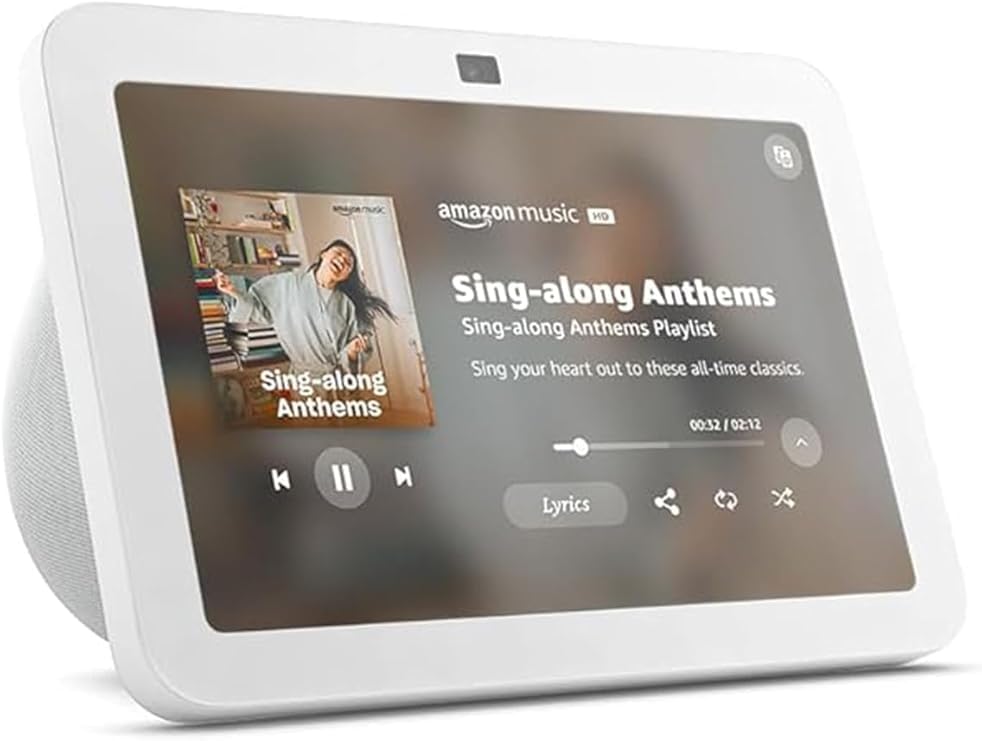
🎯 Elevate your smart home game with the Echo Show 8 — where style meets next-level control!
The Amazon Echo Show 8 (3rd Gen) is a sleek, Glacier White smart display featuring an 8-inch HD touchscreen and spatial audio powered by dual neodymium drivers. It integrates a 13 MP auto-framing camera for crisp video calls and acts as a smart home hub supporting Zigbee, Matter, and Thread protocols. Designed for privacy with a physical camera shutter and mic mute, it offers seamless voice and touch control, adaptive content display, and extensive accessibility features, making it the perfect centerpiece for connected open living spaces.
| Size | 7.9” x 5.5” x 4.2” (200mm x 139mm x 106mm) |
| Weight | 36.6 oz (1034 grams) Actual size and weight may vary by manufacturing process. |
| Display | 8.0” HD touch screen |
| Camera | 13 MP centered camera with built-in shutter (Photo quality/size may vary) |
| WiFi connectivity | Dual-band WiFi supports 802.11a/b/g/n/ac WiFi networks. Does not support connecting to ad-hoc (or peer-to-peer) WiFi networks. |
| Smart Home Hub | Zigbee + Matter + Thread Border Router |
| Bluetooth connectivity | Advanced Audio Distribution Profile (A2DP) support for audio streaming from your mobile device to Echo Show 8 or from Echo Show 8 to your Bluetooth speaker. Audio/Video Remote Control Profile (AVRCP) for voice control of connected mobile devices. Hands-free voice control is not supported for Mac OS X devices. Bluetooth speakers requiring PIN codes are not supported. |
| Audio | 2 x 2” full range neodymium drivers with passive bass radiator |
| System requirements | Echo Show 8 comes ready to connect to your WiFi. The Alexa app is compatible with Fire OS, Android, and iOS devices and also accessible via your web browser. Supported operating systems. Certain skills and services may require subscription or other fees. |
| Setup technology | Amazon WiFi simple setup enables customers to connect smart devices to their WiFi network in a few easy steps. WiFi simple setup is another way Alexa is always getting smarter. Learn more about frustration-free setup. |
| Processor | Octa-Core SoC with Amazon AZ2 Neural Network Engine |
| Accessibilty features | To enable features that personalize Alexa to your abilities, go to Settings → Accessibility. • Tap to Alexa enables access to Alexa via touch, instead of speech, through on-screen tiles or a keyboard, including the ability to save your favorite actions. • Adaptive Listening provides customers more time to finish speaking before Alexa responds. • Preferred Speaking Rate enables customers to control how fast or slow Alexa speaks. • Alexa Captioning, Call Captioning, and Closed Captioning provide text captions in any mode for supported content. • Show and Tell helps customers who are blind or visually impaired identify products when you say “Alexa, what am I holding.” • VoiceView screen reader enables access for customers who are blind or visually impaired. • Screen Magnifier enables customers to zoom in/out, and pan around the screen. • Notify When Nearby will play notification sounds when you’re detected near your Echo device. • Kindle Read Aloud will have Alexa read your Kindle books aloud. • Real Time Text enables customers to type live text in a video call. • Alexa Accessibility features also include settings for Color Inversion, Color Correction, Request Sound and more. |
| Warranty and Service | 1-year limited warranty and service included. Optional 1-year, 2-year, and 3-year extended warranty available for U.S. customers sold separately. Use of Echo Show 8 is subject to these terms. |
| Included in the Box | Echo Show 8, Glacier White power adapter (30W)/cable (4.9 ft.) and quick start guide. |
| Generation | Echo Show 8 (3rd Gen) - 2023 release |
| Privacy Features | Wake word technology, streaming indicators, microphone/camera off button, built-in camera shutter, the ability to view and delete your voice recordings, and more. Visit the Alexa Privacy Hub to explore how Alexa and Echo devices are designed to protect your privacy. |
| Language | Alexa speaks English and Spanish |
| Alexa Skills & Features | Alexa makes your life easier, more meaningful, and more fun by letting you voice control your world. Alexa can help you get more out of the things you already love and discover new possibilities you've never imagined. Discover and learn what Alexa can do. |
| Software Security Updates | Learn more about these software security updates. If you already own an Amazon Echo, visit Manage Your Content and Devices for information specific to your device. |
| Amazon Sidewalk | Sidewalk uses Echo and Ring devices to securely keep other devices connected and help find lost items by reporting their approximate location to the owner. Sidewalk can enable supported devices to remain connected even when wifi is lost or the supported devices are outside the range of their home wifi. Sidewalk uses a small portion of your internet bandwidth and the approximate location of your devices to provide these benefits to you and your neighbors. Sidewalk is turned on for your device unless you have previously turned it off. You can turn off Sidewalk at any time. Learn more about Amazon Sidewalk. |
K**S
fun for everyone
I’ve been using the Amazon Echo Show 8 for a while and it’s been really handy around the house. The screen is a great size—not too big but big enough to see easily from across the room—and the picture quality is sharp. Setting it up with Alexa was effortless, and I use it daily for timers, weather, and quick video calls. The sound is noticeably better than my old Echo, with clearer vocals and fuller audio for music and videos. It also works well as a smart home hub to control lights and plugs without any fuss. Overall it feels solid and useful without being overly complicated.
O**R
The perfect balance between sound, screen and functionality for the home.
The Echo Show 8, I can say, is the perfect middle ground. Not too small, not too big. The best part: The screen is super sharp for recipes and video calls, and even watching YouTube. The sound surprised me; it has powerful bass and fills a medium-sized room well with quality audio. Privacy: I love that it includes a physical cover for the camera. Smart home: Control lights and cameras instantly by touch or voice. Area for improvement: The touchscreen can be a little slow if you open many apps, but with voice commands, it works perfectly. Conclusion: If you're looking for a smart assistant with a screen that sounds great, this is the right model.
M**G
1000x recommend
Will forever recommend the echo show 8. Easy to use if you want as a hub for your home, turning on lights, looking at home cameras, playing music to simple requests. Love the big display, great sound quality, overall good purchase
M**O
Wont be disappointed !!
GREAT !! I love It ! Great sound and functions very well. Love the Alarm features !
L**N
A step up from a glitchy Show 5 -- but I don't like the new complex touchscreen gesture system.
I purchased this Echo Show 8 to replace a Echo Show 5 which was several years old and had a glitchy screen. I waited until I could get a good deal during Prime Days. I love the bigger, bright screen. The Sound quality is much better (I assume because the speakers are bigger). It is in my bedroom right next to my bed, and is the Echo device I use the most by far. I decided to spend some extra money and buy a stand, and I'm glad I did. Set up was somewhat complex -- mainly the tutorial for the new touchscreen controls. I was happy that my existing routines all seem to work great with no adjustments. I use my Echo to turn on various lights (using smartplugs) in several rooms. I frequently use it as a timer for laundry, cooking, and as a reminder for appointments or things to do. I appreciate how much the screen dims at night when the lights are out. There are lots of features of the Alexa system that I like and use, but that applies to all Alexa devices. I fully DISLIKE the new touchscreen gestures system. While I could handle almost everything with a single finger and single touches on the Show 5, the new operating system for the Show 8 requires one touch to select something on the screen, then a double-touch to activate it. With a single touch, the button or item is selected and the Echo says what it is (like "Continue Button"). Then, it is annoying to have to do a double-tap to activate the button. What used to take a single tap, now takes three -- one to select, and two more to activate. To scroll, it requires 3 fingers, not just one. There are all kinds of complex finger movements and touches, some requiring FOUR fingers on the screen. That's just awkward and hard to remember. Even after doing the tutorial, I don't remember most of the controls. Thankfully, I use voice control most of the time. I suppose I may get used to it eventually, but I think it is more likely that I just won't use all of those complex touchscreen controls. Mine has a weird glitch -- it often looks like a part of the screen gets touched when I haven't touched it. Occasionally, Alexa will unexpectedly say the time and date, or act like I touched the News button, when I didn't touch anything. Also, it will often click as though I touched the screen, but I didn't. I don't know if this is a hardware problem and I should return it, but in the few days I've had it, this glitch seems to be happening less often. Just to put this review in context; I am a long-time Prime Member and Echo user -- I got my first Echo pre-release (that big, tall cannester-shaped one). I even made some suggestions for functions that were eventually added. I now have my new Show 8 in my bedroom, a Dot in my kitchen, a Show 5 at my office, and my adult son has his own Show 5
K**I
Worth every penny
Okay so I have been using this every day for a little bit now and think I can provide a good review. I debated for a while getting this because I have heard pros and cons about the Echo show 8 but here is an honest review. The display is a great size for my kitchen where I can look at recipes and things like that. It is not too bulky where it takes up a lot of space but provides enough of a screen to be able to see clearly. This item is so easy to use, I set it up before it was even delivered to my house so all I had to do was pull it out of the box and plug it in. It recognizes my voice and knows when it is talking to me which I think is awesome and feels more personable. Alexa is awesome at helping me be hands free and I love the timer function-I know basic but awesome when you cook and have your hands full. I used to use my apple watch to set a timer but now I can just tell alexa to set my timer and the times up tone is nice as well. I also really like the feature of setting your routine. I am able to walk in and say "Alexa i'm home" and she will play 10 minutes of Lil Wayne radio. I do wish I could add in my apple music but the google music library has A LOT of music too so it's not bad. I also REALLY like that I can go in there and tell Alexa to pull up my ring cameras and it will show me all of them at one time or if I ask for a specific one it will pull that one up to full screen. I also bought a dot so I can have one in my bedroom and I love being able to play music hands free when I am in the room cleaning or drop an announcement for my husband in the other room if I need to tell him something and can do it hands free (yes I can do this with Siri and tell her to call or text my husband but when I am cleaning I sometimes dont have my phone on me). Also you can link up the Ford Pass and tell Alexa to start your car and things like that which is always awesome on cold mornings (we haven't tried this yet but will be!). I bought this on a sale but I think it is worth the price either way. The wide range of things this can do alone makes it worth it in my opinion. I still am playing around with it too so I know there will probably be even more awesome features too!
M**N
We like it
We like it but too many home page ads get annoying.
A**N
Love it
A**A
I upgraded to a Show 8, as my generation 1 Echo Plus doesn't support Alexa+. So this was a combination of a better unit and future proofing. The Show 8 contains three different styles of Hubs, so should work with just about any smart device. The Show 8 has a crisp and clear screen and the speakers are a huge upgrade over the Echo Plus style device. Audio feels like it fills the room much more so, rather than originating in one place. I'm primarily using the Show 8 as a voice interface, but had to use the Touchscreen a little during setup. Setup was extremely easy. I plugged it in. A minute later is asked if I was (my name) and when I clicked yes it then joined the network entirely on its own. I now have the Show 8, Echo Plus, and an Echo Dot, and depending where I am, any one of the three seamlessly answers me. The audio is the massive upgrade although using Alexa+ features is what I bought it for.
E**A
Excelente, lo recomiendo mucho!!! Excelente calidad la pantalla se ve muy bien tiene buen sonido espacial
A**L
This Echo Show 8 completely exceeded my expectations. The sound quality is amazing—it actually feels like a mini home speaker system with rich bass and crisp clarity. Whether I’m playing music, watching videos, or just listening to the news, it sounds fantastic. The display is super sharp and bright, and it automatically adjusts to the lighting in the room, which makes it perfect for any time of day. Alexa feels faster and smarter, and the responses are almost instant. I use it every day—for checking weather, playing music, making video calls, controlling lights, and even watching YouTube and recipe videos. It’s become such a natural part of my daily routine. The built-in smart home hub is also a huge plus—makes managing everything so simple. It looks clean and modern too. The Charcoal finish gives it a premium feel. Honestly, this is probably the most useful and enjoyable smart device I own. I would 100% recommend it to anyone!
S**M
This is an awesome product Easy to use and set up
TrustPilot
2 周前
1天前