We remain fully operational. Our teams are working around the clock to ensure your deliveries continue safely.

下载应用程序


🔥 Stream Smarter, Play Harder, Live Louder 🎬
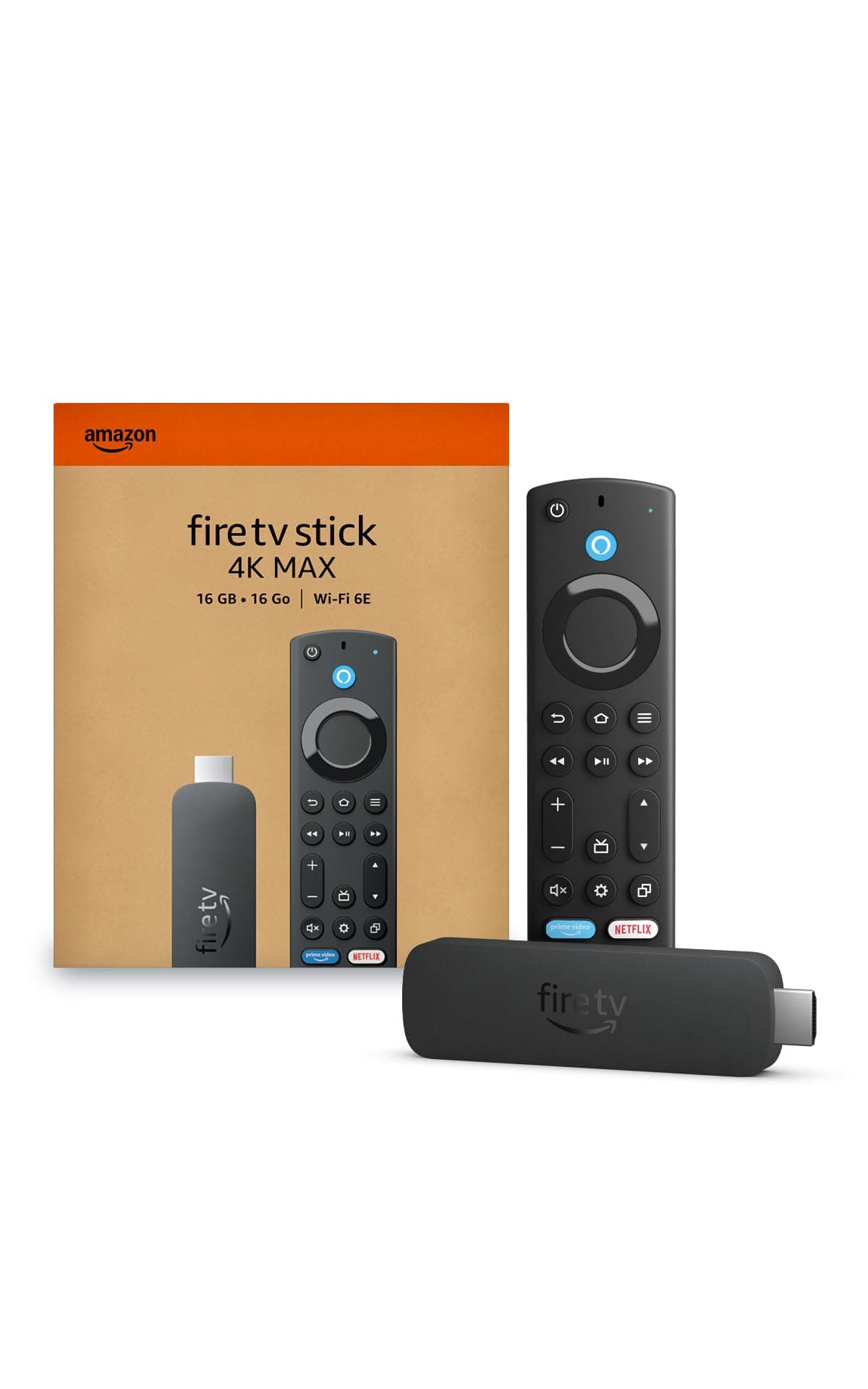
The Fire TV Stick 4K Max is Amazon’s most powerful streaming stick, featuring a 2.0GHz quad-core processor, Wi-Fi 6E tri-band connectivity, and 16GB storage. It supports 4K Ultra HD with Dolby Vision and Dolby Atmos for premium audio-visual quality. With AI-powered Alexa voice search and Xbox Cloud Gaming integration, it offers a seamless entertainment and gaming experience. The device also includes the Fire TV Ambient Experience, displaying thousands of museum-quality artworks, making it a must-have for the modern streaming enthusiast.
| Size | 99 mm x 30 mm x 14 mm (only housing) 108 mm x 30 mm x 14 mm (including the connector) |
| Weight | 43.5 g |
| Processor | Quad-core 2.0GHz |
| GPU | 850MHz |
| Storage | 16GB |
| Wifi | Wi-Fi 6E tri-band: 802.11 a/b/g/n/ac/ax (2.4GHz, 5GHz, and 6GHz) |
| Bluetooth | Bluetooth 5.2 + BLE |
| Voice Support | Yes, with the Alexa Voice Remote Enhanced (included) or free Fire TV app (available for download on Fire OS, Android, and iOS) |
| IR device control with included Alexa Voice Remote Enhanced | The included Alexa Voice Remote Enhanced can control Fire TV Stick 4K Max and certain functions (such as power and volume) on a wide range of compatible IR-enabled devices, including TVs, soundbars and A/V receivers. Note: Certain functions may not be available on some IR-enabled devices. |
| Cloud Storage | Free cloud storage for digital content purchased from Amazon |
| Ports | HDMI 2.1 output with ARC input support, micro USB |
| Audio Support | Dolby Atmos, 7.1 surround sound, 2-channel stereo, and HDMI audio pass through up to 5.1. |
| 4K Support | To watch movies and TV shows in 4K Ultra HD, you need a compatible Ultra HD TV. All services may not be available in 4K/HDR. Certain services are subject to change at any time, may not be available in all areas, or in 4K/HDR, and may require separate subscriptions. Learn more about services. |
| Content formats supported | Video: Dolby Vision, HDR 10, HDR10+, HLG, H.265, H.264, VP9, AV1; Audio: xHE-AAC, AAC-LC, AAC+, eAAC+, AAC-ELD, MP3, AMR-NB, FLAC, PCM/WAV, Vorbis, Dolby AC3, eAC3 (Dolby Digital Plus), Dolby Atmos (EC3_JOC), Dolby AC4, Dolby MAT, Dolby TrueHD pass-through, MPEG-H pass-through, DTS passthrough, DTS-HD passthrough (basic profile); Photo: JPEG, PNG, GIF, BMP |
| Output resolution supported | 2160p, 1080p and 720p up to 60 fps |
| System requirements | High-definition television with available high-speed HDMI input, high-speed internet connection via wifi. Wi-Fi 6E router needed for Wi-Fi 6E support. Auto-Low Latency Mode is included in the HDMI 2.1 standard. |
| TV compatibility | TV must support minimum HDCP requirements for protected content playback. Compatible with 1) 4K UHD TVs with HDMI capable of 2160p at 24/25/30/50/60 Hz and HDCP 2.2 or 2) high-definition TVs with HDMI capable of 1080p or 720p at 50/60 Hz. Learn more about high-definition. |
| Warranty and service | 1-year limited warranty and service included. Optional 1-year, 2-year, and 3-year extended warranty available for U.S. customers sold separately. Use of Fire TV is subject to the terms found here. |
| Content availability | Certain apps and services are subject to change or withdrawal at any time, may not be available in all areas and languages, and may require separate subscriptions. |
| Accessibility features | VoiceView screen reader enables access to the vast majority of Fire TV features for users who are blind or visually impaired. Watch videos and TV shows with closed captioning displayed. Captions are not available for all content. You can also listen to Fire TV with compatible Bluetooth headphones. Learn more about compatibility. |
| Included in the box | Fire TV Stick 4K Max, Alexa Voice Remote Enhanced, power cable and power adapter, HDMI extender cable for Fire TV Stick 4K Max (2nd Gen), 2 AAA batteries, Quick Start Guide |
| Software Security Updates | Learn more about these software security updates. If you already own a Fire TV, visit Manage Your Content and Devices for information specific to your device. |
| Size | 38 mm x 157 mm x 17 mm |
| Weight | 51 g (without batteries) |
| Batteries | 2 AAA (included) |
| Technology | Bluetooth and infrared |
| Compatibility | Fire TV Stick 4K Max (2nd Gen), Fire TV 2-Series, Fire TV 4-Series, Fire TV Omni Series, Fire TV Omni QLED Series, Fire TV Cube (3rd Gen) |
A**N
Incredible Performance and Quality in a Compact Device
The Amazon Fire TV Stick 4K Max is, without a doubt, one of the best purchases I have made to enhance my home entertainment experience. From the very first use, you can tell just how fast and fluid it is: apps open almost instantly, and navigating through the menus is incredibly smooth. As for content, it offers access to practically every major platform—such as Netflix, Prime Video, Disney+, and more—so you won't be missing out on anything. In short, it is a powerful, fast, and comprehensive device—ideal for anyone looking to transform their TV into a modern entertainment hub. Highly recommended
S**E
Good Stuff! Value for Money.
So easy to use. No issues migrating accounts to Fire TV Stick. It was so easy. Literally took me all of 8 mns to set up my Prime Video, YouTube, Disney, Netflix accounts and as I type, I am watching the freebie channel Pluto on my Fire TV stick. "Space 1999" straight from 1977. How's that for some fun nostalgia. Hard to believe we ever wore such embarrassing clothes! Anyway, back to the Fire TV Stick. It comes with a remote. The stick itself has an HDMI plug in for your monitor or tv and the other end is usb c - power block. They give you an extender for the HDMI in case you need some extra length to plug and that really helped me. But you will need an electric outlet close enough to your monitor or tv in order to be able to plug in the power block into your electric outlet and also the HDMI input into your monitor or tv source. They also provide 2 batteries for the remote. Right out of the box you'll be up and going. I love the ambient feature. I hope they add some cityscapes and more ambient landscapes. One can even add their own pictures if they like. It's so relaxing to be listening to Audible and have the ambient landscape on. I also love the Alexa support. I don't use "Alexa" as my wake word. I use "Echo," but my Fire TV Stick remote had no problem responding to my "Echo" wake word - no training necessary. Bada Boom, bada bing. You know that moment of dread you have when you have to set up any machine...well, you needn't put yourself through the anxiety. Fire TV Stick does the ugly work for you. The streaming quality is awesome. And considering I've watched at least four different movies since I got it yesterday and haven't paid a dime for those movies...I'm gonna say the Fire TV Stick has been a great value and it is just now coming up on 24 hours that I received it. 4 movies in and delivery was same day prompt! I waited so long to get one. Why I waited, I'll never know. I love my Fire TV Stick. Oh, and did I mention you can take your stick with you? Might not work in all countries. But as a dogsitter I'll just bring my stick to my client's house and don't have to worry about what I want to watch regardless of my client's programming. They don't have to pay for any movies I might watch. Awesome.
S**N
Great App Organizer!
Plug and play in minutes! Organizes all my apps like Amazon, HULU, and whatever I subscribe to all in one place. It also downloads the free apps I get with my cable company automatically. If you’re all confused about what you’re subscribed to or what you have this is a great way to organize everything. No ongoing costs. A lot of free apps are just included and it has links to Amazon if you shop there etc. No trouble with buffering unless your modem is the issue. The remote is great and functions to turn on the TV and also controls volume, it’s the only remote I use.
T**U
Fast, smooth, and very easy to use
The Fire TV Stick 4K Max is an excellent streaming device. Setup was quick and simple, and the performance is very fast and smooth. Apps load quickly, and streaming quality is great in 4K. The Wi-Fi 6E support makes a noticeable difference in speed and stability. Alexa voice control is very helpful for finding shows quickly. Overall, a great upgrade and definitely worth it!
J**E
So far so good
For the most part its good. It's fast to go to apps and open apps. I did have one issue with an app where I finished watching one show and decided to watch another.. it ended up playing a different one even though i clicked on the one i wanted, and was frozen but audio still played. I had to completely shut the app off for it to work again. Setting it up was easy but using the QR code instead of remote (which says it's quicker) took way longer and just wasn't working. So used remote instead. Love that it turns my tv on and off, and changes the volume. Wish they cord was longer. Glad that it came with the cord box instead of using my phone one.
S**O
Perfect, Reliable 4K Streaming
We picked this up for our secondary TV, and it has been a fantastic addition to our home. While it doesn't have the 6E capabilities of the Max version, it still delivers a premium 4K HDR streaming experience. It includes 8GB of internal storage for your apps. The setup was completely painless, and the interface makes it intuitive to navigate between our favorite streaming platforms. It’s a great value for anyone who works hard for their money and just wants a straightforward, high-quality streaming device without overpaying.
TrustPilot
1 个月前
1 个月前