We remain fully operational. Our teams are working around the clock to ensure your deliveries continue safely.

下载应用程序


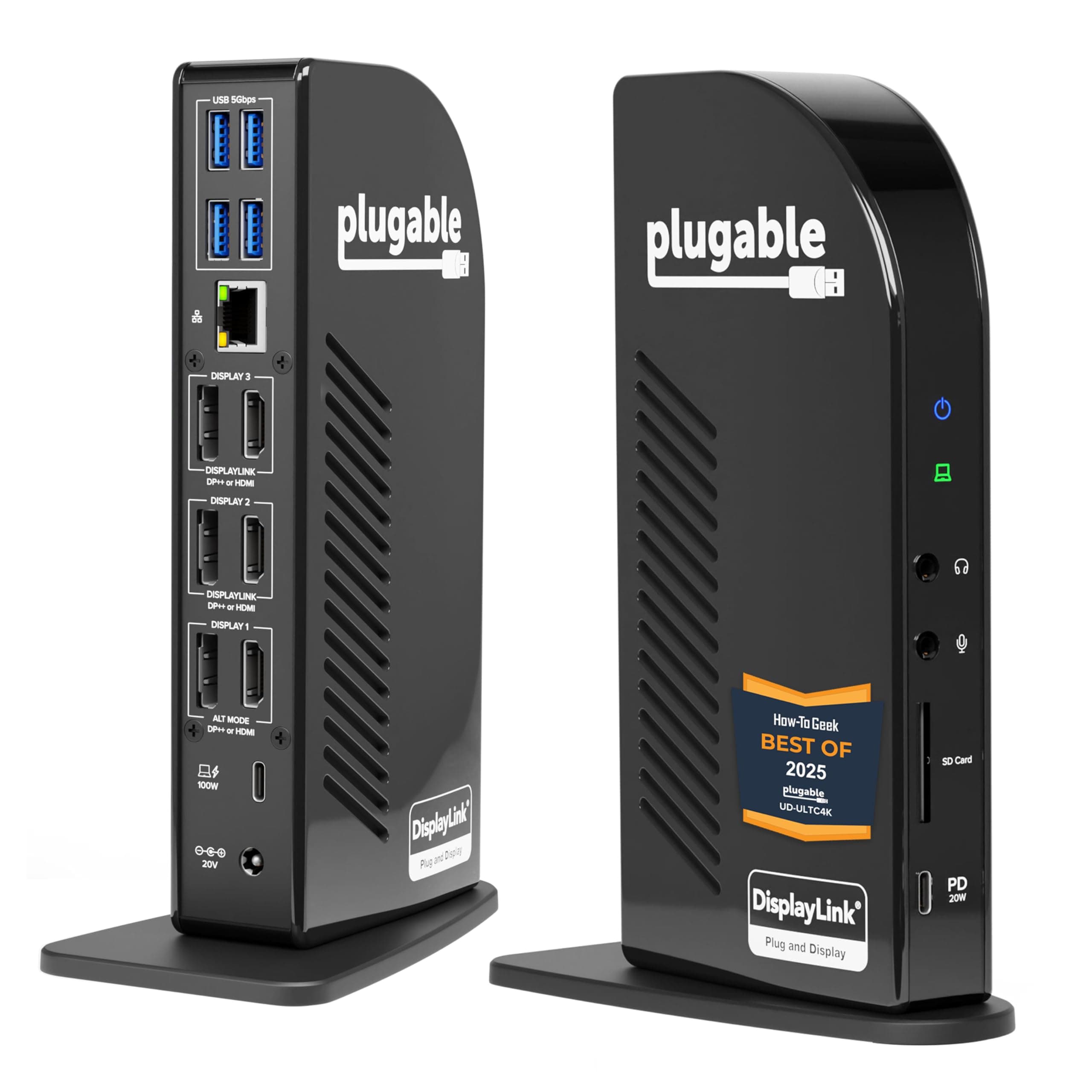
🚀 Power Your Productivity with the Ultimate 13-in-1 Docking Station!
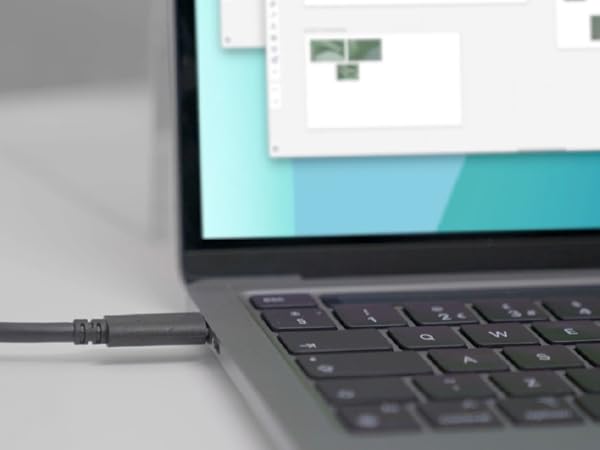
The Plugable 13-in-1 USB C Docking Station is a professional-grade hub designed for busy managers and multitaskers. It supports triple 4K monitors via 3 HDMI and 3 DisplayPort outputs, delivers up to 100W laptop charging, and offers 13 versatile ports including USB-C, USB-A, Ethernet, and SD card reader. Compatible across Windows, macOS, and ChromeOS, it ensures seamless connectivity and stable performance with DisplayLink drivers, making it the go-to docking solution for a clutter-free, high-efficiency workspace.





| ASIN | B0779K9DG2 |
| Best Sellers Rank | #4,341 in Electronics ( See Top 100 in Electronics ) #69 in Laptop Docking Stations |
| Brand | Plugable |
| Compatible Devices | Windows 10 / 11, macOS 10. |
| Customer Reviews | 4.2 out of 5 stars 1,780 Reviews |
| Hardware Interface | USB Type C |
| Input Voltage | 20 Volts |
| Item Dimensions L x W x H | 4.72"L x 2.64"W x 6.89"H |
| Item Type Name | UD-ULTC4K |
| Item Weight | 486 Grams |
| Manufacturer | Plugable |
| Number of Ports | 13 |
| Product Dimensions | 4.72"L x 2.64"W x 6.89"H |
| Total Number of HDMI Ports | 3 |
| Total USB Ports | 5 |
| Total Usb Ports | 5 |
| UPC | 819927011460 |
| Unit Count | 1.0 Count |
| Warranty Description | 2 Year Limited Parts and Labor |
| Wattage | 100 watts |
P**N
FINALLY!! A DOCKING STATION THAT WORKS WITHOUT ERRORS.
This one works! Finally hundreds of dollars wasted on Docking stations only to get error messages flickering displays, displays not working. Thanks Plugable ! - wish I had found you sooner. Although just installed but at least i didn't get any error messages and my Bluetooth is not constantly connecting and disconnecting. All 3 screens working as desired. Windows 11 ASUS ROG gaming Laptop. This working docking station search has been a PITA for a long time. This was NOT the most expensive dock I have tried. I'd say the value for this Dock is excellent although it is costly. Irrelevant because of the frustrations of the other docks even the more expensive dock ("name TOBEnot mentioned)" when you get error messages or halfway work long enough for you to tinker and update drivers and use tech support only to see your return window pass by--haha
N**C
Works flawlessly with my HP Spectre x360 15t with Katy Lake processor
This was purchased specifically to be a docking station for the HP Spectre x360 15T laptop with Intel i7-8705G processor. I wanted to purchase the higher level Thunderbolt only dock station from Plugable but could not get a definitive answer if it would work properly. (I think it would be fine but didn't want to order it and have to send it back if it didn't) I am a knowledgeable user but not a power user or techno geek, I wanted to easily set this up, get it working and move on to more important things. The unit was very easy to setup, plugs into one of the thunderbolt ports on the HP and will also work on usb-c without thunderbolt. In my configuration, I have an external 1080p monitor with built in speakers connected through hdmi. I have a WD 3Tb Passport backup drive connected by standard USB-3 and a Dell DVD connected by USB-3. the unit is also connected to my AT&T mobile hotspot using ethernet through USB. All of these devices were easy to set up and work flawlessly. Now some details: The dock station does provide charging to the HP laptop so the only connection the laptop needs is the USB-c cable that is provided with the dock station. The power charging is limited to 60 watts. There was concern that this would not be enough for the power hungry processor in the HP but I have seen no point where the power meter dipped below Fully Charged 100% USB ports: I wish this had 2 more USB-3 ports on back and at least one more on front. In my current configuration I only have one empty standard USB port and that is on the front of the unit. The front also has an open USB-c port that I am not using. I like the separate headphone and microphone jacks. I use the headphone jack but do not use a microphone. I was concerned that one unit connected to one USB-c port may slow down when trying to simultaneously provide data to the storage device, video and audio to the monitor, and internet upload and download to the hotspot but I have seen no evidence of this, the speed of everything seems to be the same as if it was all connected directly to the motherboard. I can not provide comparisons and speed tests etc. but I can tell you that it works perfectly, was easy to set up and allows me to get to the work I really need to do and that is what I really care about.
B**N
Finally, a Docking Station for MAC-book M-Series!!!
I've used this every day for work for over a year now. Apart from a couple MINOR bugs, this doc has been GREAT. The Bad: You'll have to set it up ONCE and grant it special permissions to enable the features. It froze on me ONCE and I had to unplug the cable for 60 seconds for my mouse to work again. The Good: Literally everything else. It allows you to use more monitors than your M-Series Mac Processor allows from the factory. My 2023 MacBook M3 Pro can now use 3 high-def monitors instead of the 2 factory-limited external displays, and they look great. It charges my MBP and connects ALL my devices through just one USB-C connection. It's easy to set up and the only problem it ever gave me took less than 15 minutes to correct. This is a device that Apple Computers should have made themselves. If you use your Macbook Pro every day, then BUY IT. My only regret was not buying this device SOONER.
R**E
DO NOT BUY THIS DOCK
Update: DO NOT BUY THIS DOCK. This dock is the worst experience in my entire life for buying accessories for a Mac. If you have any HDCP content you want to play, it will not play if the DisplayLink driver is installed. Even if you have a passthrough or even if you have an HDMI port. The driver disables any ability to play HDCP content. Talking to the Support team, their solution was to install Chrome. That isn't a solution. That is a workaround. I can't watch any of the movies I purchased through Apple TV or any other native app that uses HDCP. This isn't a bug. This is how Virtual USB-C displays work. They need to say this in the product details. Hiding this is just shady as hell. You only find out when you search for a black screen for playing Apple TV or Netflix in Safari. The dock, for me, was constantly dropping connection. I used the supplied USB-C cable and tried a new verified TB3 cable heck, I even used a Verified TB4 cable, and yes, the wattage was above spec for this device. I thought maybe it was my M1 Macbook Air so I tested it on a Mac Mini M1, Macbook Pro, and it still has the same issue. I stream content and it was always frustrating that it dropped the connection. I thought it was my internet. To find out it was the dock. Even USB devices would randomly drop and connect. One display always turns off and turns back on. I contacted support and that is where this gets worse. The solution was always to try a new cable or install Chrome for HDCP content. I even sent them a log from their debug program they ask you to install to gather information. They say nothing is wrong with my dock. Working with support was one of the worst I have ever worked with. You think spending $300+ dollars on a dock the company would have better support. My Solution? I bought a new M2 Pro MacMini. This has support for 3 monitors(which is why I bought this dock). I have no issues with my monitors dropping in and out. My internet connection is stable, and I have no issues. So now the dock is in the basement collecting dust. I just want a refund for not only my frustrations with the hardware but for the support. But it's too late. So my goal is to make sure no one will experience this frustration. DO NOT BUY ANYTHING FROM PLUGGABLE.
P**R
Great but design could use improvement
Solid product and I want to give it 4 stars as the design needs improvement, however I believe this hub is better than the competition so leaving as 5 stars.. Plugable take notes. I use it for work which prohibits 3rd party software installations (which you need as thunderbolt 4 (usb-c) based hubs generally rely on displaylink drivers), but once I got passed that hurdle it was all plug and play. I have it using 2x 2k monitors, one at 120h, one at 100hz (I am using hdmi and will eventually switch to DP but until then I'm willing to accept throttled frame rates), and a 3rd regular 1080p over hdmi. In addition I have power, ethernet, and three usb peripherals. With that being said, the device runs flawlessly, with one caveat... It gets pretty toasty. PLUGABLE PLEASE READ THIS: it would take very little to implement an exhaust fan or another thermal solution in your higher end/flagship workstations. I did it myself, but I know this now voids any warranty I hoped to have. Please consider adding a fan to the top of your products or something similar. If I was running the stated/rated three 4k monitors at 60hz this thing would likely get way too hot and compromise its longevity. Take a look at the pictures.... EZ! I traced and cut a hole for a 25mm usb fan by cooler guys (also purchased on Amazon, amazing..) and now have an exhaust fan atop the hub, and it works FLAWLESSLY with near zero noise. Could not be happier now. The heat from the hub had me nervous but now, no more heat :) Consider any modifications at your own risk as this will certainly void your warranty, but I'll say mine works better than ever :)
C**F
DisplayLink is very helpful now that I understand it's purpose.
As a guy who works in IT I never would have believed that any laptop in 2023 would ever go back to only working with one monitor after almost any laptop made in the past 5 years would easily work with 2-3 monitors. As I started to support people using M1 and M2 Apple laptops I was baffled to find that they only work with one monitor. My first assumption was that my co-workers didn't know jack diddly squat since obviously I'm the expert here. Imagine my humiliation when I found out they were right. This has kept me up at night, so here I am venting about it to my fellow Amazon explorers. Apple just keeps making my life harder by convincing people that their bantha poodoo computers with 8GB RAM in 2023 are better than my professional recommendations. What is DisplayLink? - All you need to know is that it enables laptops that only support one monitor to work with two monitors. It basically works by compressing display data so that there is enough bandwidth to send data to a second monitor on a poopy data pipeline. Magically, it makes a useless Apple laptop a little more tolerable. There is one downside I've noticed while using this. A lot of my co-workers use this with the laptop display on as well as 2 external 4K monitors. The first external monitor works fine, but the second extra monitor has a noticeably lower frame/refresh rate. It's fine if you aren't watching videos or doing anything graphical. (Not like their laptop could handle that stuff in the first place) Most people just make that their email or spreadsheet monitor. I would assume that this probably only happens with 2 4K displays. I don't have other displays to test unfortunately. People obviously still prefer to have a slower second monitor than no second monitor at all. However, regardless of how annoying that downside might be, I don't blame Plugable. I blame Apple. Plugable is performing miracles by creating something out of nothing. Apple is just creating a demand for miracles. The last helpful thing you should know is the difference between Plugable's DisplayLink docks vs their Thunderbolt 3 Docks... If your laptop has a Thunderbolt port AND (the important word is 'AND') has a CPU/GPU/APU that supports 2+ external monitors then you definitely want the Thunderbolt dock. You will have plenty of bandwidth to use multiple 4K monitors at the same time at full speed. If you are moneybanks enough to have a high-end Apple laptop with a slightly less poopy CPU that supports 2+ monitors you will also want the Thunderbolt 3 dock instead. It works fine. DisplayLink Dock - Makes a poopy computer better than it was. If your DisplayLink dock could talk they would tell your lappy, "It's okay little guy, I'll try to translate your sign language so the other monitor can understand what you're trying to say." Thunderbolt 3 Dock - Makes your monitors treat your laptop like the champ it is. If your Thunderbolt docky could talk this is what it would look like: Docky: It's okay little gu... Lappy: LITTLE GUY!?? DO YOU KNOW WHO I AM??!??! Docky: Uhhh, where did the other guy go? Lappy: OTHER GUY? I KILLED THE OTHER GUY! I'M THE NEW GUY AND THINGS ARE GOING TO WORK A LITTLE DIFFERENTLY AROUND HERE! Docky: My apologies, I just haven't talked to a coherent computer in years. What are your orders sir? Lappy: INTERPRET MY INCREDIBLE DANCE MOVES AND DISPLAY THE INFORMATION ON ALL FOUR 4K MONITORS! Docky: AYE AYE CAP'N!!!! Narrator: And they lived happily ever after until the bearings on Lappy's cooling fans gave out 6 years later.
A**.
Works Perfectly - Allows 3 External Monitors on MacBook Air 2022 M2!
I was hesitant to purchase this dock because of the price - but after searching for quite a while this seemed to be one of the few docks that would allow a M2/M1 MacBook to use 3 external monitors with DisplayLink. I finally bit the bullet and bought it - and installed the DisplayLink Manager program before it even arrived. I thought there would be some issues getting started - but I was surprised to find that it worked right out of the box. The hardest part was plugging in all the HDMI cables! I saw some reviews complaining about how hot the dock gets. I tested by streaming two 2k HD movies at the same time for 30 minutes and neither the dock or the MacBook Air has gotten very hot at all. I also used the dock with HDMI & USB switches, USB hubs, ethernet (it pulled 1gig while running all 3 monitors, btw), mouse, keyboard and webcam. Everything just worked - except a 5v power-only laptop cooler. The laptop cooler didn't want to turn on after plugging it into the dock's USB ports... but it turns out the dock just needs to be plugged into the laptop to activate the power to it's USB ports. Honestly, that's pretty smart since it conserves energy and heat. It also means I don't have to fiddle with the cooler's switch every time I need to turn it on too. Overall - I was expecting a struggle to get it all working, and there was none. It's worked with every single thing I've thrown at it right away - I highly recommend this dock! If you're reading this in the future - please note I *will* make an update if the Dock ever dies on me. If there's no update - it lives! Thank you Plugable - 10/10!
M**W
Wouldn't stay connected
I really, really wanted to like this docking station. I've been a plugable customer for years with their usb 3.0 docking station which worked great despit it's limited speed. I used three monitors (two plugged into the dock and one directly to the laptop). Got me through working from home during the pandemic. My job recently upgraded my laptop to one of the latest HP laptops (which works perfectly), and I figured it was time to look at a new docking station. The HP docking station I have at the office worked great, and I looked at this one to get the benefits of only having to plug one USB C cable into the laptop, so all I had to do was grab the laptop and go back and forth between home and the office. The good: When it works, it works. There was no lagging, my wireless USB mouse and keyboard, webcam, and other stuff worked great. Super fast and charged well. The fact that this thing comes with the ability to use any combination of up to 3 monitors connected via displayport and/or HDMI is really the huge benefit of this thing, and also why I bought it. The bad: The dock would disconnect frequently. I read in a few reviews that this happened to some people and they also had a troubleshooting page about it on their website. I didn't think much of it and figured they probably had it worked out by now, and sure as can be it happened the first day I was using it. It only happened once every few hours at first, and then started happening every 5 minutes which was super frustrating because every time it did, the three screens (connected with displayport cables) would go black, and then come back on with everything on one screen. Then I'd have to sit there and move everything back to how I had it so I could keep working. This was an issue because every time it happened while I was screen sharing on microsoft teams calls with colleagues and clients, they went from seeing the one screen I was sharing to whatever came out on top after the dock reconnected. And that is not good especially with clients, because then they can get a glimpse at sensitive data. I'm sure it is a driver issue, because my HP dock does not do this ever. And as much as I wanted to troubleshoot it, my job's IT department has our laptops so locked down you're lucky to even open the control panel. Since this was for work, I did not have time to be dealing with that and decided to return it after about two weeks of trying to make it work. Instead I bought a docking station from HP (HP Thunderbolt Dock 120W G4) and that has been working flawlessly after several weeks. So I know it's not an issue with my Thunderbolt ports like they claim on the plugable website. And it was only $20 more than this. So, I'm sad to say, I don't think I will be buying plugable products any longer, at least not until they can solve the disconnecting issue.
TrustPilot
2 周前
2 周前