We remain fully operational. Our teams are working around the clock to ensure your deliveries continue safely.

下载应用程序


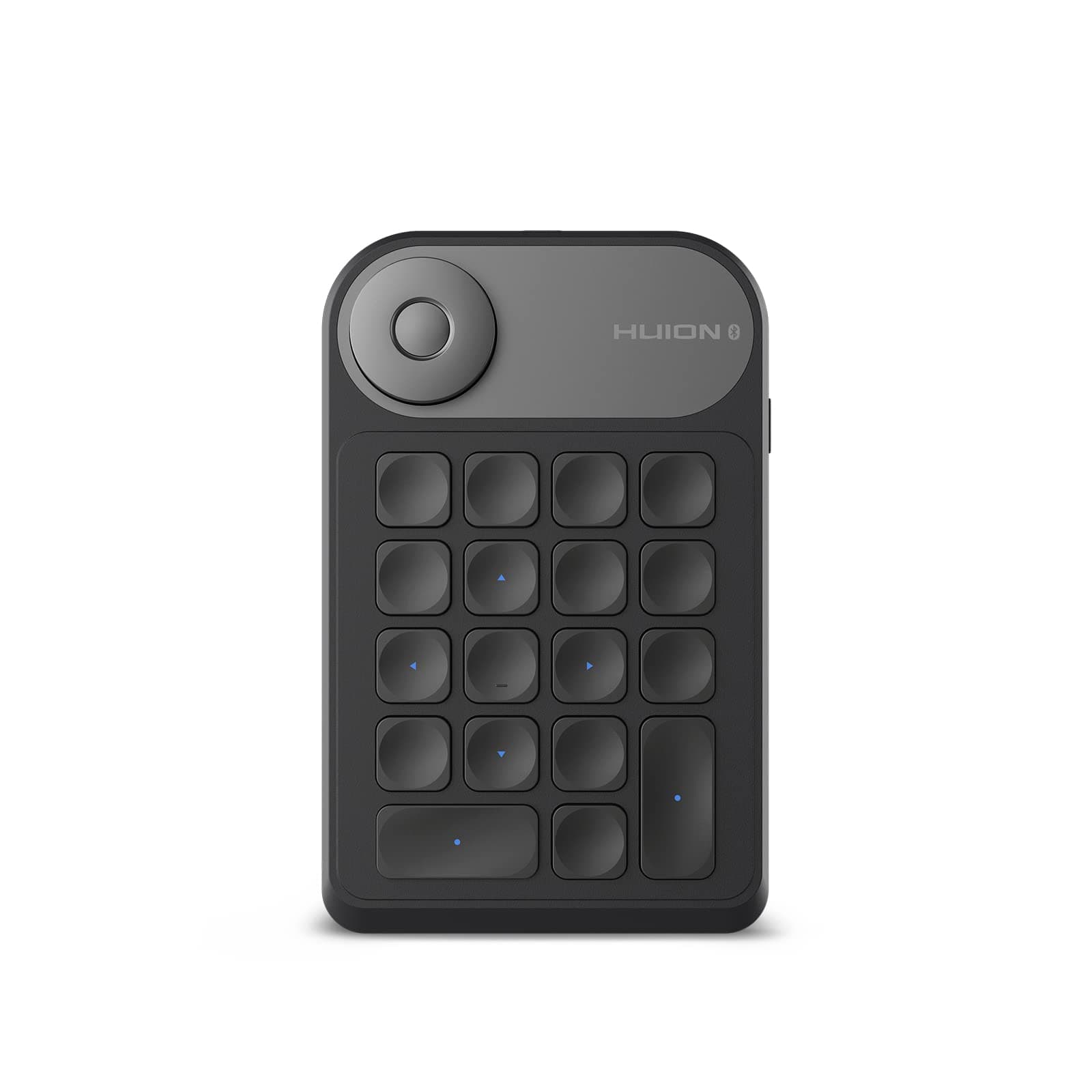
🎨 Dial into your creative flow — shortcut mastery in the palm of your hand!
The HUION Keydial Mini K20 is a sleek, portable Bluetooth 5.0 remote keyboard designed for digital artists and professionals. Featuring 18 customizable keys and a precision dial controller, it enhances productivity by enabling tailored shortcuts across multiple creative software. Its ergonomic scissor-switch keys reduce finger fatigue, while a robust 1200mAh battery supports up to 70 hours of wireless use. Compatible with Windows radial menus and multiple devices, this ambidextrous keypad offers seamless app profile switching and fast USB-C charging, making it an essential tool for efficient, clutter-free workflows.


| ASIN | B0BMPZ4C9Y |
| Antenna Location | Everyday Use |
| Best Sellers Rank | 10,270 in Computers & Accessories ( See Top 100 in Computers & Accessories ) 192 in Tablet Keyboards |
| Box Contents | Inspiroy Keydial K20, USB-C Cable, Wireless Receiver, Quick Start Guide |
| Brand Name | HUION |
| Button Quantity | 18 |
| Colour | grey |
| Compatible Devices | Laptop, PC, Smartphone, Tablet |
| Connectivity Technology | Bluetooth |
| Country of Origin | China |
| Customer Reviews | 4.2 4.2 out of 5 stars (448) |
| Enclosure Material | Aluminium, Plastic |
| Generation | 2nd Generation |
| Hand Orientation | Ambidextrous |
| Item Dimensions L x W x H | 14.6L x 9.3W x 1.1H centimetres |
| Keyboard Description | Multi Functional |
| Keyboard Layout | QWERTY |
| Manufacturer | HUION |
| Mechanical Keyboard Switch Model | scissor-switch |
| Model Name | K20 |
| Model Number | K20 |
| Number of Batteries | 1 |
| Number of Keys | 18 |
| Number of Sections | 1 |
| Power Source | Battery Powered |
| Product Features | Digital Display |
| Product Warranty | 1 year |
| Series Number | 20 |
| Style Name | Professional |
| Switch Type | scissor switch |
| Theme | Design |
| Unit Count | 1.0 Count |
| Water Resistance Level | Not Water Resistant |
N**N
Buy One
Excellent piece of kit, I wish i'd purchased one with the tablet originally. The buttons are very tactile and responsive and all the hotkeys/wheel functions can be changed depending on your art package and preferences. It's really simple to configure multiple profiles which are saved via the device. Each profile will load automatically upon launching your software, so you don't need to adjust anything before you start working, making it a breeze to switch between art packages. You can use the stickers provided if you have trouble remembering your hotkeys. I didn't bother with those, though as there's little textured bumps on some keys and, after a couple of uses, its easy to navigate without prompts. I can imagine the stickers being a pain to remove when they inevitably wear too. It clings really well to the surface of my Huion pad, saving on workspace. And best of all, it's Bluetooth 5, so no wires cluttering up my work area and no need for a dongle as it paired straight to my pc. All in all, it's dramatically improved my workflow and made things a lot quicker and more intuitive.
R**E
So good I must leave review
I have only lived with This for about a month and I haven’t owned many things like this however I am very computer literate and I have been a professional in Adobe Photoshop for many of moon. I purchased this to help me navigate the many shortcuts in Adobe Photoshop quickly i.e. to speed up my workflow. My hands are extremely large however I still struggle to quickly and effectively utilise the shortcuts now I have this tool it’s amazing it’s completely customisable i.e. control alt and V can be applied in Photoshop or on any program you wish. The reason I’m now writing a review is because I’ve recently started using Canva and this morning I managed to set up shortcuts for Canva in a matter of minutes. It’s extremely versatile can be programmed to any software you wish with any string of keyboard combinations, there’s a lot of other functions that you can allow it to do using mouse keyboard the Window software itself all in all an amazing product for not a lot of money well worth it extremely user-friendly very easy to set up the only issue I have but I cannot say it’s anything to do with the device is at one point the Bluetooth didn’t work. It just stopped randomly and would not connect to my PC but it would work when plugged in that most likely is something to do with a bug with him, Windows. It eventually sorted itself out but something to know don’t let this put you off though can be used plugged in or on Bluetooth work Immediately the user interface on the driver is extremely easy to use coupled with the dial for zoom in and out it really does make life a lot easier.
M**O
Simplifies your regular tasks quickly
I love it. If you work in any type of graphics it's almost essential for efficient work. Buttons are a little small and I find I have to keep looking to make sure I'm on the right one, even though they did have raised feelers. I use my unit on a number of different angles and it's a little annoying that their isn't a way to change the screen angle easily... but small points on this well made instrument. I use CorelDraw rather than Adobe and it's great. Even spreadsheets are easier to use, adding regular formulas quickly and scrolling is easy with the two dials both customised. Looks discreet, cool and the battery lasts... so far! Also, it can get a little confused with what program is being used, whereas its designed to recognise them program being used. Small issues that I'm sure will be ironed out with updates. Get one. It quickens the day!
S**K
Works well on Mac
I have found this works well on my Mac. I've used it across a number of apps and haven't yet come across any issues with functionality. Buttons are responsive and never stick or double press. Dial feature is great. I do think the software has scope for improvement, but it is still fine for what it does.
J**E
Not enough keys
Idea is great but still missing more keys for different tools to edit. Be a perfational need more than just a few let settings up
E**Y
Compact, works well.
Still adapting to using this alongside Procreate but there's no reason I couldn't pair it with a PC instead. A neat functional unit, not very heavy (so a fairly light build, but robust enough). Keys are positive; wheel is clicky. There are far more expensive alternatives on the market, this feels excellent value for money. Only slight downside is having to install a companion app to configure it, but that too works well.
S**Y
Huion's K20 Keypad: A Great Addition to Your Hardware and Workflow
Works perfectly for what it's intended for. The packaging is classic Huion. The grey that unboxing is part of the experience with new gear. The keys are tactile and fire immediately. The driver setup is quick and easy. I had to fully uninstall the driver for my Kamvas display tablet to bring everything up to speed. But once that was done, assigning keys simple as it possibly can be.
B**I
Unstable and Buggy Software
Terrible terrible device. While it is a well built product, that's where all the positivity ends. After downloading the lates drivers from Huion's website, the software and connectivity is extremely buggy and just doesn't work. I created multiple profiles for different softwares, but they don't just register when you open these apps. The device Ui always defaults to the general presets UI, and never to the custom presets chosen for the currently opened software. As another reviewer pointed out, moving from one page/group of shortcuts to another is extremely slow, which defeats the whole purpose of having this device. I would stay away from this product until at least they sort out the software issues. It is unusable.
D**E
Perfettamente compatibile con le tavolette grafiche HUION. Si collega in un secondo e mediante l’app da installare sul pc, è possibile configurarne e personalizzare i tasti, creando dei preset per ogni programma. Alcuni programmi tra l’altro hanno già dei preset di tasti impostati come ad esempio Photoshop. Risponde bene alla pressione e anche la rotazione della rotellina è abbastanza precisa. La durata della batteria dipende dallè’utilizzo ma mediamente dura anche una settimana e più. Si spegne automaticamente dopo 5 minuti di inutilizzo.
B**N
Wenn man keine Lust hat, die Funktionen über eine große Tastatur aufzurufen (z.B. weil man nur ein Handy hat, oder eben ein großes 22er eben gar keine Tastatur mehr auf den Schreibtisch passt), kann man für weniger Geld frei programmierbare Gamertastenblöcke holen. Oder eben dieses Teil. Designtechnisch ist es den Grafiktablets angepasst und sieht sehr gut aus. Gegenüber den billigeren Gameralternativen funktioniert auch alles reibungslos: Software, USB und Bluetooth connection. Die App ist klein und unproblematisch. Es funktioniert halt alles und man muss sich keine dubiose, chinesischsprachige App zur Einbindung (wie bei den ca. 20€ billigeren T.Mu Teilen) runterladen. Absolut für den professionellen Einsatz gedacht, sieht gut aus, der Preis ist in Ordnung, alles funktioniert, was will ich mehr...
M**T
Very convenient. App UI is very clunky though. Still, works well once set up.
J**Y
Werkt uitstekend samen met photoshop, en huion displaytablet
M**B
Bazı fonksiyonları çalışmıyor ve üretici buna henüz bir çare bulamadı. Görüşmelerde çok büyük bir ilgi var ama sonuç yok.