
下载应用程序



Level Up Your Playtime! 🎮
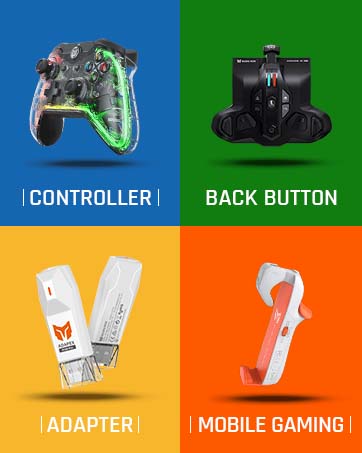
The BIGBIG WON ARMOR-X Wireless Controller Paddles enhance your Xbox Series X|S gaming experience by adding 4 customizable back buttons. Compatible with multiple platforms, this lightweight attachment features turbo functionality, macro recording, and ergonomic design, ensuring you stay ahead in every game. With a rechargeable battery and a satisfaction guarantee, it's the perfect upgrade for serious gamers.













C**S
Much better than xim nexus
This device has enabled me to play shooters on my Xbox console effortlessly with motion control. It's a game changer and it doesn't require profiles like the xim nexus, which was problematic from the start with connection issues and lack of game profiles. This device has a supporting app but is not really needed as much. I simply use it as an effective, easy to set up motion controller. At a fraction the cost of a xim. As a plus it acts as a rechargeable battery pack for your xbox controller. It's great!
S**E
So much in one package!
This add on is amazing and does so much at once. First, it acts as a rechargeable battery so you no longer need your own. Second, it has 4 back buttons that can be remappable. From my experience, they are placed in very ergonomic locations and are very comfortable and easy to press. They are also clicky. When I don't need to press them, I often forget they're there, showing that they aren't intrusive. The version I got was the pro version. The pro version supports gyro, which isn't present on the original Xbox controller. How it works is that tilting the controller moves a joystick that you set. From my testing, this is very nice to use and surprisingly accurate. This add on also lets the controller work on the Nintendo Switch. It supports the gyro I mentioned earlier, where tilting the controller moves one of the joysticks. However, it also supports the Switch's built in gyro so you can turn this off and use the Switch's gyro for gyro games. One thing I noticed for the Switch is that the ABXY buttons use the Xbox layout. Meaning, if you want to press A on the switch, you press the bottom button instead of the usual right. I couldn't figure out how to remap buttons other than the back buttons with this, though. It's not a big issue, however, since the Switch has a built in remapper in it's settings (edit: you can remap buttons using this device's mobile app). Overall, this is a phenomenal add on that adds a lot of value to your Xbox controller.
R**G
Nice addition
Would have 5 Stars, but the back buttons could use a more solid feel, slightly more responsiveness to them also. The gyro works as intended.
E**I
Can't function as a regular battery pack on MAC OS
Works pretty well, gyro is very usable. Quality feels really good when attached on to the controller. I understand nowhere does it say that MacOs is supported, but I was hoping that at least I can still leave it attached and have it work as a battery pack for my controller when im using it on my macbook. As of right now, got it to work like 10 mins at a time, i have to turn the pad on, and while turned on i have to click the button on the usb reciever to turn the reciever off, then quickly press the pairing mode on controller. Connect it to mac, then turn on usbc reciever again. Then click pairing mode again after its quickly blinking. Then let go off button and click pairing button again for about a second or 2, then it will flash xbox button slower and then stay lit and be connected to macbook. But after 10 mins it will disconnected and i have to reclick/hole pairing button, let go and click again for it to pair again. I'm guessing that after about 10 mins, the x armor pad turns off from not making a proper connection with the usbc reciever... Seems like an easy software update fix.. And no, it will not work through wired passthrough on mac either... It'll be a 5 star for me, if fixed in an update.
P**N
This makes gyro possible on Xbox! It's worth every penny
If you are looking for an Xbox gyro controller add on... GET THIS! If I could give over 5 stars I would! I actually learned of this product from reddit! I have always loved using gyro motion controls, if I'd have known Xbox was petty and the only console that refuses to add gyro capabilities I would have chosen a different console... *That is where this AMAZING controller add on comes in, I thought it was a lost cause to get gyro because I'm not spending 150plus dollars just to get an Xbox approved controller with gyro! Thank y'all for this product, the battery life is astronomical, literally takes less than 2 hrs for a full charge then I can heavily use it in game play for a min of 2 days of gaming. I have NOT found any sort of delay or lag response, it responds immediately.
P**R
How could something that started out so right end up being something so horribly wrong?
After having (and enjoying) 2 Xbox Elite Gen 1 controllers over the past 9 years, I decided to upgrade my Xbox controller setup. Naturally, I looked into purchasing the Elite Controller Gen 2, but that price tag.....YIKES!! While searching for controllers here on Amazon, I stumbled upon the BigBig Won Armor X Pro controller peripheral for Xbox Series X / S controllers. According to the description, it gives any regular Xbox Series controller the abilities of an Elite controller. Actually, it makes your regular controller better than the Elite because in addition to the paddles, macro and turbo functions, it also gives your controller gyro abilities (something the Elite doesn't have), and it's all done wirelessly. All this, and the price is far less than a new Elite controller. Needless to say, I purchased the BigBig Won Armor X Pro, expecting to level up my Xbox gaming experience, and I actually did..... For about a day. After unboxing and setting up the unit, it quickly connected wirelessly to my Series X and immediately the gyro ability kicked in. I was able to maneuver around the Xbox dashboard without using the joysticks! I simply tilted the controller in the direction I wanted the cursor to go and the screen would respond! Immediately impressed, I began a gaming session. Everything worked perfectly. The paddles, the turbo function, the wireless signal, all solid. And the gyro? OUTSTANDING! All of that changed the next day. Upon turning on the Armor X Pro the following day, everything worked except the gyros. No matter what I tried, the gyro abilities would not activate. Factory resetting the unit didn't help, so I consulted the official BigBigWon.com website for help. When visiting their support page, the site recommended performing a firmware update on the device, using my Windows PC. The next day, II carefully followed the official BigBigWon.com website instructions and downloaded the appropriate firmware files. I have the Malwarebytes anti-virus / antimalware program installed on my laptop, and have been using it successfully for years. So imagine my surprise when, after downloading the firmware update file for the BigBig Won Armor X Pro, I received an urgent message from Malwarebytes informing me that the firmware update file contained 2 viruses!! Needless to say, I immediately quarantined the files and initiated a full antimalware / anti-virus scan on my laptop. Again, Malwarebytes flagged those files as unsafe. What did I do? What do you think I did? I DELETED THE FIRMWARE FILES!!! So, to summerize my experience with the BIGBIG WON ARMOR X PRO..... In the span of 3 days, I went from being totally impressed with the device and singing it's praises, to being completely disappointed and, quite frankly, a bit angry. This device / company's software could have possibly bricked my laptop.....or worse! Needless to say, I'm definitely returning this accessory and requesting a full Amazon credit / refund. Bottom line? If you're seriously considering purchasing this product, don't do it. YOU HAVE BEEN WARNED!!!
F**K
No Brainer if you own multiple consoles and you want a Gyro function!
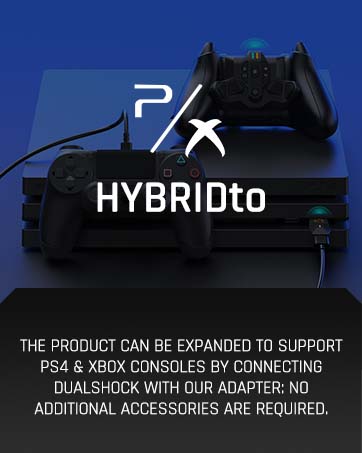
Right out of the box, I noticed the device had a good build quality. Install was straight forward, basically plug the device on the back of the xbox controller. The first time you use it, you need to pair it to the USB device. This was done easily by pressing the pair button on the usb and on by pressing and holding the FN and A-b buttons together on the device. I immediately tested the Gyro function by pressing the central button and it worked smoothly on the xbox, which was very impressive. Playing shooting games like Halo now is going to make a huge difference for me. I posted a video testing it as well! I also tried this device on my switch. By plugging the usb dongle into the switch dock and activating the pair mode, I was able to use the Xbox series controller on my switch easily. I also tried Gyro function also worked perfectly (although sensitivity could be adjusted a little via the app). But overall, now I gained an extra controller for switch console using a controller I already had, which I found pretty cool. Apparently, it can also work with ps4 console, but I don’t have one. I didn’t do any specific testing to confirm with measure the lag, but overall, I didn’t notice any noticeable lag with my setup. The controller was very responsive and worked as intended. The app is really easy (I have android). it allows you to change response curve, motion, and even the triggers dead zones. It also has a button map feature as well. Moreover, through the app, you can create a profile for each game which is a huge plus. Yes the product is pricy, but I feel you’re getting what you’re paying for, so I would definitely recommend this product to a friend. If you own multiple devices like me, it’s a no brainer.
K**V
Awesome
Great accessory to own hands down makes a big difference