
下载应用程序



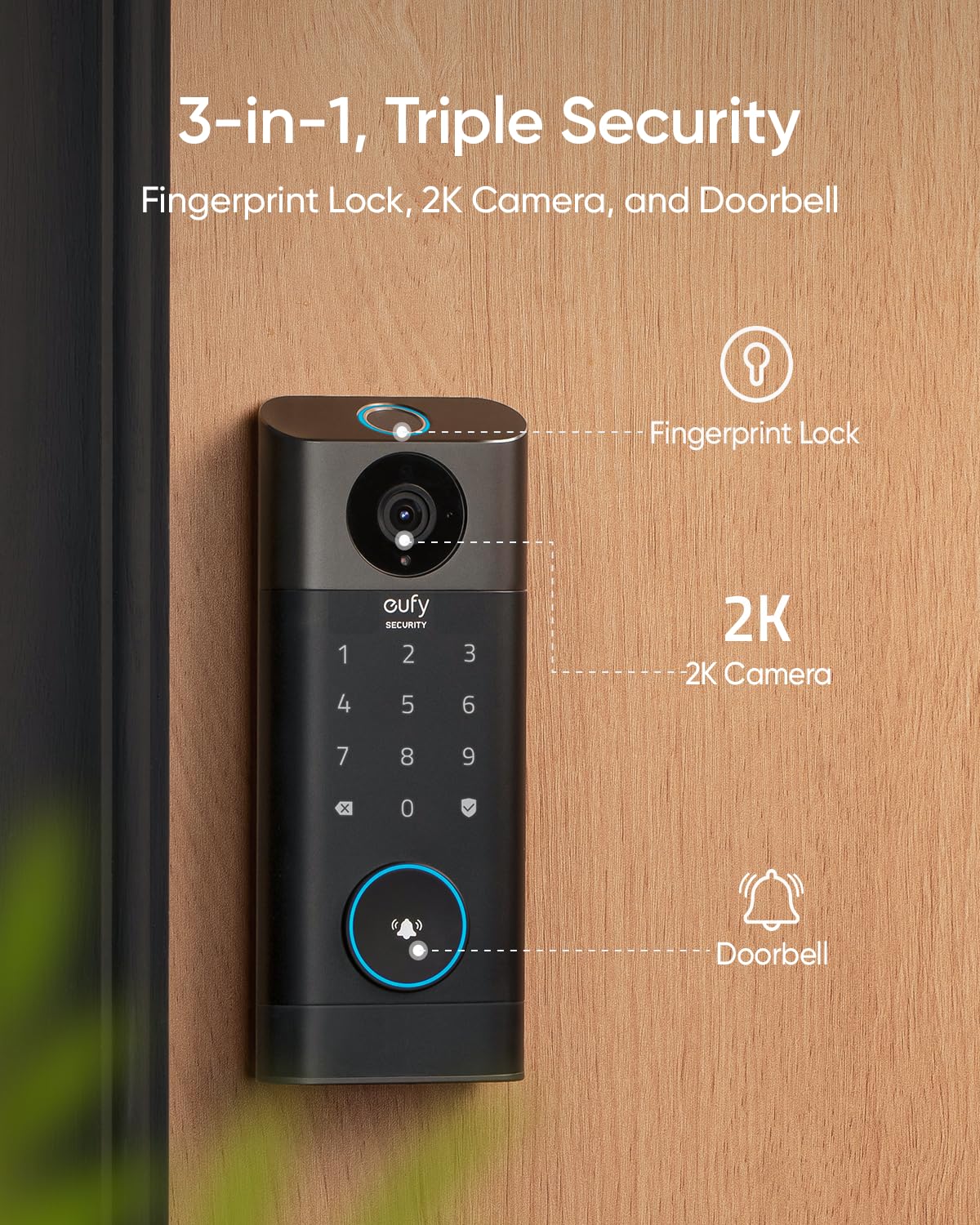
🔐 Elevate your entry game with the all-in-one smart lock that’s as savvy as you are.
The eufy Security Video Smart Lock S330 is a cutting-edge 3-in-1 device combining biometric fingerprint access, a 2K HD camera, and a video doorbell. It offers five unlocking methods including app and voice assistant control, backed by a robust 10,000 mAh rechargeable battery and IP65-rated weather resistance. Designed for easy installation without drilling, it supports expandable video storage and real-time notifications, making it the perfect smart security upgrade for modern front doors.

















| Brand | eufy Security |
| Item dimensions L x W x H | 8.66 x 3.15 x 7.09 inches |
| Lock Type | Biometric |
| Material | Zinc |
| Recommended Uses For Product | Security,Video Doorbell |
| Special Feature | 2K HD camera, advanced video doorbell, WiFi Deadbolt, Rechargeable battery(10,000 mAh) |
C**O
Excellent Smart Lock!!
Excellent smart lock! I had a very expensive Kwikset biometric lock that I couldn't stand using any longer. I trust Eufy products as I have many Eufy items and they've all been working perfectly. This smart lock was very easy to install and the biometrics are very reliable. My old Kwikset didn't recognize my fingerprint after one day consistently. I got locked out so many times because of that Kwikset lock. With this Eufy, my finger print is recognized every single time and it is very quick to respond. AND!!! I love having the camera on it! I have it placed on the door to my garage. With this lock, I can easily see inside my garage via the app. It also can connect to Alexa. The touch controls are easy to used very responsive, hidden keyhole if needed, fast battery charging, recognizes fingerprints every time in heat or when wet from rain...what's not to love about this? The app is super easy to navigate too. If you have an Apple Watch, you can get alerts on your watch for entry, locking, battery percentage and detecting movement.
J**E
Perfect all in one device
Got this because it was a Camera and Doorbell built into the lock. I was pleasantly surprised with the functionality and how well it works. My only issue is that the battery dies relatively quickly due to the fact that it cannot be hardwired, as I have done with other camera doorbells. Other than that, it was easy to install and easy to set up. It was a good value for a keyless entry and would recommend this device.
N**R
Great product and very good customer service
I ordered the Eufy S330 door lock during Thanksgiving in 2024, as I was closing my home in December and wanted a door lock with video capabilities. The important feature for me was the Auto Lock function that Eufy marketed. After installation, the Auto Lock function was working erratically. It would work sometimes and does not other times. Eufy has feature for this lock where you can set the time from 0 to 3 mins for the door to auto lock. The setting of time lower than 3 mins never worked for the lock. I contacted the customer care and we tried few settings and finally it was determined that there is an issue with lock and they replaced me a new lock. I thought the issue is resolved but the new lock came with new issues and Autolock does not work at all on new device. I contacted the customer care again and asked for the upgraded product as their product did not work as marketed but they offered be the lowered version of a similar featured product. So the situation was, I paid higher for the failed product, and now I am offered a downgraded version of the product with no additional compensation. This was a shock to me. I told them to replace me with same product one more time and now comes another shock. They sent me the used product. It was insane and so unprofessional of Eufy. When I bought the product, I was so excited about it, and I marketed it to a few of my friends and I referred it to one of my friends as well, and I feel so sorry I did that. I would never recommend this product and this company for their customer service. Absolutely disappointed. Update on May 14th 2025: So after my complains, I was sent brand new door lock and after having discussion with customer care we determined that auto lock setting in Eufy app was wrong. Also we found that if the app is used on multiple devices (phone, ipad, etc.) with same user ID and PW, the auto lock setting would not change in all devices automatically if you change it on one device. This was creating issues with auto lock functions. After making above two changes, the au to lock issue is resolved and lock is perfectly working fine. As an appreciation of my findings in of issues in Eufy app, Eufy customer service team offered me a free gift of Eufy Indoor Lamp E10 which is amazing product, I love it. With above updates, I changed title of my review and changed the star rating from 1 to 5. I highly recommend this product.
B**R
Installation and app usage is very dismal so far. No Instructions.
Experience so far. Hint: I am probably sending it back. Charged the battery overnight. Installed door knob. No instructions in box except for a paper telling you to download the app. Did that, still no instructions, but I've installed a few locks in my day. Did first time setup and it kept telling me "the deadbolt is stuck please return to the installation". So, I took it apart spun the deadbolt 180 degrees and tried again. Still same error. Loosened screws thinking it was too tight. Same error. You have to do the setup with the door manually locked. Finally, I opened the door and locked the deadbolt, then setup succeeded. Started fiddling with app. Added deadbolt to app. Couldn't figure out how to add my pin code and thumbprint, but accidentally stumbled upon it. The app requires you to set up your home, but security is at the device level, not the home. Strange. Got myself setup and was able to operate door fine. Strange thing is that to both unlock and lock the door, you need to use your thumbprint. So, you won't be able to tell a friend to lock the door for you. Wife and daughter got home. Took forever to figure out how to add them. Emails about joining the home and they downloaded app. It didn't say MyHome, it said TheirHome. So, that leaves you wondering if they actually joined the home or not. Oh well, kept going and could not figure out what to do. Finally figured out I had to share the device (deadbolt). Did that, more emails, they accepted and Voila, they could see the deadbolt. Now onto adding their thumbprints and passcode. To do this it needs to connect. And this step continually failed as if it couldn't connect, all the while it is sending video to the phone showing that there is definitely a connection. My daughter noticed that the battery is now 23%, WTF. Remember, I charged it overnight. We gave up and will work on it again tomorrow while the battery charges again overnight. I will update this review tomorrow. B.T.W. I did see a power setting and it was left at default, which is the second to least power using option. Edit: Next day: Still same connectivity problems. Decided to turn the IOT network feature on in my router. Went to connect deadbolt to that network, but no networks would show up at all. Decided to remove the deadbolt from my app and start setup all over. Was able to add it to the IOT network and reset my passcode and thumbprint. A couple hours later I set my wife's passcode and thumbprint. Decided to do her through my phone since the whole multiple phone thing is a PITA. Deadbolt worked fine. Third day: Wife left for work through that door and her thumbprint would not lock the door. Ugh. I opened the door and used my passcode to lock it while the door was still hanging open. Then tried thumbprint again and it worked. A couple hours later, my thumbprint wouldn't work again. I had sawdust on my fingers, so I will chalk it up to that. I then added my daughter, again through my phone. This went well. We now figure out if you hold down on the little lock button on the keypad it will lock it without a code or thumbprint.
Y**A
Easy install but the camera's motion detection is lacking
I would like to clear right away, my beef is with the camera motion detection. So I'd like to summarize following, not talking about t the camera: the install was fast and easy; it took exactly 8hrs to charge the battery; fingerprint set up was fast, and the fingerprint reader is spot on and opens door without any lag. The door bell feature is pleasantly nice. It's loud enough to hear it in another room (although I have good hearing). The quick response feature is great .I like that I can respond with a male voice! The only negative regarding the fingerprint reader is it's distance from it to the door... Ladies, if you have long nails, you might be either scratching the door or not going to be able to get you finger on the scanner (see the attached photo, my nail is only about 1/4 inches long). Now, let's talk about the camera. TLTR: Lack of motion detection between the rails, activity zone inconsistent between iOS and Android, no way to capture a few seconds prior to the trigger(see 3rd issue for details). I deduct points for myself for missing the fact that the deep set door jamb is going to block the view on the left hand side. Not a complete deal breaker since I have little to no activity on that side as there's a high tree growing and thus doesn't allow for anyone to walk by easily. On the right side I have hand rails that are blocking the entrance to my driveway. 1) My issue is that there is no motion detected between the rails! Sensitivity is adjusted to full on that side (see attached screenshot), so it should be picking up any cars coming and going but it doesn't. I tried to walk on the side of the driveway, and no motion was detected either. I thought maybe the distance to the road vs. the distance to the driveway entrance is too far but both are equal, around 24-27ft. So any monion visible between the rails should be captured (after all, the camera has no problems picking up passing by cars on the road). 2) second issue is that on iPhone 14 the activity zone appears differently then on REVVL 5G. On iPhone it appears to be covering the whole road in front of the house, while on REVVL it barely touches it. It appears, after some testing, when the activity zone is set on iPhone it's most accurate. Why there would be a difference is beyond my understanding. I'm waiting on support to provide some reasonable explanation. 3) Third issue is when someone pulls into my driveway, it appears the motion is initially being triggered by the activity zone being set on the road (see #2 issue). So when I watch the playback, it starts way too late, when the car already pulled in, and now I'm clueless who drove onto my driveway. Of course I tested it with my car pulling in and out, and I got the same results. It would help if there was a setting to capture several seconds of video before the trigger (I had it on one of the security cameras a while back). Update: • for issue #2 the tech team advised it's an issue with REVVL 5G resolution, which will they work on fixing. However, if we didn't install it on two separate phones, how would we even know the activity zone is dependent on a phone type. • Rain mode: yesterday we had a heavy downpour. The Rain mode was "on", and it worked as expected. The door beeped a few times, and then locked up. Now, the feature is made so the battery doesn't get drained by the rain triggering the keypad. It's all nice until you have to get home while it's pouring down, and suddenly you cannot use the keypad...I hope I'll never get to experience that. • the motion alerts are absolutely useless. I tried all sort of combinations, and it's just not responding well to motion triggers. There are plenty of events that should've been captured but there was zero response. The delay in video capture is just awful. One of was talked to the front door, and back, and the camera was able to capture person walking away only... Thanks, I guess?! • phone notifications are absolutely useless. I do not understand why when I open the app I start seeing me events (and thus getting alerts) but when the app is running in the background no new events are being captured. Sadly, this product is not working for me, and I am returning it.
H**S
All The Right Features
I chose this Eufy door lock because of its top rating from Consumer Reports. My second Schlage door lock failed just like the first one, so no going back to that brand. Plus, this Eufy was more feature rich and cheaper by comparison (my Schlage locks had no video or audio, just codes). The positives are overwhelming. Every little feature I could hope for - and some I didn't think to expect - are implemented intuitively within this product. It's clear that a lot of thought and development time went into this product, aimed at the end user experience. It's all done the same way I might have designed it and then improved it over time. - First, the mechanical installation was quick and painless, with the lock working smoothly right away. - Second, there are so many ways to open this lock. When my electronic setup hit a snag (my own fault), we were still securing our home by using the key for a couple weeks. After electronic setup, we added three more methods. #1: We quickly created unique passcodes for everyone. #2: Our favorite method for both locking and unlocking is to use our fingerprint. #3: But quite handy is the phone app by which we lock the door from work or from upstairs when we've forgotten. - Third and also cool is that my wife and I both have Admin accounts for these two devices, meaning that either one of us can access the event logs, change the ringtone, unlock the door remotely, add other users, etc. from our phones. Meanwhile we setup regular access accounts for our adult children. They each can enter their unique code at the door itself to unlock, or to lock on the way out. The next time they visit, Eufy will scan their fingerprints to enable that method also for lock/unlock. Either way, the Event log records exactly who entered and when. And records the video. - Fourth, it's so great that there's no ongoing subscription required. I made sure everything worked before ordering the micro-SD card, but we were still able to use all of the features above plus others not yet mentioned (Live View, Live 2-way Audio, doorbell, and phone alerts). Then with a cheap micro-SD card - so easy to insert - we also have tons of video and audio storage. It's all configurable if we want lower-resolution video to save space or perhaps no audio to save even more space. The 128GB maximum size has more than enough room for us to configure high-res everything. Then if there's a particular video we want to save long-term, a single tap within the app downloads it to my phone. - For the fifth positive, I can only scratch the surface about how intuitively it all functions. The live feed is just one tap. The mute-myself button is obvious, again just one tap if we want to converse before replying. I pre-recorded a few auto-responses like, "Sorry, but we don't answer the door for solicitors". Again, my pre-recorded messages are a well-placed set of one-tap options. Motion detection is too simple a word for the continuously enhanced AI features. My list of "Events" labels significant motion as "Human Detected". Based upon settings, I have no events recorded for stray squirrels or passing vehicles. Night vision calibration accounts for the white door jamb in the picture. Even the plug-in-the-wall Wi-Fi doorbell is great, with app-based volume control and several selectable ringtones. The auto-lock feature is configurable for different time settings and seems useful, but we haven't turned that on yet. The negatives are incredibly minor, especially in light of the strong positives. - I'm a decades-experienced IT professional, assembly programmer, PC builder, and more. I'm "that guy" everyone calls to setup their own high-tech equipment, including a few video doorbells. Yet I struggled with the electronic side of this lock installation. The instruction booklet simply says to install the app and follow those instructions. The app itself is great, but the setup steps could benefit from some customer feedback. A key setup step is scanning the QR code from the device itself to get its Serial Number. That step was quick and efficient for the separate Wi-Fi doorbell device - which BTW comes included with this door lock. But for the video deadbolt device, the app kept telling me "Invalid Serial Number". No problem - I can enter the SN manually. Where to find it? The app says it's in two places: the inner documentation box, and on the door lock itself. I entered the SN from the door lock - still invalid. I entered a number from the inner documentation box - but it wasn't exactly a Serial Number, so still invalid. There was a real Serial Number on the documentation booklet itself, different from the door lock's SN - still invalid. In the end this was all my fault. Kudos to Eufy's support team for a quick E-mail response when their live call center was closed for the weekend. That response asked for details including my purchase receipt. Looking up that Amazon receipt, I noticed the exact model number I purchased: "S330". The app's setup steps require me to select the item type before scanning or entering the Serial Number. Where I had preciously selected "Video Door Lock & Doorbell Combo", I tried the app again and found the S330 in a not-so-obvious selection. With that choice the QR code scanned successfully, and everything worked fully a few seconds later. That quick step even integrated the video door lock with the included doorbell device. A better setup experience (A) would print the model number on the product box somewhere, and (B) would let the app select (or at least prompt for) the device type based upon the Serial Number scanned or entered. But with the one-time setup behind me now, everything about ongoing operation is wonderful. - The other tiny negative is the advertised integration with Alexa. I don't use Alexa here except for my Fire TV remote, so I can't speak with much expertise about how this Alexa integration should work. Amazon's product page says (copy/paste) "WORKS WITH ALEXA Add voice control by combining with an Alexa device". From "voice control" I expected that I could ask any Alexa device to lock or unlock the door, and perhaps have an Alexa Show display the live video. I've been through every possible setting at least twice, and the only Alexa connection is "Alexa as Chime" whereby an Amazon Echo will announce when the doorbell is pressed. That's not even close to "voice control". Again, not a big deal for me because we haven't gone full Alexa in our household. But if we do, I don't expect the video doorbell to integrate fully like, say, the Echo-plus-Ring bundle does. The bottom line is overwhelming positives for all the important functions plus responsive customer support. The negatives don't affect me, so five stars. Consumer Reports was correct in their recommendation.
A**L
Best lock
Got this for my mom. Easy to install and use. All of us children have a specific pass code. She and I have also set up fingerprints. With this she can see who goes inside if she isn't home. Also easy for her to verify and lock the door through the app if necessary. Comes with backup keys in case of battery failure. Her doorbell was on the side of the house and didnt offer the view from the door. This gives that option. Video is good quality and picks up a lot, working on the range and sensitivity to save the battery life.
H**B
2 Years Later and I Still Love It!
I purchased this doorbell as the first step into the Eufy system back in Nov 2022. I was initially slightly hesitant due to the higher cost, but I fully believe it was worth it. Now, in Oct 2024, it still is working perfectly well. I barely have to charge it since it holds battery incredibly well still. I do not have the HomeBase system, so this review is coming from considering this as a stand-alone product. My favorite thing is there are absolutely no additional costs. When I purchased a Ring Doorbell, I did not know that to view anything, I would have to pay a sub, that is why I originally ditched Ring and came to Eufy. I can view everything on my phone without paying a dime to view live, view recordings, and control my doorbell from my phone. Since then, I have added multiple other Eufy products to my house and have no regrets. With this doorbell, you can set motion zones so that you aren't picking up on the street constantly. You can also set up multiple passcodes for different people as well as fingerprints. My fingerprints have never failed me unless my fingers are too dirty or wet, but that is understandable. You can also set up allowed times for people to visit, so say you want a friend to be able to come in during the day, you can set them up with a passcode that only works from 8a-9p. Using it after those hours will reject them which is a pretty nice feature for babysitters, dog walkers, or any services that take place. I also set up an emergency code to be able to give a 911 operator should anything happen that way they don't have to break down my door if I am unable to unlock it either manually or via the app. (As in unable to navigate my phone due to the state I am in.) Highly recommended, you can always change it after! The only negative I will note is that it has a very long delay to announcing any motion on my Alexa device; however, that might be an Alexa integration communication issue on Alexa's end and not Eufy, that I don't know and it doesn't really bother me. There is also a delay on getting notifications to my phone sometimes as well. Since I am not too worried about viewing who is at my door live, I don't mind it. I mostly got the camera to make sure I don't have any packages stolen since I order from Amazon a lot. I have caught both UPS and FedEx leaving packages at my door that were supposed to be signed for and forging my signature which had those packages have been stolen, I would have been SOL if I didn't have that footage recorded since they faked my signature both times! Definitely a good camera to have to ensure you don't get any issues with that. Little bonus: if you own a cricut or labeler, there is enough space at the bottom of the doorbell to put a small "No Soliciting" sticker right below the doorbell button.