We remain fully operational. Our teams are working around the clock to ensure your deliveries continue safely.

下载应用程序


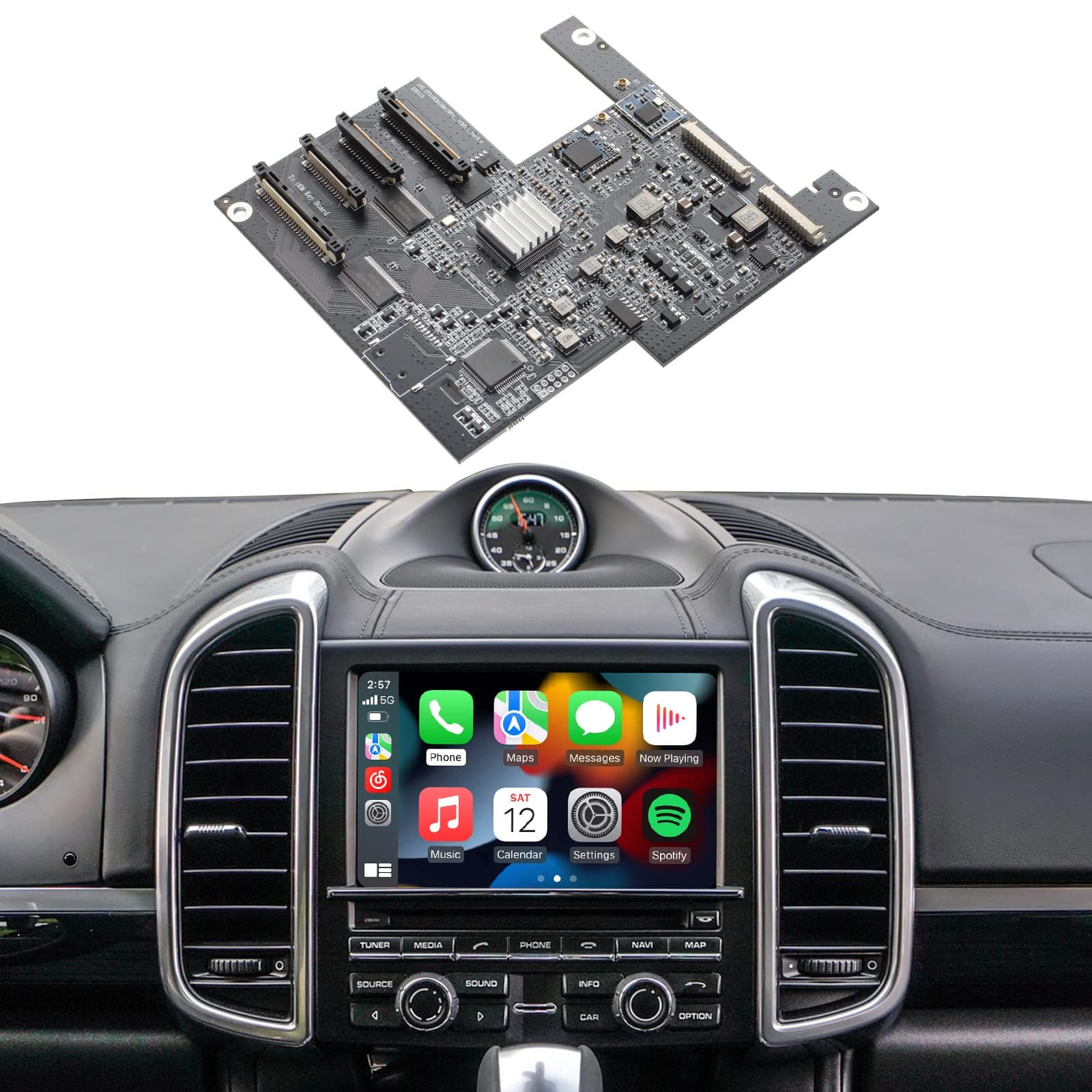
🚗 Upgrade your Porsche’s cockpit to smart luxury—wireless, seamless, and seriously sleek!
The ISUDAR PCM 3.1 Wireless CarPlay & Android Auto Module transforms your Porsche Panamera, Cayenne, Macan, Cayman, Boxster, 911, or 718 with wireless smartphone integration. Designed exclusively for PCM 3.1 systems, it offers non-destructive installation, supports OEM and aftermarket cameras, parking sensors, and steering wheel controls. Powered by a SUNPLUS Cortex A9 processor and 5GHz WiFi, it delivers stable, lag-free connectivity and customizable DSP audio, elevating your driving experience with smart, seamless tech.


| ASIN | B09Z1YJB72 |
| Additional Features | Bluetooth |
| Are Batteries Included | No |
| Audio Output Mode | Stereo |
| Best Sellers Rank | #34,769 in Electronics ( See Top 100 in Electronics ) #158 in Vehicle GPS Units & Equipment #195 in Car In-Dash Navigation GPS Units |
| Brand | ISUDAR |
| Built-In Media | CD |
| Compatible Devices | Smartphone |
| Compatible with Vehicle Type | Car |
| Connectivity Protocol | Wi-Fi |
| Connectivity Technology | Bluetooth, USB, Wi-Fi |
| Control Method | App, Voice |
| Customer Reviews | 3.8 out of 5 stars 68 Reviews |
| Display Type | LCD |
| Human-Interface Input | Buttons, Microphone |
| Item Weight | 0.69 Kilograms |
| Manufacturer | ISUDAR |
| Map Types | Mobile Device Dependent |
| Mounting Type | Dashboard Mount |
| Operating System | Android |
| Screen Size | 13 Inches |
| Supported Satellite Navigation System | GPS |
| Touch Screen Type | Capacitive |
| UPC | 768479113903 |
| Warranty Description | 1 |
E**D
Works great. RTFM/WTVs
I am so pleased with the ISUDAR Apple CarPlay kit I installed in my 2014 Porsche Cayenne (PCM 3.1). It comes on almost immediately after starting the car and performs flawlessly. And all of the OEM equipment capabilities are still easily accessible if I ever need them. I did experience some challenges/ learnings installing it so highly recommend watching all the videos and carefully reading through the installation instructions. Along the way I managed to damage one of the ribbon cables and one of the data cables. Thankfully, after reaching out to ISUDAR tech support, they promptly sent out replacements for both. Some key learnings & tips to pass along: 1) Pay attention to the direction of the ribbon cables (blue band facing direction) if you need to detach both ends of a ribbon cable. It matters. 2) Heed the instructions provided on proper ribbon cable seating 3) Don’t detach the clips holding the ribbon cables, ever so gently pull them upwards until the cable releases. The clips can easily break. 4) If you find yourself detaching the front display from its ribbon cables make sure when you reassemble you attach the ribbon cables to the display first and then the other end to the ISUDAR sister board. This will provide you ample hand room to achieve a proper seating. Note this, if you reassemble the unit and you get a black screen a poor ribbon cable seating is likely your issue. 5) Inspect the wires coming into your OEM power connector to see if your vehicle is equipped with fiber optic sound system. If it is you will need to relocate those two fiber optic cables from the OEM power connector to the ISUDAR power connector. If your vehicle has fiber optic sound, they will be the two cables in the lower left-hand side as you look at the rear of the OEM connector. No sound and an inability to switch to other sources, e.g. FM, AM, SAT, AUX, should be your first clue that this is the issue.
C**8
no sound. redid the job 2x
no sound… followed instructions. made sure Fibre optic cable was moved. No sound coming from unit
S**T
Don’t wait
This completely updated our Cayenne. I don’t know why I waited years to purchase this. It may have been due to installation involved. In reality, the installation was really easy. There are a few nuances to be aware of, such as using higher stand off’s to clear satellite radio (you can’t just remove that - it affects other things. Some DIY videos don’t acknowledge that). Also, with the additional wiring harness required, fitment gets really tight when reinstalling the head unit. Aside from that, this thing is awesome. It works really well and does exactly what you would expect while maintaining the OEM look of the car (yes, backup camera still functions as normal). I do have to occasionally re-pair my phone or restart the unit when it acts up but, it isnt often. This thing is really well engineered and just works well. It’s like getting a new car in a way given the horrendous UI the cayenne comes with for this generation 958.2). I also have a 911 with CarPlay installed from manufacturer and this thing is honestly better considering it has wireless connectivity.
P**A
Use the USB interface
Pretty simple install. Basically the same as all of the PCM 3.1 CarPlay internal upgrades. In the end, it is a 90% solution, but it preserves the interior and all functions, however inconveniently. Perfect platform if you don’t already have a backup camera. Adding it does add a fair amount of complexity to the install. I have two 2011 Cayenne S vehicles. These upgrades do seem to have inconsistent Bluetooth reliability. Works fine for weeks, then it drops and has to be reconnected as specified in the manual. I use the USB interface since CarPlay is hard on the battery and it keeps my phone charged and it has been rock solid regardless of brand, so far.
M**C
Works great - you need a T9 bit to open the case
This works great on my 2016 Cayman with my iPhone. It comes up automatically thru the bluetooth. I have the microphone hanging out over the driver footwell and the hands free phone works well. Watch the installation video a few times and have it running & paused during the install. That helped. You can edit the icons in CarPlay: hit Home and then Settings Note: you’ll need a T9 bit to open up the case. That was a surprise and I had to run out to the hardware store.
T**Y
The unit works and is good quality, but is hard to install and support is practically non-existent.
The unit works and is good quality, but is hard to install and support is practically non-existent. Car Tunes installed the unit for me, but it took them two days (4.5 billed hours) to figure it out, due to too short pins supplied. They eventually got advice/recommendation how to install it from somebody/colleague who happen to have experience installing this model. Unfortunately, there is practically NO SUPPORT for this product. I tried to get support from the seller, but support was practically useless (and arrogant).
M**E
Randomly changes sources from CarPlay to radio
I purchased this for my daughter’s 2013 Porsche Cayenne base so we could add CarPlay to this really nice vehicle. I installed following all the instructions and it worked for about a day. Then it started randomly switching the audio source from CarPlay to a random radio station. Some times this would happen a few times a day, sometimes it would happen every 5 minutes. Working with support is tough. They’re in china so they’re asleep when I’m awake and vice versa. We worked on this off and on for a couple months and their “fix” was to apply a new firmware version. This bricked the isudar device. Luckily it did not hurt the radio and after removing the isudar device I have the radio back to factory. This was an incredible waste of time and money. I suggest finding a device that has US based (or US time) support. Be aware, all of these devices seem to come with an extra wiring harness that you’ll have to try to fit into the small opening behind the radio, in addition to the factory wiring harness. It’s a very tight squeeze.
H**.
Don't rush into it, install it right first time
I used this product to add Apple CarPlay functionality to the PCM in my Porsche. Installing the ISUDAR board was straightforward and didn’t require any specialized knowledge. However, I highly recommend reading the installation guide thoroughly and watching the suggested video tutorial before getting started. Patience is key—don’t rush the process! Summary of Installation Steps: 1. Carefully removed the PCM unit from the car and detached the CD unit. 2. Disconnected three ribbon cables from the original OEM board. 3. Installed three pins to create a platform for the new ISUDAR board. 4. Routed the ribbon cables through the ISUDAR board and connected the supplied antenna. Pro Tip: Take photos of all connectors and cables *before unplugging them. This will make reassembly much easier, especially with flat cables, which can be tricky to position correctly. While the product works well, the included paper manual could use significant improvement. For example, the instructions on reconnecting the fiber optic cables (essential for Bose systems) were easy to overlook. Additionally, the first-time setup could be clearer—though in my case, resetting the PCM allowed it to recognize the ISUDAR board quickly, and it smoothly guided me through the CarPlay setup process. Note to the Manufacturer: Improving the clarity of the instructions wouldn’t require much effort. Adding a troubleshooting section to the manual would also be a welcome enhancement.
TrustPilot
1天前
1 个月前