
下载应用程序



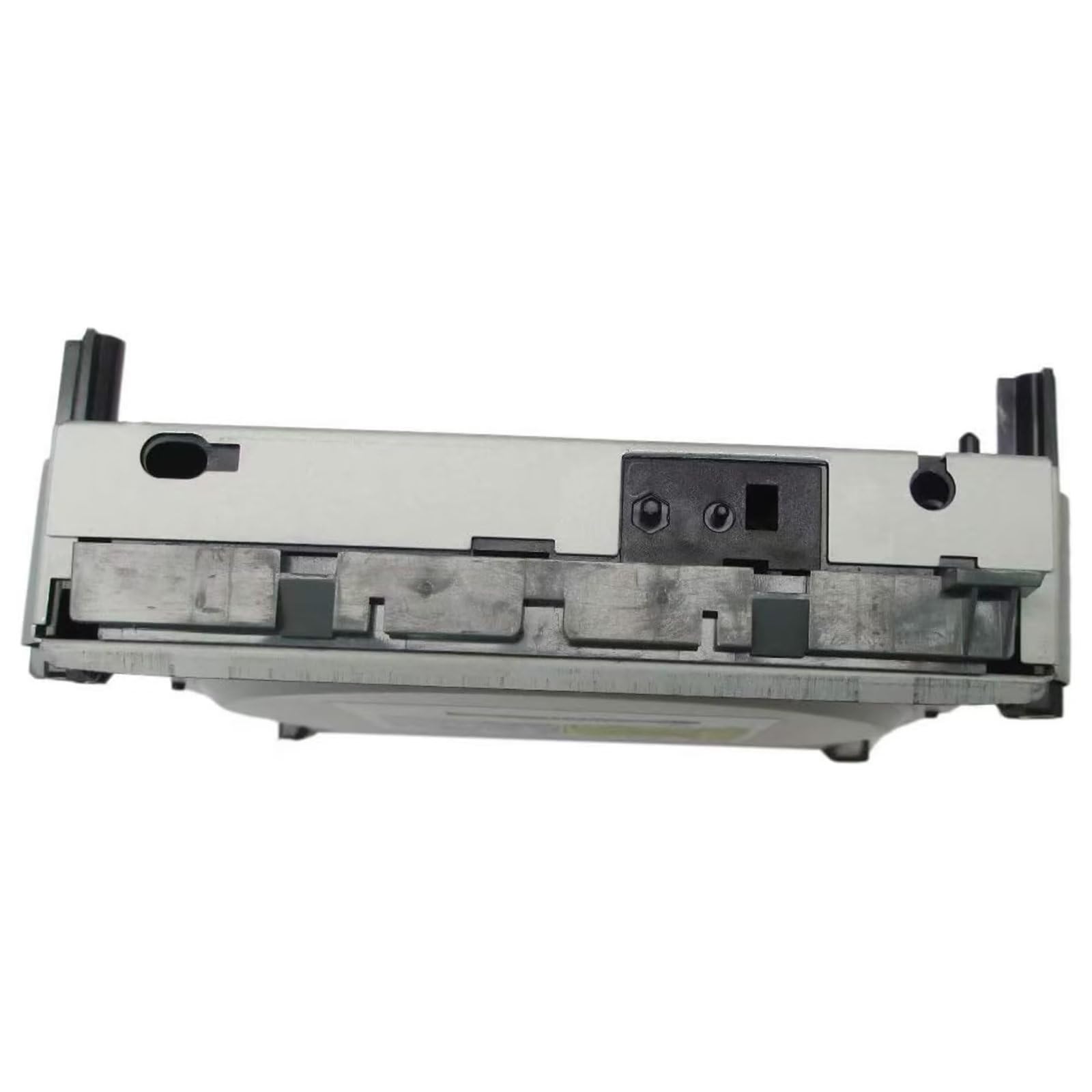


🎮 Upgrade your Xbox 360’s heart — because your gaming legacy deserves a second life!
The Original DG-16D2S Philips Lite-on DVD Drive is a direct replacement part for Xbox 360 consoles, designed to revive non-working DVD drives. Installation requires either flashing the drive’s firmware or swapping the drive’s motherboard to transfer the security key, ensuring compatibility. This replacement offers quieter operation and faster game loading, extending the life of your Xbox 360 with a cost-effective, DIY-friendly solution backed by strong community resources.
| Best Sellers Rank | #17,922 in Video Games ( See Top 100 in Video Games ) #242 in Xbox 360 Accessories |
| Customer Reviews | 4.0 out of 5 stars 813 Reviews |
D**G
Do Your Homework: Dg-16d2s Phillips Lite-on Drive for Xbox 360
Let’s get a few things straight. If you don’t do your homework you will either buy the wrong drive and or install it incorrectly. Yeah, this is like school. If you want to succeed you need to do your homework. This is not busy work, this is work required to succeed in fixing your X-Box if you are willing to put in some time and effort. You may even learn something about yourself. It was determined on my son's X-Box that both the drawer and laser were not working correctly. The drawer was malfunctioning (stuck in and/or out) and booting up games seemed to take longer, even with new game discs. Replacing the X-Box was too expensive and a self-repair was required. Let’s go over what you need to do to correctly identify your X-Box drive and what options there are for installation. (1.) Determine if Drive Needs Replacement. There are lots of videos or articles that can help identify and fix problems with your X-Box, i.e., laser replacement. Seek those out and see if a less invasive solution is a better solution. If those solutions don’t seem to be applicable, or do not work, move on to number 2. (2.) Identify Drive Brand and Model: There is a sticker on the drive with the info you need. Open the X-Box to find the correct drive model. There are about 6 different models in X-Boxes currently. (3.) Search the Web. Use the phrase, “installing Phillips Lite-on X-Box drive” or a similar phrase. At least 3 videos will pop up that will explain how to replace the drive. View each one and see which will help you understand the installation process. Bookmark the one that speaks to you; you will need it during installation. There will also be numerous pages that will detail what tools you’ll need. (4.) Review the Process of Installation. Yes, more review homework. (5.) Determine Which Option to Use (so your drive will play games). Go to the WWW and perform a search to find the most articulate article or video that speaks your language and bookmark or print it for future use. - A.) Option 1: “flash” the drive’s firmware to transfer the “key” from your Old drive to your New drive. This is what makes your New drive able to play the games. - B.) Option 2: remove and replace your New drive’s circuit board with your Old circuit board that has the correct "key" already installed. [ I did this because there is very little soldering required to uninstall and reinstall the circuit board. Make sure you buy the correct solder specific to electronic work. ] (6.) Amass All Tools and Instructional Info. Dependent upon your work-space space it is a good idea to have your work in front of the computer screen. It is very helpful as you move through the process. I was able to stop and start the video as needed. Once all your info and tools are together it may take you 1 to 2 hours to perform the operation. --- The Review --- Once installed the Phillips Lite-on drive performed flawlessly. No problems, no issues and it is so much quieter too. I was amazed at how much faster the drive booted up each game. It appears the New drive is not faster but that the Old drive, due to aging, had slowed down and was not as efficient. I don't know if this was due to the laser or for mechanical reasons, possibly both. 5 Stars for the drive and 5 stars for me because it worked perfectly for the past 2 years and it is reasonably priced. So, if you do some homework, become familiar the work required, and have a couple hours to spare you too can replace your drive. If you did not do your homework don’t blame the drive or the vendor.
C**S
Another Xbox 360 salvaged from the trash heap
*Mostly* a drop in replacement for a broken Xbox 360 dvd drive. Picked up a white 360 from a thrift store for $5, being sold as a red ring failure. Turns out, it boots just fine but the DVD drive was a mess. Someone had cracked the tray, and broke the spindle off when they tried to "repair" it as best as I could tell. I tried gluing the tray and spindle, but at that the spindle was off just ever so slightly (one heck of a DVD wobble). At that point when it still wasn't working, I could have replaced the laser lens, and saw if that was the problem, but I had a feeling the wobble might have also interfered and that would have led to a new motor. In the end, the best option was to just replace the whole thing. I said *mostly* a drop in replacement... long story short for someone hearing about this for the first time... dvd drives and xbox 360 motherboards and encoded in the firmware to be paired up, and if the "tags/keys" don't match up, it won't play games. There are two solutions... extract the firmware, and flash it to the new model. The other option is to swap the boards inside the DVD drives. I'm pretty handy with a soldering iron, so that was the simplest and quick options for me. I want to say it was all of 5-6 wires I had to solder? Wasn't bad. Now is this what you need to get yours running again? Maybe not. If all else looks intact, you might be able to save a few $$$ with just getting the lens as it seems they go pretty easily. Only way to really know is to crack in open and visually inspect the parts. Then again, if you want a sure thing so your project doesn't drag out for a few days (open, fix and close in the same day), this is the way to go. A month in, still working fine.
C**R
Buyer Beware - NOT plug-n-play and cannot be 'unlocked' by vendor
I received this today. I have installed in in my xbox and have 2 issues: 1) The product arrived damaged. One leg of the drive was snapped. I rigged a support to hold it and installed. 2) The original ad stated this was ready to install, with PCB board installed and unlocked. The unit does NOT play games. It reads game discs as regular DVDs. This implies I either need to change out the board (which requires soldering in this model) or flashing the firmware, which I am not set up to do. Something fishy is going on here. I do not know that the seller who fullfilled the order (GameRiza) is at fault. When i click on the item under 'my orders' another unit from a different seller comes up. The description on that ad does not match the description I was viewing when I made my purchase. I did find an ad that matched what I purchased, but there are no ratings for that vendor, which Amazon calls 'Just Listed.' Checking the item from 'my orders' again brings up a THIRD vendor. I believe Amazon to be at fault here for not policing the vendors fulfilling the orders, or placing the deceptive ad which I originally made the purchase from. I did some additional investigation and discovered that it is NOT POSSIBLE to 'unlock' these drives do to a plug-n-play replacement in an Xbox. These drives require flashing the internal card, which is not something the average person can do (requires special cabling/software/skill). Older drives are serviceable such that the card can be swapped from one unit to the next, but this is not one of those drives (unless your circuit board soldering skills are TOP NOTCH)
S**.
Great replacement
After following the steps to swap drivers this drive works perfectly. It was a pain to swap out the chip but in the end it works.
J**R
Good unit.
This unit worked well once I moved the control panel from the original unit. This is not a simple plug and play solution but it is manageable.
M**8
Revitalize your Xbox 360 with a working drive
Product is as described. Item will fit as long as you just make sure it is the proper Xbox 360 model for the drive. Additionally, you must absolutely know how to solder and keep careful track of where to put the wires on the board (you swap your current drive's control board onto the replacement's to make it work). Another note: If you buy it used, it may be one that was returned due to the person who bought it not knowing which way to put the wires. This however is no problem as long as you look at your Xbox's current drive, take a picture of the way the wires were soldered inside of it, and also mark each of the wires in the order left-to-right that they were attached, then you can desolder the new drive's control board and proceed. In other words -- item works well, just make sure to carefully read instructions and keep track of correct way to place the wires. But for someone like me who is experienced, works perfectly fine.
T**S
Perfect fix to a years old problem
My bro's XBOX 360 had a couple issues, but one of the biggest ones was that the disc tray would not open. We used to have to pry it open with one of his guitar picks after pressing the open button, but at one point that stopped working entirely. And whenever the thing did open, we couldn't get it to shut. When my brother moved out, he left his XBOX at our dad's place and never came back for it. A little after I moved out, I decided to take it with me and play doctor. I've never worked on one of these things before, but I wanted to try to fix it since I had used it frequently and it was just one part that wasn't working, how hard could it be? Did some research and discovered something very important: You can't just remove the disc drive and put in a new one, there's more to it. You have to remove the circuit board in the old one and solder it into the new disc drive in order for it to actually work, because there's a security feature in the XBOX's software that prevents any drive from working that didn't come with that particular console. I never soldered anything before in my life but it was fairly easy to do, I found. I managed to take the XBOX apart and remove the old drive. I also got the old drive open and removed the circuit board, then did the same with the new drive, and swapped the circuit boards. I ran a test to see if the new mechanism worked, and I'd be lying if I said I didn't literally cry from happiness seeing that thing open for the first time in years. It is absolutely worth it getting a new disc drive mechanism instead of giving up on the console and replacing it.
R**7
Great replacement for an xbox 360 elite that had a bad disc drive
TL;DR: This is not a new drive, shame on the seller. It still works perfectly, and is still worth the price, but like others have stated it is not "Brand New". This drive fits my XBOX 360 elite manufactured 3/8/2010. There are six wires to de-solder on each drive, and then you will need to re-solder your old board into the new drive. There are other 360's that look like my 360 that take a different drive, make sure to order the correct one, look online for more information in determining if this is the correct drive, you might not be as lucky as me and accidentally order the exact one. This was a perfect replacement. watched a quick video to figure out how to take the xbox apart, ordered a replacement. But the drive in my xbox was not the same as from the video I watched. It was the same xbox as mine, except a newer model. The board inside the disc drive that you have to swap in the video I watched just had 3 ribbon cables to disconnect. My drive had two ribbon cables and 6 wires to de-solder/solder. Fortunately I was always prepared to do some soldering, if you are not then you will need to find someone to replace it for you. Thankfully, considering that there are different possible drives for the same gen of xbox, I happened to order the correct one. The drive I received was near identical. I was able to swap the boards, put it all back together and it works well, but not perfectly. It makes an unpleasant grating noise when it opens and closes. but it indeed opens and closes unlike my old drive. It is as good as I honestly expected at this price point, but it is important to point out like others have pointed out in these reviews THAT THIS IS NOT A BRAND NEW DRIVE. It is clearly used, probably from someone parting out broken xboxs and selling the parts that still work, but there will be no way to ever tell if its been used 50 hours or 5000 hours or who knows. It has seen considerable use considering the dust build up inside, I have seen enough electronic guts to tell you it has been used quite a bit for quite a while. There is "New" which may mean it has been purchased before but never before used and can therefor still be considered new, but then there is "Brand New". The distinction here is that brand new means it has never been purchased by an end consumer before. That is what I was told I was getting, and that is not what I got. Thing is I still would have bought this drive for the same price I paid had I been told honestly that it was used and in working condition. This is pretty much the most I was willing to pay to fix my old 360, so I am happy that it was easy and it works. But I have been mislead and that is something I disapprove of. If the seller(or sellers) just listed this honestly I am sure it would not change their business model in any way but to improve it. I hope anything I said can help the next person fix up their old xbox.
TrustPilot
1 个月前
1天前