
下载应用程序


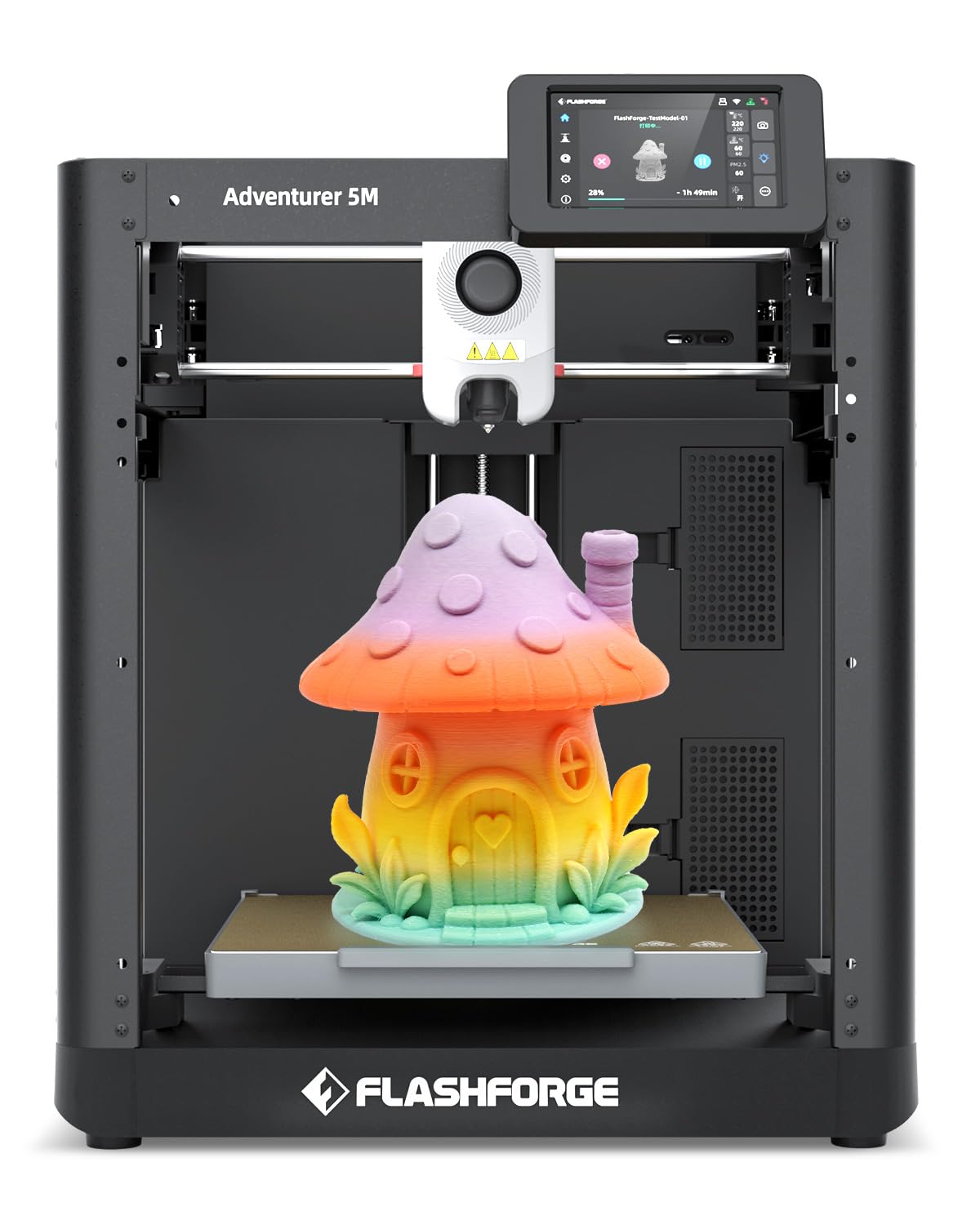
🚀 Print Fast, Print Smart, Print Like a Pro!
The FLASHFORGE Adventurer 5M is a beginner-friendly, high-speed 3D printer featuring a 220×220×220mm build volume, 600mm/s max print speed, and a 280°C direct drive nozzle. Its intuitive 4.3-inch touchscreen, auto bed leveling, and 3-second nozzle change make it perfect for home, classroom, or hobbyist use. Designed with an industrial-grade CoreXY frame and smart features like filament detection and power failure resume, it delivers professional-quality prints quietly and reliably right out of the box.


| ASIN | B09F38G4PJ |
| Best Sellers Rank | #34,355 in Industrial & Scientific ( See Top 100 in Industrial & Scientific ) #56 in 3D Printers |
| Brand | FLASHFORGE |
| Built-In Media | 50g Burnt Titanium PLA * 1, Spool Holder * 1 (with 2 screws), Adventurer 5M 3D Printer * 1 (installed with 0.4mm nozzle), Power Cable * 1, Quick Start Guide * 1, Tool Kits * 1, Glue * 1, Grease * 1 |
| Color | AD5M |
| Compatible Devices | Windows, IOS |
| Compatible Material | PLA / PETG / PLA-CF / PETG-CF / ABS / TPU |
| Connectivity Technology | Ethernet, USB, Wi-Fi |
| Customer Reviews | 4.2 out of 5 stars 260 Reviews |
| Enclosure Material | Metal |
| File Format | STL |
| Item Dimensions D x W x H | 14.8"D x 14.3"W x 16.3"H |
| Item Height | 16.3 inches |
| Item Weight | 20 Pounds |
| Manufacturer | FLASHFORGE |
| Material | Metal |
| Nozzle Temperature Maximum | 280 Degrees Celsius |
| Operating System | Windows 10 /8 /7 MAC OS Linux |
| Power Consumption | 350 Watts |
| Printing Technology | FDM |
| Product Dimensions | 14.8"D x 14.3"W x 16.3"H |
| Voltage | 110 Volts |
| Warranty Description | Lifetime professional technical support., One-month free return., One-year warranty. |
J**H
Best Entry Level Printer on the market.. PERIOD
I've been in the 3D printing business for about a decade now. My primary workhorses are a makerbot Replicator 5th edition and SnapMaker 2, which I still love for a number of reasons.. but since this review is about the FlashForge FinderLite- let's talk about that. My wife and mother-in-law both run very successful cookie businesses that require custom designed cookie cutters at a rate of 3-4 per week (on a slow week). I have been able to crank those out for my wife with the makerbot, but since my mother-in-law lives on the other side of the world she was having to pay someone to design/print her cutters for her (at a price of $5-$10 per cutter). I set out on a quest to find a cheap 3D printer that she could use. My goal was <$300, simple to use, MacOS compatible. I was hoping for Wifi connection and heated bed as well, but those were not requirements. After my initial setup and testing I suggested it to my mother-in-law.. and she's a cookie cutter making fool now. In order to ensure her success I made an un-boxing video and even a "how-to" video explaining the important features of FlashPrint.. and now I create the STL for her cutters, and email them directly to her. Here's the details 1. Setup: Very quick and easy, just follow the prompts. Bed leveling is an annoying process with the most obnoxious beep that is not clear how to silence- but once you complete the steps it's good to go. 2. FlashPrint software: This is the only thing I don't like about this printer. On my MacBook Pro 13" (16GB RAM) using OS 10.15 Flashprint crashes constantly. On my wife's older Macbook 12" no problems yet- so I don't know if it's an OS issue, or some other problem? I prefer simplify 3D over flashprint anyway since it gives me more control over all the parameters, so I just use Simplify3D to create the .gcode file (**more about this in a minute) 3. Filament Storage: I love the filament storage in the back of the printer. Makerbot also does this, and it helps immensely to keep your workspace clean. The downside is that only 500gram filament spools will fit in the storage area, which means you're limited in what filament you can buy.. There is an alternative, though. I printed a filament winding device that attaches to my drill and I re-spool filament from larger 1kg spools onto the smaller spools which allows me to buy any brand/color I want. 4. Filament Included: WHAT FILAMENT? Yes, they include a very small amount of "test filament"- but it doesn't come on a spool. You need to buy a roll of Flash-forge compatible 500g in order to have a roll to use/store (see comment #3). 5. Noise: Machine is virtually silent. My makerbot is really loud.. I figured all 3D printers were, but not this one.. you don't even know its running unless you're sitting right next to it. 6. Bed Adhesion: No complaints here. I use the gluestick they provided to coat the bed with a thin layer and the models have no problem sticking to it, and pop right off. This is especially important since I don't like printing rafts. 7. Networking: THIS PRINTER HAS NO COMPUTER INTERFACE!. If you want wifi/USB get the Finder vs FinderLite. For my specific usage - downloading the STL/.gcode/.gx file directly to the SD card and printing is no problem, so I opted to save $50. If you do go for the extra money the Wifi/USB printing is a little clunky- (I cover it in my review of the Adventurer3) but it does work. 8. File format: I HATE PROPRIETARY STUFF (I know makerbot is proprietary too). Flashforge prefers a .gx file which is a .g file with added thumbnail of the printed item so that it gives you a littel picture on the screen. This printer (FinderLite/Finder) will also accept .gcode and print it just fine. The difference is that it will not show a thumbnail of the item to be printed on the screen, but it will print just fine- so if you use simplify3D (or cura, or other slicer) you can create a .gcode file and drop it on the SD card and it will print just fine. **Note, this is not the same on the Adventurer3 (see my review on that). Adventurer 3D will only print .gx or .g files, not .gcode. 9. Media: SD card slot is easily accessible and works fine. I prefer USB over SD so I don't need an SD card reader, but those are cheap- so no big deal. Even if you get the Adventurer3 to get the USB port (vice SD) it's the older style vice USB-C so I need an adapter to connect to my MacbookPro (or get the cool thumbdrives that have both USB formats on the same device). 10. Food Safe: Since we're talking about using these to make cookie cutters, it is important to note that PLA is not FDA approved for use with food. There are a number of reasons for this that most cookie makers negate by using saran wrap or sterilizing. PETG is food safe, but cannot be printed on this printer. If that is important to yo, then look at the Adventurer3Lite ($369) or DreamerNZ ($449) as your next best option. Buying advice- If you want quick, easy out of the box simplicity this is the printer for you. If a heated bed is important, that you should be looking at the Dreamer or Adventurer3. My personal opinion is that wifi/USB connectivity is not a big deal since you have to clear the build plate before each print anyway- so I don't know that I'd spend the money for it.. spend that $50 on buying extra rolls of filament that you can re-spool with whatever filament you prefer.
A**Y
For the price- can't beat it
I have used the standard Flashforge Finder for a couple years, so I was curious what the new "Lite" version was like. So far I can only see 3 differences: 1) Color options (I love the blue color much more than the original red). 2) SD card only- no printing via thumb drive, USB cable, or WiFI. This does not bother me at all as I never used the WiFi or USB cable on the original Finder, and the SD card is just as easy as the thumb drive was. 3) No internal memory - This isn't that big of a deal, but I was kind of bummed to discover this. On the original Finders, there was a built-in internal memory, so you could remove the thumb drive during a print and it would keep printing from the internal memory. I tried this same thing on the Finder Lite with the SD card, and it caused the print to cancel, so the SD card needs to be in at all times. I give five stars because of the immense value given for the very low price (as far as 3D printers go). That being said there are a couple tweaks I think would make it the best intro printer to buy. Here's a brief breakdown of pros and cons: PROS: Quiet - This is a very quiet printer. I usually have it printing for multiple hours a day and it does not bother me at all. The loudest part of it is the cooling fan, but I wouldn't even consider that part to be "loud" Reliable - I have yet to have any sort of clog or technical issue, but I have only had it for a couple weeks now. However, during these two weeks I have been printing almost nonstop to stress test the machine. It has been holding up very nicely so far, with great quality prints after slight adjustments in Flashprint's slicer settings (this is the software that comes with the printer to load your 3D files) Setup - The machine was very easy to get up and running, although I may be the wrong person to judge this as I have been teaching with the Finders for a couple years. Price - again, in my experience only $280 is a very good price for this quality of 3D printer Flashprint - the software that comes with the printer is very beginner friendly, but there is an option to switch it to expert mode if you are like me and want to tinker with all the possible settings. CONS: Leveling process - the process to level the bed uses the printer's speakers to give out a tone when you have raised a corner to the proper height. This tone was surprisingly loud- to the point where it was sort of painful, as your head needs to be close to the bed to see how much more you need to tighten or loosen the knobs. I think a software patch could fix this volume issue. I also think a visual option for those who are hard of hearing would be great, and probably overall more effective. Default Temperature - Flashprint has the default printing temperature to 225 degrees Celsius. For standard 1.75mm PLA this is too hot, so a lot of prints I did out of the box came out stringy. I adjusted to 195 degrees in Flashprint and now the prints are coming out PERFECT. Not a big deal, just a minor adjustment that needs to be made Proprietary filament - The filament cartridge does not fit most spools of filament, as it is a bit too small. If you buy your filament from Flashforge then this isn't something that will be a problem, but if you are like me and want to use filaments from many different companies, then you need to print a simple attachment that goes on the back of the printer and can hold any filament. Again another quick fix and a good object to make your first print! You can find a lot of these on Thingiverse :) Overall, 5 stars. This is a printer that looks nice, performs well, and makes 3D printing easy for beginners- for only $280. I will be making a full in review to post on my YouTube channel, and if I discover anything significant I will update this review.
R**R
Usb Port came broken, Warranty and support is great though
great printer, but the usb came already snapped and broken inside it. Warranty was provided though so if it does happen, they will send you the part at no cost to yourself.
J**2
Great Printer, Great Quality prints, Great Value, Easy to Setup and Use, and FAST!!!!
The Flashforge Adventurer 5M is a great printer. Fast, reliable, excellent quality prints, and trouble free, Did I mention Fast? Fastest set up of any printer I have owned. I didn't love the ribbon cable attachment to the screen, unnecessarily more difficult than most, but I attached it successfully. I suggest study the ribbon cable and port carefully, take your time and align it properly. I was up and printing in less than a hour with uncrating and setup and calibration. Calibration was automatic and the leveling program is the easiest I have seen. With the ease of setup, ease of leveling, ease of calibration I would recommend the AD5M for entry level users as well as experienced users. I have been wanting a Core XY printer for a long time. The AD5M is my first and it is everything I hoped it would be. I am using full Orca Slicer 2.2.0 and it has worked well so far. I am in the learning phase with Orca Slicer but the AD5M defaults have worked very well for me so far. I think it will only get better as I learn the ins and outs of this slicer. I own 8 printers of various brands. I have gone down the upgrade and tinkerer road with several Enders, I have upgraded or replaced every part except the frame. I have compiled my own firmware, I have tinkered with multi-colored printing. I have a lot of successful prints under my belt and plenty of failures. When I tried to make one of my Enders fast with Klipper, it was nothing but frustration. I never got very fast and my quality suffered unbelievably. The AD5M prints like a dream and it is everything I had hoped to achieve with my Klipperized Ender3Pro. I won't stop tinkering as the AD5M is teaching me things that may help. But I don't feel a need to tinker with the AD5M at all at present. Great Printer, Great Quality prints, Great Value, Easy to Setup and Use, and FAST!!!!
L**E
Tremendous Printer!
First off, I have a lot of other machines from different manufacturers (Bambu, Qidi, etc.) and I gotta say--this one really surprised me with it's build quality, print quality and the speed of the prints. I built it a custom enclosure under a stacked Lack table, directly under my Qidi Q1 Pro, and it has been slinging prints non stop. This is a hidden gem that I'm recommending to friends to start out with as we're all tinkerers and want to play with our devices. Pros: - Noise level is not a big deal, my enclosure all but silenced it. - Bed Adhesion, zero problems there. Everything sticks perfectly. I do not use glue, never have, just dish soap and alcohol to prep. - Bed Leveling is automatic, which is great! - The ability to customize this printer is AWESOME. I can see myself doing a lot more with this machine than my A1/A1 Mini. - Price. I mean come on, it's crazy cheap for the value you receive. - With the enclosure and hardened nozzles, I was able to print ABS, ASA, PETG-CF, PLA-CF & Wood without a single hiccup. Just dialed in the settings and I was off to the races. Cons: - Honestly, it's not even a con, you can print multiple colors but I didn't buy this for that function. I have others for that. - Camera. That's about it...it didn't come with one BUT having the ability to add one is huge, that's my next upgrade. 10/10, 5/5, 2 Thumbs up for the 5M.
L**.
Do not recommend
I had two previous Flashforge Finder machines. When it was time to replace them, I bought two of these Lite machines. I have returned both in less than 48 hours. Both of the brand new machines were defective out of the box. I was able to get them both to print the test file box that was 1"x1". The second test file was a phone stand. Both printers failed multiple times printing this file, losing heat in the middle of the print. They gave error messages saying that the cables needed to be checked. "Temperature is reducing. Please check the wiring." I mailed one of them back immediately. Fresh off production, this should not have to be done. The other I did take apart and checked all of the wiring and it still did not fix the problem, so I sent it back. I contacted Flashforge before I returned them and they refused to provide any help or service, stating, "Unfortunately, this machine is not distributed by us. Please contact your direct seller for further assistance." So basically, the manufacturer refuses to acknowledge or provide help for what seems to be a production defect. This is extremely disappointing. I loved my original Flashforge Finders. The software was super easy to use. The price point was great. It was a great starter printer for a Makerspace classroom. But if the Lite machine cannot be manufactured in a way to hold heat, it is not worth trying to purchase.
A**.
Decent Starter, painfully loud system sounds, but quiet print
Overall, this is a decent enough starting printer. Granted, that's mostly because it will teach you what can go wrong, and then the best way to fix it (after you look it up, usually not through their manual or website). It took a while to set up, and then even longer to get the correct settings for the filament. Even still, the printer has a tendency to create strings between different objects, and towers/taller objects are near impossible to form correctly if it has to travel over empty space. The level of detail could be much better as well, as even at the lowest layer height, the lines and bumps are still clearly distinguishable. But man, can you make some durable objects. I would definitely recommend it if you're using it mainly for simple utility items, or if you want to get a large(ish) low detail model printed. I have to say this as the worst part of the printer possible. Sweet (expletive) is it loud. I have been tempted multiple times to find and rip the speaker out. Turning it on is like having a trumpet blast a cavalry charge right next to your ear. Levelling sounds like a patient just flatlined only they connected that to a loudspeaker and put that right next to your ear. And it has to do that three or more times (usually more as the levelling process has to tell you higher, then check, then lower if you went to far). Get some ear plugs and warn your neighbors. But the printing process itself is in fact fairly quiet (until it finishes, then it *has* to blast the horn again). Again, overall it's decent. Not the best for the price you pay, but it is at least a decent sized printing bed.
M**S
Easy and ready to operate right out of the box
It’s been good so far…easy to use for someone not very techy or new to the 3d printing world.
TrustPilot
2 个月前
1 周前