
下载应用程序



🚀 Elevate your desk game with the ultimate 12-in-1 docking station — because multitasking like a boss never looked this sleek!
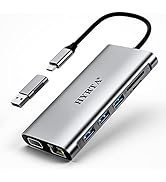
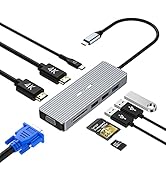
The HYRTA 12-in-1 USB C Docking Station is a compact, aluminum hub designed for professionals who demand seamless multi-device connectivity. Featuring dual HDMI and VGA outputs for up to triple monitor setups, ultra-fast USB 3.0 ports, Gigabit Ethernet, and 100W Power Delivery charging, it supports a wide range of laptops including MacBook Pro/Air (M1/M2/M3) and Windows machines. Its DisplayLink technology breaks Mac multi-display limits, making it a must-have for productivity-driven millennials seeking a clutter-free, powerful workstation.



| ASIN | B098DWHMRY |
| Best Sellers Rank | #37,946 in Electronics ( See Top 100 in Electronics ) #570 in Laptop Docking Stations |
| Customer Reviews | 4.1 4.1 out of 5 stars (225) |
| Date First Available | July 1, 2021 |
| Item Weight | 5.6 ounces |
| Manufacturer | HYRTA |
| Product Dimensions | 4.7 x 2.2 x 0.59 inches |
S**A
Fantastic docking station for both USB-A and USB-C laptops
I have both USB-A and USB-C laptops. We can connect USB-C laptops directly to this docking station. If we want to connect USB-A laptop, we can use the supplied "USB-C OTG converter". On the support team's recommendation, I am even supplying 65W power to this docking station so that this always displays as soon as we connect. (I had to connect again sometimes if this didn't show display when I wasn't supplying the power to this docking station). I initially purchased a USB-A docking station with the converter to USB-C but that wasn't working on my USB-A laptop. Later I bought this and I am happy now, this connects to both my laptops immediately. I can switch immediately. Also, other advantage is, since I am supplying power to this docking station, I don't need to charge the USB-C laptop, it gets charged with the docking station. Still need to charge USB-A laptop though because we connect that using the converter. I very much recommend this device.
J**O
Was just what I needed to attach the third monitor
I was able to attach a projector and 2 monitor to my laptop with this Display link with no issues. Perfect for the presentations I needed to do.
D**S
DisplayLink Driver is troublesome and video quality - otherwise good
Other than the rough edges with the DisplayLink driver on MacOS, its a solid piece of kit if you only need to support 1080p monitors. I can't recommend for anyone running 1440p or 4k due to lacking support. Do read the fine print if you see "2k" in any of the marketing around the resolution, since it is not proper 1440 (2560 x 1440, 16:9 aspect ratio). Due note that at the cost of this product, you should be considering if a Thunderbolt 3 or Thunderbolt 4 adapter is more appropriate for your situation. Depending upon what you need this for, it's a fine piece of very versatile kit for working on monitors or lower res screens on the road. It's also handy to double as a 3.5mm audio jack for phones which no longer have them, which I used on my OnePlus 7T Android smartphone. Knocking one star off as the original marketing claimed that this supported 4k (assumed to be at 60fps), but it does not support 4k at any framerate. However, the seller was gracious enough to check into my original support claim and realized the issue was not in the product, but in the advertising.
D**L
I'm very happy with it. It provides my needs well.
I'm very happy with it. It provides my needs well. One of the best parts is the two different style plug-in's. I have an older desktop PC that I "lifted the hood and souped-up." I've been a nerd and a hot-rodder for years. I try to make everything go faster. I hate slow cars and computers. This device gets me the speed I desire for plugging-in ancillary devices that are fast, like portable SSD's. Amazon had a reduced price too. That always makes it better. Hee, hee.
K**B
Worked for 1 month, just beyond the return window
Purchased this docking station for myself and several colleagues to facilitate the use of two external displays. It worked great for the first month, and almost like clock work, stopped working a few days after the return window closed. It is completely useless unfortunately and now will just have to be recycled. So disappointed in the quality of this project at this cost.
S**A
Perfect if you need Dual Monitors for MacBook Air M1
I was about to get a new laptop of a different brand, which was proving to be a bit difficult because I have been using Apple Macbooks since 2014. I got my 1st MacBook Air in 2014, and it held me down until 2021. The only reason I upgraded was because I couldn't download the new updates to the OS anymore, which became a bit cumbersome, as I also started to use some software that didn't seem to work well with the OS I had. The fact that my MacBook Air lasted me as long as it did with absolutely no problems at all until I could no longer update the OS made me want to get another one. For me, the price for the length of time and the quality of my purchase made it worth it. Well, when I got my current MacBook, I had no idea that it didn't support dual monitors - this was a mistake on my part, but I also had no use for dual monitors at the time that I purchased it. Once that came up, I was really frustrated with Apple and just as annoyed with myself for not knowing this. I looked up some videos on YouTube for a workaround, and couldn't find anything promising because they all requires an expensive purchase for a DisplayLink hub, and I wasn't about to make that kind of purchase because what if at some point, Apple no longer supports the driver? So, I looked on TikTok (LOL. TikTok for the win!), and I found a video of someone who had this hub. Purchased it same day, this came in the mail 2 days later, and voila!! I have dual monitors! Y'all saved me time from researching other laptops and money from buying one! Thank you!
A**L
Great hub but can't watch movies from Pixel 7 phone
This is a great hub and I am using for many things, such as connecting monitors and transferring files and I have no complaints in that department. I was also hoping to use this with a portable monitor when traveling so I could watch movies from my phone, but since i have a Pixel 7, I had to download the displaylink software and for some reason the displaylink app doesn't let you watch Netflix, Prime, or YouTube movies even though you've paid for them. It's a shame. I looked it up and it's not the hub, it's the displaylink software which is from a different company. For example, I can watch YouTube videos just fine, but when I play a copyrighted movie on YouTube, it will only show a black screen but you can hear the movie. If you have a flagship phone, like the Samsung S23 or the S21, there is no need to download the displaylink software and you can watch movies no problem. Hopefully they fix the app at some point.
A**R
Only 1 independent monitor output
Quality seems okay, have several laptops charging with no issue. However, despite having 2 HDMI and 1 VGA, it doesn't have enough bandwidth to run a 2560x1440 display at 60hz, and plugging in two monitors results in only one being detected with the same output mirrored to both. That was a bit of a letdown as Thunderbolt 3 ports support multiple monitors.
I**N
I purchased this docking station last year. After just a few days of use, both my monitors started flickering every few minutes. Unfortunately, it was already beyond the return window, and I didn't leave a review at the time. Now, the flickering has become so frequent that the docking station is essentially unusable. This was not an ideal purchase, and I will be looking for something more reliable and better value for money.
M**.
دي الحاجات اللي وصلت لي https://drive.google.com/file/d/1IVpRiybohC__gnYAOv5xer9CxhEW-Ydx/view?usp=sharing, https://drive.google.com/file/d/1IZtMFgB-Dy3KQl2dkXJeaBh-AlFq3P_E/view?usp=sharing, https://drive.google.com/file/d/1Iarj7zII4ZCzRjsv5tU5jVwy_A_ZSu85/view?usp=sharing, https://drive.google.com/file/d/1Iasca4k2TL8ePA9gpYC11R6pi3b3jrUH/view?usp=sharing, https://drive.google.com/file/d/1IdekpHDT7qM-WYdQfTnHWTbE3vPYzoC5/view?usp=sharing, https://drive.google.com/file/d/1Imj9XG4jx-dlkGvRC6YO8rUGw-Q7mCD7/view?usp=sharing, https://drive.google.com/file/d/1In_B7Tt9d_mtNXrBavznORAvyglc0hii/view?usp=sharing, https://drive.google.com/file/d/1InlaUkHOO7SPnKAO7GP2n68GK-cz1VM3/view?usp=sharing
J**A
Al principio no sabia que se tenía que descargar un software, pero me fijé bien que en la misma base trae una etiqueta pegada que te indica donde puedes hacer la descarga para él controlador, quedo excelente y no me da problemas funciona correctamente
B**G
It's working perfectly with Macbook Air M1. You save my life.
N**L
Great device works exactly as described. Able to split my M1 MacBook Air into 3 separate screens. Very happy with the performance.