We remain fully operational. Our teams are working around the clock to ensure your deliveries continue safely.

下载应用程序


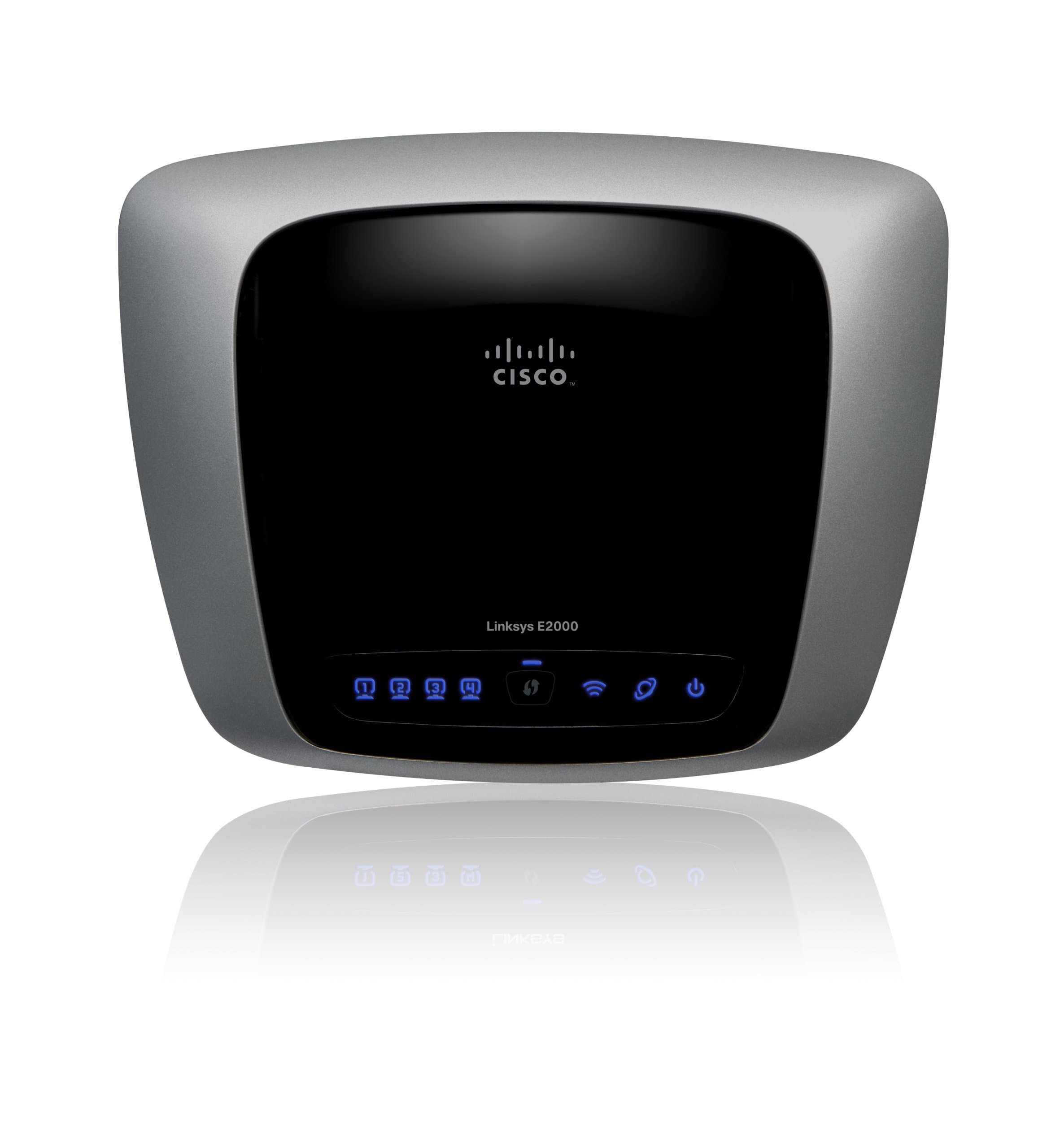


🚀 Elevate your home network with speed, security, and seamless connectivity!
The Cisco-Linksys E2000 Advanced Wireless-N Router delivers dual-band Wi-Fi (2.4/5 GHz) with Wireless-N technology for extended range and faster speeds. Featuring four gigabit LAN ports with auto-crossover, WPA2 security, and guest network access, it ensures robust, secure connectivity for multiple devices in large households. Easy to set up and backed by Cisco’s reliable support, it’s designed to keep your home network fast, safe, and hassle-free.
| ASIN | B003B20F54 |
| Antenna Location | Home |
| Antenna Type | Fixed |
| Best Sellers Rank | #112,727 in Electronics ( See Top 100 in Electronics ) #781 in Computer Routers |
| Brand | Linksys |
| Compatible Devices | Personal Computer |
| Connectivity Protocol | Wi-Fi |
| Connectivity Technology | Wireless |
| Control Method | Voice |
| Controller Type | Switch |
| Coverage | Large Household |
| Customer Reviews | 4.1 4.1 out of 5 stars (472) |
| Data Transfer Rate | 300 Megabits Per Second |
| Frequency | 5 GHz |
| Frequency Band Class | Dual-Band |
| Global Trade Identification Number | 00745883589449 |
| Has Internet Connectivity | Yes |
| Has Security Updates | Yes |
| Is Modem Compatible | No |
| Item Weight | 1 Pounds |
| LAN Port Bandwidth | 10/100/1000 (Gigabit) |
| Manufacturer | Linksys |
| Maximum Upstream Data Transfer Rate | 1625 Megabits Per Second |
| Mfr Part Number | E2000 |
| Model Name | E2000 |
| Model Number | E2000 |
| Number of Antennas | 6 |
| Number of Ports | 4 |
| Operating System | Cisco IOS |
| Other Special Features of the Product | WPS |
| Router Firewall Security Level | High |
| Router Network Type | Wireless-N |
| Security Protocol | WPA2 |
| UPC | 745883589449 731840148712 745883590988 |
| Voltage | 110 Volts |
| Warranty Description | 1 year |
| Wireless Compability | 802.11a/b/g/n |
J**R
Very Reliable Router - Glad I decided on this one.
This is my first experience with wireless anything. I did a ton of research online before finally deciding on this particular model. I did a lot of fretting and worrying about my decision and a lot of it was not necessary. I have a hard-wired desk top HP Media Computer, a Vonage phone, and use DSL from the local phone company. I purchased a Toshiba Satellite A665 laptop and thus needed to network on a small scale. Also, looking to purchase a Roku box for Netflix soon. I have used this router about 4+ months now. For someone completely ignorant about wireless it took me about 20 minutes to actually set it up from box to working. I admit to calling the Cisco-Linskys support line during setup with one dumb question. They were very helpful, didn't make me feel stupid, and even helped me finish my installation. I should have been able to do it alone. I was one connection from completion in the setup when I had a brain [...], uh, freeze, but it was probably brought on by fear and stupidity. I have contacted their support once since then, via online chat, with another very elemental question about wireless technology; again they were more than helpful. Their support certainly outshines (and out-communicates, if you get my drift) oh, I don't know, lets say...Hewlett Packard, Vonage, or Toshiba. In the time I have had the router I have had to reset it twice - this is a HUGE improvement over my experience with just my cable modum and Vonage box. Resetting it is easy, just unplug three cords, replug three cords, and your back in business in about three minutes tops. I believe most, if not all, of that problem is my DSL company since it happened a lot more before I went wireless. I have seldom lost my internet connection at the laptop computer level, tho it has happened a few times. I just clicked on the 'connect' link on the computer, reconnected with the router, and the internet was back up and working. I routinely use both computers fairly close to the router itself, but have tried my laptop in all other rooms of my house, which is a one-story and not too big (about 1200 sq, ft.) Nothing in speed or connection suffered. Have not taken the laptop outside my home into the yard yet. If there is a down-side to this router, it is that every once in awhile the video on an online video will freeze up while the audio continues on; the video portion will catch up later. I blame this on the router, but, I could be wrong, it could be my computer or actually any one of the other elements involved. I have used a Linksys hard-wired router in the past for Vonage router and I was not happy with the company or the device at all. But, having no wireless comparison experiences, and keeping in mind this is from a wireless newbie and a technical dunce, I can say the setup with this router was a piece a cake, much easier than what I had been reading, and the router itself has worked great and performed better than I hoped for so far. For ease of use and performance I would highly recommend the Cisco-Linksys E2000 Advanced Wireless-N Router.
T**B
A Good Router, if a little irritating
I bought this router for my father-in-law after his neighbor decided to start password-protecting the router he was hooking up to. I was skeptical, as I read some reviews that indicated flaws (easy enough to find, if you're looking for those reviews). My experiences with this router were reasonable. I decided to skip the installation disk; when I bought my own Cisco router, I felt that the disc was grossly unhelpful. I'm reasonably experienced with routers, so it was easy enough for me to punch in the IP address and configure it through a browser. The router came online very quickly. I will say that some of the menus in the browser system aren't very intuitive. It took about 5 minutes for me to figure out how to password the router, and another five minutes for me to figure out how to change the name of the router. Since the router has been set up, all has gone well. Speeds are great throughout the multi-level home, and the router doesn't balk at having five to six computers drawing from its connection at the same time. There have been no connection drops, and I haven't had to reset my connection (something common with past Netgear routers). I would have given this router five stars, but Cisco-Linksys loses a star for having a needlessly complicated configuration system. It would be easy enough to make that a little more user-friendly. Still, a fine product.
J**N
Fast vs Slow
After purchasing this router and putting it to use for about 2 - 3 weeks I think it is time to provide the pros and cons of this router. Pros 1. Non Wireless - The non wireless aspect of this router does very well at splitting up one internet connection between different computers. Does not affect the speed too much but if only one person is using it at a time then that computer will get the full speed. 2. Setup - If you are setting this up for only two computers on the non wireless hookup it is not entirely difficult. The main objective is you should use the CD provided so you can login to the router without using the IP address way. 3. Split up of connection - It does the job of splitting an internet connection between wireless and non wireless pretty good. But the settings is where the cons start. 4. Connection between walls - The setting I have it on is for N technology and I tinkered with the advanced settings for 5.0 ghz. Going through 3 walls it gives a good connectivity so staying connection does not seem to be a major issue. The problem of connection through walls only becomes apparent when other things interfere at 2.5 ghz level. Cons 1. Wireless - The wireless aspect of this router is okay to good at times but after usage becomes an annoyance. This router can be used in g/n technology. If you choose mixed signals of g/n it slows down drastically. If your computer can use n technology then setting it up in advanced settings is okay for tech savvy people but a major headache for people not tech savvy. In order to not create conflicts it appears one setting needs to be chosen so it's either g or n. 2. Wireless Speed - If you have properly set up the advanced settings in wireless then it works great for a period of time. After awhile one will notice it starts to slow down because it seems to have a type of buffer. An example is after awhile it works like CDMA when signals are sent in packets but only when requested. When one first begins using the wireless it acts like GSM packets constantly flowing without any problems. To compensate for this slowing down and buff like setting unplug the unit and modem then plug them back in to power cycle. It's a pain in the behind but works. Overall, it's an okay to good router if you are tech savvy and understand the concepts of n technology. Until one tinkers with the advanced wireless settings the default for wireless is not that good. For the price it is about right. If you are not familiar with how to login to a router, tinkering with advance wireless settings, testing different settings, and the concepts of G & N wireless technology then I suggest you pass this one up. Using complete default settings on this for wireless will disappoint most people. EDIT: After using this product for wireless it still works. On the other hand one truly needs to tinker and test the settings. After about two weeks it slowed to a crawl. I investigated and after playing with the advanced wireless settings I learned one must try numerous combination of settings with the beacon interval, fragmentation, and rts. It may seem confusing to people who don't understand the terminology and meanings. Beacon interval is how fast packets are sent out to keep the connection alive. Sometimes when this number is too high wireless loses connection or slows down. As of after 2 weeks of usage it still is up to speed now without any issues. But as mentioning one MUST test and tinker with the advanced wireless settings to find the right combination.
M**L
I have purchased that router to replace my Netgear WGR614v9 which has been provided by Virgin. I have had so many problems with my previous router. I am using VPN connections a lot and three times out of ten I was not able to connect using wireless (only LAN connection worked flawlessly) and even when I got connected I could not use other devices in parallel or I would get kicked out from VPN. I have been using a Three dongle alongside my Virgin broadband just so I could VPN and browse internet at the same time (2 separate laptops). I have tried many times to change config on my old router so it will work fine but I have finally gave up and took a punt with Linksys E2000. What a joy it has been so far. I have been using it for a month now without a single problem or restart. I am able to VPN and browse internet without any problems whatsoever and the best part is that it did not require any changes to the config (which is great cause setting up routers is not my strongest suit).
D**O
I bought this as a replacement for a Netgear wirless router which was reliable but rather slow. The e2000 is fast in comparison and is one of the fastest routers available for home / small office use. When I got it up and running there was at least a 50% increase in speed with the e2000. However, the e2000 is not as easy to set up as the Netgear. I recommend that you do not install the software that comes it with, but configure the router via the web interface. That said, I found this interface unintuitive to use and missing certain expected features such as the ability to show what devices are currently connected. The basic set up was simple enough, but I found that I had and still have problems with this unit that I did not have with the Netgear. These are the problems on the e2000 that I encountered: 1) Sometimes a client cannot obtain an ip address from the router after connecting wirelessly, and thus is not able to get access to the Internet. 2) Sometimes the wireless speed drops to less than 0,5 Mbits/second. 3) I could not, and still cannot, connect to my PC from outside my home via remote desktop via the e2000. The first problem can sometimes be solved by re-installing an updated driver on the client's onboard wireless network device - if you can find one. if you using a Vista client expect trouble, and if it's an old machine then you'll be hard pressed to find a compatible driver. Even after updating the drivers, the firmware and everything, and the problem is apparently fixed, the problem will still mysteriously come back sometimes of its own accord, hang around for a while, then disappear again! I haven't yet discovered the logic behind this frustrating problem. Rebooting and restarting the router sometimes helps, and I have found that I have to restart this router quite often. The second problem is caused by interference with other wireless routers in the neighbourhood which using the same channel, and means you have to experiment with the other channels until you find one that works. I expect this has something to do with the long range of the receiver. The third problem was never resolved which is annoying because RDP was a service I used regularly. Despite following the instructions to open the RDP service ports on the e2000, and asking technical support, the service is still being blocked. I have read that other users have had this problem also. In conclusion, I would not recommend this router unless you are good with computers. It's fast, but not as reliable or stable as it should be. I think it's very bad that wireless connectivity is so sensitive to the network driver version used on a connecting computer, and also bad that it's not possible to connect to RDP through it like it says you can.
F**N
I expected a lot more from Cisco, the so called industry leader, but had to return the Linksys E2000 as it was not suitable for my needs. The router was easy enough to setup and configure and it was running in just a few minutes. The main problem was it was completely useless for any devices that need to connect at 802.11g. Initially these would connect at 54Mbps but usually within a minute, this would drop to 1Mbps and then disconnect completely, even with the device sat next to the router. I reset the router to factory defaults several times and experimented with different wireless settings (2.4GHz or 5GHz, auto and fixed channels) but this had no effect on my 802.11g devices. This rendered most of my wireless devices useless - these consisted of Toshiba and HP laptops and an HTC phone. Wireless-N 802.11n devices didn't suffer these problems and connected without any issues. Other features I didn't like were that the guest access feature can only be managed via the Cisco Connect software. This software only works if you have the router running a basic configuration. If you wish to customise the router config e.g. change IP address, the Cisco Connect software will not work and can only be administered using the browser based utility. The guest settings simply do not exist in the browser based utility which is my preferred method to access the router settings. The router also does not feature its own internal DNS server for the local LAN. This is something I wrongly assumed all home routers would have. Instead, it relies on your ISP's DNS or an external DNS server (incl. DDNS). Therefore, unless you have a seperate DNS server on your local LAN, if you lose your ISP's connection, DNS for LAN devices is also lost. The router does have some other nice features, (QoS, DMZ, VPN, logging, diagnostic and status) but I didn't explore these after discovering the above limitations. I'm thankful that Amazon allowed me to return the E2000 for a full refund.
C**H
Fast delivery. Product is excellent - probably the fastest and easiest hardware and software I have ever installed. Up and running in less than 5 minutes. I have this connected to a Speedtouch modem - ADSL broadbandc connection. Coverage all over the house including in the garage at the bottom of my garden. Has 4 ethernet sockets for connecting to a TV, PC or any other equipment.
J**S
Been running for years. The interface is a bit dated now, but the hardware just runs and runs. For a while I had it outside, in an old plastic paint pot upside down (don't ask why). Very rarely have to reboot, if I do its the ISP causing the problem, not the router. I now just use it as a gateway with separate Wireless Access Points, and it is just fine for that.