We remain fully operational. Our teams are working around the clock to ensure your deliveries continue safely.

下载应用程序


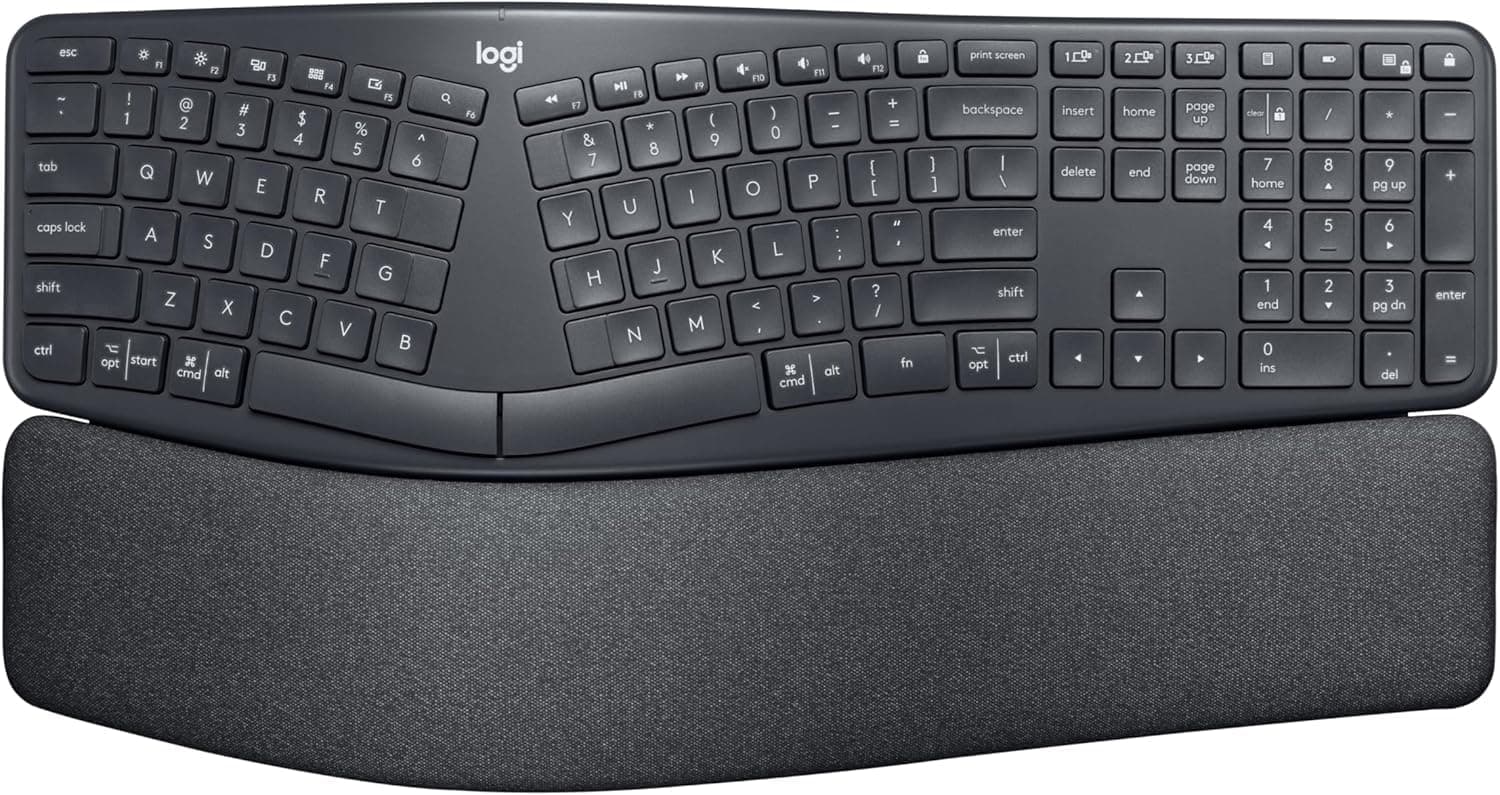
⌨️ Elevate your typing game with comfort and style—because your wrists deserve the best!
The Logitech Ergo K860 is a professionally renewed wireless ergonomic keyboard featuring a split keyframe design, pillowed wrist rest, and adjustable palm lift to enhance typing posture and reduce strain. Compatible with Windows and Mac, it offers Bluetooth and USB connectivity, 78 tactile keys, and long battery life, making it an ideal choice for professionals seeking comfort, durability, and productivity in one sleek package.
| ASIN | B08B47K2CR |
| Additional Features | Bluetooth, Wireless |
| Antenna Location | Office |
| Best Sellers Rank | #1,820 in Amazon Renewed ( See Top 100 in Amazon Renewed ) #521 in Renewed Computers & Accessories #734 in Computer Keyboards |
| Brand | Logitech |
| Built-In Media | Ergo K860 Keyboard |
| Button Quantity | 78 |
| Color | Black |
| Compatible Devices | PC |
| Connectivity Technology | Bluetooth |
| Customer Reviews | 4.4 out of 5 stars 865 Reviews |
| Enclosure Material | Plastic with Silicone wrist rest |
| Hand Orientation | Ambidextrous |
| Item Dimensions L x W x H | 9.17"L x 17.95"W x 1.89"H |
| Item Weight | 40.92 Ounces |
| Keyboard Backlighting Color Support | Single Color |
| Keyboard Description | Ergonomic |
| Keyboard Layout | QWERTY |
| Manufacturer | Logitech |
| Mechanical Keyboard Switch Model | Tactile |
| Model Name | K860 Keyboard |
| Model Number | 920-009166-cr |
| Number of Keys | 78 |
| Power Source | Battery Powered |
| Recommended Uses For Product | Office |
| Special Feature | Bluetooth, Wireless |
| Style Name | K860 Keyboard |
| Switch Type | Tactile |
| Theme | Office |
| UPC | 753575554705 |
| Unit Count | 1.0 Count |
| Warranty Description | 90 days limited warranty |
T**H
Great Keyboard
Great keyboard! Purchased refurbished almost 4 years ago. I work 8 - 12 hour days, and this keyboard has stood up well to my abuse. While the letter D and S are becoming faded (pictured) that is pretty amazing for the use it recieves. As pictured, I popped off keys that I don't use and kept accidentally hitting. That annoyance easily solved. At times, keys have gotten stuck because from dust, crumbs and cat hair! Lol. I don't clean it like I should... so, when this happens I give it a good clean and pop off the affected key to get really clean. Very pleased with battery life and connectivity. Great keyboard and highly recommend for ergonomics, function and durability!
T**9
Excellent Choice! Easy Adjustment to use.
I bought this K860 as an Amazon renewed keyboard and was really impressed by its flawless condition minus the original box. At a pretty good discount, this was a great deal. Setup on my MacBook Air was as easy as selecting it in Bluetooth settings. I’m 72 and my wrists were sore after typing on my Apple keyboard, and was wondering if I could retrain my hands and fingers to use this ergonomic keyboard. I tried it flat on my desk as well as using the front legs to give it a slight tilt towards the rear. Found out that was my most comfortable position for me while typing. So far I’m 100% happy with it, and knowing how much more affordable it was as an Amazon Renewable purchase was very rewarding as well. I procrastinated buying the K860 for years and am so happy that I finally took the opportunity to buy and use it. Hope this review helps you in finding the perfect keyboard for yourself. Ciao….
C**E
Buy it!
LOVE this keyboard. I bought it for my office job. So comfortable, easy to clean and the keys are great quality.
A**E
Great replacement for MS Ergo 4000 only IF you can handle the flat keys
Been using a Microsoft Ergo 4000 for as long as I can remember but they are hard to come by now and I wanted something wireless. I'm using the Logitech MX mouse and have always been a fan of their products so I went ahead and gave the K860 a shot. I'm writing this review with it right now, the first day I have it attached, and so far I'm having to correct every 5th or 6th word. The issue is with the height of the keys, it's a HUGE adjustment from the MS keyboard, but I'm sure I'll get there - I used to carry around old mechanical keyboards because I was very particular but the Ergo 4000 broke me of that. I'll update this review if anything else weird happens, but so far, on a Mac Mini, this keyboard is great. Oh yeah, after I remapped the Option and Command keys for more natural placement for me.
R**Z
Best of the best
I bought this keyboard for work. It is the best and proudest purchase I have ever gotten for myself. I do not use it to its full capacity though. I use it on a work computer and I can use it as plug and play and not allowed to add software for certain button customizations. I still love it. Keys are quiet which is important considering my attitude depends the amount of pressure I tap those keys. Keys are smooth and nice to touch. The wrist rest is not too low and not too high. Easy to wipe. Battery life is amazing!! I started using this August of 2023 and it's on the same battery!! (Now that I've said something though I'm sure I'll have to change batteries soon. This is due to my luck.) I did not have a lot of adjustment when I switched to this keyboard other then the backspace was a hair to the right which threw me off a little but got use to it quickly.
L**2
Overall, a great keyboard! A little pricey. Lots of useful features! One minor issue (4.5 stars?)
UPDATE - An issue that has gotten pretty bad is the letters are wearing off the keys - no E, S, D, L, C, V, N, M & others are showing signs of wearing off. Not sure if this is a defect or just poor quality. Overall, a great keyboard! A little pricey. Lots of useful features! One minor issue (4.5 stars?) My favorite features are the easy key remapping that can be done from the Logitech App, Easy-Switch to different computers, CAPS lock on screen notification & Quick-lock key. -Jumping from system to system is easy without having to employ a KVM. -I am a touch-typer but often hit the CAPS lock by accident, the on-screen notification keeps me from yelling in my emails. -I work on secure systems & need to lock my screen whenever I am not in front of the monitor, the Quick-lock allows me to lock my system with one key, rather the Ctrl-Alt-Del & then clicking Lock. The only minor issue is that the letters have worn off the E, S, & C keys. Many other keys have a nice shiny spot from millions of key-strokes. No big deal since I type by touch but if that is something that bothers you, now you know.
M**E
Best Keyboard I’ve Ever Owned!
I loved this keyboard so much that I bought one for both work and home! The ergonomic design makes typing so much more comfortable, especially during long hours. My wrists and hands feel so much better since switching to the K860. It’s incredibly well-built, responsive, and looks sleek on any desk. Hands down, the best keyboard I’ve ever had.
B**K
Don't buy this
Upon receiving the "refurbished" unit, its condition strongly suggested prior use, exhibiting visible signs of wear. Consequently, a return was initiated. The replacement unit received was non-functional upon arrival, necessitating the installation of Logitech Plus software to configure the receiver for keyboard operation. Considering these issues, purchasing a new unit for an additional $40 is strongly recommended over this refurbished option. This experience with Amazon Refurbished has been disappointing.
TrustPilot
1天前
3 周前