We remain fully operational. Our teams are working around the clock to ensure your deliveries continue safely.

下载应用程序


Buy anything from 5,000+ international stores. One checkout price. No surprise fees. Join 2M+ shoppers on Desertcart.
Desertcart purchases this item on your behalf and handles shipping, customs, and support to Malaysia.
🚀 Elevate your meetings with pro-grade video and audio — because your team deserves the best seat in the room.
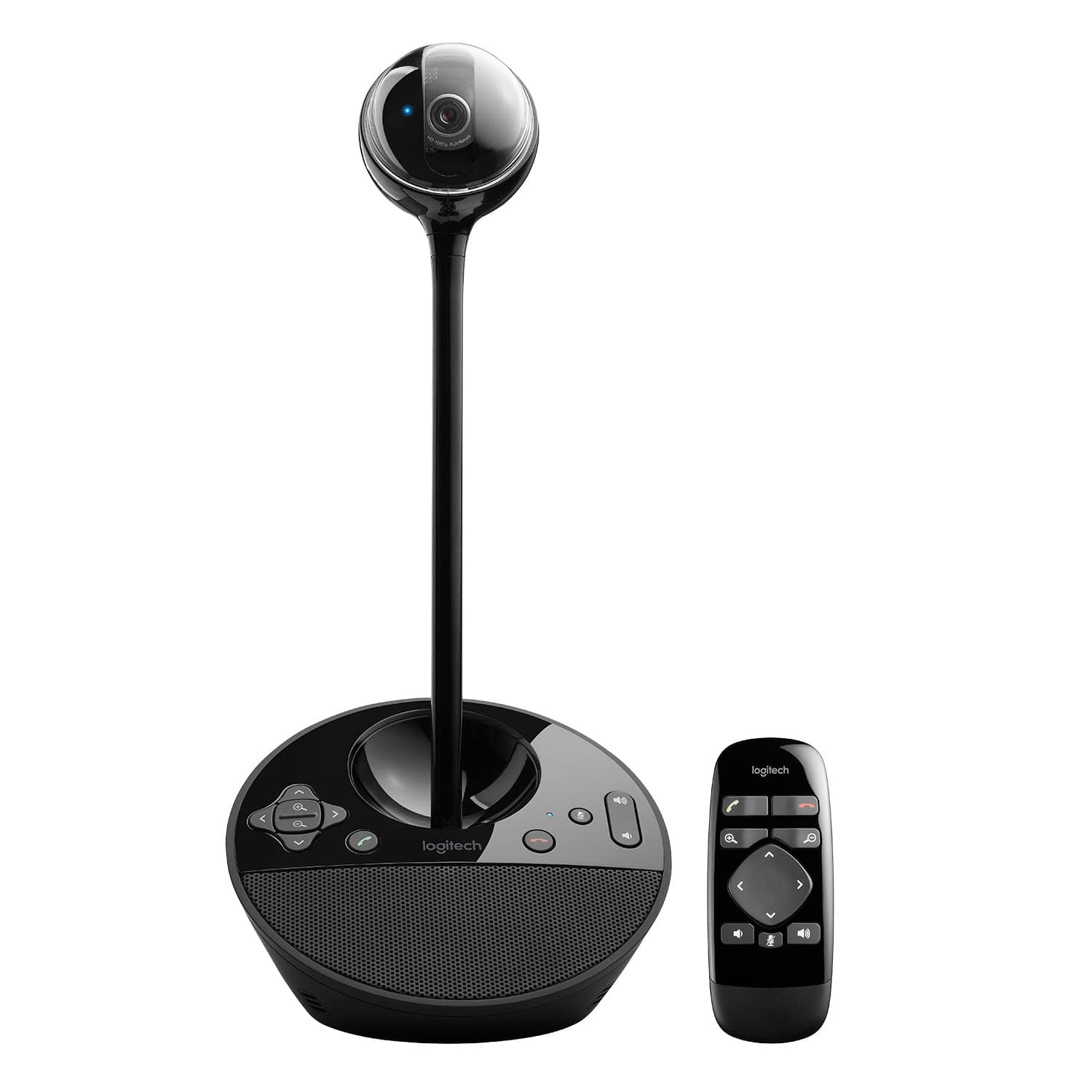
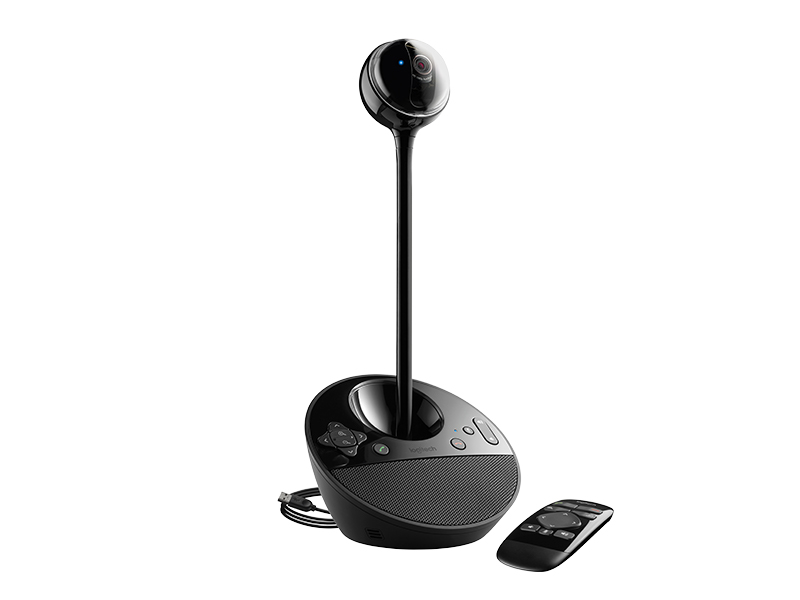
The Logitech BCC950 Desktop Conferencing Solution combines a Carl Zeiss 1080p HD webcam with a full duplex speakerphone and noise-cancelling microphone, delivering crystal-clear video and immersive audio for small group or individual conferencing. Featuring wireless remote PTZ control, plug-and-play USB connectivity, and broad compatibility with leading business communication platforms, it’s designed to enhance productivity and collaboration in any professional setting.



| ASIN | B0083I7Y8W |
| Are Batteries Included | No |
| Best Sellers Rank | #120 in Webcams |
| Brand | Logitech |
| Built-In Media | Conferencecam^Remote Control^Stem^User Documentation^A/C Adapter^USB Powe Cable |
| Camcorder Type | Video Camera |
| Color | BLACK |
| Compatible Devices | Laptop, Personal Computer |
| Connectivity Technology | USB |
| Customer Reviews | 4.3 out of 5 stars 1,439 Reviews |
| Digital Zoom | 4 x |
| Display Resolution Maximum | FHD |
| Effective Still Resolution | 3 MP |
| Effective Video Resolution | 30 MP |
| Exposure Control Type | Automatic |
| Features | Low Light |
| File Format | JPEG |
| Flash Memory Speed Class | C10 |
| Flash Memory Type | Micro SD |
| Flash Memory Video Speed Class | V90 |
| Focus Type | Auto Focus |
| Form Factor | freestanding |
| Global Trade Identification Number | 00097855088499 |
| Has Image Stabilization | No |
| Image Aspect Ratio | 16:9 |
| Image Capture Speed | 30 fps |
| Image stabilization | false |
| Item Dimensions D x W x H | 6.97"D x 6.81"W x 4.88"H |
| Item Weight | 2.28 Pounds |
| Lens Type | Zoom |
| Manufacturer | Logitech |
| Maximum Aperture | 2 f |
| Maximum Focal Length | 0.1 |
| Minimum Focal Length | 0.1 |
| Model Name | bcc950 |
| Model Number | 960-000866 |
| Number of Batteries | 1 CR2 batteries required. |
| Number of Speakers | 1 |
| Operating System | Windows, macOS |
| Optical Zoom | 100 x |
| Photo Sensor Technology | CCD |
| Screen Size | 65 Inches |
| Sensor Type | CCD |
| Shooting Modes | Automatic, Easy |
| Style Name | Webcam |
| Supported Audio Format | MP3, AAC, Opus |
| Supported Image Format | JPEG |
| UPC | 097855088499 |
| Unit Count | 2.6 Pounds |
| Video Capture Format | AVI |
| Video Capture Resolution | 1080p , 720p |
| Video Resolution | 1080p, 720p |
| Warranty Description | 2 year limited warranty |
| Water Resistance Level | Not Water Resistant |
| White Balance Settings | Auto |
| Zoom | Digital |
R**R
Surely the best web cam for conferencing!
Been waiting for a webcam that is designed for small group as well as individual conferencing, and this is it! Has several key features that are absolutely unique at this price point, and the quality of hardware, audio and video is top notch. Key points: + Pans, Tilts and (digitally) Zooms for easy adjustment of image during conference. + PTZ function is via wireless remote, NOT software, which is a huge plus! Nobody wants to be fooling around with software for a camera while conferencing! The remote puts this function right where it belongs, in a purpose-built unit that is super simple and quick to use. + HD images are excellent, with great ability to adjust to ambient light automatically. + Audio sending and receiving quality are remarkable. Speakers are crystal clear on reception, and easily fill a large conference room without distortion. + Driver-free operation! Plug it in and go! + Compatibility with Microsoft Lync was excellent. Just had to choose the Logitech as my source camera. + Raising camera on stalk makes for more normal viewing angles for folks around a conference table. + Dual power options - USB or AC adapter + The digital zoom quality is pretty good, given that you're essentially cropping the image. Improvement areas/wish fors... * Charging port on camera should be standard USB mini or micro, NOT barrel type, so that other power sources could more easily be used to power the camera, e.g., an external battery or any of the millions of USB chargers folks have laying around. * Camera cannot be operated until connected to computer, even though the AC power is connected. Would be handy to be able to PTZ before connection to get ready for a conference or specific shot, say of a product. and in a moderately higher priced companion... * Optical zoom for full res image as one zooms in * Would love to see ports for add-on boundary mics for use on larger tables via standard 3.5mm audio in jacks * Would be useful to be able to daisy chain a couple of cameras set in different locations with different views, and have the camera hardware join the images into a collage, with the remote then able to switch from collage to single camera view and back again (again, keeping all the functionality in the hardware and remote, not the PC or custom software). Overall, the best webcam for conferencing I've ever found, worth every penny when it comes to on-line collaboration. Highly recommended for small group or high quality personal conferencing. ***********Update 2013-01-23 Plug and Play for Win and Mac laptops********** The Conference Cam continues to work extremely well. Can now confirm simple, plug and play operation on range of both Windows and Mac laptops. I just leave this sitting out in our team room, and folks have no trouble connecting and using it for group conferences. The remote is not only intuitive, but kinda fun to play with as well!
A**T
Easy to Use and Effective
Once I realized that I had to slide on a part to be able to plug in the camera this was super easy to set up. Good quality, and the remote enables you to pan the room. I am a corporate trainer and use it for Zoom meetings in a conference room to get everyone in the room. You can zoom in on one or two people too- remote is super easy to use as well. Good quality. You could also use it to video tape a small group or a role play for a training video, etc. I recommend the seller, CTS Warehouse. Before I realized I had misplaced a part, I was ready to return. They quickly sent me an email offering to send me any missing part. Wasn't necessary since I found it, but I was impressed that they quickly tried to resolve the issue.
E**E
Great for hybrid meetings
After a bunch of research, I landed on this camera for our stakeholder meeting as there were in-person and virtual attendees. It works great. Loved the camera quality and the option to rotate to speakers. You do need to be in front of the camera to be able to move it with the remote. The speaker is okay for a really small meeting, but I actually purchased a secondary speaker that made a good difference for us. Overall I'd recommend this camera.
J**T
Saved us money over Cisco Telepresence
I work in IT for an engineering company that relies heavily on conferencing for a lot of our business. However, we've run into several instances lately where we have been asked "Why don't you guys have video?" Our answer has always been that we just can't afford the telepresence systems we'd love to have. Now that Logitech has released this conference camera, we finally can afford it! Through testing we found many upsides, but also a few downsides. The video seems choppy sometimes, and it definitely can have exposure problems when the user is sitting near a bright light or window. However, the speakerphone and microphone has seemed extremely clear, and we've received good feedback from other conference attendees. I've organized a table below to reflect the pro's and con's. ***PROS*** -Price (compared to comparable products) -Features a remote (no more reaching for the camera to move it!!) -Speakerphone is loud & clear -Can be powered by USB (this saved us tons of crawling under the tables- my knees will be thanking me when I'm in my 70's!) ***CONS*** -Video sometimes choppy (this is probably an internet speed thing, too) -Exposure is easy to blow out (you can't really sit by a window and expect it to work, but this wasn't a problem in our conference room) -Pan & Tilt is very choppy- no smooth motions. Overall, I recommend this for any small to medium business that doesn't have 10k+ to buy a telepresence system but still needs to join web conferences with video without huddling around a laptop. This was not built for consumer use, and it certainly not priced for consumers. However, for the right audience, this camera can be perfect!
M**N
Microphone stopped working in first month, but not fast enough to return it. DO NOT BUY
Absolute garbage. The microphone worked for two weeks, and the product was great, then the microphone stopped working. After spending hours with resets, settings and reboots, it came back. Now there's no mic again. I've wasted way too much time on this. Plug-and-play my ass. Same experience trying multiple Windows PCs to make sure it was the conference cam and not the computer settings.
D**E
A perfect mid-level conference option for smaller teams
If you frequently have to hop onto video conferences (or even audio conferences), this is a great solution between using your built-in laptop camera and a full-blown standalone conference unit at the price. There doesn't seem to be many options at this price point and functionality. Pros: - Simple setup and works immediately. - Great camera - the height is perfect and the zoom and adjustable angle is a massive upgrade from laptop cameras - The standalone camera has many benefits versus having a device attached to your screen, including better for more than 1 person on a video con. - Mic quality is clear and very receptive - Speakers offer a great solution for a small boardroom - The little remote is a cool toy to adjust the camera without reaching for the unit during a conference (plus mute buttons) - Physical mute and call drop buttons on the device (versus trying to figure out on whatever conference software you're on where to mute your mic) Cons: - It's not very portable. It has a separate power supply, plus USB cable, so it is a bit of a mission to move around from room-to-room if that's what you need it for. - It can feel a tad dated with limited additional software (but it is designed to just work, and work with any video software) Overall, I would recommend this if it suits your needs and your budget.
C**E
Fantastic camera for the price
I have used this for a book club with on site and online members. What I was most surprised by was the audio quality. We have a group of five in the room and the camera easily fits us all in. We are well over nine feet from the camera and everyone can hear. Easy to set up with computer and tv or monitor.
E**S
A couple of notes.
This cam works great. I use it on a conference room for meeting of 4 to 10 people and it is a HUGE improvement over the integrated laptop cam/mic/speaker that we were using before. A couple of points to consider: This is not just a camera. It is a camera, microphone and speaker. As a matter of fact, the biggest improvement was with the microphone. No need to raise the voice for the other party to hear you, even when sitting across the room (about 12 feet away from the cam.) The camera was plug and play on Windows 7 with Skype. I got the video, mic, speakers, volume control, pan and tilt and the remote working immediately. However, the answer and hang call buttons didn't work out of the box. I haven't installed the included drivers or apps since I don't really need these functions and I prefer to keep my PC as clean as possible. The little bar that raises the camera is NOT telescopic. You either have the camera plugged directly to the base or you use the extending bar to raise it about 10 inches, but no middle point and the camera will not pop up when you power it up. This is not a problem at all but it is good to know. Look at the product pictures. The speaker is good for conferencing. It is better than my laptop speaker but not nearly as good a stand alone speaker set. I haven't tried it for anything other than voices. In conclusion, if you Skype with more than one person in the room then this camera will make your experience much better and significantly easier. Laptop cams and mics are meant for one person only, so if this is your primarily use then you are probably better off with your integrated cam.