
DOWNLOAD THE APP


Customer Services
Copyright © 2025 Desertcart Holdings Limited
DOWNLOAD THE APP


🚀 Upgrade your connection, own your network game!
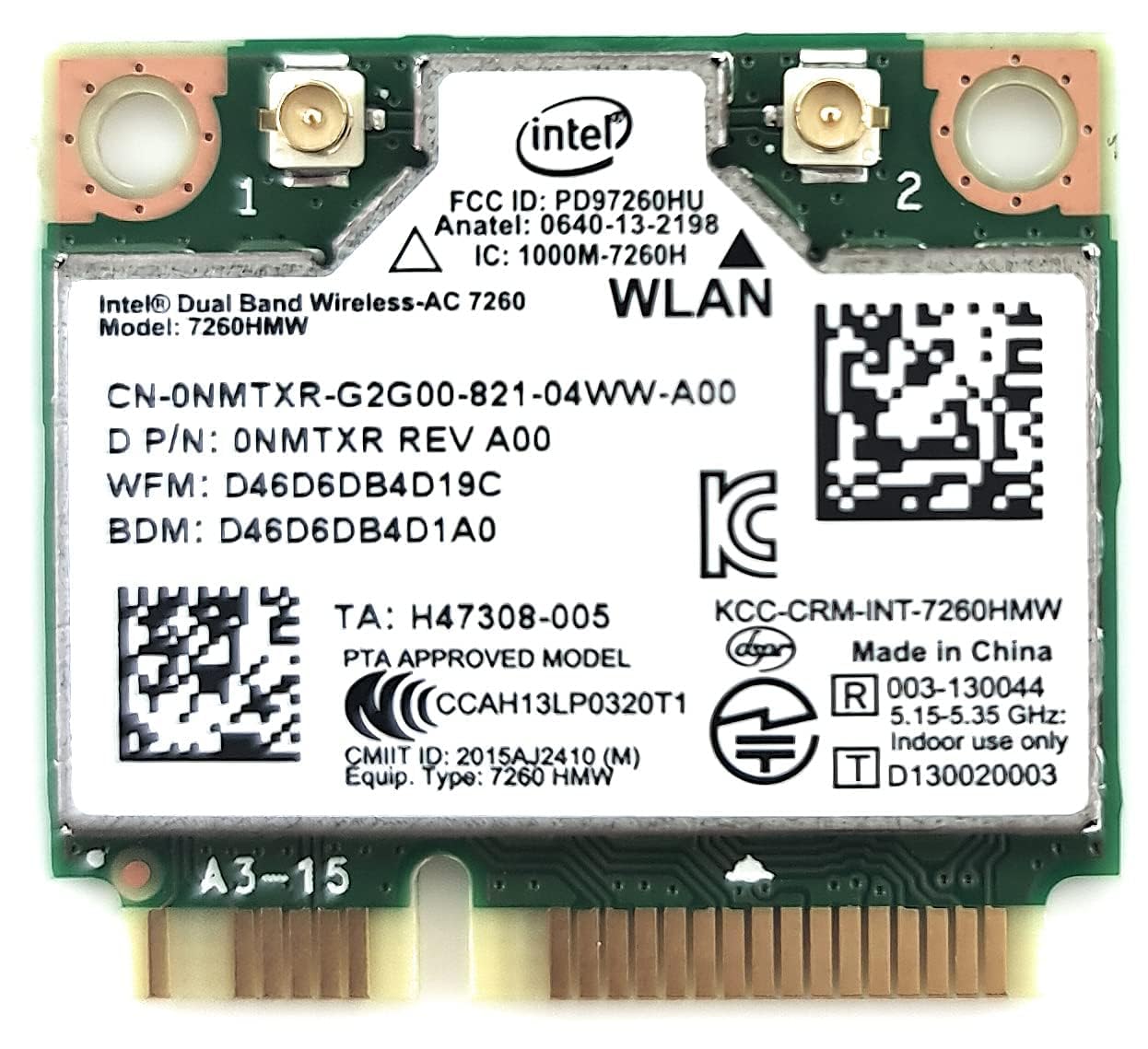
The Intel Dual Band Wireless-AC 7260 is a high-performance Mini PCI network adapter delivering dual-band 802.11ac Wi-Fi speeds up to 867 Mbps and Bluetooth 4.0 connectivity. Designed for professionals seeking reliable, fast, and versatile wireless solutions, it features Intel Smart Connect technology and a business-class wireless suite to ensure seamless connectivity at home, office, or on the go.
| ASIN | B00N7474CS |
| Best Sellers Rank | #417 in Internal Computer Networking Cards |
| Brand | Intel |
| Built-In Media | Network Card |
| Color | Green & White |
| Compatible Devices | Desktop |
| Customer Reviews | 4.4 out of 5 stars 2,486 Reviews |
| Data Link Protocol | IEEE 802.11 ac, IEEE 802.11n, IEEE 802.11g, IEEE 802.11b, IEEE 802.11a, Bluetooth |
| Data Transfer Rate | 867 Megabits Per Second |
| Global Trade Identification Number | 00715663720713, 00735858288972 |
| Hardware Interface | Mini PCI |
| Item Dimensions L x W x H | 1.18"L x 1.26"W x 0.1"H |
| Item Weight | 9.07 g |
| Manufacturer | Intel |
| Product Dimensions | 1.18"L x 1.26"W x 0.1"H |
| UPC | 733619068214 735858288972 715663720713 |
| Warranty Description | 30 Days |
D**V
Seamless Connectivity and Exceptional Performance
The Intel Dual Band Wireless-AC 7260 Network + Bluetooth Adapter (7260.HMWWB.R) has completely transformed my connectivity experience, offering seamless Wi-Fi and Bluetooth capabilities. This 2x2 adapter combines exceptional performance with reliable Bluetooth connectivity, making it a versatile and essential addition to my devices. I am thrilled to provide a five-star review for this remarkable network adapter. Fast and Reliable Wi-Fi: One of the standout features of this network adapter is its fast and reliable Wi-Fi connectivity. It ensures that I have a strong and stable internet connection for all my online activities. Dual Band Support: The dual band support allows me to choose between 2.4 GHz and 5 GHz frequencies, optimizing my Wi-Fi connection for various tasks. Seamless Bluetooth Connectivity: The built-in Bluetooth adapter is seamless and reliable, providing a convenient way to connect my devices and peripherals. Exceptional Performance: The adapter's 2x2 design and Intel's high-quality engineering guarantee exceptional performance, reducing latency and enhancing data speeds. Compact Design: The compact design of this adapter ensures it can easily fit into various devices, making it a versatile choice for upgrading or adding wireless capabilities. In conclusion, the Intel Dual Band Wireless-AC 7260 Network + Bluetooth Adapter is a five-star solution for individuals seeking seamless connectivity and exceptional performance. With fast and reliable Wi-Fi, dual band support, seamless Bluetooth connectivity, and a compact design, this adapter offers everything you need to stay connected and efficient. Whether you're upgrading your laptop or adding Bluetooth capabilities to your desktop, this network adapter is a top-tier choice. I wholeheartedly recommend it to anyone in need of reliable and high-performance connectivity.
W**N
Outstanding performance, but may be overkill for some
First off, I pay for 60 Mbps internet and only have a dual band wireless N router... So this card is overkill for my set up as it probably will be for most people. However, for only $25 (at the time of this review), this is one of the few times overkill is very affordable. More importantly, I can take the card with me to my next computer. Performance: I get 58 - 65 Mbps performance (that is full speed from my ISP) on this card from anywhere in our normal sized house on both the 2.4 and 5 GHz wireless-n band. To put it in some perspective, I get same performance from my HTC One M8 on the 5 GHz band within 10 - 20 ft from router, but performance drops off to 40 Mbps at about 35 ft for my HTC One M8, but stays at 60 Mbps for this card. All tests done using speedtest.net. Takes under 3 seconds to connect to a known network when you manually select it in Windows. No dropped connections ever. Connects to the default network as fast as computer can automatically log me in after booting up (Windows 10 on SSD). Bluetooth works great as well (although I had to put some tape on one of the pins to get it working, more details later). Where it also shines is connecting between devices on the same network (like Windows Remote Desktop Connection or Xbox One streaming to Windows 10). I loved it so much that I am getting one for my newly built desktop (with an adapter for PCIe of course). In fact, cost of this card and an adapter is cheaper than the high end desktop AC wireless cards. Pros: Easy to set up and Windows automatically got drivers for me after detecting it after a few reboots. One of the few internal parts (along with your SSD) that you can expect to take with you when you upgrade your entire computer. Cons: For the average person, cheaper $5 - $15 802.11n cards will give them all the performance their network set up can provide and this card could be a bit of an overkill. P.S: For those trying to use this on Lenovo laptops, it is still usable but it will not be simple. First off, you will need to flash your BIOS to remove the wi-fi card white list or add this card to it. Also, you will have to physically add a tiny cut of tape to cover one of the pins directly on the card (pin 51 I believe) to get Bluetooth to work at all.
J**O
Greatly Improved Laptop with This Modest Investment! ****** UPDATED
I loved that it was so easy to install! This was purchased to upgrade the WiFi Card in my Dell Inspiron 17R SE 7720 Laptop. I wanted to make the 5Ghz band accessible on it. The original card only allowed access to the 2.4GHZ band. I installed it in fewer than ten minutes, using only a jewelers screwdriver. Once installed, I turned on the Laptop and the drivers were automatically discovered, downloaded, and installed by Widows 10 Pro. The Internet Menu now showed both Bands ... so I just selected the 5Ghz band and was able to operate IMMEDIATELY. A speed test showed download speed of 175 Mbps on the 5GHZ band compared to the 80 Mbps achieved with the original card on the 2.4GHZ band. Overall, I am very happy with the purchase, which was seamless. I now have an improved Laptop that lets me work quickly! ****** UPDATE: I purchased another one of these for my Dell XPS17(L702x) Laptop. Once again, the download speed was greatly increased (2 1/2 fold) simply by having and using the 5GHz band. Installing this card in the XPS17(L702x) was fairly difficult. It required some deep surgery, requiring removal of both the the palm guard and the keypad. That involved removal and reinstallation of tiny screws and four ribbon cables that were very delicate. It took 3x as long as the Inspiron17SE7720 install. The latter merely required an easy removal of the rear cover. Biput BOTH laps are operating beautifully!
B**B
Used in a Dell Xps 8700 that did not come with dual band
Seems to work fine. Installation was pretty straightforward and it's a good time to suck or blow out dust before you get going. Card is very small with really small screws but I used the original screws which had larger heads. You have to be careful when disconnecting the black and white antenna wires from old to new. You don't want to break the wire connectors which simply pop on and off. I attached wires first to new card before tightening. It's a small space to work in. Anyway, my application was for a Dell XPS 8700 which was manufactured before 5ghz was a thing. Original card was 2.4 ghz only and was mighty slow. Install is easy as long as you're comfortable opening the case and getting into it.
A**R
Dramatic but cheap improvement!
I have two older laptops, and two experiences here: My test: Two Linux boxes on the same home network, and only my laptop on WiFi: We'll use a program called iperf to test network performance. On the server, type "iperf -c", and on the laptop, type iperf -s <server IP or name> Older WiFi cards got in the range of 20Mb transfer, even with 5G. AC-7260, got over 200Mb/s, a 10-fold improvement. (Your results will depend on your WiFi access point.) As a benchmark, I tried the same test using the wired network and I got pretty close to the 1G speed of the non-busy network. My two laptops: HP 8570w Workstation laptop: This is my best performer and main laptop, and I really need a good built-in BT adapter. (Sigh...) Well, the WiFi works extremely well, and was greatly improved over the stock WiFi, even though this card is newer and not listed as a spare for this unit. However, the HP laptop CANNOT SEE THE BLUETOOTH part of the card. Sadly, the HP laptop has a separate Bluetooth adapter that seems only suitable for a nearby keyboard and mouse, because it doesn't have enough range to reach a BT speaker or anything that's not directly in front of the keyboard. This is the main reason I was looking for a WiFi / BT combo card. However, it seems HP has not implemented the USB path to the half-mini WiFi card, so it can't see the BT adapter. Yet, for the WiFi improvement, it's still worth getting this card! How I know this isn't the fault of the WiFi card, is I still have my older laptop: Acer Aspire 5736Z-4790, a less powerful, older Windows 7 class machine that didn't have Bluetooth. The AC-7260 works like a charm, getting the same WiFi performance as the HP, and killer Bluetooth performance that can reach my BT stereo receiver across the room! If I decide I want to stream my own music to my BT receiver, I guess I have to drag out the old Acer, at least for now. I'm guessing if you have an older HP laptop that has a little Bluetooth adapter somewhere on the bottom with a little cable going to the system board, chances are (assuming they haven't blocked the entire AC-7260), they did not implement the Bluetooth part of the PCIe half mini specification, and you will not see the BT adapter.
J**R
Works and is a great replacement
I have an 7 to 8 year old laptop. It is a Gigabyte P25. Overtime the wireless card was losing its strength to connect to our wifi. I was looking for a replacement of an exact match. My wireless adapter came with built in bluetooth as well. I stumbled on this card and saw it was nearly an exact replacement. There were some off brands at a cheaper price, but I felt it would be best to stick with what had been working for years in my old laptop. I was glad I did. The device was well wrapped. It came rolled in bubble wrap along with a non-static bag. Removing the back cover of my laptop, I located the wireless card. There are two cables that attach to the card as well as a screw to hold it in place. I used a small tool, pliers, to pop off the connectors and a 000 size Philips to remove the screw. The card acts similar to memory where it is inserted at a 45 degree angle and then press down. The old card was removed and the new one went in easily (as it should). The screw went in next without a hitch and the two cables (bluetooth and wifi) connected with a little down pressure to "pop" them in place. The cover was soon placed back on and the computer turned on. There were no "hiccups" at all. Everything went smoothly. The adapter was turned on and connected. The signal strength was much better (from 40% up to 80%). The card seems to be working great and without the need for drivers (remember I was replacing in kind from the same brand). I assume it will continue to do so for several years. Should help keep the connection alive for my son during the whole school at home scenario. If this changes, I'll make sure to update my review.
M**T
Full 802.11ac speeds but needs some tweaking to work for gamers
Originally my new ASUS Z97-DELUXE motherboard came with an AzureWave AW-CE123H which was only getting 802.11n speeds for whatever reason and as it turns out, the motherboard uses a standard mPCIe port like a laptop in order to keep the card small and discreet in the middle of all the other motherboard parts. So rather than use another PCIe X1 port, I took it all apart, put this in and it worked great. I was finally get full or close to full speeds for 802.11ac. Unfortunately once I loaded up CS:GO it was unplayably laggy. World of Warships also showed large ping spikes but was still playable given the nature of that game. I did some research and it seems from looking at the Intel and Lenovo forums that this card is very aggressively scanning for other networks almost constantly which causes major latency issues so first I had to go into the device manager settings and set roaming to low which didn't help much. Then I found out about a registry DWORD setting called ScanWhenAssociated (Google it for directions) which can be set to 0 to disable all background scanning for other networks when already connected to a network for Windows 7/8/8.1 but Windows 10 seems to disregard this setting because using Location requires the card to ping local routers, probably to triangulate your location or some other such method. So once I turned off both Wifi Sense settings(a suggestion from another W10 user) and Location in the Action Center, everything was finally back to normal at the cost of Cortana no longer being available while location is off. I looked around the Intel forums and it's clear this is a huge issue with the drivers that affects many many people but Intel doesn't seem to care at all and just instructs their forum mods to misinform and blame it on everything else like system specs, router, ISP etc. Other than that, I'm very happy to have the speed I was supposed to have before with this card, although I've seen from the reviews that the AzureWave usually works well for other people. I would have gladly bought a card from Killer instead, especially after this mess, but it looks like they never bothered to make an 802.11ac mPCIe card before they moved onto M.2
K**N
Works like a champ!
I couldn't be happier with my purchase. I've never replaced a network card before, but I followed the directions of someone who previously posted a review on this item. I have my laptop set-up to triple-boot from Grub 2 into Windows 8.1, Ubuntu 14.04, and Linux Mint 17 Cinnamon. I updated all three operating systems and downloaded and installed the Windows 8.1 drivers for both wireless and Bluetooth in advance. I experienced no problems at all in Windows 8.1, but I can tell that I will need to grab a proprietary Linux driver in order for Bluetooth to work in my Linux OS's. Cracking open the laptop was a little scary, and I had to be sure to remove all of the screws that held the backing onto the motherboard, but experienced no problems there either. The laptop I use is in the Toshiba C55D series. (The original RealTek wifi card that came with it was horrible.) When I cracked open the laptop, I discovered that there is only one antenna. However, I read several blogs and found that only one antenna is needed. I connected the antenna to the left connector on the new Intel card (the right connector is AUX) and it works just fine. I have purchased a second antenna and will install it upon arrival. My average wifi speed for downloads used to be around 15-40 Mbps with drop-offs using the old card. Using a 5 GHz band (which the old card was incapable of using), I now average 140 Mbps on the same network. It was well-worth the upgrade even without the Bluetooth. I'm incredibly satisfied with my purchase and glad to have a more current wifi card that enables me to maximize the network speeds available to me.
Trustpilot
2 weeks ago
1 month ago