


🖤 Print smarter, not harder—3 years of power in one sleek package!
The Brother DCP-1610W All-in-Box Bundle is a compact, monochrome laser printer that combines printing, scanning, and copying in one device. Featuring wireless and USB 2.0 connectivity, it delivers fast printing speeds of up to 20 pages per minute. This bundle includes five toner cartridges, providing up to 5,000 pages or 3 years of printing, and comes with a free 3-year manufacturer warranty, making it an ideal choice for home offices and small businesses seeking reliable, long-term performance.
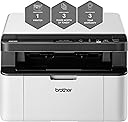


| ASIN | B07J4MHCBV |
| Additional Printer Functions | All In One |
| B&W Pages per Minute | 20 ppm |
| Best Sellers Rank | 280,567 in Computers & Accessories ( See Top 100 in Computers & Accessories ) 433 in Laser Printers |
| Box Contents | 1 * DCP-1610WVB |
| Brand | Brother |
| Brand Name | Brother |
| Color Pages per Minute | 20 ppm |
| Colour | Cool White |
| Compatible Devices | Laptops, PC, Smartphones, Tablets |
| Connectivity technology | USB, Wi-Fi |
| Controller Type | Android |
| Customer Reviews | 3.0 out of 5 stars 13 Reviews |
| Display Type | LCD |
| Duplex | Automatic |
| EU Spare Part Availability Duration | 3 Years |
| Hardware Interface | USB 2.0 |
| Initial Page Print Time | less than 10 seconds |
| Ink Colour | Black |
| Item Type Name | Brother DCP-1610W Mono Laser Printer | All In Box Bundle | Wireless & PC Connected | Print, Copy & Scan | A4 | Includes 3 Years’ Worth Of Printing |
| Item Weight | 7.2 Kilograms |
| Manufacturer | Brother |
| Maximum Copy Resolution Black and White | 600 x 600 dpi |
| Maximum Copy Speed Black and White | 20 ppm |
| Maximum Print Resolution Black and White | 600 dots_per_inch |
| Maximum Sheet Capacity | 150 |
| Maximum Supported Paper Size | A4 |
| Model Name | DCP-1610WVB |
| Model Number | DCP1610WVBZU1 |
| Model Series | DCP |
| Model name | DCP-1610WVB |
| Network Connectivity Technology | USB, Wi-Fi |
| Number of Trays | 1 |
| Other Special Features of the Product | Print Functionality |
| Paper Size | 210 x 297 |
| Power Consumption Size | 380 Watts |
| Print media | Paper (plain) |
| Printer Output Type | Monochrome |
| Printer Type | Laser |
| Printing technology | Laser |
| Product Warranty | 3 years |
| Resolution | 600 x 600 |
| Scanner Type | Flatbed |
| Special feature | Print Functionality |
| Specific Uses For Product | Office and household |
| Total USB 2.0 Ports | 1 |
| Warranty Type | limited warranty |
| Wattage | 380 watts |
C**G
Not my Brother! Not by a long shot.
It was easier connecting a computer to a printer 30 years ago. It seems printer manufacturers have regressed. Why make things simpler when you can make them infuriatingly difficult? I spent over three hours trying to connect the printer to the computer. In the end I gave up. The printer is being returned and my confidence and trust in Brother is gone forever. I could spend another three hours itemising all the things that are out of whack with reality (and common-sense) with this printer. But I won't.
F**T
Nice printer.
Print quality is good, and easy to set up although remote printing is not so easy. Didn’t realise when I purchased the printer that it was WiFi enabled but not AirPrint enabled - on line help from Brother did not help my particular issues, but finally sorted with help from another on line community. As far as I can understand, all documents, emails etc has to be saved as a file document before it can be printed from the Brother print and scan app.
D**E
Brother DCP-1610W A4 Mono Laser Printer, All in Box Bundle
The 'Brother DCP-1610W A4 Mono Laser Printer, All in Box Bundle, Wireless and PC Connected, Print, Copy and Scan, Up to 3 Years' Worth of Printing' is a great value black and white laser printer/scanner/copier bundle. It comes in a rather dauntingly large box, but the printer itself isn't enormous, the box is oversized because there is a box containing four additional toner cartridges inside it (giving an impressive total of five toners). We were unable to connect the printer wirelessly as it can only connect to a domestic wi-fi router, whereas we have a network, but this is not an issue as it connects readily to a PC with a standard USB cable. We had no issues setting it up, and it was all done and printing within a few minutes. The print quality is excellent, and it prints sheets quickly (although it is a little on the noisy side). We haven't tested the 'scan' function as we haven't needed it yet, but it copies extremely well, and I was pleased to note that the hinge on the lid is slightly loose so that it can accommodate thicker items without having to scan with the lid sticking up. The only problem we have experienced in the few weeks we've been using it was one paper jam, which was easily remedied by opening the front of the printer, removing the toner cartridge assembly, and simply pulling the paper through. I think it must have been a crinkly piece of paper, as we have printed many sheets since without the problem recurring. Very impressed with this, ideal for black and white printing (it does scan images to your computer in colour, but obviously cannot reproduce things in colour itself). Brilliant value and great machine.
A**E
Compact printer with basic scan and copy facility
I used the quick-start guide and included software disc to set up this printer and found it reasonably straightforward. It wasn’t included in the box but I also used a USB printer cable because it helps to speed the installation process and also makes it easy to set up the Wi-Fi. I’ve been using it with a couple of laptops running on Windows 10 as well as an assortment of tablets and phones. It’s necessary to install the Brother app on mobile devices and although it is usable the app is not very good. However, it does mean that I can print from them which I’m pleased about. I like that this particular printer package comes complete with five toner cartridges so there’s no need to worry about sourcing replacements for a long time. An advantage with laser printing (when compared with traditional inkjets) is that they don’t dry out over time so they make perfect sense for those people who only need to print now and again, as well as being much cheaper to operate. Duplex (automatic double-side) printing might have been a nice feature on the printer but I can cope without it. It is good that this is quite a compact machine, even with the scanner at the top. However, in common with many other printers you need to have the paper tray sticking out of the front of the printer if you want to leave it set up and ready for action. In my case that’s not an issue but it does mean you need to allow a little extra space on your desk for it. It’s worth noting that although this is a mono (black & white) printer the built-in scanner can still scan in colour so you’re able to keep proper, useful copies of colour documents and photographs. The scanning quality isn’t as good as a standalone model that I also use but is fine for simple scanning jobs where I don’t mind if the quality isn’t top-notch The printer itself is great for lots of text – I find that the print quality of text pages is very good, with clear, defined lines. Images are less sharp than I’d have liked but are perfectly acceptable. Printing speeds are fine for domestic use but probably too slow if you regularly print out in high volumes. I think that this all-in-one would be best suited for those looking to buy a decent compact mono printer which also has some basic scanning and copying facilities.
R**D
In the modern tech era, this is unforgivably awkward
Print is good, the stack of 'proper' cartridges included is very welcome and the wireless works flawlessly once set-up. You can already hear there's a big 'but' here... but set up and installation are woeful. Brother's support page where the drivers are to be found (via a ludicrously convoluted URL) but attempt to download them and the installer attempts to download a ton of unnecessary bloatware, including a universal driver app that would attempt to take over management of ALL your connected devices. In the end, we chose to google the drivers separately and download from a trusted alternative. Then the machine itself, annoyingly, the promotional images show a neat square self-contained box but it in actual use, you have to have the front flap permanently down with paper sticking out. Samsung's excellent range of similarly compact laser printers instead use a tray system that closes entirely into the body of the printer. Flaps and exposed paper is a messy way of doing thing.
S**Y
Arnaque!!!
L'imprimante n'est pas une bonne affaire. Au bout de deux semaines elle marche mal et je ne me suis pas encore servie vraiment. Et GOLDWAY.. faites attention a tout ce que vous achetez avec eux car ils prend pas leur responsabilité, achetez plutot sur le site brother ou sur les sites officiels des imprimantes, c'est mieux que perdre 239 euros ici. 1000% déçue !!!!
Trustpilot
5 days ago
2 weeks ago