Buy anything from 5,000+ international stores. One checkout price. No surprise fees. Join 2M+ shoppers on Desertcart.
Desertcart purchases this item on your behalf and handles shipping, customs, and support to Malaysia.
💧 Stay dry, stay connected—water leaks don’t stand a chance!
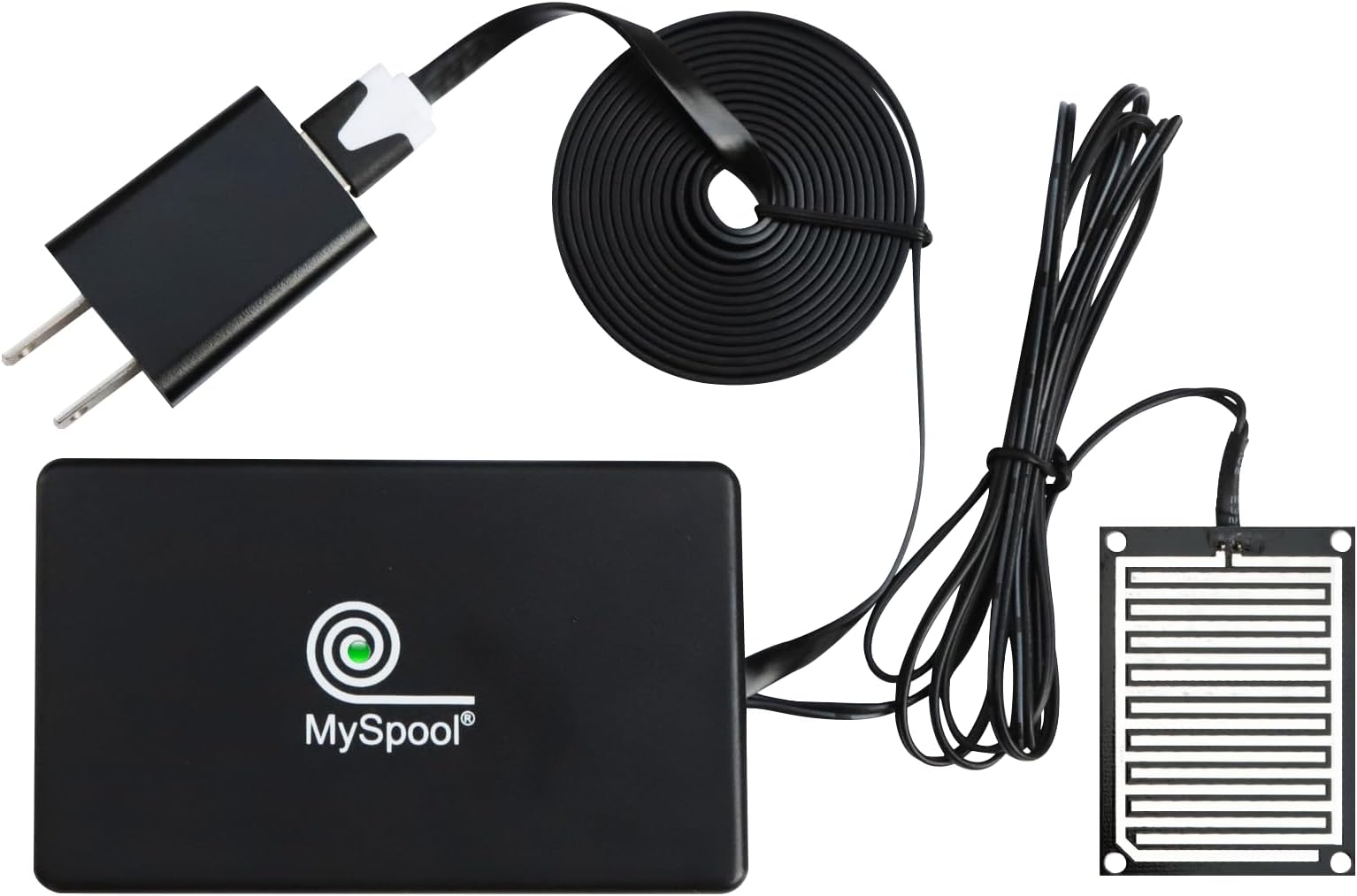
The MySpool Water Detector is a professional-grade, WiFi-enabled device that sends instant SMS and email alerts when water is detected. It requires no app or hub, features a corrosion-resistant sensor with a 5 ft wire, and includes a 6 ft power cord. With built-in central monitoring and customizable alert frequency, it offers reliable, hassle-free protection for your home or office.


| ASIN | B07BS9Z255 |
| Best Sellers Rank | #242,530 in Tools & Home Improvement ( See Top 100 in Tools & Home Improvement ) #173 in Water Detectors & Alarms |
| Brand | MySpool |
| Built-In Media | Case |
| Color | Black |
| Compatible Devices | Smartphone |
| Control Method | App |
| Customer Reviews | 4.3 out of 5 stars 573 Reviews |
| Item Dimensions L x W x H | 2"L x 2"W x 4"H |
| Item Type Name | water alert |
| Manufacturer | MySpool |
| Mfr Part Number | WATER_001 |
| Model Number | WATER_001 |
| Power Source | Corded Electric |
| Product Dimensions | 2"L x 2"W x 4"H |
| Sensor Technology | Moisture Sensor |
| UPC | 720260522356 |
| Unit Count | 1 Count |
M**N
Reliable Messages for Rare Water-On-Floor Events
For me an AC-powered water sensor is better than battery powered ones. I use these on floors near water heaters, and alerts are not expected for long periods. I can set them up and forget them, even for years after a battery would typically die without my awareness. Setup was not difficult following the brief instruction guide, but there are a few things to note: There is no installable cell phone app. Such an app could simplify initial setup by automatically detecting the Wi-Fi network and password and simplify connecting to an account. But the guide completely shows the steps in doing this through your phone's Wi-Fi settings. After powering-up the device, you temporarily select the Wi-Fi network SASensor-0000000 on your phone, then manually identify your household network and password. You should do this quickly after powering up the device, so that no neighbor or passersby can hijack it. Should this happens, the product website, MySpool.com provides instructions on how to reset the device and start again. An app could eliminate this problem. Like almost every security device, you have to set up an account on the product's website. Here you can see recorded events from the sensor and set up additional options. After logging in using my phone, I was able to connect the new sensor to my account with the sensor's "0000000" number. When I set up a second sensor through the same phone, it was automatically connected to the account. Since there is no installed app, I bookmarked the website for easy future access. On the website, each sensor has separate notification settings. When you enter and save your email address for any sensor, you should immediately look in your inbox for an email titled "AWS Notification - Subscription Confirmation." Then click the "Confirm subscription" link in that message. You will not receive emails for sensor events until you confirm. I am very leery about AWS messages since they have no details about their purpose and are widely sent. The only thing that indicates you can safely respond is that you will receive the email within seconds of saving the email address in your MySpool account. You wiil have to do this for every sensor. The FAQs on the website cover this problem. If you missed the AWS confirmation email, you can just clear-save-reenter-save the email address again to trigger a new AWS email. The sensor settings also allow you to specify a phone number for messages, but there was no confirmation required. The sensor operates as I expected. Anytime the sensor goes from dry to wet, an email and text message are triggered immediately, with both notifications identifying the detection time and name of the sensor, which can be changed on the website. The email sender is "Alert-0000000". If the wet condition continues, "Optional Device Settings" in the app determine how frequently emails will be retriggered. By default re-emails are sent every 1 minute, but this period can be adjusted up to a max of 24 hours. I changed my settings to 1 hour. I did not see a way to turn off email messages without deleting the email message entirely. Text messages are sent to the phone every 5 minutes, and that period cannot be adjusted. Under "Optional Settings" text messages can be turned off. All email and text settings can be changed during a wet event, taking effect immediately. So if you are already aware of a condition but can't correct it right away, it's good to know you can turn these off. Remember to turn them back on after correcting the problem. Note that your web account shows the last 10 wet conditions for the sensor, repeated every 1 minute. I did not find a way to adjust this frequency. UPDATE: I unplugged one of the sensors, and I for two 24 hour cycles alerting me that the sensor is off-line. Good for MySpool. Only two emails, but that was good enough for me. All said, I think this sensor is a very good solution. I think a dedicated installable app would improve the product significantly. Although the operation is good as is, it would be helpful to be able to: - Auto-detect phone Wi-Fi settings on initial setup - Set a period for re-messaging. - Allow emails to be turned off. - Send a message or email when a wet-event ends. - Send a message or email when power fail occurs and ends. - Update: I also agree with other posts that it would be great to send messages to multiple phone numbers
R**.
Cost-effective and simple
Simple to install, works well and will notify you with a text not requiring you to install a separate app, which I consider a big benefit
S**R
Simple, easy to use water detector - perfect for sump pits!
When we bought our house 6 years ago, even the inspector couldn't find the sump pit. Turns out, it was in the finished bedroom's closet under the carpet, oddly in the middle of the basement. It's filled up a few times over the years, thankfully when we're at home, so my shop vac and I were able to clear it before there was a problem. A plumber quoted $12k to install a pump because of the odd location, tear down of finished areas, and rebuilding. That wasn't happening. However, with us traveling more, I wanted peace of mind when there was an issue so I could have a neighbor take action. Thankfully we haven't had a real alert in the pit, but the testing worked beautifully. It can send texts up to 1 number, you can customize the message to a degree, it'll also send emails, and you can adjust the frequency of the alerts (1 min, 5 min, 10 min). It's basic, but it does exactly what it needs to do. It was also very simple to set up - you need an account, but there is no subscription fees like other devices, which is a huge win.
K**S
Does exactly what I need - a text & email alert to my phone when a water leak is detected.
If you're looking for a device that will send a text and/or email to your mobile device when a water leak is detected, then this is what you're looking for. For the price, you just can't beat it. There's no monthly charges or contracts, you don't have to download an app, the alerts come directly to your phone via text or your email, you can customize the message that's being sent, the device is powered by your household 110VAC so there's no batteries to change, and the device is ping'd daily to the MySpool servers to ensure that the device is online. I put one under my new hot water heater and it works like a charm. I have a Galaxy S9+ and I did have one hiccup in the setup process that I needed help with, but the MySpool support guy CALLED (not texted or emailed) me about 10 minutes after I submitted a support request online and walked me through the issue over the phone which we resolved pretty quickly. Take note, other online businesses - this is what good customer service looks like. It does exactly what its advertised to do - send text and/or email alerts when a leak is detected, but really nothing more. If MySpool ever adds some relay contacts to this device to drive external devices (i.e. shutoff valve, alarm buzzer, pump, etc.) this could be the heart of a very complete and effective leak detection and flood mitigation system - and I'd buy it in a heartbeat!
T**M
It works great!
I installed the My Spool water detector in my basement after we had a problem with the floor drain backing up. I had previously installed a wifi range extender in the basement, so I was confident there would be a strong enough wifi signal for the device to connect to. It is probably best to go through the setup process at the location where you intend to install the detector, rather than setting it up elsewhere and resetting the network connection in its final location. The physical installation is quite straightforward. There is a small black box with the electronics and two wires extending out from it. One has the detector at the end, the other is for power and plugs into the USB port on the supplied charger. The directions are a bit complicated and could benefit from some reformatting of the pamphlet’s text, but if you follow all of the steps (exactly, in order, not skipping anything) it’s really pretty easy. When it’s plugged in the device creates its own local wifi network, so you log into that with a smartphone, log the device into your house wifi network, then create an account on MySpool’s server and link the device to that account. From that point on it uses your house wifi network to send any alerts to the MySpool server and thus to your email or text messaging. At the end of the process you dunk the detector in a glass of water to test it and voila!—it sends you an email and a text message. You can have up to five email addresses on the alerts, so you can have a someone check the detector if you’re away. There is a light on the top of the little black box that is green when it is on and running properly and red when it has been triggered, so I can see whenever I go to the basement that it’s running. I’m hoping it’s never actually needed, but since the floor drain can back up unnoticed, it’s nice to have the reassurance that I’ll find out about it before any real damage is done. And I now have a submersible pump on a shelf right next to the drain—so I’m ready!
B**C
No audible or visual alarm. Text msgs are limited to just one phone number. Outstanding Support!
B E W A R E - this product does not provide market standard features. For instance: 1) this device does not trigger an audible or visual alert when a leak occurs! The device has no LEDs and is SILENT when it detects a leak so even if you are standing next to the device you have no way of knowing it has detected a leak unless you happen to read your email and/or text message. 2) This device will only send a text message to one phone number. No matter what I tried I could not upgrade it to send a text message to a second phone number simultaneously. (So my spouse cannot be alerted via text message). This is particularly frustrating given that every major cell phone carrier allows its customers to have emails sent to the customer's cell phone number where the carrier will then convert the email to a text message and send it on to the customer's phone. It never occurred to me this product would block such emails to my spouse! 3) The item I received only worked intermittently. I called MySpool support (which is outstanding) and the technician quickly isolated the issue to a defective wire connector. He then guided me in how I could fix the issue myself. The support is outstanding but it should not have been needed! I can only wonder what other poor quality manufacturing workmanship lies ahead. I have since purchased several competing Leak detectors. The Zircon wi-fi model costs about $1 more but it offers text messaging to multiple phones by using the appropriate cell phone carrier's "email to text message" conversion service. In addition its alert triggers a 105 dB audible alarm as well as sending multiple electronic email messages via Wi-Fi. I haven't encountered any Zircon workmanship/manufacturing issues.
J**G
Very Easy to Install
I have a finished basement that has a crack in the foundation and it leaked during all the rains we had in summer of 2019. Now that I've repaired the crack, I always want to be alerted if there is ever the presence of water in this area, so I ordered two of these devices. It was very easy to set up. I was a little concerned because one review said that they had trouble when using a google mesh router ... I have a google mesh router and it worked flawlessly during set up ... I was also concerned because on review said you really had to be careful to write down numbers on a screen during set up and if you didn't you might have to take the unit apart to find the number or reset it ... I did not not have a issue with this ... the instructions were very concise and easy to follow and it took 5 minutes start to finish. I only had one interaction with customer service ... before I started the set up I sent them an email to ask them about any issues with a google mesh router ... it was late at night when I sent the email and I was surprised to get a helpful response in a matter of minutes. Of course, I haven't had an incident in the basement to report on, but the alerts during the set up all worked as they were supposed to and the website where you configure your new device is all very logical and easy. Very good product, easy to set up and I'll have peace of mind knowing I'll be alerted if I ever do have a problem.
M**J
Stays Connected!
I had been looking into a water sensor such as this one for a while, hoping to avoid a problem. After trying some of the battery operated sensors, I discovered that in order to consume less power that their range wasn’t good enough. This sensor is incredible! It must be plugged in, but I wanted that feature. It was pretty easy to setup and really works well. If I had to point out any negative points, I would have to say it would be nice if it had its own App. All of the setup and management is done via the website using a browser. But honestly, I’ll take clunky webpages and great functionality over a fancy App and a device that does not perform well. I highly recommend getting this device over the more expensive, battery operated units.
C**K
Instructions confusing - here is how to configure it simply
Device works great, notifications are sent to my email and SMS. Here is how to configure it out of the box. 1. Go to MySpool.com and register for an account. An email will be sent to you, confirm it by clicking link 2. Dip the water sensor end into water for a couple second (that kicks off the device setup) 3. On computer or mobile, open WIFI and connect to the SASensor-####### (# denotes your device ID) 4. Open webbrowser such as Chrome, Edge on your computer or mobile and in the address bar, type 10.10.4.1 5. Configure you 2.4ghz WIFI, click SAVE. NOTE: it will test that wifi and if it doesn't accept it, you will continue to see a SASensor-###### in your WIFI SSID list. If it accepts your WIFI, that will disappear. 6. Log into your MySpool.com portal, click My Devices and you should see your device there now. 7. Click on Configure Device, enter your email addresses, phone number and also click Advanced Setting to change notification intervals Keep in mind, this unit requires your WIFI connection. The sensor device sends regular heartbeats back to the vendors servers with updates on water sensing alerts. If WIFI isn't working or if the device fails to call back at regular intervals, server marks missed heartbeats and will indicate it accordingly. For best practice, you may wish to have a UPS hooked up to this sensor and to your WIFI modem and router should your environment consider water monitoring a critical requirement (such as server rooms or basements where sump pumps are hooked up) Hope this helps.
K**G
Excellent support, one of the best
I had a little problem setting it up, due to the recent up grade to my phone and tablet, after tec support e mailed and set a time to call me , worked like a dream, I even set up my second one myself, and no battery to change, can unplug and plug back in and holds everything in memory , no fussing around, so you can move it from place to place on the same network. You could plug into a battery pack if there is no plug access. Excellent product
D**N
Take note
This thing works well. It does have a delay with sending the email. About 15-20 mins. So account for placing it lower so that this time gap won't cause water damage because you didn't get there in time. But otherwise, it's great! Easy to set up and can customize the emails.
P**K
Bon produit jusqu'à maintenant
Je viens de terminer l'installation et la phase de test et tout fonctionne bien. Si vous n'êtes pas allaise en informatique, je vous conseille de demander l'aide d'un parent ou ami. Lorsque vous choisissez le réseau du détecteur d'eau sur votre cellulaire, si aucune fenêtre ne s'ouvre comme ça m'est arrivé, essayez plutôt sur votre laptop ou ordinateur. Ça a fonctionné pour moi. Et n'oubliez pas d'aller voir dans vos courriers indésirables pour les courriels de confirmation. Finalement, pour recevoir des notifications texto, une fois que le compte est créé et que vous êtes connecté à celui-ci, allez dans menu, my devices, configure device et entrez votre numéro de cellulaire. Semble être un bon produit à bon prix. At the setup stage, when you choose the water detector network on your smartphone and any window open up, try it on your laptop instead. It worked for me. Seems a good product at reasonable price.
L**N
This device could save you a 'sheeet' load of money and frustration with house insurance!
This is the best device worth every penny and should really be paid for by your insurance co. $50,000 at least-that's just a guess what the damage would have cost the insurance co. if we hadn't caught our wash machine overflowing last week. I'm a retired Power Engineer and was responsible for over 400 apartments with 1200 - 1500 residents - water damage was the biggest expense by far. I spent a lot of time looking for something like this for work. I bought mine 3 years ago had issues with my wifi so took it out. Last week wash our machine overflowed for the second time in the last 10 years. The pan I installed caught most of it-my wife popped in to shut the machine off as we were going out...it would have overflowed for over an hour or 2 and destroyed the entire downstairs wood floor drywall etc. This is for BOTH when out and when home as well. People somehow think as long as they are home they are safe>>>NONSENSE...Both times we were watching TV just around the corner from the machine and had no idea it was overflowing full bore. Both times from excessive lint that plugged the tube controlling the water level-NOTHING to do with the age of the machine-clean out all the pockets! NEVER EVER leave your house with your washer running and with this device I carry my phone when the machine is running. The txt to me is 10 sec. or less. It sends me, my wife and son a gmail usually under a min. and will also send txt to anyone else via email if your carrier is supported...will send my wife and son who lives on the property a txt message via email as well. There's a cap of 150 msg. if you need more than that you should fix the problem...got a check list on my HWTank to test the unit each month. Most hot water tanks don't 'rupture' but begin to weep...if the sensor is placed correctly it will catch this well ahead of time. I have my laundry and hot water tank with sensors just have the dishwasher left to do. My wifi is good now and I will see my insurance carrier shortly and see if I can get a discount! Hey-no monitoring fees! Got wifi then get one of these they are fantastic!
Trustpilot
4 days ago
2 months ago