Desertcart purchases this item on your behalf and handles shipping, customs, and support to Malaysia.
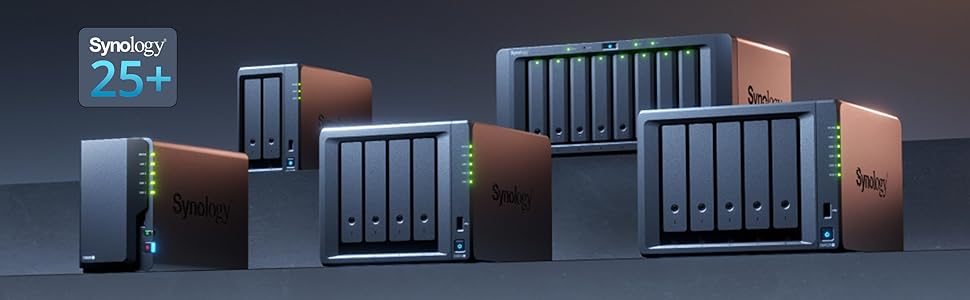
💼 Elevate your data game with Synology DS1825+ — where power meets simplicity.
The Synology 8-Bay DiskStation DS1825+ is a versatile desktop NAS designed for professionals seeking high-capacity, reliable storage with advanced data protection. Supporting up to 8 drives, it enables seamless multi-site synchronization and smart surveillance capabilities. Powered by Synology’s acclaimed DSM software, it offers effortless setup and robust backup solutions, making it the go-to choice for secure, scalable private cloud storage.


| ASIN | B0C8SBXSTJ |
| Assembly Required | Yes |
| Best Sellers Rank | #141,294 in Computers & Accessories ( See Top 100 in Computers & Accessories ) #35 in Network Attached Storage (NAS) Devices |
| Brand | Synology |
| Brand Name | Synology |
| Colour | Black |
| Compatible Devices | Android, Desktop, Laptop, Server, iPhone |
| Country of Origin | Taiwan |
| Customer Reviews | 4.0 out of 5 stars 35 Reviews |
| Enclosure Material | Metal Plastic |
| Importer Contact Information | Synology Inc., 9F., No.1, Yuandong Rd., Banqiao Dist., New Taipei City 220632, Taiwan |
| Item Dimensions D x W x H | 24.3D x 34.3W x 16.6H Centimeters |
| Item Type Name | NAS Main Unit |
| Item Weight | 6000 Grams |
| Manufacturer | Synology, Synology Inc., 9F., No.1, Yuandong Rd., Banqiao Dist., New Taipei City 220632, Taiwan |
| Manufacturer Contact Information | Synology Inc., 9F., No.1, Yuandong Rd., Banqiao Dist., New Taipei City 220632, Taiwan |
| Manufacturer Part Number | DS1825+ |
| Material | Metal Plastic |
| Model Number | DS1825+ |
| Mounting Type | Tabletop |
| Packer Contact Information | Synology Inc., 9F., No.1, Yuandong Rd., Banqiao Dist., New Taipei City 220632, Taiwan |
| Product Dimensions | 24.3D x 34.3W x 16.6H Centimeters |
| Size | 166 mm x 343 mm x 243 mm |
| UPC | 846504006021 |
| Unit Count | 1 Count |
| Warranty Description | 3-year hardware warranty |
J**K
Third-Party Drives Supported as of DSM 7.3
Three-time Synology owner (DS1812, DS1819, DS1825) and almost wasn't given the now short-lived decision by Synology to only support first-party drives (Synology branded) on the DS25 series. So it is clear, as of DSM 7.3 Synology has silently walked back their short-lived first-party only experiment and now third-party drives are supported on the DS25 series. There are still some first-party requirements around NVMe (be sure to read up on it, search "synology drive compatibility policies"), but third-party 3.5" spinning disks work just fine. I have a fleet of Western Digital Red Pro 18TB drives working very well in the DS1825. Comparing Synology CPU, memory, networking, etc. against Synology's competition is missing the forest for the trees. It is rather well-known (and accepted) that Synology NAS's do not have the latest, greatest, best, fastest CPU's and memory "per dollar". We buy Synology for the best software and support, not for bleeding edge bountiful hardware. DSM (the OS) and the package management is second to none for prosumers looking for something that is feature rich and "just works" without fidgeting, tinkering, and hacking around (although you can certainly do that as well). My Synology runs as a SMB share, DNS Server, and DHCP Server. It also provides the backend NVR functions for several non-Synology cameras through Surveillance Station and serves to backup my personal OneDrive (natively through Synology Cloud Sync and Hyper Backup) and iCloud Drive (through some third-party tooling given the security enabled on my iCloud account and Synology Hyper Backup). Other functions I've used over the years include the Container (Docker) manager, Active Directory integration, and using it as an iSCSI target. From a software standpoint, each of these use cases have worked very well over the years and remain the principal reason I look to Synology for my NAS needs. They just work without much care and feeding (other than software updates). I evaluated and built out a TrueNAS host (with ECC memory, LSI HBA and everything) given first-party drive requirement from Synology (I was frustrated like everyone else). TrueNAS is fine, but I just don't want to tinker anymore. After reading about Synology DSM 7.3 supporting third-party drives, quickly picked up a DS1825 and some fresh WD Red Pro's over Black Friday 2025. If Synology decides to go down the road of "first-party drives only" again on the prosumer lines (like the DS), it'll be on a future series and equally as frustrating. Fingers crossed they've learned their lesson. For now, I've got 7 years of Synology DS1825 with third-party drives to enjoy until I am in the market again when the DS1832 is released. We'll see what it looks like then.
M**L
منتج مميز
يسهل عليك حياتك حسابات سحابية لجوالات العائلة ومكتبة افلام ومسلسلات وسهولة مشاركة الملفات بين الاجهزة وتوصل بياناتك من كل مكان
R**Y
Great after v7.3+
Synology appears to have listened to critical feedback around drive compatibility and reversed course. That’s significant. When you’re buying a NAS at this level, flexibility and long-term trust are a huge part of the value, and that decision made me feel much better about staying in the Synology ecosystem. DSM is still one of the biggest reasons to buy Synology. The operating system is clean, mature, polished, and very approachable. Even someone who is not especially technical could probably get comfortable with the basics pretty quick. The DS1825+ feels like a strong, sensible upgrade if you want more bays, and a reliable file-serving platform. It is not the cheapest option, and I do think Synology hardware can feel a bit overpriced for the specs on paper. That said, some of that may simply be the current market climate. For file serving, backups, media storage, and general NAS use, it does exactly what I wanted. It’s not the best value if you only compare raw hardware specs, but as a complete NAS experience, it is still absolutely worth it for me.
Q**D
OK so far.
Starting to work out quite well. Some confusion caused in guides where actual process time or progress is not mentioned. Minor failing of icons not transferring onto desktop display as professed.
福**9
NASはやっぱり信頼性
取り敢えず ネットワーク機器に疎く「刺したら使える」物をお求めなら、Synology NASキットとかでは無く USBの接続のドライブとかをお勧めします。 以下、不心得者の顛末 444488+8(ホットスペア)の7本をSHR-1の構成で HDDは、補償付きのIronwolfPro、DS918+とDX517で使用していましたが 突然、DS918+の電源ランプ点滅で起動できなくななり 仕事でファイルのやり取りに使用していたため、否応なく買い替えを検討。 ※コンセントが98~99Vしか出て無かったから 微妙な過負荷でアダプターのコンデンサーが駄目に成って電源入らなかったのかも。 当初、DS918+だけを新しい物に替えようと思ったら 増設ベイの接続が、シリアルからUSB-Cに変更に成っていて 後継機のDS925+では、DX517と物理的につながらない為 色々検討の末DS1825+を購入。 DS925+とDX525も考えたけど、金額的に殆ど変わらないので 1ベイ少ないけどスペースも考慮してDS1825+に決定。 まず、来なかった。物が… 発注して次の日には最寄り迄来ていたのに、配送に成らず・・・ 復旧の為に現場休んで待ってたのに・・・ 届いたのは、到着予定日に22時ちょい前。しかも箱の角がちょっとクシャって・・・ 時間も惜しいし、メーカーの梱包は衝撃にもほどほどに強そうだったので、取り敢えずそのまま受領。 髙いけどSynology にしたのは、今まで使ってて非常に良かったのと ネットで見る限り、引っ越しはHDDの差し替えだけで、ほぼ丸っと移行できるから。 出来るから・・・・だったのに・・・ 起動できない・・・ 青ランプ点滅で起動せず、ネットに繋がらず、 待てど暮らせど立ち上がらず・・・どうも、ドライブを刺す順番が違っていたらしく システムが読み込めなかったらしい。 ホットスペアにしていた1台を起動用に刺してDMSを入れてみたり 電源を入れては待ち、起動できずにHDD入れ替え、電源を入れ、入れ替え電源を・・入れ替え・・・ m2SSDを刺しては抜き、刺しては抜き・・・繰り返す事かれこれ1昼夜。 一先ず、m2無しで起動はできたけど m2刺して無い状態だと、起動は出来ても致命的なストレージの不足とか、HDDの書換を迫られ・・ ここでボリューム作り替えたら、データ飛ぶ!! と思って、Synology アカウントからユーザーサイトに繋いで 既存のデバイスを確認したら、SSDのシリアルとm2スロット番号の組み合わせがっ!! m2スロットにSSDを戻して、やっと再起動に成功!! その後、コントロールパネルからDMSを復元したら、じわじわと元の状態に復旧!!! 散々こねくり回して、HDDを抜き差しして、もうだめかと思ったけど データも無事に復旧!!!ほぼ元通り。 LANが2.5Gに成ってCPUも変わって、諸々レスポンスも良くなった!! HDD指定の件で不評を買って大分叩かれた様ですが DMSのバージョンが上がってからは、サードパーティーのドライブも使える様になったし 今回、ぬるい考えからひどい体験して、NASに重要な信頼度は抜群に高いと感じたので とても良い品だと思います。 マジで、もうだめかと思った・・・データ
Trustpilot
3 days ago
3 weeks ago