๐ Elevate your home office game with speed, color, and wireless ease!
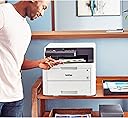
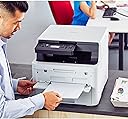
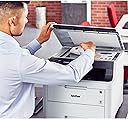
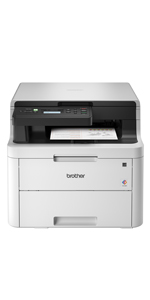
The Brother HL-L3290CDW is a compact, wireless color laser printer designed for busy home and small office professionals. Delivering fast print speeds of up to 25 ppm, automatic duplex printing, and vibrant laser-quality color output, it supports versatile media handling with a 250-sheet adjustable tray and manual feed slot. Equipped with a flatbed scanner and easy-to-use LCD interface, it offers seamless wireless connectivity including Wi-Fi Direct and mobile printing compatibility. Durable and efficient, itโs built to keep your workflow smooth and your documents standout.


| ASIN | B07FN78LY5 |
| Additional Printer Functions | Copy, Scan |
| B&W Pages per Minute | 25 ppm |
| Best Sellers Rank | #338,306 in Office Products ( See Top 100 in Office Products ) #464 in Laser Computer Printers |
| Brand | Brother |
| Built-In Media | HL-L3290CDW Digital Color PrinterStarter Black Toner Cartridge (1,000 pages)^Starter Cyan Toner Cartridge (1,000 pages),Starter Yellow Toner Cartridge (1,000 pages),Starter Magenta Toner Cartridge (1,000 pages),DR223CL Drum Unit Set (18,000 pgs)**,CD-ROM All Drivers/SoftwareQuick Set-Up Guide and Userโs Guide |
| Color | White/Black |
| Color Depth | 24 bpp |
| Color Pages per Minute | 25 ppm |
| Compatible Devices | PC, Smartphones |
| Connectivity Technology | wireless |
| Control Method | Voice |
| Controller Type | Amazon Alexa, Vera |
| Customer Reviews | 4.2 out of 5 stars 2,888 Reviews |
| Display Type | LED |
| Dual-sided printing | Yes |
| Duplex | Automatic |
| Global Trade Identification Number | 00012502651772 |
| Hardware Interface | USB |
| Ink Color | Cyan, Magenta, Yellow, Black |
| Item Dimensions D x W x H | 16.1"D x 18.7"W x 14.5"H |
| Item Type Name | Brother HL-L3270CDW Compact Wireless Digital Color Printer with NFC, Mobile Device and Duplex Printing - Ideal for Home and SmallOffice Use |
| Item Weight | 47.8 Pounds |
| Manufacturer | Brother Printer |
| Maximum Copy Resolution Black and White | 600 dpi |
| Maximum Copy Resolution Color | 600 x 600 dpi |
| Maximum Copy Speed Black and White | 25 ppm |
| Maximum Media Size | 8.5 x 14 inch |
| Maximum Print Resolution Black and White | 600 dpi |
| Maximum Sheet Capacity | 250 |
| Maximum print Resolution Color | 2400 x 600 dpi |
| Model Name | HLL3290CDW |
| Model Number | HLL3290CDW |
| Model Series | HLL3290 |
| Number of Trays | 2 |
| Other Special Features of the Product | wireless |
| Paper Size | 5-x-8-inch |
| Power Consumption | 430 Watts |
| Print media | Card stock, Envelopes, Paper (plain) |
| Printer Connectivity Type | wireless |
| Printer Output Type | Color |
| Printer Type | Laser |
| Printing Technology | Laser |
| Resolution | 19200 |
| Scanner Type | document |
| Special Feature | wireless |
| Specific Uses For Product | Home, Office |
| Total Usb Ports | 1 |
| UPC | 012502651772 |
| Unit Count | 1.0 Count |
| Warranty Description | 1 year |
| Warranty Type | limited warranty |
| Wattage | 430 watts |
G**K
Wish scanner scanned EDGE TO EDGE, but it leaves a gap all the way around!
Printer is fabulous. Based upon what all it does for the price, it is marvelous. People who complain about photograph quality have absolutely no background to understand these things! Itโs like buying a Toyota Avalon and complaining because it canโt haul enough gravel in it to effectively surface their driveway. Inkjet printers on glossy paper is what you need for near photographic look. Iโve had wonderful experience with thatโabsolutely superb prints on Canons of the day (but boy have they changedโIโve gone from loving them to hating them!), but that was a few decades ago. I HATE inkjet printers now, because if you donโt use it for a week or two (much worse when you have a month or two gap), it keeps using up all your ink (to keep it flowing instead of stopping up the jetsโand mfgโs think gold is a major ingredient of ink, I think)! You can spend over $100 on cartridges for which you are โsupposed to get 1,700 pagesโ [this is for HP printer, which was supposed to be cheaper per copy because of large ink cartridges--HAH--better use them fast, because they waste your ink all day and all night while not in use!!!], then by using it very infrequently, be lucky if you get a few dozen prints (or so it seemsโwho keeps count on low volume usage!). A laser jet you can leave alone for ยฝ year, then come in, turn it on, and print out hundreds of fabulous quality pages, and in a real hurry! Pictures are quite good as wellโIF you understand the kind of quality you can expect from a laser. Things are crisp and distinct, and color looks great on designed patterns, but certainly not photo-quality on faces, scenery, etc. That is NOT what itโs made for. If you understand that, you may be quite satisfied with printed color pictures. Compared to the frustrations of inkjets, I LOVE it!!! But I do have a list of complaints--things I wish Brother did differently on this printer, although if I had it to do over again with only the choices and prices that were available, I would HANDS DOWN buy it again--no question! That's why I give it 5 stars, despite my gripes: --I hate the way the scanner has a gap all the way around the platen! Scanning is NOT just to make copies, so do NOT limit the scanner by the printerโs edge limitationโฆwhich by the way, canโt they overcome that in 3+ decades?! --I scan checks into my bank account. I can get around this, but it's a hassle EVERY TIME I scan a check. --I've had to scan in documents that were printed into that gap area on both sides. It caused a hassle!: --I scanned it twice, once fully including the left side into the scanned area, then fully on the right. --Then I went to Microsoft Publisher, overlapped, cut, then matched images, combined, and saved as JPEG. That's a TON of work for what should have been a simple, one-pass scan! If this weren't rare for me, I'd DEFINITELY send the thing back and buy a different printer for the scanner! --I WISH it had a paper feeder for the scanner. This would: --At least solve the top-bottom gap problem. --Enable scanning longer documents. --And most obviously, allow scanning of a stack of documents, instead of one at a time. BUT I suppose this was one of those built-in limitations to force purchase of a more expensive model. Once again, while I REALLY WISH theyโd make these improvements, all things considered FOR the price, Iโd make the same choice all over again.
K**N
Impressive Printer for Home Office
We purchased this printer to replace our Brother all-in-one inkjet printer that after several years of use has been clogging/drying out. We also have a low cost/efficient Brother B&W laser printer (no copies or scanning) as the workhorse printer. Despite my noting the dimensions and weight of the new printer when ordering, I realized how big and heavy it is when I opened the box. It was very well packed and the instructions for setting it up, activating wifi and installing the software were clear and easy. It is relatively quiet and smooth running when printing and the color toner cartridges, although expensive should last a long time for us (even the starter cartridges). Even better, they won't dry out. as someone else noted, the printer leaves a small margin of unprinted area on either side of the page but this will not impact how we will be using it. Scanning and copying work well but I did notice there is a bit of slop in how the scanner cover closes. If one is not careful, it might not line up with the front of the printer when closing. I think this is the result of the feature allowing one to fit a 1 inch or so book on the scanning glass when copying. This printer might be a bit of overkill for some but we needed a color scanner/copier and there is no longer any ink to dry out. I have had problems with H-P ( wifi connections) and Epson printers ( print head clogging). Brother is great at home printers. I will only buy Brother.
J**N
Like everything else it has its pros & cons
First of all I would like to start off with the consโฆโฆ by saying that this printer is heavy as hell !!! So have a designated set up area if you have a bad back like myself AND if you do donโt even think about it ! Get yourself a helper point blank!!!!!! Con #2 itโs was very difficult to connect to my internet it took me 5 hours I reboot my box several times, I deleted then re-installed my internet still nothing tried turning my box off for about ahalf hour turned it back on finally that worked con#3 when this printer goes to sleep it hard to wake this thing up smh, if Iโm printing something from another room , I have to get up to push the button to enable it to print??? pros#1. The printing quality is beyond great Iโm very pleased let me tell you the color pops , I love it. pros #2 the speed is awesome itโs very fast. Iโm very very pleased ๐ plus the amount of ink is beyond awesome I spent so much money on my previous printer Iโm so happy this one will save me a whole lot of money.๐pros#3 Iโm loving that itโs very easy to operate. The paper Jams are very easy to fix itโs either assessable to fix the paper jam in the back door of the printer or by removing the ink cartridge the paper is right there easily to remove. I hope this help someone with there decision on Purchasing , I outweighed my pros and cons, I have to say I have no regrets it gets the job done . The only problem I can see thatโs a pain in the but is when the printer goes into the sleep mode . If anyone knows how to fix this could you please share . I would appreciate it. Thatโs it for now if I notice anything else I will definitely be happy to share with whomever that is interested.
M**E
My Favorite Printer of all time
I have been an HP fanatic for thirty years. I have loved and used their products through several generations. I picked up an old brother black and white laser a few years ago though, and learned to like it for what it was. A good, cheap, reliable printer. The time came to upgrade my HP inkjet that was feeling its age, and I looked for color lasers. This was the one that best fit my budget, and so I chose to take the leap from HP to Brother. I love it. I am a sporadic printer, so my printers will often spend weeks between print jobs. This Brother spools up in seconds and prints it perfectly. Text. Pictures. Anything I send it with no streaking or anything. The pictures look great, even on standard paper. I love that it does double-sided printing automatically to save paper. I love that it has a good flatbed scanner. Every part of this printer does exactly what I want it to do, and I am completely happy with this purchase. One of my best Christmas Presents. :)
J**B
Lies about toner level to get you to pay more
Here is why it gets one star, it is a great printer outside of this one area. Message finally popped up saying black toner is low, replace soon. That's fine I'll get to it. I just submit a print job that is 4 pages and unfortunately, the default setting was to print both sides but they are shipping labels so I can't have that. "ok", I think "I'll just print two more pages with the labels that are on the backside of the page" - WRONG - even though the four page print was crisp, deep, rich black, the device will not allow a single page more to ever be printed until I replace the black toner. The quality of the print I did 5 SECONDS AGO tells me that there is plenty of toner left so I know you are lying to me about a replacement being necessary and are not fully utilizing the toner cartridge. I wish I had found this out earlier so I could return this and get a refund. EDIT TIME: Its even worse than I thought. Not only does the toner lie, it also, like every Brother I've had, will just stop working. The queue won't print and restarting the device does nothing. It will say "Receiving Data" for hours and not print and then when it does, it will print partial pages and then a bunch of blanks and then finally maybe print what you wanted. You will waste 10-15 pages for a 1 page print. I am looking for a different printer and will NEVER buy another Brother. This company is a complete and utter scam Update: trash brand. Just prints whatever it thinks is best. Wasted roughly 50 sheets of paper today for a 3 page print because it took it upon itself to start over several times
M**T
Outstanding Performance and Quality - Brother HL-L3290CDW Compact Digital Color Printer
I recently purchased the Brother HL-L3290CDW Compact Digital Color Printer, and I am extremely impressed with its performance and the quality of the prints it produces. This printer has exceeded all my expectations, offering laser printer-quality results at an affordable price. The setup process was a breeze, with clear instructions and user-friendly software. The printer's compact design allows it to fit seamlessly into my workspace without consuming too much space. Additionally, the wireless connectivity feature has made it incredibly convenient to print from multiple devices without any hassle. The print speed is remarkable, allowing me to complete tasks efficiently without compromising on quality. The color prints are vibrant and accurate, while the black and white prints are crisp and sharp, making it perfect for both personal and professional use. The printer's user interface is intuitive, and the screen display makes it easy to navigate through the various settings and options. The duplex printing feature is an added bonus, helping me save paper and contribute to a greener environment. In conclusion, the Brother HL-L3290CDW Compact Digital Color Printer is an excellent investment for anyone in search of a high-quality, efficient, and reliable printer. Its features, performance, and ease of use make it a must-have for any home or office workspace. Highly recommended!
M**.
Easy set up and fast printing
I bought the color printer - HL-L3290CDW (printer, scanner & copier). First, it's bigger and heavier than I expected. Getting it out of the box was a challenge, but I managed it myself. If you follow the Quick Setup Guide to the letter, you should be fine. Take your time removing all the tape and packaging. Had a little hiccup during the install because I couldn't complete it using the disc provided because my computer does not have an external disc drive. I found the drivers at Brother online and completed the install. During the setup, the printer wasn't recognized by my wifi network, so I resorted to using a USB cord between my computer & printer to finish the install. After that, I was able to set up the wireless print function on the computer and cell phone. This printer is faster and quieter than I expected as well. It defaults to 2-sided (duplex) printing so you have to manually uncheck the function if you don't want it. The print quality looks great and I think there's a setting to make it darker but that would use more ink. I'm happy with my choice of a color laser printer. At first I was going to go cheap and buy the monochrome model, but knew I would regret not having color copying available. The brand name replacement cartridges are pricey so I'm on the lookout for a reputable off-brand replacement. I believe I'll get longer life from the laser cartridges considering how quickly the inkjet refills dried up. After two days of use, I am happy with it. More use over time and troubleshooting any future issues will be the true test. If there's anything else that would be helpful after more use, I'll report back.
F**.
Nice printer at a reasonable price
This was purchased to replace an Oki C5500n color laser printer that had been a serious and reliable workhorse. Setup was somewhat painless. Once it was discovered on the network, things went well. It has good print quality and the color palette was reasonable. We hope this will be as solid as our Oki. Time will tell - so far - so good Edit January 23: I can, for the first time, print from mobile devices. Duplex printing is easy and consistent. Document print quality is very good as is color images. I have no complaints to date. It is well worth the price. The only function not tried is scanning. Brother includes scanning software that I'm certain will produce excellent results. Hamrick also will scan with this printer. I started utilizing Hamrick with an Epson scanner. The change from Win 95 forced the purchase of Hamrick software. It has been a solid workhorse. Stand by for future updates.
J**.
Best all in one color laser printer that's reliable with affordable cartridges
Shipping came in 1 day before the expected date for delivery interval. Great. Printing quality is awesome. When in sleeping mode I do not need to manually switch it on in order to start printing my job... It's always on stand by. That's exactly what I expect. Even though it's on a pricier side in my opinion it's totally worth it. Did my due diligence and for several weeks I searched for the best all in one colour printer that has Automatic Sheet Feeder, Ethernet option (not just Wi-fi), NFC (you can print straight from your phone without connecting to the Wi-fi network) and overall customer reviews. This printer beats all the competitors. On top of it it's cartridges are not that expensive compared to other brands. I use it for my small home office and my kids online homework assignments (tired of drawing them picuters daily). Definitely recommend this printer.
C**Y
Great Machine!
Bought this Brother Printer to replace an old Brother printer I had for over 12 years. This was so easy to setup. I now have all my devices including iPhones and our iPads connected and it was a breeze! You can never go wrong with Brother Printer. Highly recommend.
M**L
Great machine - terrible setup
I had a few issues with this laser printer - more specifically the setup 1) With most new laptops we do not have a dvd/cd port and what does Brother ship for setup? a dvd. In 2023 you would think companies would know this and ship a USB card instead. 2) Since I could not use the DVD for setup had to go through internet. Printer would not recognize WIFI 3) Since printer would not connect thru WIFI I needed to use USB cable - WHICH DID NOT come with printer - good thing I had a cable from old printer 4) When installing from internet, the installation stalled at 90% - reboot and restart 5) After 3 hours of playing with printer, it suddenly connected to WIFI If I did not have a bit of computer know-how, this would have been a huge headache for my wife to setup. However, once printer was setup we tested printing from laptop, android 7 pro, and apple cell phones with great success. If it once for tough installation I would have given 5 stars.
D**B
Great printer and fast
Heavy but it works well. Takes a load of paper and does auto-duplex in quantities. Quiet
R**N
excellent printer
the brother HLL3290CDW worked flawlessly out of the box. easy to set up and print quality is excellent.
Trustpilot
3 days ago
1 week ago