


โก Elevate your workspace with power, speed, and stunning visuals!
The CalDigit Thunderbolt 3 Mini Dock is a compact, bus-powered docking station featuring genuine 40Gbps Thunderbolt 3 connectivity, dual 4K@60Hz HDMI outputs, USB 3.0 ports, and Gigabit Ethernet LAN. Designed for Mac and Thunderbolt 4 compatible PCs, it delivers high-performance multi-display setups and reliable wired networking without the need for external power.
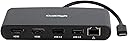


| ASIN | B079H4WTR4 |
| Best Sellers Rank | #14,474 in Computers & Accessories ( See Top 100 in Computers & Accessories ) #805 in Laptop Docking Stations |
| Brand | CalDigit |
| Color | Dual HDMI 2.0, Black |
| Compatible Devices | Laptop/Personal Computer |
| Customer Reviews | 4.3 out of 5 stars 541 Reviews |
| Hardware Interface | Ethernet |
| Item Dimensions L x W x H | 4.88"L x 2.55"W x 0.74"H |
| Item Weight | 0.21 Kilograms |
| Manufacturer | CalDigit |
| Mfr Part Number | 500377 |
| Model Number | TBT3-MiniDock-HDMI |
| Number of Ports | 2 |
| Product Dimensions | 4.88"L x 2.55"W x 0.74"H |
| Total Number of HDMI Ports | 2 |
| Total USB Ports | 2 |
| Total Usb Ports | 2 |
| Warranty Description | 2 Years |
| Wattage | 40 watts |
M**T
Great MacBook Dock for the price.
Worked perfectly for what I wanted. Previously I was using the Apple USB-C/HDMI - USB Video adapter and a similar device form Choetech. Both worked, but with daily plugging/unplugging it literally got to the point that if you knocked the desk, the screens would lose their image for a second or two, and occasionally stay off, and would require plugging/unplugging/wiggling etc. I saw the review of this on 9to5Mac and pretty much immediately ordered one. It has been about a week now, works perfectly, everything permanently connected to the CalDigit, and one cable to the MacBook. Even "jiggled" the plug and no disconnect at all. The only thing I a not keen on (but not a deal-breaker and I knew it before purchase) is you still need to plug the charging cable directly to the MacBook, but then I guess technically that is better anyway (no 3rd party devices in the middle). the only other thing i did notice, I use a full-size Apple USB keyboard which has two USB-A sockets, you might get some issues with them if you plug in something to charge (or that needs power) with the keyboard connected to the USB2 on the CalDigit, but when connected to the USB3, everything seems fine. Again, not a deal-breaker, but wanted to let people know in case they thought (like I did at first) that something was wrong. All in all great product. just wish I could buy another one and have four screens (but my Macbook won't handle it)
N**S
Great value for triple display 2019 16" MacBook
I purchased this after trying some other less expensive options for connecting dual monitors to my 16" MacBook Pro. I have been able to run the following display configurations: MacBook display, a 3440x1440 display @ 100Hz, and a 1920x1080 display @ 120Hz. MacBook closed (so no MacBook display), 3440x1440 display @ 100Hz, and 1920x1080 display @ 120Hz. Confirmed framerates via the Test UFO site. Haven't tried only running one of my monitors but I assume that will work fine considering I'm able to push three displays. Ethernet is working as expected, as well as the USB 3.0 port for both power and data. The hub does run fairly hot, but that's to be expected. Compared to some more expensive hubs, if you are like me and need less ports, just need ethernet and 2xHDMI ports, this is perfect. I have tried some of the options more around the $70 and they haven't worked. Spend a little more and grab this.
L**N
Plug and play
Seamless connectivity with macs and PC's without uploading software. I have one set up with two monitors, wireless keyboard, webcam, and wireless mouse. Just plug in my PC or MAC laptop and everything works flawlessly. I have had the CalDigit hub for years and just purchased a second one for an additional home office. I have tried other hubs, but was grossly disappointed-this one is the way to go.
C**K
Great for Windows and Linux with supporting drivers for it
I see a lot of complaints regarding macbook for this device. I don't use mac, so I'm not going to touch on that. I use windows and linux and this thing works with those OS's on standard x86/64 hardware without issues. Also, thunderbolt is not exclusive to Mac, so if you think thunderbolt ports are limited to the mac platform, that isn't true. You are starting to see thunderbolt on many of the newer non-mac based laptops and desktops ... Thunderbolt 3 in particular has up to 40 Gb/s (4 x 10 Gb/s lanes) which is significant for sending multiple streams of video. For comparison, USB 3.1 gen 2 support 10 Gb/s and is one lane. Pretty obvious what Intel was doing when it developed Thunderbolt with Apple. Going forward USB 4 and Thunderbolt 4 will be compatible and backwards compatible with previous versions using the same usb-c port hardware interface ... which means we may finally get to a point where we can just use one cable type for all peripheral connections (printers, monitors, power, etc) in the near future. So if you want something that works great out of the box, I highly recommend this device if you have Windows or Linux running on x86/64 hardware.
C**R
It works, and works well, for a while
Updated Review: The Mini Dock had only one real vice for the first 15 month or so: as mentioned in other reviews, it would reconfigure the monitors when reconnected. No matter what I did, it made sure the two external one were reversed, and both on one side of the laptop. That was a nuisance, but little more. The USB connections worked for external hard drives (the USB 3.0 one), and the USB 2.0 handled printers and slower peripherals. However, the Mini Dock has taken up disconnecting the displays over the last couple of months. Initially, it was just when it was moved, and I suspected that something was coming loose in the connection between the Mini Dock and the USB-C plug. A small move would shut off the external monitors and reconnection may also require reconfiguration. But tonight I had an external hard drive plugged in, the first for some time, and even with no movement the Mini Dock was interrupting the connection every 5 minutes or so while the hard drive was connected. It's lasted me 18 months, but a replacement (of a different brand) is on its way. Don't expect this Mini Dock to last as long as the monitors or the computer. Or even the hard drives connected through it. Downgraded my review to 4 stars, as it worked well while it did, but longevity doesn't appear to be its strong suit. Original Review: The Mini Dock was exactly as described and worked exactly as described. It has been in almost continuous use since it arrived. I am running a pair of monitors and an ethernet connection for a MacBook Air, and connect various devices through the USB ports, such as external hard drives, printers and keyboards. As I move between home and office set-ups, which are very similar, the Mini Dock gets unplugged and reconnected most weekdays, and seems to be handling that without drama. I particularly like having two monitors supported. I run a pair of 27" HDMI monitors and the Mini Dock makes working with the two set-ups easy. In addition, I can take it to classrooms and plug in the HDMI for the projector and everything just works. When I was first setting it up, it took me a little while to get the ethernet operational. So I fired off a question to CalDigit's customer support. About 5 minutes later, I got it working and it's been fine every since, so I fired off another email saying to ignore the last one. About an hour or two later, I got a reply, just a 'glad to know it's working.' So customer support works, too. The Mini Dock can get a little warm, but that's not a serious issue. I have to assume that it's working, and getting serious about it.
M**H
Plugged it into Mac Book Pro running Catalina, and it just works!
My wife works from home - Mac Book Pro with two external monitors. Tuesday she updated to Catalina and the J5create we were using to attach the monitors stopped. Going to their website we discovered Catalina and J5create are not compatible and there was no driver available!! After looking at the options we decided to look for an alternative rather than go through the pain of going back to the previous IOS. CalDigit Thunderbolt 3 Mini Dock looked like a good candidate so I posted a question asking if it was compatible with Catalina and got a quick answer Yes. I hit the Order button yesterday and it arrived this afternoon. Checked the online manual - basically "Plug it in, it works" We plugged it in and it just works - nothing more needed. Thanks CalDigit!
B**N
Does. Not. Work. as advertised
The root problem here is that Apple has inexplicably removed the support for more than one external monitor. This product is advertised to get around that. Very disappointing to spend the money on this and then not have it work at all. It's no better than my Thunderbolt 2 docking station that I have. When I plug both HDMI cables from my 2020 M1 MacBook Pro to the hub, either neither screen turns on, or one will and it will have poor resolution. I've played with the configurations in many different ways. Restarted the computer. Still no luck. I've sent an email to CalDigit's support and have had zero response, so far. If they can help me sort this out then I will revise my review here.
K**1
It gets really hot
So far the product is working, however it is really hot, even after less than an hour of being on or used. That is concerning to me.
Trustpilot
1 month ago
2 months ago