🎶 Unleash your inner rock star—record, mix, and create like a pro, anywhere, anytime!
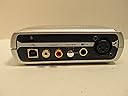
The M-Audio Fast Track US44010 is a compact USB audio interface designed for Mac and PC users to record guitar, vocals, and keyboards with professional-grade inputs and zero-latency monitoring. Bundled with GT-Player Express software featuring over 2GB of loops and amp simulations, it empowers musicians to produce high-quality tracks effortlessly, making it an ideal choice for aspiring artists and home studio creators.
| ASIN | B00061ZM2Y |
| Best Sellers Rank | #237,848 in Musical Instruments ( See Top 100 in Musical Instruments ) #1,571 in Computer Recording Audio Interfaces |
| Compatible Devices | Personal Computer |
| Customer Reviews | 4.0 4.0 out of 5 stars (73) |
| Date First Available | May 31, 2006 |
| Hardware Interface | USB |
| Is Discontinued By Manufacturer | No |
| Item Weight | 1.1 pounds |
| Item model number | US44010 |
| Operating System | Windows, macOS |
| Package Dimensions | 8.27 x 7.24 x 2.52 inches |
| Supported Software | Music software compatible with Mac and PC |
D**E
Perfect for my needs!
Quick preface: I don't play with a band, I simply write/record songs using Garageband, on an iMac. This audio interface is perfect for my needs. I don't record guitar by micing my guitar amp; I plug my guitar into an effects processor (I use the POD 2.0 from Line 6), and then plug that straight into the guitar cable input on this M-Audio Fast Track. When I want to record vocals, I plug my microphone into the mic input in the back. Everything works fine and there is no unwanted hiss or feedback when I am listening to the final mixes on my songs! Some tips in case anyone is confused on how to get this thing to work with garageband: 1) Make sure the Fast Track is set as BOTH your audio input AND output in the Garageband audio preferences (you can, if you're so inclined, even make the Fast Track your audio input/output for your entire computer, you'll still get decent sound, plus it allows you to play your guitar over songs from your iTunes library, which is a big help with guitar practice). 2) In your "Input Source" for any given instrument track, you have to select "Mono 2" instead of "Stereo 1/2" if you're recording guitar, and "Mono 1" if you're recording vocals (or anything from a microphone). You'll want to switch "Monitor" to "Off." Although I have discovered that if you're trying to simulate a bass guitar with your regular electric guitar, for an extra strong bass sound, fiddle with your effects processor to get as close as you can to a bass guitar sound, and then switch Monitor to "On," and use one of Garageband's prepackaged bass guitar settings on TOP of that. Gives your "simulated" bass guitar a little bit more oomph, if you're like me and don't actually play bass. Another cool feature on the M-Audio Fast Track is a "mix" knob which allows you to control the volume balance between the track you are recording and the playback from the rest of the song, so you can always make sure you can clearly hear what you are recording against the backdrop of the rest of the song! Anyway, like I say, this is perfect for MY needs, and I know there are plenty of people for whom this device would not be sufficient. But if you're a non-pro musician who enjoys making songs in your spare time with a "bare essentials" collection of equipment, then you might want to look into purchasing one of these!!!!
L**D
Great for live guitar recording
I'm living in a dormitory where I can't make loud noises, so I use my laptop as an amp and listen with my headphones. I bought this thing for two purposes, guitar playing and guitar recording, and I am very satisfied. Here are a few important tips if you intend to use it for live guitar recording: - You need a good VST noise gate when playing distortion to suppress the noises, and the GT player already comes pre-configured with a decent one. - The GT player is good but limited, and I use another DAW software with wich Fast Track was entirely compatible. The Fast Track should be compatible with all of them, as it appears as an ordinary sound card. The nice thing about GT player is that you can use it as a VST inside another software, but like I said you don't have to stick to it in order to use the Fast Track. - I have Windows Vista and had no trouble with the GT Player. As for the driver, I didn't even try the one included in the box as it is outdated. I downloaded the newest driver from their site (it's only 4.15 MB), and it worked perfectly. - I have a Dell laptop, and I found that unless I turn off the WiFi, the sound will be very chopped and full of glitch. However this is a Dell related problem and not a fault in the product. - If you're planning on using your laptop speakers, they won't be functional while the fast track is plugged in, at least not mine. But you can the output from the Fast Track box to another speaker if you don't want to use a headphone. I experienced no latency problems at all, and was overall satisfied. I did not try the microphone input yet so I can't judge that, but I don't see why it would give me trouble. Considering the cheap price here on Amazon, I recommend this product for any one starting with computer recording, especially guitarists.
D**P
Works fine, but...
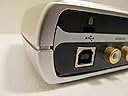
I bought the Fast Track to practice guitar in Garage Band. I use a Mac Pro Intel running OS 10.5. SET UP - no issues. Plug and play. In system preferences you need to change input and output to Fast Track USB. USABILITY - I had to plug my external speakers into Fast Track - this partially disables the system volume control - minor hassle. The design is flawed - inputs for guitar and microphone are on the back of the unit near the USB port. If I'm facing the thing, it makes more sense to have them on the front of the unit, so I can plug in without flipping it around. And since it is so small and light, it can flip over w/ the weight of the cables. I have mine sitting sideways - pretty dumb! SOUND - is fine for practice. You want to follow Garage Band instructions closely to avoid aggravation. CONCLUSION - not great, but fine for the price and my purposes.
Trustpilot
2 weeks ago
1 month ago