💾 Upgrade your vintage tech with silent speed and dual-drive power!
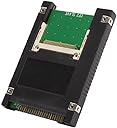
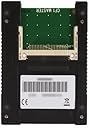
The Syba SD-ADA45006 is a sleek black 2.5" IDE/PATA adapter enclosure that supports dual Compact Flash Type 1 cards via a 44-pin interface. Designed for seamless integration into legacy systems, it offers UDMA IDE compatibility for faster data transfer, supports booting from CF cards, and features LED indicators for power and drive activity. Ideal for reviving older laptops like Apple iBooks and PowerBooks, it delivers quieter operation, improved performance, and extended battery life.
| ASIN | B0036DDXUM |
| Best Sellers Rank | #396 in Enclosures |
| Brand | Syba |
| Built-In Media | 2.5” IDE to Dual Compact Flash Drive^User Manual |
| Color | Black |
| Compatible Devices | Desktop |
| Connector Type | 44-pin IDE/PATA |
| Customer Reviews | 4.0 out of 5 stars 395 Reviews |
| Finish | Black |
| Global Trade Identification Number | 00810154014248 |
| Input Voltage | 5 Volts |
| Item Dimensions | 5.23 x 1.92 x 5.19 inches |
| Item Height | 5.19 inches |
| Item Type Name | Syba SD-ADA45006 Dual Compact Flash to 44 Pin IDE 2.5" Adapter Enclosure, Black |
| Item Weight | 0.2 Pounds |
| Item dimensions L x W x H | 5.23 x 1.92 x 5.19 inches |
| Manufacturer | Syba |
| Model Number | SD-ADA45006 |
| Number of Items | 1 |
| Number of Ports | 1 |
| Package Quantity | 1 |
| Power Plug Type | No Plug |
| Specific Uses For Product | personal |
| UPC | 810154014248 |
| Unit Count | 1.0 Count |
| Warranty Description | 1 year |
D**T
Works in my iBook clamshell model.
I bought this to revive and improve an Apple iBook clamshell model, the Firewire Special Edition Key Lime G3 466mhz/DVD iBook. The drive in it was noisy, small (10GB), and a power hog. The product specs say both that this is OS-independent, and that it is compatible with various Windows versions and Linux. No mention of Mac compatibility, System 9.x or OS X. I took a flyer on it. And it does work--it is compatible with Mac OSes. Its form factor meant that I didn't have to tape it down or jury-rig the installation; it fits perfectly in the iBook's hard drive bracket and space. The single hitch is that the iBook's HD connector has one connector pin hole blocked, so this didn't fit stock. I girded my loins and snapped the single pin off the adapter by bending it a few times, and hoped it would work. It does. I put a 16GB 400x card by Transcend in the Master position. Then I put the adapter in the drive space. Put the iBook back together. Put OS X 10.2 in the DVD drive. Booted up from the DVD drive. And installed the OS. There was one abortive installation; not sure why it happened. But the second try worked. I'll be updating the OS to 10.4 Tiger ASAP. (That's the last version of OS X that is PowerPC compatible.) So it works--it boots fairly fast, it makes the previously very noisy computer *completely* silent, is much cooler, performs much better than the hard drive, and extends battery life by (at my current estimate) another 50% (about two hours). Also, unlike some other IDE-CF adapters I've read about, with this one, the iBook can successfully wake from sleep. Note that there is a red LED on the drive that glows through the iBook's case and keyboard. But it is very subtle, unnoticeable in a lighted room and visible only in darkness. So I'm very happy with it. And if I ever want to, I can expand my storage space simply by adding another CF card (okay, the two-hour teardown and rebuild isn't that simple, but it's doable). I don't see why it wouldn't work elsewhere just as well, so, five stars.
R**N
Works with my PowerBook G3 Lombard
I bought this to replace the IDE HDD drive in my G3 Lombard. So far it's been working well. Speeds are good, considering the IDE interface limitations. I haven't had any weird compatibility issues, like some more complicated SSD to IDE adapters have. The installation is easy; just plug and play. The dual card support mounts one drive as 'Master' and the other as 'Slave'. This is nice to provide additional space. I use the second drive as a paging/scratch drive to reduce reads and writes on the main drive when I can.
J**T
Works but is over-sized
I bought this to replace the hard drive in a fit-PC Slim fit-PC Slim Linux so it would run in silent, no-moving part mode. Visually the adapter looks like right size, but when compared to the Fujitsu 60GB drive it replaced, it is both thicker (9.5mm vs 9.0 mm) and effectively longer. In my fit-pc the thickness prevented the adapter from sliding in to the space vacated by the hard drive - there is a slot on the right inside cover where the adapter would not fit in. (To make it fit, I had to remove the top black plastic cover.) Although the actual overall length is the same (100mm), when the cable connector is attached (and I had to bend all of the pins away from the circuit board to get the connector to 'seat'), the connector still sticks out to extend the length of the unit. This is the same connector that allowed to Fujitsu hard drive to fit perfectly. Doubtful another connector would work better as the connector did seat against the black angle pin block. Remember, the fit-pc is very small and its IDE connector is also, so I think Syba just didn't consider this in the size (pin length) and placement (relative to the circuit board) of the angle pin connector block. So I had to trim off the last 1.5mm of the bottom cover. I tried to just put the circuit board into the fit-pc without any of the black cover, but the circuit board was just a little too free to flop around from side-to-side without it. However, after all the modifications, the adapter did indeed work with 4GB Sandisk Ultra Compact Flash card SanDisk SDCFH-004G-A11 4GB 30MB/s ULTRA CF Card (US Retail Package) . I was able to boot Linux from a USB drive and install to the CF-adapter 'IDE hard drive' and the fit-pc works (quietly!) So, if you are planning to use this adapter in a space-limited (tight tolerance) location, I'd reconsider the purchase unless you don't mind modifying the adapter (likely voiding the warranty) and likely your connector cable. I have not tried installing a second CF into the slave slot, but I expect it to work. The slave card installs on the bottom and is flush with the bottom plastic cover (which I left on) so it should fit physically. Had the adapter fit both in thickness and length (or rather, had the connector fit properly and seated far enough in to not require modification, I would have rated this 5 stars.
J**A
9.5MM standard, works fine on a Compaq Contura Aero, mounting holes not standard complete.
I was rebuilding a vintage Compaq Contura Aero 3/44c. The original drive used a very unusual screw layout (both side and bottom holes towards the center of drive!)...this enclosure didn't comply with that...but no modern 44-pin IDE drive would have either...so I don't fault them! I ended up desoldering PIN 20 and removing the hole pin for a clean look (although I didn't need to as the system I was using had no blank for pin 20 anyway)...but this helps you retain orientation! Finding it was easy, pin 19 (on the bare PCB) solders into the center of a tiny X-looking track, right under that is the pin 20 track...which leads...nowhere..just a via for soldering. I installed two used Cisco 256MB Industrial CF cards. Now IDEDIAG registered BOTH cards, but the very old BIOS only knows what a master is...so DOS/Win3x will only sees the master. However (theoretically) Windows 9X and greater will directly probe the controller and SHOULD find the slave...but whatever I knew the risk. Worked great for DOS and such. Given the CHS values and the Diag partition there is really no way to correctly align the drive for optimal R/W...but I found the speed great for the speed of the machine anyway. Outside of desoldering the pin, it was plug & play!
W**N
SATA, BUT UDMA 5 (100 MB/s) limited...
I really like this product, but that is because it fits in my (Lenovo T400, both primary and 2nd hdd spots) laptop. Boots and runs Linux Mint & Ubuntu nicely. Perfect for recycling older hardware. Low cost, low power, no noise, no problems. I have to point out that a 800X (120 MB/s rated) CF card is limited to ~90 MB/s reads (2 different manufacturers of both CF:SATA adapters AND of CF cards; using AHCI). With a ~0.5 msec access time, that is plenty quick. Under Linux boots both using USB 2.0 & SATA.
T**7
Unable to boot from this device
Original Item Purchased: SYBA SD-ADA40001 SATA II To Compact Flash Adapter with Mounting Bracket. Can be Used Internally or Externally The main (only) reason I purchased this item was to set up a NAS using FreeNAS 9.1.0 and making this my boot drive. The motherboard I am using is a F2A55-M/CSM from ASUS. Everything worked fine with getting the adapter recognized by the other hardware and the bios. I successfully installed the FreeNAS software on a 8gb CF memory card. The memory card is UDMA 600x certified. However, when I tried to boot the newly installed OS it gave me an error message which told me to "Select a Proper Boot Device and press any key to continue". No matter how I configured the Bios regarding the boot options available, it would not boot off this adapter. I could use it as a Read/Write drive all day long, I just couldn't boot from it. My solution was to purchase a similar item sold by "CablesOnline" and made by "Koutech" here on Amazon.com Here it is: CompactFlash/SSD to SATA Adapter with 3.5" Front Panel This item works perfectly I was able to install, configure and boot the FreeNAS OS without a hitch. I may have another issue, although I haven't installed it yet. I purchased another item made by the same manufacturer "SYBA". This review is about a SATA/CF adapter. I also purchased a IDE/CF adapter as well. I purchased it for the same purpose, and it will be intalled on a similar system, again with an ASUS motherboard, in which I have installed a SATA/IDE controller combination. The setup works fine with the Hitachi hard drives and the LG BlueRay Writer that are installed. Currently this system boots FreeNAS from a USB Flash drive. I am concerned that once I install this other IDE/CF adapter, the system will not be able to boot from it and I will have 2 devices that I cannot use as I had originally intended. I will keep you posted on how that install goes.
S**E
Cheap SSD for Laptop HDD replacement
Nifty little adapter makes a Compact Flash card look like a 44-pin 2.5" notebook drive. Has LED-s on it to show power and disk activity. Caveats: This device can be plugged in "upside down" with likely disastrous results. Make sure you "mind Pin1". Pin 1 is denoted by a square pad for the copper on the Printed Circuit Board. You may have to break off one of the pins of the 44-pin connector to fit the the socket. Examine the drive you are replacing carefully to note which pin to break off. Again, make sure to mind your pin1 to insure you do not accidentally have the drive upside down. Formatting for DOS 6.20: Remove the old HDD, replace with this module. I used a SanDisk "ULTRA" CF card. You want a fast one, and you want one with the wear-leveling issue addressed. The File Allocation Table takes a lot of hits, and EEPROM-based Flash technologies have had a history of write endurance issues. I have already had volleys of Email with SanDisk over this. Their ULTRA series incorporate advanced wear-leveling algorithms that keep me from killing the FAT area. As you know, if the FAT is corrupted, the data becomes inaccessible, as the OS has no idea where it is. Incidentally, the ULTRA series CF cards have a lifetime warranty. Boot up under a bootable floppy, having at least the system, command.com, fdisk.exe, format.com. Using FDISK, delete the existing NON-DOS primary partition ( actually, it is formatted FAT32, but the early FDISK does not know anything about FAT32 ). Create a new primary partition. On my machine, I had a 8GB CF card installed. FDISK only saw 1GB. I went ahead and created a 1GB FAT16 primary partition. Reboot. Again, using FDISK, delete the 1GB partition you just made, but now, FDISK should see all 8GB of space. Create a 2GB primary partition, and a 6GB extended partition. Mark the primary partition active. Create three more DOS drives of 2GB each in the extended partition. Remember, the old BIOS and DOS does not recognize anything over 2GB. If you take this back further, you may not even be able to format even this much. You can now format C:/S to format the primary partition as C:, and transfer the system files to it. You now need to do a FDISK /MBR to copy the Master Boot Record to the C: drive. At this point, you should be able to boot directly into DOS from your new CF based SSD! Go ahead and format D:, E:, and F: . You now have 4 drives of 2GB each! One thing about SSD drives, such as this. You will never need to defrag it. "Seek time" is the same, no matter where the OS points the next sector to. Have fun. And pat yourself on the back for getting the fast CF card. Other reviewers have noted some mechanical discrepancies. In my case, the physical sizes of the populated CF drive and the drive it was replacing were similar. Yes, the pins were about 1/16" longer than the pins on the HDD they were replacing. As far as the mounting holes on the side of the plastic case, they were different than was on my HDD, but since the mounting hardware I had has slots, it wasn't an issue for me. For keeping old dinosaurs alive, this little gadget is hard to beat.
S**U
Never had a problem with these
These are incredibly useful for breathing fresh air into old laptops. I've restored a number of fun old computers, the latest being a PowerPC MacBook, and having completely silent operation and fast boot times with both OS 9 and OS X is fantastic with this machine, so long as you pair it with a good CF card. CF is basically just IDE with a different pinout, so any problems you have with this device, make sure it isn't just the CF card being bad. I've used these in at least 5 different machines and had 0 issues. Would recommend.
Trustpilot
1 week ago
2 months ago