Desertcart purchases this item on your behalf and handles shipping, customs, and support to Malaysia.
📝 Elevate your note-taking game—because your ideas deserve more than just paper.
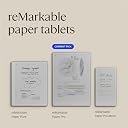
The reMarkable Paper Pro Bundle features an 11.8” full-colour e-ink display designed to replicate the natural feel of paper with ultra-responsive Marker Plus pen and built-in eraser. It includes a premium Mosaic Weave Book Folio cover and adjustable reading light for versatile use day or night. Ideal for professionals seeking distraction-free digital note-taking, it offers advanced organization tools like tagging, PDF annotation, and handwriting-to-text conversion, all in a sleek, portable design.


| ASIN | B0DGBDR2PM |
| Best Sellers Rank | 848 in Computers & Accessories ( See Top 100 in Computers & Accessories ) 3 in eWriters |
| Brand | reMarkable |
| Brand Name | reMarkable |
| Colour | Basalt Mosaic Weave |
| Country Of Origin | Vietnam |
| Customer Reviews | 4.3 out of 5 stars 527 Reviews |
| Frame Material | Plastic |
| Included Components | reMarkable Paper Pro, Marker Plus, 6 spare Marker tips, Book Folio, USB-C cable |
| Included components | reMarkable Paper Pro, Marker Plus, 6 spare Marker tips, Book Folio, USB-C cable |
| Item Weight | 1.16 Pounds |
| Manufacturer | reMarkable |
| Manufacturer Part Number | RM83C-1001NW |
| Material | Paper-like Digital Surface |
| Material Type | Paper-like Digital Surface |
| Model Number | RM83C-1001NW |
| Number of Batteries | 1 Lithium Ion batteries required. (included) |
| Number of Packs | 1 |
| Recommended Uses For Product | Office |
| Recommended uses for product | Office |
| Special Features | Color Display, Reading Light |
| Special feature | Color Display, Reading Light |
| Unit Count | 1.0 count |
| Writing Board Type | Doodle Board |
K**T
A Remarkable beautiful device
It’s truly a great device, however I find that the battery doesn’t last more than 3 days with moderately high usage. The colours are extremely muted, but I did expect that. I have used the Remarkable everyday, whether I’m making diary entries, (something I’ve never done since my filo fax years), drawing and planning mini projects. The point is I’m enjoying putting pen to paper again. I haven’t drawn anything since my school days, and I remember how my 2 - 3 hour art lessons used to disappear in a flash, because I was lost in thought and concentration. Well it’s happening again with the Remarkable and I love it. It’s mad, I no longer play games on my PlayStation, and I rarely use my iPad or laptop anymore. I must emphasise that the remarkable doesn’t replace my iPad in anyway, because they are two very different devices. In my opinion, I don’t think that the Remarkable was ever meant to. Many people who consider buying an e-ink tablet and ask what it can do? Then look past the Remarkable and consider either an android e-ink tablet or better still get an iPad. I say this because no e-ink tablet can compare with a colour tablet that usually cost about the same or even less than colour e-ink tablets. E-ink tablets don’t require power to run e-ink technology, and none can even stream movies, because of the very underwhelming screen refresh rate. If you want something to eradicate paper then you’re on the right path, because that’s what the Remarkable is great at. It has a low learning curve, whilst having a fantastic filing system and pen tools. I originally bought a kindle scribe, which also has a paper like feel when writing, however, the Remarkable feels and sounds more authentic. I soon realised that although the scribe has a much better resolution and actually does look more like a piece of paper than the Remarkable does, it is a reading device first. Consider this scenario, I’m on the phone and need to record some notes or take down a number, with the remarkable as soon as I detach the pen wether from a sleep state or opening the cover, I’m instantly ready to write. However with the scribe I open the cover, wait 2-3 seconds to wake up, navigate to notebooks, then create, choose a file name and a template, choose create, then wait for a a second, and then I’m ready to record. However just because it takes a few seconds to reach that point, unfortunately the moment is lost and it was quicker to get a piece of paper and a pen. I love both devices as well as my iPad, but they are three totally different devices, and should be treated like that. Although the scribe has had three further iterations, the speed has improved and the notebook section of the scribe has been replaced by a workspace and it’s now instantly available, it is still a kindle first and a notebook second. To conclude, if you don’t have a smart tablet or smartphone, then consider an iPad, because it can do everything. You can install paper feel screen cover. But if you are looking for a device, without distractions, and something awaken your imagination, then you really need a Remarkable tablet, but it only serves a niche market, because it’s really just an electronic notebook, manages all your notes in one place.
M**M
Great upgrade to the ReMarkable 2!
I was a ReMarkable 2 user. I upgraded to the ReMarkable Paper Pro (RPP). ReMarkable are the only paper tablets I've used and this upgrade was well worth it. Amazon's own pay in 3 options really helped as it's well documented just how expensive this product is, but as an avid note taker for work on a daily, hourly basis it's a tool that has saved me countless notebooks (although I'm nowhere near having saved the cost of 2x remarkable devices in saved notebook expense). What it has saved me is storage space and time and effort in organising and finding my notes with the help of tags. Start using tags immediately -finding your notes without them once you're several months in can be a pain. Everything that I wanted to be improved from the RM2 has been upgraded for RPP. Colour and backlight are also well documented and both very delicate yet effective. Less well publicised is the slightly larger screen and the improved detail possible with pen styles and widths. Where the RM2 was prone to blurring and flaring the strokes at the screen edges this one maintains tight and improved detail throughout. While heavier and slightly larger, mine is always desk bound and so remains comfortable to use or rather holding it is never an issue for me. The addition of colour is very good. There are many different types of colour from highlighters to R,G,B, magenta, orange, cyan, yellow, grey... plus shaders which give you different depths and strengths of each colour. Don't expect OLED vibrancy of colour however... The colours are pale, (washed out even) on the RPP's own screen, which is fine for note taking - but they're strong and vibrant once you open your document on PC, phone or tablet screens. There was nothing about this purchase that I regret, but it definitely comes down to the balance of price versus need as it's not cheap.
D**R
Great tablet
I had been searching for a writing tablet for a while. iPads were too distracting, so I looked into alternatives. After watching some YouTube reviews, the Remarkable Pro caught my attention. The build quality is outstanding, with a premium feel—even down to the included USB-C cable. Setting up the Remarkable was simple, and integrating it with OneDrive and Google Drive was seamless. I also love the screen-sharing feature for PC. Writing on it feels incredibly natural, which is where this tablet truly excels. The pen tracking on the Remarkable is precise, making it well worth the price. Overall, it’s a fantastic product and a great experience
A**R
Good for what it intends to be
(My purchase of this was stolen by someone within Amazon UK, substituted by a cheap item with a similar weight and box size+shape -- the outer Amazon box had been opened and re-taped with a second layer of Amazon Prime packaging tape. I described this in my return note. Amazon refused to refund me, sent me some warning about abusing the return policy, and DID NOT REACH OUT TO INVESTIGATE AT ALL. However, I bought several reMarkable Paper Pro by now, so I can leave a review.) The reMarkable Paper Pro is great for what it is -- take the time to understand what it ISN'T before you buy. It's NOT a normal/generic eInk tablet. It's a good but minimalist answer to "how can we make paper better?", with the limitations of 2025's color eInk displays. I've had two of these now, and I intend to buy at least two more. Two for myself, two for friends who tried mine and immediately clicked with it. # Things I like: 1. The text features are extremely well-designed. (They're not perfect, but I've already seen them improve in the right direction with updates.) - The selection tool only grabs strokes which are fully within the selection lasso, so you can easily clean up hand-writing by moving/resizing/deleting/cutting/copying/pasting individual letters or strokes. My whole life, handwriting was either fast but so messy that it's write-only, or neat but so slow that it's unsustainable for most proposes -- this single-handedly fixed that. - The erasing tools mostly disregard strokes (up to some precision that you'll only start to notice in rare cases or at 5x zoom, they will erase exactly what you cover even if it splits pen stroke). - There's a "select all below" option which lets you create room for new additions in the middle of existing notes super easily. Combines perfectly with the fact that pages can grow infinitely downward. Those are just a few examples. This was clearly designed by people who use this tablet for real work and have really thought about a minimal yet elegantly powerful set of tools for improving the writing-on-paper experience. 2. Almost every single feature works on top of PDFs. Basically, an imported PDF works just like a background layer in a regular "notebook" ("templates" also work this way). So you can highlight, write, draw, copy and delete pages, move pages into separate notebooks, etc. 3. Sync is pretty good. - I can view my notes on multiple devices (e.g. view notes from a meeting on the web/desktop/phone apps, while writing new notes on another page on the tablet), quickly screenshot text/drawings done on the tablet from the app, etc. - Sync between tablets/apps is not live, but it's pretty fast most of the time. You can even have the same page open on two tablets, write on one, and eventually (minutes, not seconds), the page on the other will update. You don't even have to close out of the notebook. (The apps seem to lack any obvious "sync now" button, which is frustrating.) I have NOT tried editing the same notebook page from two tablets/apps between syncs. - You can have up to five tablets (and seemingly any number of apps) on a Connect subscription. If you trust someone to have access to ALL of your notes/drawings/etc, you can let a family member or friend or co-worker sync to the same account (pairing a new tablet or app does NOT require account password). With some agreement on folders/tags/etc, this is viable, but I would much rather have a proper native feature to share folders/notebooks with other Connect accounts (I'm sure they're working on it -- it's an obvious value add and I've already seen them make two other improvements that I thought were really worthwhile). 4. The color support is decent. The colors are good but not very vibrant. I always wanted to add colors to my notes but didn't want to carry multiple utensils. 5. The backlight is good. It let's you read/write/draw in the dark, while basically being invisible during the day. There's five brightness levels and an option to switch to brighter levels in the settings. 6. Dev mode is great if you want to tinker. (Turning it on wipes your tablet, but if you have everything in Connect it'll restore once you re-pair.) It's a Linux tablet, and I don't mean Android -- so you can SSH in, get root, install/write custom software, the works. The stock UX is just one GUI program. 7. Upload/import: very useful -- I use the web app or mobile app to upload documents and books that I want to review/read/show. 8. Download/export: also very nice -- for example, I've used this to sign a legal document PDF and then export it back out with the handwritten signature. 9. Battery life is good enough that I don't even remember/know how long it takes to discharge. You will notice it after very heavy use, but still easily over a day. # What could be better: 1. The display isn't always reliable at registering touch gestures, and sometimes it freezes for seconds or even dozens of seconds, especially if you move too fast with too many multi-finger touch gestures back to back -- and then the freeze lasts disproportionately longer if you do more gestures. Alone either of these issues is more tolerable, but together they mean that your first reaction to a freeze will be to make it worse, because you think your gesture didn't register. (However, the worst of this seems to have stopped after the latest update?) 2. I would really love the ability to sync certain notebooks and folders between people. If there's a "merge config" in a page, just automatically copy it and give some visual indication that this happened. Right now it's all-or-nothing -- either you're on the same account and share everything, or you're on separate accounts and have to share indirectly through one of the supported cloud providers (and I'm not sure how well that works). 3. The display responsiveness and color -- the Paper Pro has an off-white screen which often starts to look "dirty" or "stained" between full screen refreshes. If you don't need colors, the Paper Pure alledly has a markedly better display. 4. Would be great if they had a marker button or two to cycle through two or more favorite tools. (For example, I an always switching between my preferred pen and the select tool while taking notes.) 5. After you add the better marker and a folio, it's pretty pricey. I think it's worth it IF you already have a good sense of what you want and you can see a strong match. 6. Sync could definitely be better. I'd rather spend more battery life to have reliably imperceptibly short delays between when I make a change and when it appears elsewhere. As-is, it's somewhat unpredictable if you'll see synced changes almost immediately or after e.g. five minutes. 7. You can't zoom in and out infinitely, and notebooks only have infinite scroll in one direction (down). This is pretty limiting when the goal isn't handwriting notes but complex diagrams or large mind-maps and so on. (Starting at maximum 5x zoom and using the thinnest writing tool can be a good start for getting big diagrams. You might also be able to abuse a PDF file with particularly large dimensions to give yourself a bigger canvas -- haven't tried that one yet.)
D**E
Expensive but outperforms the cheaper options
Pros - it’s super easy to use, still feels like you are writing with pencil or pen on real paper. It’s excellent at converting my handwriting to text at the easy press of a button. It looks good and feels like a nice weight. It’s designed well and does exactly what it sets out to. I haven’t worked out all the templates and layers yet but it’s great to use. I like the size and weight of it - it’s like an a4 notepad but feels like a good size and weight. It feels like good quality Cons It is expensive but hopefully time will tell if it’s worth it.
W**N
Beware
Purchased this on 7th March 2025 for around £700 just for the tablet and pen, a few days later the pen went faulty and unresponsive and would not work, then the screen kept freezing time after time, i had to factory reset each time. So this was very inconvienient. Then a software update was released and i updated as required, now the pens not working, the screen is totally frozen and it will not switch on of off. Looks like the company has not resolved all the bugs with the software side before sending to product to market. This item has now just sat there! useless! to use for circa 14 month, and a total waste of money! Stay clear people it will only fail you when you need it the most and you will most certanly also have issues. Beware!
M**H
Fantastic for note taking.
The title of the review is intentionally specific. If you are looking for something that does more than take notes, then you will be disappointed. Fantastic technology, it feels similar to paper and pen. Of courses one could argue that a paper notebook and pen is far cheaper. They are right, but you're not buying this because you can't afford a paper notebook. The build quality is fantastic. Feels solid and premium. There are some occasional issues with the pen not being detected by the tablet. They do seem to be widespread and it is frustrating when it happens as there is no clear way to resolve it. It has only happened a handful of times but as of writing this review it is still not resolved
L**V
Saving note paper & ink was my driver.
Id been eyeing up colleagues own digital notepads for some time, but wasn't 100% convinced on which make or model I'd want. reMarkable had some great reviews, real feedback & the specs/capabilities ticked the boxes. It's easy to use, it can even translate my worst scrawls into legible text, it's super lightweight, easy to use for notes, drawings and pretty much anything you'd use a traditional paper notebook for. The size is perfect, slips into my laptop case with ease & the magnetic pen is always firmly against the pad, so no scrabbling in the bottom of a bag. The price is a little high, especially when you compare it to a tablet or laptop, but if you're after a digital notepad, I highly recommend this product.
K**E
Should have bought it sooner!
Very great to use. I thought about this for along time (over a year) before I actually bought it. The only complaint I have is that I waited so long. It’s convenient to have a “tablet” writing pad that’s not a tablet. There are no games or distractions. The brightness settings are cool for low light but you can turn them off to save battery. I love how you can have folders as well. Highlighter function is very cool. The remarkable is very user friendly. Writing isn’t quite like paper but pretty darn close for electronic. Very much worth the money and I would recommend it over and over again.
J**R
Begeisterung seit der ersten Minute – Remarkable hält, was es verspricht!
Ich bin seit dem ersten Moment vom Look & Feel des Remarkable Tablets begeistert. Das Gerät wirkt hochwertig und minimalistisch, genau wie man es sich für ein Premium-Produkt wünscht. Besonders beeindruckend ist das Schreibgefühl: Das Werbeversprechen wird zu 100 % erfüllt. Nach wenigen Minuten vergisst man völlig, dass man auf einem digitalen Gerät schreibt – es fühlt sich an wie echtes Papier. Für mich ist das der größte Pluspunkt und macht das Remarkable einzigartig. Auch die Zusatzfunktionen sind hervorragend umgesetzt. Die Handschriftumwandlung funktioniert zuverlässig und ist gerade im geschäftlichen Umfeld extrem praktisch. Ich kann meine handschriftlichen Notizen problemlos in Maschinenschrift umwandeln und direkt weiterverarbeiten oder versenden. Die dazugehörige App für den PC ist ebenfalls ein großer Vorteil, da sie den Zugriff auf alle Notizen jederzeit ermöglicht und die Integration in den Arbeitsalltag erleichtert. Ein kleiner Kritikpunkt ist der relativ schnelle Abrieb der Stiftspitzen. Das ist zwar etwas lästig, aber für mich kein Dealbreaker, da das Schreibgefühl dadurch nicht beeinträchtigt wird und man den Abrieb auch von hochwertigen Papierstiften kennt. Ersatzspitzen sind zudem leicht erhältlich. Ansonsten merkt man, wie durchdacht das gesamte Konzept ist: Vom magnetischen Befestigen des Stifts am Tablet bis hin zum Cover, das alles perfekt umschließt. Die Verarbeitung ist hochwertig, das Design schlicht und elegant – genau das, was man sich von einem digitalen Notizbuch wünscht. Fazit: Wer ein authentisches Schreibgefühl sucht und gleichzeitig die Vorteile der Digitalisierung nutzen möchte, wird das Remarkable lieben. Für mich ist es eine klare Empfehlung und jeden Cent wert!
I**R
Great gift, met expectations after daily use
Bought this as a gift for a colleague who wanted an e-paper device for notes and reading. Arrived well packaged and in perfect condition. According to them, it's met expectations after some daily use - comfortable to write on and does what it's meant to do. Solid purchase overall.
M**A
If you write- this amazing tool is for you.
It’s been now many months since I purchased this and can give the Pros & Cons in detail: Pros: 1. Amazing writing tool. No distractions like an iPad that I have. 2. Writing experience is smooth like paper. Unlike writing on a glass surface like iPad. 3. Organizing notes is super easy. Adding new books or pages is as simple as a click. 4. We can add different types of page styles like ruled, plain, dotted etc. 5. The bundle pen that came along has an excellent grip. Does not roll over as it is not round. Has a strong magnet and has never fallen ever since I purchased. 6. Simple erasing techniques where selection tool to erase is there. Also, back of the pen gives you erasing option. 7. Converting handwritten text to typed text is an option that I haven’t used much. 8. You can create tags to written contents to easily search them when needed. 9. Great battery life. Mine lasts for a week. C type charging is there. 10. Folio case that came as a bundle is of top notch quality. 11. There’s option to send email of your handwritten notes too. 12. You can access your handwritten notes from the remarkable app of your phone or laptop. So data syncs on all platforms. Cons: 1. Although the device charge lasts for a week but this could had been more. 2. There is back lit option too to use in dark. The light though is not too bright. So I do not use it. 3. There’s option to create colour highlights or color ink. However these colours are little faded types. So I use black 99.9% of times. Overall, if you have it, you’ll definitely find it useful and people around you will be inquisitive to know what it is.
A**O
Increíble
Muy bueno y la entrega fue antes de tiempo y el paquete llego muy bien.
Trustpilot
1 week ago
1 day ago