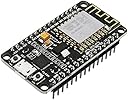
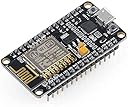
๐ Elevate your IoT game with the Robodo W18 โ where smart meets sleek!
The Robodo W18 ESP8266 ESP12 Lua NodeMCU Wi-Fi Dev Board is a compact, cost-effective development kit designed for rapid IoT prototyping. Featuring a tiny 24.8 x 14.3mm footprint, it supports three Wi-Fi modes (AP, STA, AP+STA) and offers 10 multifunctional GPIO pins compatible with PWM, I2C, and 1-Wire protocols. Powered by open-source Lua firmware, it enables interactive, Arduino-like coding with built-in Wi-Fi connectivity, making it an ideal choice for developers seeking fast, flexible, and affordable IoT solutions.
| ASIN | B073Q2VZZG |
| Best Sellers Rank | #111,602 in Industrial & Scientific ( See Top 100 in Industrial & Scientific ) #1,952 in Printed Circuit Boards |
| Brand | Robodo |
| Colour | Black |
| Compatible Device | Personal Computer, Smartphone, Camera |
| Connectivity Technology | Wi-Fi |
| Country of Origin | China |
| Customer Reviews | 4.2 4.2 out of 5 stars (22) |
| Date First Available | 4 July 2017 |
| Generic Name | Wi-Fi Dev Board |
| Importer | Bombay Electronics, 602 Valencia Paradise, Chunam Lane, Off Lamington Road. Mumbai 400007 |
| Included Components | 1x Robodo W18 Esp8266 ESP 12 Lua Nodemcu Wi-Fi Dev Board Internet of Things Cp2102 Based |
| Item Dimensions LxWxH | 31 x 98 x 140 Millimeters |
| Item Height | 14 Centimeters |
| Item Weight | 50 g |
| Item Width | 9.8 Centimeters |
| Item model number | W18ALT |
| Manufacturer | Bombay Electronics, 602 Valencia Paradise, Chunam Lane, Off Lamington Road. Mumbai 400007, Robodo |
| Memory Technology | DDR3 |
| Model number | W18ALT |
| Net Quantity | 1 Count |
| Number of Memory Sticks | 1 |
| Number of processors | 1 |
| Operating System | Linux |
| Packer | Bombay Electronics, 602 Valencia Paradise, Chunam Lane, Off Lamington Road. Mumbai 400007 |
| Product Dimensions | 3.1 x 9.8 x 14 cm; 50 g |
A**R
Great cheap replacement of arduino
This is a low cost alternative to arduino espcially when it comes with inbuilt wifi. Great for IOT projects. Aleeady bought 5 of these for different projects. But need high speed micro usb wire to connect with laptop for arduino ide. If ide is giving port error try changing the wire. Also if sketches are not uploading still, try changing the upload speeds from ide. It uploads on a medium speed rather than fast or slow speed.
J**S
Amica board
it's Amica
Trustpilot
3 weeks ago
2 weeks ago