
DOWNLOAD THE APP


Customer Services
Copyright © 2025 Desertcart Holdings Limited
DOWNLOAD THE APP


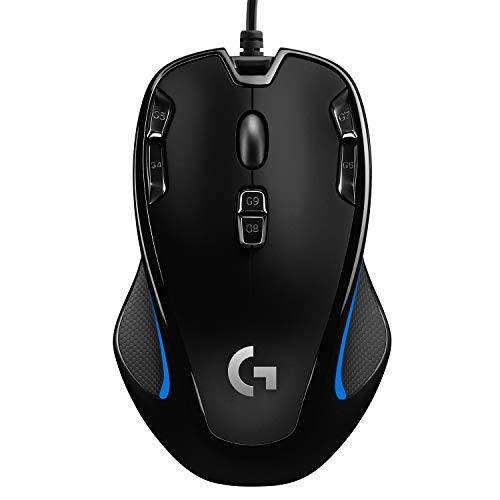


🎯 Elevate your play and productivity—because average just won’t do!
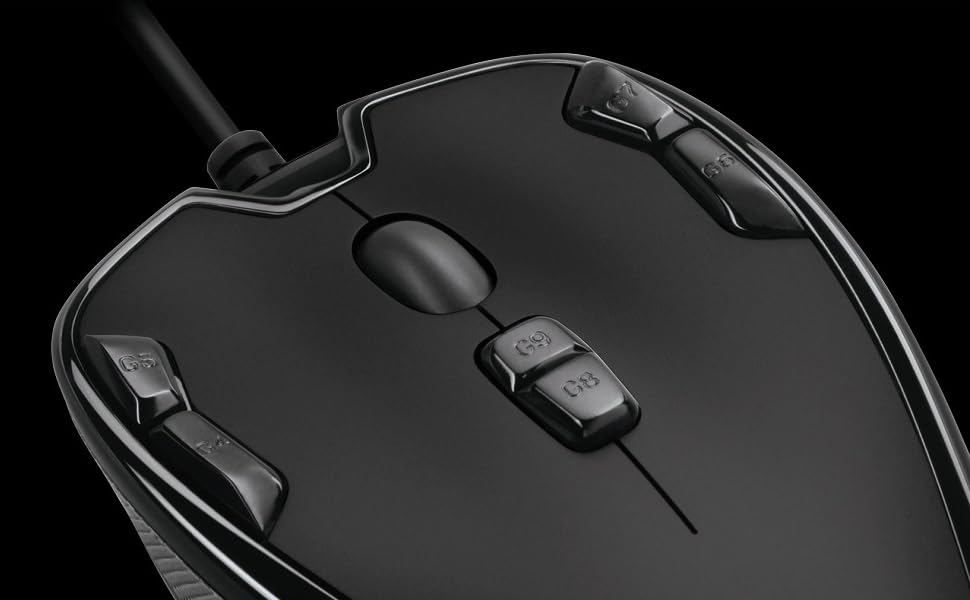
The Logitech G300s is a lightweight, wired gaming mouse featuring 9 programmable buttons, onboard memory for up to 3 profiles, and customizable RGB lighting. Its ambidextrous design ensures comfort for both hands, while the 2500 DPI optical sensor delivers precise tracking across various surfaces. Compatible with PC and Mac, it’s perfect for gamers and creative professionals seeking versatile control and style.


| ASIN | B00RH6R7C4 |
| Are Batteries Included | No |
| Batteries | 1 A batteries required. |
| Best Sellers Rank | #27,969 in Computers & Accessories ( See Top 100 in Computers & Accessories ) #225 in Gaming Mice |
| Brand | Logitech G |
| Colour | Black |
| Customer Reviews | 4.3 4.3 out of 5 stars (6,109) |
| Date First Available | 10 December 2014 |
| Generic Name | Gaming mouse |
| Hardware Platform | laptop,pc |
| Importer | Rashi Peripherals Pvt Ltd, Rashi Complex, Survey 186, Dongari Pada, Poman, Vasai (E) Thane, Maharashtra -401208, Registered Address - Rashi Peripherals Pvt Ltd, Aristo House, 5th Floor, Corner of Telli Galli, Andheri (E), Mumbai 400069, India |
| Included Components | G300s Gaming MouseUser documentation |
| Item Dimensions LxWxH | 11.4 x 7.1 x 3.6 Centimeters |
| Item Height | 1.4 Inches |
| Item Weight | 81.6 g |
| Item Width | 2.8 Inches |
| Item model number | 910-004360 |
| Lithium Battery Energy Content | 4 Watt Hours |
| Lithium Battery Weight | 3 Grams |
| Manufacturer | Logitech |
| Net Quantity | 1 Piece |
| Number of Lithium Ion Cells | 2 |
| Number of Lithium Metal Cells | 7 |
| Operating System | Mac |
| Packer | Logitech Asia Pacific Ltd, Unit no. 1003, Tower 1, Cheung Sha Wan Plaza, Cheung Sha Wan Road, Kowloon, Hong Kong |
| Power Source | Corded Electric |
| Product Dimensions | 11.43 x 7.11 x 3.56 cm; 81.65 g |
| Series | Logitech |
| Wattage | 50 |
| Wireless Type | 802.11abg |
M**A
Overall Good Product Respect of Brand & Price
Bought this @1200. Good mouse for entry level gaming. Cable too much long (2 m) which is good, but not satisfied with usb plug and cable join. Not expected breaded cable from a brand like Logi in this price range. Program buttons are good and an customized through Logi Gaming software. Have 3 profile for that with customized rgb static color (6+no light). Style is good and can use in both hand due to uniform design. Also good for professional task such as video and photo editing. 2500 dpi not a good choice for extreme gamers but still manageable. Black abs plastic with sky blue base. While could be better
R**A
A good product, must buy for gamers and creative professionals
Logitech G300s Optical Gaming Mouse (910-004347) Really good product.. It is recommended to install the latest available software for the mouse from the official logitech support. very sturdy, can be programmed to experience gaming and software handling to another level. Pros: Good cable length Good Built Ergonomic Design Buttons are placed and feel perfect in hand and the ease of accessing them is just right. Cons: The size is just few cm small.. I have a big palm and i prefer big mouse to work with, but the customizing features is just perfect to make my editing software handling experience very fast and smooth. Overall a very good product and perfect for value for money.
S**S
Is it a gaming mouse? Only a little
Pros: +it looks nice; its appearance suggests it is unaggresive and yet purposeful +probably great for primary/middle school age +probably good for the ladies in the office +quick, accurate and responsive +it had enough buttons for my use case +logitech kept it simple with how the mouse works by default. There are 3 arrangements, indicated by led color and swapped by the dedicated button. You don't need a manual to figure it out. The default buttons are browser-forward & browser-back (or dpi-up & dpi-down), pgup & pgdown (or ctrl & alt), and closewindow (or ch-dpi). +there is some wiki documentation for making it work in linux Cons: -not quick to use: read on... -too small to rest my hand on, too large to move with only fingertips. For me, this mouse is claw-grip or nothing. -no linux tool that handles the mouse's capability to change button profiles saved in the mouse's memory. If you make a mistake in configuration, you can only reset things by replugging the mouse. -there isn't a consistent grip for hitting all the buttons and moving the pointer at the same time. I find myself switching my grip based on whether i'm hitting the corner buttons vs. when I'm just scrolling, pointing and clicking. -the scroll wheel is small, untextured and doesn't flick easily. It needs some pressure applied to make a rotation happen. Using this mouse's wheel is slower and less consistent than on other gaming mice, or even on cheaper mice, I find. ...In fact I just bought a mouse as a gift for someone else that has a better scroll wheel, it was a Natec V55 wireless at about the same price. Overall, this Logitech G300s is a mouse that only certain people will like. It suits my purposes, as an inexpensive backup mouse. Nearly any other mouse with typical back/forward buttons will be more comfortable to use for gaming than this one. If you have tough, large man-hands, you will not feel comfortable using this. If you have average sized hands, then: this mouse can be comfortable after a while of using it, however still, you can easily lose the position of your grip. It is smooth all around the surface, maybe too smooth? So, if you need a comfortable left-handed mouse, buy a left-handed mouse and not this one. This mouse is made for the compromisers because it is ambidextrous, yet also comfortable for nobody. You can use it for your office work, MMO games or RTS games, but then there are much better options on the market for the same price.
M**H
The best gaming mouse for those who are on a budget.
Awesome gaming mouse with a lot of options. Pro's : - Very comfortable to hold. - Superb precision in FPS titles (Couple it with a quality mouse pad. Mine is Razer Goliathus) - 4 programmable buttons which work flawlessly in windows and mac (Please download the dedicated software) - 3 separate macro modes and dedicated mode switching button (4 keys can be configured in 3 modes. And the best part, mouse has option the store these values so that it will work the same way in both windows and mac) - 4 LED colors that are programmable - On-the-fly DPI switching with dedicated button - 5 DPI settings that are customisable from 200-2500 range. - No ghosting felt so far. Con's: - Can't think about anything. Only positive experiences so far.
G**N
Awesome product as expected from Logitech
Writing this review after a year and a month of usage . Logitech software can be used to program the keys to emulate any keyboard combination. I definitely recommend it. Pros: Good quality plastic. Keystrokes have a good tactile feel. Customizable keys - i.e all the jeys can be programmed and upto 3 profiles can be saved. Eg: In my first profile I use keys G5 to emulate ctrl+c and G6 to emulate ctrl+v and so on. RGB lighting. On the fly DPI adjustment key. Good ergonomics - has rubber grips on both sides. Ambidextrous mouse so can be used in both hands. Cons : Nothing much, the mouse is a little light for my liking.
M**L
average mouse
very good mouse. main left and right keys are very good and durable with 20 million clicks i think. rest of the extra keys are weak micro switches. dont go for it, if you need all the buttons to be highly durable. i changed some bad switches with replacement switches. its an ok product but not all keys are durable.
M**0
منتج اصلي وشكرا للبائع
A**N
Best gamer mouse
J**H
Excellent mouse, especially for the price. That it has a 'pinched' body makes all of the buttons easy to use. I previously owned (well still own) a much more expensive logitech gaming mouse (g700s) and the layout of the mouse and placement of the buttons made almost all of them unusable. With the pinched design, you can freely move your index and middle fingers around to any of the top buttons very easily and intuitively. works extremely well with the g13 lefthand gamepad. The automatic game detecting settings work for both devices at the same time, and both devices share the set of per-game 'functions', so you can assign them to gamepad or mouse buttons very easily, and move them around at will. None of the buttons are dedicated to specific functions like switching profiles or DPI (or even mouse clicks/scrolling) so you can get really creative with how you configure this thing. The actuation force of all of the buttons (and the scroll wheel) are extremely low but also satisfyingly tactile, so you get an appropriate amount of feedback without requiring stressful contortions to get enough leverage to engage the buttons. I wear a 'large' sized glove (which is average/small for men) and the distance and spacing between buttons is perfect for my hand geometry. In my opinions, this sort of button configuration is optimal for both gaming and productivity. When you want it to be a regular mouse, all of the extra functionality is out of the way, when you want to take advantage of the extra buttons, they are within reach and actuating them accurately is not difficult. Best mouse I have ever owned, and one of the cheapest too!
R**N
[Edit 2020 October] Unfortunately, the left click has developed a double-click issue. 3.5 years isn't a bad lifespan though. I will update on whether the double-click issue can be resolved by cleaning the switch. [Edit 2020 August] It has now been over 3 years and it's still going strong! Wouldn't take any other mouse over this one. I don't have the USB issue anymore on a new computer (probably was an issue with my USB port). I would recommend it to all my friends except the fact that you would need pretty small hands to feel comfortable with it. [Original review] At the time of this review, I've been using this mouse for 16 months. It's really the perfect mouse for me. I play a variety of games casually and the number of buttons is just right since I don't use too many to begin with. The button layouts are pretty good, except sometimes I'll hit the DPI adjusting ones but it's easy to just reverse that. The cord is a good length, not too long and not too short. The mouse itself is very responsive and I've never had any issues with it. As many other comments said, this mouse is quite small in size. That is not an issue for me because I personally have very small hands (child size) that measure 5.5 inches (wrist to top of middle finger). I think if you have large hands, this mouse might not be so comfortable for you. Recently, I've found that the USB connector itself has been a little finicky. Sometimes if I bump the USB a little bit I'll hear it disconnect, and it can't be 100% plugged in for it to work, only 95% plugged in. I don't find this to be an issue though. Would recommend this mouse. If this mouse dies on me (which I don't expect it to), I'll definitely be getting another one of the same.
B**L
Très bien
Trustpilot
2 months ago
3 weeks ago