Desertcart purchases this item on your behalf and handles shipping, customs, and support to Malaysia.
🚀 Cut the cords, not the quality — wireless HDMI that keeps you ahead of the curve!
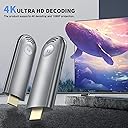
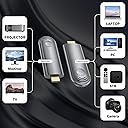
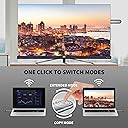
The BRAIDOL Wireless HDMI Transmitter and Receiver kit delivers plug-and-play wireless streaming with up to 98 feet range using 2.4G/5G dual-band technology. Supporting 4K decoding and 1080p/60Hz output, it enables seamless screen mirroring and extension from laptops, PCs, and set-top boxes to HDMI displays or projectors. Its compact, travel-friendly design and hassle-free setup make it ideal for professionals seeking clutter-free, high-definition wireless connectivity.


| ASIN | B0CKXC7X2R |
| Best Sellers Rank | #18,751 in Electronics ( See Top 100 in Electronics ) #113 in Wireless Audio Receivers & Adapters |
| Brand | BRAIDOL |
| Built-In Media | Wireless HDMI Receiver and Transmitter |
| Color | Gray |
| Compatible Devices | Projector |
| Connectivity Technology | Wireless |
| Connector Type | HDMI |
| Controller Type | Remote Control |
| Customer Reviews | 4.2 out of 5 stars 886 Reviews |
| Form Factor | TV Stick |
| Item Dimensions L x W x H | 5.12"L x 5.12"W x 1.85"H |
| Item Type Name | Wireless HDMI |
| Item Weight | 1.8 ounces |
| Manufacturer | BRAIDOL |
| Mfr Part Number | TR30 |
| Model Name | TR30 |
| Model Number | TR30 |
| Number of Items | 1 |
| Other Special Features of the Product | Screen Mirroring |
| Resolution | 1080p |
| Special Feature | Screen Mirroring |
| Supported Internet Services | YouTube |
| UPC | 860010838211 |
| Unit Count | 1 Count |
| Video Codec | H.264, H.265/HEVC |
| Video Output Resolution | 3840x2160, 1920x1080 |
| Warranty Description | 3 months |
D**E
Happy dance!!! 💃
WHOOOHOOO! This connected my son's projector to his laptop, now he's streaming movies just fine from Prime and Disney, off his computer onto our white wall in our gaming room, how cool is that?!!! Too fun, so easy!!! This was compatible with his older MacBook (he couldn't get airplay to work but this did, ?). I didn't notice any heating issues, it did get warm but that's expected, plus we know to keep the MacBook ventilated, there's an extra desk fan on it at this point. He's streamed two movies back to back so far, pulling up a third now, I'd say its streaming capability is very good. I'm curious to try it with other things now, like an old tv I'd occassionaly like to use in my laundry room lol. The design and directions are super simple. I'm not techy (my son is a bit techier than me so that helps), so high five to all us non-tech moms that just need things to work ✋. This works!💃
K**N
Easy and good clarity and sound
So far the transmitter is easy to use. The delay is very minimal for wireless transmission. The videos playing from my computer play well. The sound transmission is great too! The actual projection is crisper than the attached image.
M**N
FAN-FREAKING-TASTIC!! BRILLIANT!! AMAZING!!! --- *** FIOS CABLE BOX TIP ***
First, I've been involved in broadcast television IT for 30 years. Very familiar with video and audio setups. I've run hundreds of miles of video,, audio, HDMI cables. So I was VERY skeptical. My setup/problem: I have a Verizon Fios Cable TV box in my family room. Large screen TV wall-mounted. Since I was lazy, never got around to fishing the HDMI through the wall to the TV... so its a cable you can clearly see going from the box, up the wall, to the TV. Wife hates it. She's not wrong. In addition, we have a large-screen TV mounted in our screened-in patio. I connected an HDMI splitter to teh FIOS cable box, one HDMIL cable runs visibly up the wall to the family room TV, the second HDMI cable (75' long) is snaked under the house out to the patio and to the patio TV. I simply wanted to mirror the inside TV to the patio, primarily for football... wander in or out and the game is on. The splitter and setup works great. Along come this product. I was very skeptical. I unboxed it, Plugged the TX into my HDMI port on my laptop... the laptop provide power. The RX I connected to my office TV. The HDMI port did not provide power, so I used the provided USB-C cable to connect power to the RX. Before I could get back to my laptop... the devices sync'd and my laptop was on the TV (seconds). Did some testing, including sports and YouTube high quality videos and concerts... flawless. Micro-second delay between the laptop and TV... but no lip sync issues... audio was perfect, as was the transmitted picture. Testing passed with flying colors. Onto the family room/patio resolution. I plugged the receiver into the TV's HDMI port, it provided power! I disconnected the HDMI cable that runs to the wall-mounted TV from the splitter... and plugged in the transmitter. It lit up, we had power! The TV indicated it was waiting for connection, but nothing happened. So I simplified. Removed the HDMI splitter altogether... plugged the TX directly into the Verizon bow. Same issue. Then it dawned on me... any time I've had TV issues, it always comes back to the Verizon boxes! So I connected USB power directly to the TX... and it instantly connected to the RX... and we were working perfectly! Point is... their box apparently provided enough power for the TX to light up... but not enough to transmit. I moved the TX back to the splitter (with external USB power still connected) and reconnected the splitter to the FIOS box. It worked perfect. I then reconnected the patio TV hard-wired HDMI cable to the splitter... and everything works great! Any the cable in the family room is gone and I'm a hero! This thing really is amazing! 12 stars out of 10!! Just be aware of the power issue I ran into! Mike
K**E
Great for Watching Content, Not for Gaming or Live Events
I wanted to see if I could use this for a live stream. I figure the price was worth giving it a shot, compared to other higher-end tech (which would definitely do the job better). This was acceptable for the most part. It throws the image just fine. Connects easily, but I feel like I ran into some connection issues when trying to use more than one of them at once next to each other. A little patience and finagling made it all work out. I had one set up with a camera feed (where the camera operator moved around a lot), and one connected to a separate PC showing a different source of content (The Presentation, if you will), while I had a main camera set up and directly plugged into the main PC. I had audio coming in from the house (venue where the event took place) going into my main camera so that it synced perfectly. We went from an Air Cooled building to a very hot, summer outdoors (into the 90s F/Upper 30s C) and it worked just fine through a couple hours in both environments. This wireless HDMI transmitter has a delay of about 500-800 ms with this set up (going from camera to a capture device and into the PC). So the audio was always off a noticeable amount when seeing that camera live. It was at least consistent though, so it was easy to nudge clips in the edit afterwards since it was always the same amount. But again, this is a very different use for this device than what is advertised. So I can't be all down on it. I do have a projector that's mounted on the ceiling at home, and tried this wireless HDMI with that and my laptop. For the most part it seems to work very well! I can't use it for gaming though because of the long latency. So, great for the price, but only great for watching content, not engaging with content.
T**M
I think I might need more of these ...
We ordered this so we can remove the monitor cables to our file server, now everything is wireless. It works great for that. Then I also tried it with our larger monitor, and it also worked well, even though it's much further away. I would also like to try this when connecting our laptop to a TV in a hotel room. That would be great for our travels. The description for this product says: Note that this product is not suitable for connecting to mobile phones or tablets. Additionally, if your computer lacks power or cannot supply power to HD, please plug the transmitter's power into an adapter or micro power interface (5V/2A). BUT - I tried it anyway with a Samsung phone with a Dex Station hub (USB C Hub HDMI Adapter VEOOVE, bought on Amazon), just to see if I could get it working. It does, and it solves my biggest complaint with that Dex hub. I had to be close to the monitor due to the HDMI cable. With this, it transmits to the large monitor just fine! All I want is to sometimes use my phone apps on the large monitor, and not sit right in front of the screen. THAT makes this a very interesting product for me, and I may need to buy another one. Issues were that two power sources are needed (one at my phone, one at the monitor). The monitor power was very easy to do. On the phone side I found that my Dex hub didn't seem to provide enough power. I had the normal phone charger so that also was an easy fix, but I can see having more issues with power in a hotel room. This worked exactly as we hoped, plus opens up some new options. We are really happy with it.
L**Y
Worked better than expected.
Connect my laptop to any TV and it projects the screen just fine. Picture is clear enough.
L**H
ABSOLUTELY IMPRESSIVE! 100% RECOMMENDED!
I'll save you the extra pictures since people have already posted. Listen! this thing is amazing! Here's what I like: - Setup, so easy and simple. It's truly plug and play. Plugged the tx to my laptop and rx to my monitor and connected the power for both and baam!!! turned on and connected. I didn't have to press anything. It was literally a 5 second connection process. Just FYI, when you connect to the laptop portion to your laptop, it turns on a blue light even if you have not plugged in the power cable. It won't work without the power cable, so connect it please - The contents that come with the box! literally saved me. My monitor used a mini hdmi so I got discouraged, looked in the box and oh wow, they thought about it. There is was, a full hdmi to mini hdmi dongle! I was so happy - Speed: There was literally no lag(I'm using a macbook pro by the way). Connection was seamless, it connected simply and everything worked so great! No lag, literally no lag. It was surprising considering it's wireless and it's a display projection. Overall great product. it's going in my tech bag permanently. I'll be using it for projection when I visit somewhere. Hotels, airbnbs, I'm happy with it truly and I 100% recommend it! Technology has come so far...yeesh!!
R**N
Works Unbelievably Well!!!
This Wireless HDMI transmitter and receiver is truly plug and play! Everything you need to get started right out of the box comes included -- USB-USBC cables along with different HDMI adapters. The instruction manual is well written and easy to follow. Even the packaging that the devices come in is of the highest quality! Plug in the RX device into the monitor or TV's HDMI port, connect it's power cord (USB-C) to USB into a power brick and plug it in, and the RX light starts to glow. Next do the same with the TX device into the laptop (or whatever other device you want to use to cast to the monitor) and plug in it's power cord, and the TX light starts to glow. Hold in the RX button for a few seconds and the monitor will display a message that it is in pairing mode. Hold down the TX button on the other device for a few seconds and quickly you will see that the two devices are now talking to each other. I used my laptop to test this process and quickly I was able to cast from my laptop to my monitor wirelessly! What a great device. We will be using this device to set up karaoke in our gameroom -- a large monitor on the wall and using our iPad or laptop to cast to the monitor -- it's perfect! I recommend this product!
S**H
Does the job well, extending my laptop monitor
FYI - You need to connect power to both sender and receiver. They lights up without the external USB power, when they are inserted into the laptop and monitor, but they wont connect to each other without the extra power. There is an almost non-detectable, split second delay when moving the mouse around the receiver screen. I don't really notice it other than when intentionally comparing response time to the laptop screen and external screen - so it's really not an issue for my application of a second laptop screen. They are bulky. The transmitter in the laptop blocks the neighbouring USB port. The one in the monitor also sort of blocks the USB port beside it, but the mini HDMI adapter is being used there, so there is just enough room to use that port for the extra power source. All in all - it's good - it gives me the wireless freedom I need for my application. I didn't know what to expect, so I was happy that it just worked as I had hoped.
K**N
Great HDMI cable alternative!!
Satisfied with the product⭐️ many pros and minor cons. Perfect for on the go presentations, outdoor gathering (bbq, backyard movie nights, etc.) easy to set up and comes with cable accessories. Better than constantly unraveling and setting up a long HDMI to place. HDMI transmitter, can also be powered through the wall or portable charger or even without cable. Almost like it can be charged(not sure how long it can last, but a cool feature I accidentally discovered) Visuals rating is 4.8/5, millisecond latency when used on projection slides. Very doable! Once you know your timing. A little bit pixilated when used watching on smart TV. Wouldn’t recommend this to be used for gaming. Overall does what it’s intended for.
A**W
Great transmitter and receiver combo
I set up a tv with built in dvd player in the master bathroom so we could watch while soaking in the jacuzzi. I wanted to be able to watch live tv too, so decided to get this HDMI transmitter and receiver combo so that I could stream from the rogers box connected to the bedroom tv. I used an HDMI splitter connected to the transmitter and connected the receiver to the tv in the bathroom (the distance is about 20-30 ft. The set up works great, it was truly plug and play, very easy to set up. The picture and sound streams perfectly. Very little if any lag in the transmission. Overall very happy with this HDMI transmitter / receiver combo !
A**R
15 seconds of latency makes it unusable
Took me quite a while to get it working. I suspect the KVM switch I was orginally plugging the receiver into didn’t provide enough power over usb, although I was getting an image on the monitor just saying it was connected to the transceiver… which made me think it was a pairing issue, but pairing didn’t help. Ultimately I ended up plugging it straight into the monitor with a dedicated usb power port and finally it connected! However, despite the distance between the transceiver and receiver being maybe 10 feet apart (with nothing inbetween them) I’m getting around 10 and 20 seconds of latency. While I expected some amount of latency I wasn’t expecting anything that horrendous. I move the mouse on the computer and the cursor doesn’t respond on the screen for a really long time; sometimes up to 30 seconds of waiting. I don’t see anyone else complaining about latency in the reviews so maybe I just got a bad one? Or maybe the re-pairing process messed something up? Regardless, in its current state it’s unusable. Unless I can fix this I’ll have to return it. Will update this review and rating if I find a fix.
K**E
Poor connection hard to setup
Not convenient, hard to setup and poor connection.
Trustpilot
1 month ago
2 days ago