🚀 Elevate Your Business WiFi Game with TP-Link EAP225 — Speed, Control, and Coverage in One!
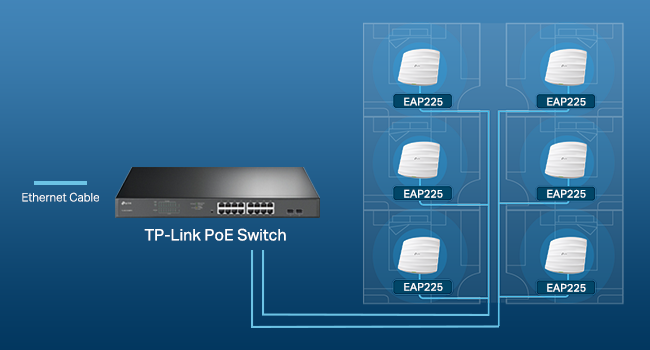
The TP-Link EAP225 is a high-performance business-grade wireless access point delivering dual-band AC1350 speeds with MU-MIMO technology. It integrates seamlessly into the Omada SDN platform for centralized cloud management and supports flexible Power over Ethernet installation. Designed for robust coverage with mesh networking and seamless roaming, it ensures reliable connectivity across multiple devices. Backed by a 5-year warranty, it’s a future-proof solution for professional environments demanding fast, secure, and manageable WiFi.


| ASIN | B0781YXFBT |
| Antenna Location | Business |
| Best Sellers Rank | #4 in Computer Networking Wireless Access Points |
| Brand | TP-Link |
| Built-In Media | AC1350 Wireless MU-MIMO Gigabit Ceiling Mount Access Point EAP225 Power Adapter Mounting Kits Installation Guide |
| Color | PVC |
| Compatible Devices | Personal Computer |
| Connectivity Technology | Wi-Fi |
| Control Method | App |
| Controller Type | Switch |
| Customer Reviews | 4.3 out of 5 stars 7,671 Reviews |
| Data Transfer Rate | 1350 Megabits Per Second |
| EU Spare Part Availability Duration | 5 Years |
| Frequency | 2.4 GHz |
| Frequency Band Class | Dual-Band |
| Global Trade Identification Number | 00845973093006 |
| Is Modem Compatible | No |
| Item Dimensions L x W x H | 8.09"L x 7.15"W x 1.47"H |
| Item Type Name | access point |
| Item Weight | 1.1 Pounds |
| LAN Port Bandwidth | 1350 megabits per second |
| Manufacturer | TP-Link |
| Maximum Upstream Data Transfer Rate | 867 Megabits Per Second |
| Model Name | EAP225 |
| Model Number | EAP225 |
| Number of Ports | 1 |
| Operating System | Linux |
| Other Special Features of the Product | Access Point Mode |
| Security Protocol | wpa2-enterprise, wpa-enterprise |
| Special Feature | Access Point Mode |
| UPC | 840460602310 845973093006 |
| Voltage | 12 Volts (DC) |
| Warranty Description | Limited Life Time Warranty |
| Wireless Communication Standard | 802.11ac |
| Wireless Compability | 802.11ac |
V**G
Great wifi access point
I bought one of these for the opposite end of my ranch-style house, since my router's wifi was weak at that distance. I like that it's POE, so I only had to run a CAT5e cable to it and hook it to my POE switch (although it comes with its own POE power injector which is a nice bonus). The setup was fairly straight forward using the app to get it set up initially, and later using the built-in web admin page through a browser for additional changes. It puts out a decent signal, but I was a bit disappointed in that it didn't quite make it from its location to my office, which is on the same level, but about 50 feet away with about 3 hollow (stud/drywall) walls between. My office seems to be somewhat of a dead zone in the house due to its layout, so I ended up buying another for near my office, creating a triangle around the perimeter of the house with my router and the two APs. When you're within 20-30 feet of the AP and no walls, it works very well and signal is quite strong. In my tests, it provided full throughput for my internet service, just make sure you connect it to a gigabit router and/or POE switch or it will only operate at the speed of the slowest link. My existing POE switch was only 100 mbps (for security cameras), so the switch was limited to that throughput, so I added a gigabit POE switch and connected the APs to that instead and they now show full throughput on internet speed tests. One feature I really liked was the ability to add additional SSIDs. During initial setup it asks for your 2.4GHz and 5GHz passwords, but I also have a 2.4GHz and 5GHz guest networks on my router. After the initial setup, I went into the browser interface and found a small "add" (+) button near the list of SSIDs and I was able to add the guest network SSIDs for each frequency. I was also able to select them as "Guest" networks in the AP configuration pages. I duplicated the SSIDs from my router and there doesn't seem to be any conflicts. Wirelress devices just seem to pick up their connection from the closest AP or the router depending on where they are in the house, which is how I hoped it would work. For installation, the mounting plate attaches to the ceiling, then you "twist" the device into to three "tabs" until it lock in place. This part was a bit tricky as the tabs seemed tight. Getting it to twist into the tabs is difficult to align as you place the AP over the bracket, and I really had to push the AP up and rotate it hard to get it to snap into the bracket. The "snapping" process on one of them took a lot of force and I thought I broke it when it finally locked in, but it was fine. It has a tab you can insert a paper clip into to release it from the bracket for removal. I think the mounting plate design could use a bit of a rework given my experience, but it's certainly not a reason to pass this by. Another inconvenience was the fact that updating the firmware causes all your settings to be lost. This happened with both devices. I hope future updates don't require a full reconfiguration of the device each time. I'm looking forward to great wifi throughout my house now. So far, the devices that were previously located in a "dead" or "weak" spot (for example, streaming boxes that could only able to get 1-3 mbps) now get 90+ mbps so it definitely solved those issues. Just be aware that depending on the size and layout of your home, you may need more than one. I didn't want this to be visible in the center of my living room ceiling (which is the center of my home), so I had to install them in hallways which are more on the perimeter of the home, thus needing more than one to get full coverage. For the price, this was an excellent choice for our home and I highly recommend it.
C**C
Pretty Much As Perfect As It Gets!!
First of all, let's get this out of the way. There's a review that states: "You can’t program this device (create and ssid and password protect your WiFi) without downloading their app that logs all the sites you visit TP Link shares this information with their 'partners' per their privacy policy..." Let me explain what I did and let you be the judge. I installed one. (I ordered two and they're both installed now.) Then I discovered its IP address using Advanced IP Scanner. (I also could have used IPScan or looked at a status page on my router.) At no time did I use a mobile device for anything, let alone download an app. From there, I its (really GOOD) GUI interface, turned off its DHCP and set the IP address I wanted it to be, using Firefox (I could also have used Chrome, Opera, or K-Meleon, all of which I have installed. I then went back in and set everything else the way I wanted it. If the reviewer was talking about the Omada software (which I don't use), he should have stated that. I hope this will allow you to make it past that review and read some "real" reviews. There are no cons that I can think of except those dictated by the limits on WiFi imposed by the FCC. The range is not miraculous, but it's VERY good. Really nice 360 degree coverage!! (When mounted on the ceiling, anyway!) It's extremely competent and secure, with lots of settings. Guest networks with lots of settings. Pretty much each and every setting can be set for each band (2.14 or 5GHz) and for the guest networks - separately. I have a 10 foot ceiling throughout, with ceiling tiles. I can't tell you how pleased I was that long, thin screws, "fender" washers and wingnuts were included just for that!! I can almost say it's a tool less installation, but you do have to cut a hole in the ceiling tile. I used my Swiss Army Knife. They look really nice. The power LED is very bright and visible and can be turned on or off in the settings, too. Two of them have been running flawlessly for almost two months now. It's a 3000 square foot building and it's notorious for "eating" RF. It's cider block and it even has some cinder block wall on the inside. The best cordless phones made can barely make it from one end to the other and die almost as soon as one walks outside. These two EAP's cover it completely and even reach outside! There is nowhere I can go where the signal strength isn't at least "Good". In most places, it's "Excellent". Now there's WiFi outside, too, as long as one doesn't stray too far. One is powered by the PoE adapter that came with it, and the other is powered by a PoE gigabit switch. They work great either way. And they're as fast as gigabit Ethernet, anyway! I can't think of anything I've ordered from Amazon that I like more than these things! I'd be happy if I'd spent twice the money for them; just to avoid the "junk" out there! I'm starting to have all kinds of faith in TP-Link - especially when it comes to WiFi!!
M**.
Needed an AP upstairs for kids that I could schedule and not replace my entire existing sytem.
Just received and connected, not a long-term review. I learned basic networking for an Associate's degree in programming I started in 1999. The bubble burst and due to my life commitments I never got into IT but it has helped a lot over the years. Networking sure has come a long way since then. The technologies and acronyms are enough to drive me crazy and I don't have time to figure it all out. In the default configuration the advanced features are there if you need them but this is just for a home network so I'll leave them alone. I'm using this as a standalone access point, the Omada software is probably great but I didn't want to add a controller or have a 24/7 server running it. This unit has it's own web UI that lets you set all of the basic info and a lot of advanced features. It has a scheduler so I'm just going to put some reasonable times in it for the kids to connect and change the password on our downstairs system. We don't have gigabit internet but did recently upgrade to 300Mbps. Our old Apple Airport Express system was certainly faster than our WAN connection but after seeing the insane speeds this AP hits I MAY have to get a controller to use with my TP-Link ER605 and set up a few more of these. Again, it's been 20+ years since I went to school and I haven't kept up with all the advances but the screenshot I've included was taken on my Mac Mini with ethernet disabled, wireless connection to the EAP225 connected to our LAN. Somehow I got faster speeds than I pay for but that MIGHT be some quality or service or similar trickery that the AP provides. Either way it's hella fast AND includes a POE injector which is a great deal at this price point. I had looked at a LOT of mesh and secure wifi systems but could never find for certain if the RJ-45 ports on the back were manageable. Couldn't find any company that even talked about it. Maybe they are but I didn't want to have to fill the ports with hot glue if they weren't. Decided on this instead because it's pretty easy to plug something into the back of one of those but this can be mounted on the ceiling or wall and will kill ALL the wifi upstairs if they try to take it off to get to the ethernet jack. The unit is smaller than I thought it would be. The LED is green and doesn't look like it will be horribly bright. However it has the ability to turn it off (genius!) in the UI. 120 yr old plaster house results using EAP225 connecting to testmy.net: *Using 5GHz band in the same room I get 300Mbps or more on iPhone 13 mini, one room over drops to 180, and then in the kitchen it drops to 100. Not horrible. *Using 2.4GHz band it drops to 80 in next room and 20Mbps in the kitchen. Pretty decent with the 5GHz so if you struggle with plaster walls this works well. If you were wondering why we are still using old Apple Airport setup it's because they were able to make a "mesh" system long before they became mass market items. In our impenetrable old house WiFi suffers horribly trying to get through layers of plaster, lath, more lath, and then more plaster so we have Airport units placed where we need them that are connected to a central Airport. They all share the same network name and password so we can roam and automatically connect to the best connection. Usually. After this review I've convinced myself to look deeper into the Omada software and may wind up getting a controller and a few more APs. Will update if so. This is a great price for a great piece of hardware whether you use it as a standalone AP or part of a larger system. If you want something smaller they have a /Wall version with 3 ethernet ports on the bottom and the WAN port on the back.
K**H
Confusing features but works very well - EAP225 Outdoor
These models and model numbers are confusing because they are all grouped together and it is difficult to tell what exactly each does and doesn't do. In this case I got the EAP225 Outdoor which *looks* like it is a wireless extender, which it isn't...exactly. The EAP225 does extend the wireless signal, but only when you can reach it by an ethernet cable. If the router has no outputs, or there is no physical connection available to where this should be extended (barn, for example) this won't work and in fact isn't even configurable. You can't connect to it's web interface until it is physically connected to the router via ethernet. But... When it is connected to the router it works and works well. It works so well that when I was only setting it up, and it was sitting on the floor just next to the router, the signal outside was already better. And the web interface is pretty versatile and east to use. You can even (and SHOULD) have more than one SSID broadcast. This is nice because very often the main SSID will be a duplicate of the router's, or of other extenders, and without a second SSID you can no longer connect to this extender to configure it, or at least it is very difficult to know which you are currently connected to. But if you add another SSID like "tplinkconfig1" you can always connect to that and configure it. Having POE is also useful, it makes installing and powering this outdoor unit very easy as you don't need a separate power connection. But again, it would have been nice to have a built-in ethernet switch to be able to daisy chain these around a property. Or at least be able to connect them wirelessly. So as it is, you will need a separate router connection for each, or add another switch to accommodate each of these extenders. But at a bare minimum, if you only connect this to your router with a 3' ethernet cable, the signal is already better and makes this unit worth it. If you have the ability to run ethernet all over the property, even better.
C**E
Reliable Wi-Fi extender for outdoor use
This review is for: TP-Link EAP225-Outdoor | Omada AC1200 Wireless Gigabit Outdoor Access Point | Business WiFi Solution w/ Mesh Support, Seamless Roaming & MU-MIMO | PoE Powered | SDN Integrated | Cloud Access & App I bought and have been using 2 of these for over 3 years. One is outdoors and the other is in my shop. They are both still working great! It took a bit to get them set up but the instructions were good and I got them up and running without issue. -Aesthetics —------- They look pretty good for what they are. They are plastic -Functionality —- They work great and function in all kinds of weather. -Value for price — They cost a bit more than other extenders but well worth it considering they still work after 3 years of use through rain, wind, snow and the heat of summers. -Ease of use —--- As with any Wi-Fi extender there is a bit of set up involved but once that's done it's easy to connect any Wi-Fi device as long as you have the password you create during setup. -Durability —------ It's plastic so it doesn't look as durable as it actually is. -Use over time— Both are still functioning well after over 3 years of continual use. Pros: Well worth every penny! Good signal, reliable, holds up and functions through all kinds of weather. Strong signal strength for a good decent distance. Cons: I don't really have any complaints I am fairly critical with my reviews, reserving; 5 stars only for products that I would highly recommend or would purchase again. 4 stars to products I like and work well but are less than perfect. 3 stars is for products that are barely usable. 2 Stars for products that I have returned or thrown away but are somewhat as described in the product description. 1 Star is for products that are falsely described in the product description and do not meet the needs of my purchase. This review reflects my honest opinion. I was not paid for this review nor was I given the product, or have any affiliation with this product.
M**N
Software is God awful! Standard AP features are missing.
I bought two of these with the intention of connecting a network that has a lot of physical separation between components and subsections of the network. I want to put all my security cameras, some wired together to a switch some just WiFi connected, all on the same 10.10.10.0/24 subnet Wow has this been a disappointingly difficult device to configure and set up! Never before have I encountered password encryption implemented this way and it does not decrypt the password automatically. Never before have I had to turn on Layer 3 accessibility in order to access the device from a different subnet! Took me days to figure that one out! Very disappointing that it does not support client bridging mode,, most AP's I have used, do. And to set it up in mesh mode I will have to purchase yet another device from TP-Link. The software management GUI is clunky at best, not easy to understand many of the functions and settings. Lastly, be warned the Android app for setting up and managing these TP-Link devices is a real piece of junk! I couldn't even figure how to set a separate SSID for each band with the app, and it was difficult to figure out how with the onboard web interface. WARNING! These do NOT have a built in DHCP service so be prepared to either go with static IP addresses or run your own DHCP server. It does support having a fallback DHCP server which is really weird since I think most DHCP servers can support fallback or failover services. Hardware many be OK, but the software is real junk! Addendum, it gets even worse! The functionality of the AP is divided between the web interface on-board the AP itself and the Android app. This means you are going to have to use both. For example, you cannot set up a mesh network using the web interface of the AP. The two GUI's (Graphical User Interfaces) do NOT provide a common user experience and methods for setting up the AP. The model of the AP, as presented to the users by the two GUI's are very different and confusing because the user has to learn what, where and how to set features and settings, what are the limitations, and how to navigate the menu items. I strongly suspect these GUIs were designed by inexperienced team members (hackers) with no cross communication between those who designed the web GUI and those who designed the Android app GUI.
I**E
Exceeded expectations — excellent range and stable connections
Installed this 3 years ago in a rural setting for a ring camera setup approximately 500 ft from antenna. Good line of sight with only a tree partially obstructing. Only one connectivity issue in three years due to prairie winds “adjusting” the antennas. Recently had a need to test the range for an additional camera. Was able to obtain a good connection at nearly 600 feet, direct line of sight. Couldn’t be more pleased with ease of setup, range and signal stability. Your mileage will vary depending on obstructions and level of RFI noise. Extreme cold, heat and moisture on Colorado eastern plains didn’t touch it.
R**R
Does what I need it to do, roaming seems to work with my att fiber router (BGW320-500)
I'm renting a townhouse with cat6 ran to the ceiling on all 3 floors for in ceiling access points. The router that ATT provided with their fiber service (a BGW320-500) is fairly strong and can make it's way up from the basement closet (where the fiber connection is) all the way to the top floor to the point where it is "usable" but speed definitely drops down to sub 100mbps, and when several devices are using data on the top floor, all the dropped packets can slow the entire network down. Enter this device, which I bought as a trial to use the built in cat6 cable, and possibly buy another 1 or 2 with an OC200 controller (or run the controller software on hardware I already have running) and just disable the BGW320-500's antenna all together. The BGW320-500 doesn't put out PoE, so I needed the power adapter, but it works fine (although its a bit messy in my networking closet and would like to buy a PoE switch eventually). I did fry my network cable tester by having the signal emitter on the ceiling end to identify the right cable in the network cabinet, and then connecting the power injector on to the cabinet end, sending PoE *into* the signal emitter. By the time I realized what I did, it was non-functional and had burnt electronics smell. If you need a cable tester to find the correct cable, be sure to remove the device before connecting to PoE. After connecting the access point to the PoE live cable, it turned right on. It took maybe 30 seconds to mount into the drywall ceiling with the adapter plate. It comes with drywall anchors but the device can't weigh more than a couple of pounds, and 3 screws seems to hold it fine without any additional weight hanging from it. When first connecting it, it was able to hang from just the cat6 cable without any real amount of stress, so if by some chance we have an earthquake and it falls from the screws, it still shouldn't fall to the ground. After that, it's as simple as finding the IP in your router's client table, going to the web access panel, and setting up the SSID/Password (I used the same as my home network). There's even a feature buried in the configuration that you can disable the status LED, which I did, considering it's mounted right outside of my bedroom door. After the SSID/Password were set up, it worked flawlessly. You can see which clients are connected directly to it. The ATT router config menu even shows it as an "access point" which I believe helps it recognize the roaming 802.11 standards, and they somehow control the handoff amongst the two devices with no extra configuration needed, because several devices have switched over to the access point without being power cycled. My phone gets upwards of 280-300 mbps on the top floor now, which was only ~100mbps before, so it's definitely a massive improvement. No more loading delays where I have to drop wifi and connect to 5g to keep moving, everything seems to have "full service" level speed/connection. It actually works so well that my plans to buy another one or two with a PoE switch and a dedicated OC200 controller have been sidelined until I have some more "play money" spending cash, because I just simply don't need them anymore. It seems to cover the largest dead spot in the house, and now I get reliable connection across all 3 floors without needing to spend a couple hundred bucks. Finishing out the full 3 AP setup with a PoE switch is just a "nice to have" luxury at this point.
Trustpilot
2 days ago
1 month ago