Desertcart purchases this item on your behalf and handles shipping, customs, and support to Malaysia.
๐จ๏ธ Elevate your office game with speed, smarts, and seamless wireless power!
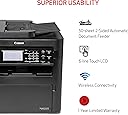
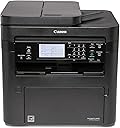
The Canon imageCLASS MF269dw II is a monochrome wireless laser all-in-one printer designed for small offices and professionals who demand fast, reliable printing, scanning, copying, and faxing. With a rapid 30 pages per minute output, automatic duplex printing, a 50-sheet duplex document feeder, and mobile device compatibility, it combines high-capacity toner efficiency with user-friendly wireless connectivity and advanced administrative features, making it a future-proof productivity hub.


| ASIN | B0BVGR1DZ3 |
| Additional Printer Functions | All In One |
| B&W Pages per Minute | 30 pages_per_minute |
| Best Sellers Rank | #168,290 in Office Products ( See Top 100 in Office Products ) #153 in Laser Computer Printers |
| Brand | Canon |
| Built-In Media | Cartridge 051 Black - 1,700 Page Yield, Documentation, Drum 051 - 23,000 Yield, MF269dw II Product, Power Cord & Fax Cable |
| Color | Black |
| Color Depth | 1 bpp |
| Compatible Cartridge | 051, 051 High Capacity Toner |
| Compatible Devices | Smartphones |
| Connectivity Technology | wired, wireless |
| Control Method | App |
| Controller Type | Android |
| Customer Reviews | 4.0 out of 5 stars 214 Reviews |
| Display Type | LCD |
| Duplex | Automatic |
| Global Trade Identification Number | 00013803357257 |
| Hardware Interface | USB |
| Initial Page Print Time | 5.1 seconds |
| Ink Color | Black |
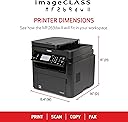
| Item Dimensions D x W x H | 16"D x 15.4"W x 15"H |
| Item Type Name | Multifunction Printer |
| Item Weight | 29.3 pounds |
| Manufacturer | Canon |
| Maximum Copies Per Run | 50 |
| Maximum Copy Resolution Black and White | 600 x 600 DPI |
| Maximum Copy Speed Black and White | 30 pages_per_minute |
| Maximum Media Size | 8.5 x 14 inch |
| Maximum Print Resolution Black and White | 600 dpi |
| Maximum Sheet Capacity | 250 |
| Model Name | imageCLASS MF269dw II |
| Model Number | 5938C005 |
| Model Series | imageCLASS |
| Number of Drivers | 1 |
| Number of Licenses | 1 |
| Number of Trays | 2 |
| Other Special Features of the Product | 1 Year Limited Warranty, 250-sheet Standard Cassette, 1-sheet Multipurpose Tray, 50-sheet Duplex Automatic Document Feeder, Auto 2-sided Printing, Auto Document Feeder, Auto-Duplex, Display Screen, ENERGY STARยฎ, EPEAT Silver, Network-Ready, Print up to 30 Pages Per Minute (BW), Touch Screen, Uses Toner 051 / 051 High-Capacity Toner, Wireless 4-in-1 (Print | Copy | Scan | Fax) |
| Output sheet capacity | 250 |
| Paper Size | Standard Cassette/Multipurpose Tray: 3 x 5 inches - 8.5 x 14 inches inches |
| Print media | Envelopes, Paper (plain) |
| Printer Connectivity Type | wired, wireless |
| Printer Output Type | Monochrome |
| Printer Type | Laser |
| Printing Technology | Laser |
| Processor Count | 1 |
| Resolution | 600 x 600 |
| Scanner Type | Sheetfed |
| Special Feature | 1 Year Limited Warranty, 250-sheet Standard Cassette, 1-sheet Multipurpose Tray, 50-sheet Duplex Automatic Document Feeder, Auto 2-sided Printing, Auto Document Feeder, Auto-Duplex, Display Screen, ENERGY STARยฎ, EPEAT Silver, Network-Ready, Print up to 30 Pages Per Minute (BW), Touch Screen, Uses Toner 051 / 051 High-Capacity Toner, Wireless 4-in-1 (Print | Copy | Scan | Fax) Special Feature 1 Year Limited Warranty, 250-sheet Standard Cassette, 1-sheet Multipurpose Tray, 50-sheet Duplex Automatic Document Feeder, Auto 2-sided Printing, Auto Document Feeder, Auto-Duplex, Display Screen, ENERGY STARยฎ, EPEAT Silver, Network-Ready, Print up to 30 Pages Per Minute (BW), Touch Screen, Uses Toner 051 / 051 High-Capacity Toner, Wireless 4-in-1 (Print | Copy | Scan | Fax) See more |
| Specific Uses For Product | Office |
| Total Usb Ports | 1 |
| UPC | 013803357257 |
| Unit Count | 1 Count |
| Warranty Description | 1 year |
| Warranty Type | Limited |
O**R
OK unit, works well.
Installation by way of cable was easy and fast. Prints are good and the scan function works well also. Instructions were comprehensive and clear. Be aware that this unit is quite large. About twice the size of my old defunct Epson EcoTank. Same foot print, but twice as high. This is my first home Laser Jet. Do not do a great deal of printing, but scan and send a lot. Liked the way the ones at work printed, thought I would give one a try. Canon website has the downloadable software and optional apps to complete the install. Package also comes with a disk for off-line installations. Satisfied, money well spent.
B**J
Canon makes great printers!
I was tired of buying 4 colors of ink for my CANON Maxify color inkjet printer especially when I rarely needed color prints. I bought this machine because I remember what great print quality laser print was in my first printer long ago. The laser cartridge extended is less than 4 ink cartridges and you get so many more pages - plus if a page gets wet, laser print does not run. I bought a less expensive version of this line with Canon and was happy with everything about it except that it didn't scan both sides of the page. I returned it and got this one which was $90 more but well worth it! Canon is so superior to the major brand with 2 letters that I bought for years. Canon isn't a nightmare to connect to wifi or keep connected. Works great with my android phone too!! I really like the paper capacity and that the paper supply is hidden by a door on the front face of the printer. This one has more administrative features I likely won't use but that is typical for me being a sole proprietor in my small business. It is nice to know those multi user features are there just in case..this machine is probably the last printer I will ever have to buy and I have confidence it will outlast me!
R**F
Constantly throws errors.
Three month update - it died completely. Started printing only random characters from any software and file format. I removed and reinstalled drivers for the up-teenth time. Didnโt fix it. Then it was no longer detected. Switched USB cables. No luck. Switched computers. No luck. Then it was detected by the generic drivers, and that was fine,,โฆexcept if I was printing more than three pages. Everything after the second page wasโฆโฆ.you guessed itโฆ..garbled characters. Other issues - had to scan in color (when scanning documents to PDF) because BLUE INK was not picked up by the scanner. This made for decidedly unuseable file sizes with large documents. There is just so much wrong with this printer and software. Absolute waste of too much money. I bought a cheap-o Brother instead and itโs working just fine. โโโโโโโโโโโ- Original review: Yes, it is faster than most printers at this price, has honestly some great features, tooโฆ..but I get errors every other print requiring me to shut it down and restart. Never any error messages or codes so I can troubleshoot, just "error printing." Also, scanning doesnโt work from the printer, I have to use the software on the computer. Also, also, I am not able to get double sided scanning to work, just copies. Printer is a fail and I wish I had opened it and tested it much soonerโฆunfortunately this is going to a classroom and we just started school. Should have returned it.
C**G
Great printer for the price
I print too much for an inkjet. I purchased this for home use. It connected quickly and works great. The only down side is the screen. It is black and white and looks like 1990's tech. I only look at the screen when I am setting it up, so it does not really matter. Print quality and speed are great!
O**Y
Call for help with Windows drivers
I spent hours trying to get it all to work. There are 3 separate sets of drivers (why they can't go in one folder is incomprehensible) and I couldn't get to the 2 for the scanning. I ended up calling the 800-OK-Canon and someone walked me through to find them and get the computer connected to receive the scans. Everything looks good now. The android app for the phone worked fine, but being able to put a paper in the machine and push it to my laptop is the best process for me. I have been an hp customer my entire life. But I "broke" my access to the Microsoft Store by downloading an app I needed. HP stores all drivers in the 3 stores and not on their website I found out when I bought a replacement printer. I picked Canon because they have the drivers on their website and the good reviews on this one. I am shocked at the quality of the print. I had no idea how shitty hp printers were! Not to mention the line down all my copies and scans. The Canon manual and interface are pathetic. But if it does what I need, I don't care.
B**N
Top-Line
Love this printer, works like a charm. Prints 31 copies per minutes, both sides if you like, which I do. Buy one you will love it.
A**N
Utility
Una muy buena ayuda en mi oficina y calidad de impresiรณn
P**L
A marvel of overengineering to the trash
UPDATE: This device is hilarious Trash, and will be thrown in the garbage, having only printed roughly 20 pages. The scanner function somehow needs so much 'support' as to required the network IT skill that while I can accomplish (with multitudes of trial and error), it is simply a waste of time and energy. My $150 Epson from 15 years ago somehow just scanned, and if the USB was connected to a device- used that device as a hard drive. It also could have a USB simply pugged in to it, as the engineers obviously knew that a complex-yet-tiny touch screen would be an absolute waste of tech if the appliance was so overthought as to required constant IT attention. Canon should be embarrassed, I'll definitely never buy a single thing from them again. ORIGINAL REVIEW: The quality level of Canon printers has been -entirely- destroyed, by the bureaucratic need to prevent this product from simply being plugged in and starting, like any other modern appliance. DO.NOT. BUY. I'm no slouch but even if you get it running, the chance you are overwhelmed with idiotic minutia at the first sign of a needed configuration change is approximately 100%. If I decide to throw my new, unused and almost completely useless printer in to the street (a likelihood), I'll absolutely post pics, along with a step-by-step of how I navigated the comedic tragedy that is this printers touchscreen nightmare interface, it's tiny paper instructions, and finally- kafkaesque online instructions. Buy it for your enemies
A**X
Great unit.
These imageclass units are very good an reliable. I only had issues with bigger ones MF414dw, 2 of them needed fuser replacements in a first 18 months. Previous models and latest MF445dw are also good.
A**N
printer is best ,but
driver install may be problem.
T**S
Good value
Functional laser printer. Good quality printing. Not take too much room. Not able to use too much yet to give 5 stars. Interface could be a little easier.
C**E
Works as intended
Not fancy but does all of the basics well. Might get another for the home office. Takes up a reasonable amount of desk space
Trustpilot
2 weeks ago
1 week ago