We remain fully operational. Our teams are working around the clock to ensure your deliveries continue safely.

DOWNLOAD THE APP


Customer Services
Copyright © 2025 Desertcart Holdings Limited
DOWNLOAD THE APP
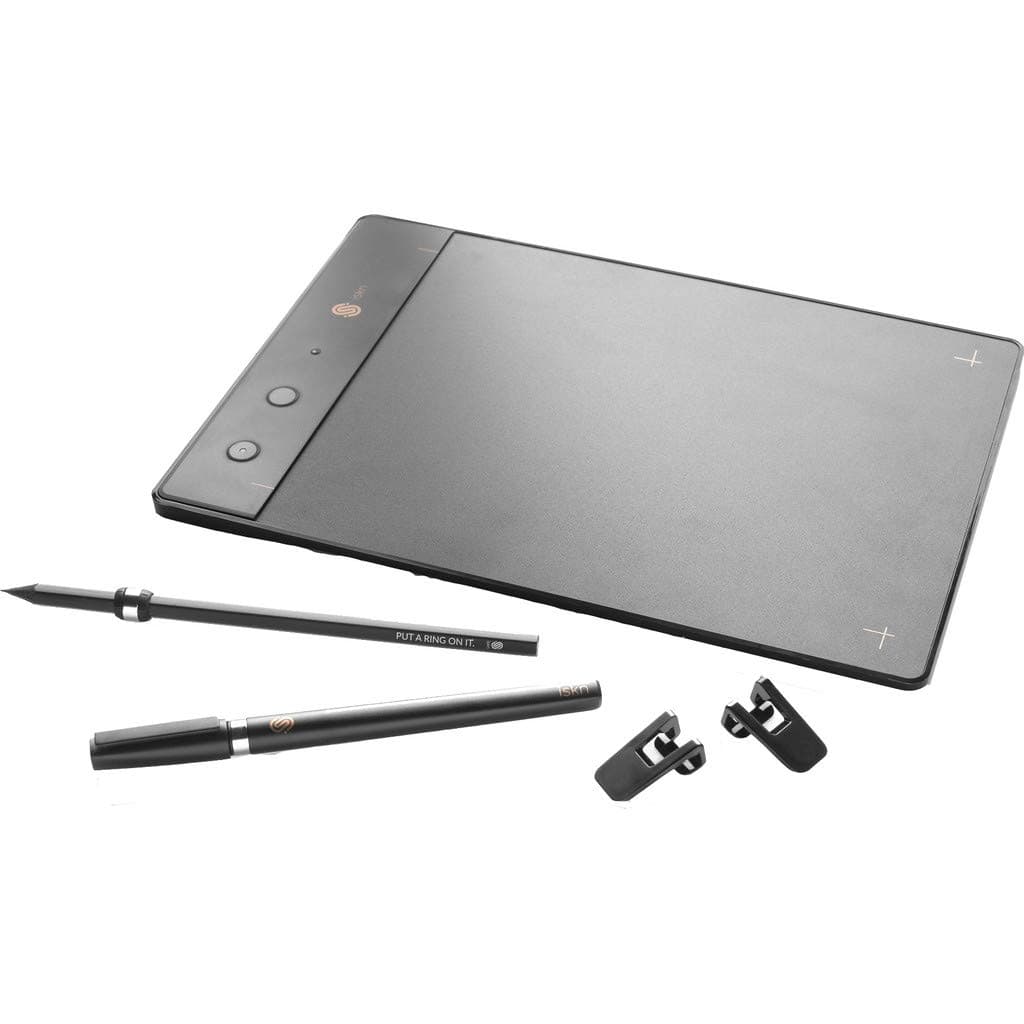
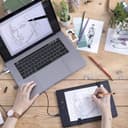
✏️ Elevate your pencil game—where analog meets digital brilliance!
The iskn Slate 2+ is a sleek, lightweight graphic tablet that digitizes your pencil and pen sketches in real-time on any device. Compatible with all paper types up to 7mm thick, it offers seamless integration with major OS platforms and professional software, empowering creatives to capture, enhance, and share their art effortlessly.


| ASIN | B0751RBN9R |
| Active Surface Area | 31.08 centimetri quadrati |
| Box Contents | 1 pencil with removable ring (S size), 2 clips, Slate, USB Cable, inks black Pen with integrated ring, sketchpad |
| Brand Name | iskn |
| Colour | Black |
| Compatible Devices | Android devices (list of compatible devices on iskn.co), Windows (from Windows 7 or newer version), iPad (from iPad 3 or newer), iPhone (from iPhone 6 or newer), macOS (from OSX 10.10 Yosemite or newer) |
| Customer Reviews | 3.8 3.8 out of 5 stars (516) |
| Display Type | LCD |
| Global Trade Identification Number | 03760261070163 |
| Item Dimensions L x W | 21L x 14.8W centimetres |
| Item Type Name | Pencil & Paper Graphic Tablet |
| Item Weight | 381 g |
| Manufacturer | iskn |
| Model Name | the Slate 2+ |
| Model Number | SLATE2PLUS |
| Native Resolution | 2560x1660 or higher |
| Network Connectivity Technology | Bluetooth, USB |
| Operating System | iOS, Android, Windows 10, MacOS |
| Pressure Sensitivity | 4092 Levels |
| Product Features | Portable |
| Product Warranty | 2 years |
| Screen Size | 0.27 Inches |
| Specific Uses For Product | business, personal |
| Target Audience | Teacher |
M**.
Great for hobbyists
Got this for my partner, he's been enjoying it a lot, finds it straightforward to use and it connects well with the app and PS. Accurate product description, all functions are as detailed, what you see is what you get.
D**N
Drawing pad
Ok, but never really got on with it as you can’t see where you are
A**A
The tablet itself was of good quality and it arrived for Christmas
The tablet itself was of good quality and it arrived for Christmas, which I was very pleased about. The only problem with the tablet that I have is that it kept losing connection in the beginning, but once I managed to figure out why then it worked well. The set up of it was quick and easy for me (I work in IT), but my family wasn't able to connect to it and required help quite a lot with it in the beginning.
A**Y
Love it recommend to creatives.
I love this product as a fashion designer and lover of drawing, the drawing is very accurate and the all three functions work well my favourite is probably of screen mode, and the freedom of paper to pc so effortlessly. Its a joy to be able to use paper and have the freedom to edit on photoshop ect. I Would recommend this, especially to artist and people who love to draw and be creative.
A**S
Useless if you want SVG
I work with vectors on a daily basis. Drawing is part hobby, part work, and so I have several vector drawing apps on my iPad and on my Mac. But I miss the texture of paper. The Slate looked ideal, I could sketch on paper, out and about in places where the backlight of my iPad would be intrusive, and keep those sketches while later reusing their digital version to make up any final compositions. I could keep layers separate while drawing, which would make this far more efficient than any scan. Except, despite the advertised compatibility, SVG is not properly supported by the Slate 2+. I unboxed the device and set it up on my Mac. This was relatively straightforward, and the calibration seemed reasonable, it functioned well. I scribbled a few bits with pen and pencil, all good. I tried the screenless mode and then uploaded the drawings, still good. But the editor is very basic, and I have my preferred vector workflow already, so I exported as SVG and sent the file to my iPad. My vector app said the file was corrupted. Long story short, I found that none of the three Vector drawing Apps I had could open any files from an SVG export from the Slate. Inkpad and ProtoSketch both said the file was corrupt and iDesign just crashed. Importing SVG files into these are a normal part of my workflow. I tried Inkscape on my Mac, it manage to open the file, but presented it as one object, no distinction of layers, no editing possible. I had to convert it and resave as plain SVG before anything worked, and that resaved file was then fine too with my iPad apps. But I do most of my drawing on my iPad, having to export files via desktop was not at all convenient, I wanted to export while on the move, but neither files from the Imagink desktop upload, or uploaded via the Imagink iOS app were openable in any of my iPad vector apps. So I contacted Iskn (they have a message centre within their iOS app but no email listed on their website) It took about a week and several “please reply” prompts before they replied that I was correct, the SVG files would need to be converted by software like Inkscape before they could be edited or used in apps that import in SVG format. They appeared unconcerned about this and were sorry I had a problem with it. I explained that this meant their device was of no use to me, and that the device was not as described, and I trusted that they would update their marketting accordingly. Consequently, I am now returning it to Amazon as not being as described. I came to the Amazon listing via the Iskn website which declared a 30 day try /return option, so fingers crossed my return goes smoothly. I feel I have wasted a lot of time on something that had good hardware, but was let down by marketing it as having a function that it did not.
C**E
Interesting concept and will update on this review later
Interesting concept andI think you're limited to using a5 paper. My only criticism is the constant warnings that pop up on the imagink app about magnetic interference. I think its for precaution so you don't end up destroying your slate with items that are magnetic . I read all the instructions and did the setup correctly, yet every 10 mins or so the drawing program would pop up with a warning about a magnetic item disrupting the drawing process on my slate. Im not sure about this but I think you are limited to drawing on an a5 paper which I am slowly getting used to. Its still too early for me to give a thorough review on the slate but Im still getting used to this device, as this is my first time operating a graphics tablet. The reason I purchased this tablet was for the detachable ring feature which I found pretty cool. It also has an inbuilt Wacom feature which requires a graphic pen with a separate purchase . As I stated before I have never used any form of a Wacom Tablet before so this is all very new to me. I am using the slate to draw fashion sketches which I would like to import onto my instagram account . which saves time instead of tracing and scanning each and every individual sketch that I create. I am undecided about how I feel about the slate but i will update on this review later on. So far its great I just need to remeber not to put magnetic items around the Slate when I am using it. The Iskn Company are quick to respond to any queries which is great.
A**R
VERY BASIC...Does what it says it will
Soft ware still a bit "Iffy" ..you can end up with dribbles across your screen/paper..works well with other software paint/drawing applications.
R**1
Unboxing +++++++++++++++++++ Die Verpackung des Slates finde ich persönlich sehr gelungen, sie ist hochwertig und edel anzusehen. Das Interieur ist übersichtlich und gut angelegt mit allem, was man braucht, um das Gerät sofort in Betrieb zu nehmen: das Slate, ein Bleistift mit einem magnetischen Ring versehen, der sich abnehmen lässt, ein Kugelschreiber mit einem fixierten Ring, ein Zeichenblock in A5 und ein Kabel zum Verbinden mit einem Computer. Tablet und Accessoires +++++++++++++++++++ Das Slate ist komplett schwarz und gut verarbeitet, es ist schön leicht und deshalb gut geeignet für unterwegs. Es gibt einen seitlichen Knopf zum Anschalten und zwei Tasten obenauf, die zum einen eine neue Seite aufrufen können oder eine neue Ebene im Zeichenprogramm ImagInk hinzufügen. Wenn man die Slate als Grafiktablet benutzt, dienen die Tasten zum Wechsel zwischen Zeichnen und Radieren. Außerdem dienen sie zur Kalibrierung der eigenen Stifte auf dem Tablet. Zurzeit wird die Slate mit dem gelieferten Kabel an einen PC angeschlossen; ich habe beim Kundenservice nachgefragt, anscheinend wird an einer kabellosen Verbindung gearbeitet. Mobile Geräte werden per Bluetooth verbunden. Beide Verbindungen haben gut funktioniert, bei meinem iPad musste ich es ein zweites Mal versuchen, aber danach ging es ohne Probleme. Man kann das Slate auch ohne Bildschirm verwenden, das werde ich demnächst einmal ausprobieren, wenn ich unterwegs bin. Der Bleistift ist von einer guten Qualität, es macht Spaß, mit ihm zu zeichnen. Der Kugelschreiber liegt angenehm in der Hand und schreibt gut. Ansonsten ist ja das Schöne am Slate, dass man seine eigenen Stifte benutzen kann! Dafür braucht man dann den Ring, der auf dem Bleistift mitgeliefert wird. Er wird auf etwa 4cm Entfernung von der Spitze angebracht und muss kalibriert werden. Ich habe bei iskn noch eine Sleeve, eine Hülle, bestellt zum Verstauen des Slate mit meinem iPad, die finde ich besonders schön, da sie nämlich vegan ist!! Installation +++++++++++++++++++ Auf der Website des Herstellers stehen im „App Center“ zwei Programme zur Verfügung, mit denen das Slate verwendet werden kann: das Programm ImagInk, in dem man seine eigenen Stifte und jedes Papier verwenden kann und der Konfigurator, um es mit anderen Softwares zu verwenden. Das Herunterladen ging ohne Probleme. ImagInk gibt es für Windows, macOS, iOS und es gibt auch eine Beta Version für Android. ImagInk ++++++++++++++++++ Beim Öffnen des Programmes und Anschließen des Slates wird man darauf hingewiesen, dass es ein neues Udpate gibt, das ich sogleich vorgenommen habe. Geht recht schnell, ist in wenigen Sekunden erledigt. Nun kann es losgehen! Es gibt mehrere Pinsel zur Auswahl wie Bleistift, Kalligraphie, Kreide oder Airbrush, sehr echt nachempfunden. Darunter kann man die Parameter auch einstellen. Zuerst dachte ich, dass es nur die im Programm vorgegebenen Farben gibt, aber tatsächlich kann man sich jede Farbe zusammenmischen, wenn man doppelt auf eine der Farben klickt. Speichern kann man seine Zeichnungen in PNG, JPEG, SVG und PSD. Was ich echt cool finde ist das Replay Video von der eigenen Zeichnung!! Entweder zeichnet man mit den mitgelieferten Stiften oder mit seinen eigenen, auf die man den iskn Ring aufsteckt. Die Zeichenerfahrung ist wirklich beeindruckend – meine analogen Zeichnungen werden in Echtzeit wirklich detailgetreu im Programm abgebildet! Wenn man zwischen mehreren Stiften wechselt, muss man dazwischen immer kalibrieren, da es sonst Probleme mit der Präzision geben kann, das stört mich manchmal im kreativen Fluss, aber gut, damit kann ich leben. Also, ich bin schon ein bisschen fasziniert davon, wie Magnetismus so funktionieren kann. Daumen hoch also für die Leistung des Slates! Grafiktablet Konfigurator +++++++++++++++++++ Ich habe Photoshop auf meinem Computer und das Slate damit auch probiert. Es ist zum Beispiel möglich, in ImagInk anzufangen, die Zeichnung als PSD zu speichern und anschließend damit weiter in Photoshop zu arbeiten. Da ich mir aber den Tip nicht gekauft habe, den Eingabestift, habe ich es nur kurz mit einem meiner Stifte probiert. Das funktioniert auch, aber man muss in jedem Fall Papier drauf legen, damit man eben das Slate nicht anmalt Es wäre schön, wenn man die Tasten der Slate für sich programmieren könnte, vielleicht ergibt sich da ja noch was bei iskn. Fazit ++++++++++++++++++ Ich bin mit meinem Kauf soweit sehr zufrieden, weil die Marke iskn nicht so bekannt ist, war ich erst unsicher, aber jetzt bin ich froh, den Schritt gewagt zu haben. Vom Preis-Leistungsverhältnis finde ich das Slate nämlich unschlagbar und kann es nur jedem weiterempfehlen, der auch digital mit Stift und Papier zeichnen will! Sollten Probleme auftreten, ist der deutschsprachige Kundenservice per Chat gut zu erreichen und auch sehr effizient.
D**S
I was looking for an affordable way to draw digitally but I also felt like there would be a disconnect in my brain to draw while looking at a screen. I've had my Slate 2 for about 1 week now and my goal was to recreate my physical drawings, digitally so that I could animate them. Let me start by saying if you are looking for highly professional tablet, this is not it. This IS great for a beginner, someone looking to familiarize themselves with digital drawing, coloring or even a note taker. There are 4 settings that you can use this amazing tech! USB connected directly to PC/Mac, Bluetooth connect to your Android/IOS device, drawing with paper, drawing/writing/coloring without paper. You are able to use your own drawing appliance as long as the circumference fits the provided ring, this is super special and super sweet! You can take notes/draw disconnected and import them to your device when ready. The possibilities are endless and if you are easing into digital drawing I feel this is the BEST machine to help. It's not all peaches and cream however there are a few things you have to get the hang of such the distance in which you hold or place the ring, keep certain devices a safe distance so as to not interfere with the magnetic signal, I'm still trying to get the hang of drawing vertically or horizontally as I normally place my paper at an angle but this is minor. If you are using Photoshop or another compatible program you may need to adjust a few settings in order to get a nice smooth line but the software they provide Imagink captures and works well right out of the box. TIP. Photoshop users, you might want to disable your ruler as it seems to add a slight lag. All in all I thing this baby is amazing, a great buy and very versatile. The only reason I will upgrade at some point is because it doesn't seem to work well with some other programs like Harmony Toon Boom. Oh and definitely purchase the tip, it's worth it as you will want to work without paper if you are coloring, using one colored pencil/pen doesn't work well and you'd need to buy several extra rings or replace every time you changed colors if you want to use the colored pencils with paper and color digitally as well.
Y**G
like it.
M**.
Bel prodotto, relativamente facile da usare, perfetto per docenti tenuti alla didattica a distanza
C**A
Responde totalmente a mis expectativas, muchas gracias
Trustpilot
3 weeks ago
2 weeks ago