🚀 Elevate your workspace with wireless precision and marathon battery life!
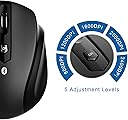
The JETech M0884 Bluetooth Wireless Mouse offers a high-definition optical sensor with adjustable 2400 CPI sensitivity, Bluetooth 3.0 connectivity with a 10-meter range, and an impressive 6-month battery life powered by a single AA battery. Compatible with PC, Mac, and Android tablets, this slim, quiet mouse is designed for professionals seeking reliable, long-lasting wireless performance.

| Brand | JETech |
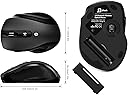
| Product Dimensions | 10 x 7 x 3 cm; 132 g |
| Item model number | 0884-Mouse-BT-bk |
| Manufacturer | JETech |
| Series | M0884 |
| Colour | Bluetooth Mouse - M0884 |
| Power Source | Battery Powered |
| Hardware Platform | PC |
| Operating System | Windows, Mac OS |
| Average Battery Life (in hours) | 6 months |
| Are Batteries Included | No |
| Item Weight | 132 g |
| Guaranteed software updates until | unknown |
G**T
Reliable and tough
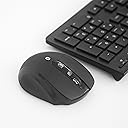
Voluntary review of a product that I purchased and paid for.Purchased in September 2020 as (at that time) essential peripheral device for my tablet.When working away from comfort of home office, on a small device (10” screen), it felt really uncomfortable to use touchscreen while emailing delivery reports or data spread sheets. Tablet alone is just not enough when fielded to work in the middle of nowhere.I have acquired mouse and keyboard. Call it a desktop/laptop habit but work got much easier ever since.Mouse is exactly as described by seller. Strongest factor of my purchase decision was (no doubt) price £8.98, cheapest I could find at that timeI admit by that I didn’t expected much from that device and… I was for a surprise.Mouse is very energy efficient (it still runs on a battery installed in September 2020), ergonomically designed, delivering smooth performance and definitely stands out as one tough peripheral device.For days on end it had to cope with work on rough surface, dirt, dust, damp or hot air, interference of other devices connected via Bluetooth to tablet or working nearby, you name it.I’m more than just satisfied with its performance and durability (just slight signs of wear and tear, please see the pictures). It still runs on the battery placed in September 2020! Although is not used as frequently as before.It is same efficient while connected to my laptop (Acer Aspire, MS Windows 10). I can’t see any difference between its and wired mouse or touchpad performance.I must admit that I have no comparison to other similar devices available on the market but from my experience this mouse is really good and I would recommend it to anyone looking for that kind of device.
J**A
Excellent bluetooth mouse.
I already owned the Microsoft Sculpt Comfort bluetooth mouse, which a consider a very good one but, althoug the size is nice for me it's too heavy with 2 AA batteries (it doesn't work with one battery as the Microsoft wireless 900 do for example). So, after reading some reviews, namely at youtube, I decided to buy this one. I was afraid the mouse would be too small for me but after some time working it's really a very nice and ergonomic mouse and in the end I loved it. The pairing it's a blink, very easy to do and smooth. So far the signal is very stable and I didn't find irregularities as some reviewers complains. One thing I find interesting to mention it's that I didn't need to remove the bluetooth connection of the Sculpt Comfort which means that I may use either one. To conclude I find the mouse excellent with a remarkable ratio Quality/Price and I strong recommend it to anyone looking for a bluetooth mouse. There is no need to expend a lot of monney,just stop looking as you already found it.
P**R
Great product!
The mouse works great! Pairing was easy, battery life is extraordinary, mouse works on almost every surface. It's small enough to take everywhere, yet not too small, so it fits comfortably in your hand. Also - it's bluetooth, so doesn't take any USB ports, if you have BT built in.The only issue I have with it is that after going to sleep mode it isn't ready immediately when I want to use it again - it takes about half of a second to reconnect.
P**.
NOW WORKS WITH IPAD! (With IOS 13.4)
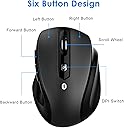
Despite the description saying, categorically, that this mouse will NOT work with an iPad, I bought one anyway (don’t ask!). Sure enough, I couldn’t even get it to connect via Bluetooth, to any Apple device, let alone get it to work as any form of mouse! Worked fine on my PC though, straight out of the box (once I’d put a battery in).After a bit of Googling, I found some information regarding my current IOS versions. Apparently, it ‘should’ work (as should any Bluetooth mouse) under IOS 13.4. So, I then updated the IOS on both iPads.Eureka!The mouse was then found on Bluetooth immediately, but with a different name, depending on the device; mouse on iPad Air, JETech 0884 on iPad 7th Gen. Just press the RoHS button on the bottom of the mouse, the red light flashes on the top, and it’s in Bluetooth connect mode. The red light goes out once it’s connected.The mouse is very comfortable to use, with the normal left and right buttons. There are two extra button on the left side, handy for a thumb click (if you are right handed, of course!?!). The scroll wheel works well (but see later) and you can also click it for extra functionality. So, five buttons, that can all be configured to do different things on Apple devices! (Yes, I know!)The last button on the top also changes the resolution, and works very well. It scrolls though 5 DPI settings from slow and steady to super fast!I do have two minor issues that are more to do with Apple than the mouse:The scroll wheel seems to work the opposite of what I’m used to, but still work perfectly for scrolling up and down lists, documents and web pages. I haven’t yet found a way to ‘reverse’ that action...To get full button functionality on an IPad, you appear to have to use ‘assistive touch’. Works incredibly well, but leaves a transparent grey ‘button’ on the screen (although you can move this to one corner, just out of the way). Perhaps I’ll get used to it...I can’t comment on battery life as I have only had it a short time. It takes one AA and it will be simple enough to use a rechargeable.As far as sleep mode, I left it quite a while before I came back to it, and as soon as I moved it or pressed a button, the iPad ‘woke up’.So 5 stars for the mouse, 4 stars for Apple...If you want a Bluetooth mouse to use with and iPad (or a PC) you can’t go wrong with this, especially at this price!
Trustpilot
3 weeks ago
4 days ago