🚀 Print smarter, faster, greener—because your office deserves the best.
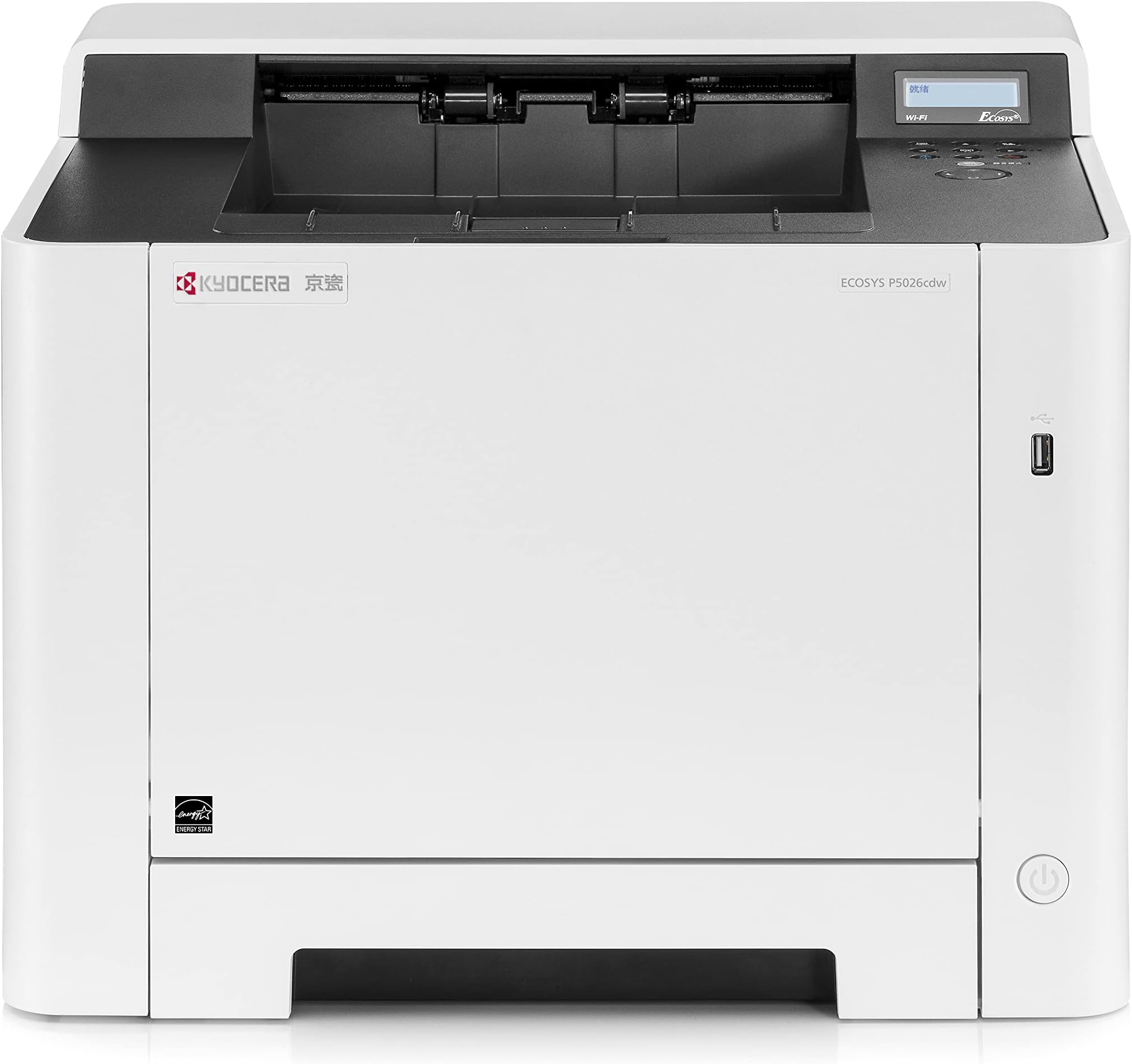
The KYOCERA ECOSYS P5026cdw is a high-performance color laser printer delivering up to 27 ppm with sharp 1200 dpi resolution. It features standard duplex printing to reduce paper waste, flexible media handling up to legal size, and robust connectivity options including Gigabit Ethernet, USB Host, Wireless, and Wi-Fi Direct. Mobile printing is fully supported via AirPrint, Google Cloud Print, and KYOCERA’s own app. With 512 MB memory and ECOSYS long-life consumables, it offers efficient, cost-effective printing tailored for busy professional environments.


| ASIN | B01M35FV54 |
| Additional Printer Functions | Scan |
| B&W Pages per Minute | 26 ppm |
| Best Sellers Rank | #529,714 in Office Products ( See Top 100 in Office Products ) #692 in Laser Computer Printers |
| Brand | KYOCERA |
| Color | Black |
| Color Depth | 24 bpp |
| Color Pages per Minute | 26 ppm |
| Compatible Devices | Smartphones |
| Connectivity Technology | Ethernet, USB, Wireless |
| Control Method | Remote |
| Controller Type | Push Button |
| Customer Reviews | 4.0 out of 5 stars 189 Reviews |
| Display Type | LCD |
| Dual-sided printing | Yes |
| Duplex | Automatic |
| Global Trade Identification Number | 00632983036631 |
| Hardware Interface | Ethernet |
| Ink Color | color |
| Item Weight | 21 Kilograms |
| Manufacturer | KYOCERA |
| Maximum Copies Per Run | 10000 |
| Maximum Copy Resolution Black and White | 1200 dpi |
| Maximum Copy Resolution Color | 1200x1200 dpi |
| Maximum Copy Speed Black and White | 27 ppm |
| Maximum Media Size | 8.5 inch x 14 inches |
| Maximum Print Resolution Black and White | 1200 dpi |
| Maximum Sheet Capacity | 550 |
| Maximum print Resolution Color | 1200 x 1200 dpi |
| Model Number | 4105804 |
| Model Series | ECOSYS |
| Number of Drivers | 1 |
| Number of Ethernet Ports | 1 |
| Number of Licenses | 1 |
| Number of Trays | 1 |
| Other Special Features of the Product | Ethernet,Wireless |
| Output sheet capacity | 150 |
| Paper Size | 8.5 inch x 14 Inches |
| Power Consumption | 375 Watts |
| Print media | Paper (plain) |
| Printer Connectivity Type | Ethernet, USB, Wireless |
| Printer Output | Color |
| Printer Output Type | Color |
| Printer Type | Laser |
| Printing Technology | Laser |
| Processor Count | 1 |
| Resolution | 1200 x 1200 |
| Scanner Type | Automatic Document Feeder (ADF) |
| Series Number | 4105804 |
| Special Feature | Ethernet,Wireless |
| Specific Uses For Product | small business |
| Total USB 2.0 Ports | 1 |
| Total Usb Ports | 1 |
| UPC | 632983036631 |
| Wattage | 375 watts |
A**I
It's all about the print quality!
I replaced an older Lexmark color laser, as the cost of the replacement parts just didn't make sense. I did a lot of research and stumbled upon the Kyocera, as it was one of the very few that offered 1200 DPI print quality when running at half speed. I'm running the printer via Ethernet, and while the limited front panel is a bit of a challenge, once you print the printers "Status Page" and get the IP address, you can then fully manage the printer via the web browser using the default login and password of "Admin" and "Admin." While it came with a CD-ROM (what's that to some of the younger people), proper protocol is to get the latest drivers from the Kyocera website. I am running Mac OS 10.14.6 (Mojave) on a MacPro6,1 (TrashCan, yes, in 2024). The driver install went without any hitches and the test prints I did look great. I'm using HP Premium Choice Laser paper (32 lb) which has a nice finish to it, which I purchased at my local Office Creepo. Note: You definitely need two people to pick it up out of the box and to keep it level. I was impressed with the box design, as it had two inner cardboard handles which made it very easy. I recommend this printer (YouTube video to follow soon).
M**I
Excellent crisp printing
The GOOD: - very sturdy construction - very fast - excellent print quality The BAD: - small TWO line, hard to read display - very cumbersome and hard to use menu
C**N
Great Printer!
Great printer...really fast delivery & excellent packing!
A**Y
Almost impossible to connect to a network
Two days of phone calls to technical support, multiple youtube videos watched, and working through the owners manual and I still can't get the thing to work. Yes, it will work with a printer cable, but I bought it to print from my laptop wherever I'm at in the office. Likewise, it will print with a direct wi-fi connection, but precludes internet use when connected to the printer. When other reviews say: "Cumbersome menu controls", what they mean is: cumbersome to the point of inoperability.
G**Z
Buena y rapida
Muy buena calidad y excelente servicio
J**N
Helpful Information
I see reviews on here that are not very good.....along with some good ones as well. People, do yourself a favor and purchase from a local hardware dealer. You might pay a tad extra but all the things you give this printer negative reviews for would most likely be handled by the installing dealer. Yes, this printer can be made to print in B/W only, if you run out of color toner, but this is not the default setting. You can change this behavior from within the printer's self hosted web page. These devices are super simple to configure but do yourself a favor and configure it from the self hosted web page. I am not kidding when I say these are nice little printers and are more than capable of performing, as described in the Kyocera flyers. Please, next time you purchase a printer purchase it from a local vendor with support.
N**I
Not User Friendly
I would definitely advise against purchasing this printer if you are not computer savvy! I have built computers before and have a good understanding of how they work. Even setting it up was confusingly difficult. There are at least a dozen confusing steps to setting it up Wi-fi. Don't try to print an envelope with it. IT'S VIRTUALLY IMPOSSIBLE! There is much more to say but I have already spent too much time with it today.
N**E
Junk printer
Don't buy its piece of junk
M**M
print i.h.a. keurig
Bij > 100p. waren sommige regels op een paar bladzijden in zwartwit sommige niet helemaal strak, maar verder keurig. Had letters van meer dan 90 punten en die waren mooi strak zwart. Een aantal pagina's met ook kleur zien er 'helemaal echt' uit. Voordeel: geen verstopte printer inkt meer - eindelijk doet ie 't gewoon.
P**I
Perfekter Soho-Farbdrucker
Wir mussten einen Canon-Tintenstrahldrucker ersetzen, der nur vier Jahre gehalten hat und schon in dieser Zeit dauernd Mucken machte. Dagegen ist der Kyocera Ecosys P5026cdw ein echte Bereicherung für unser Büro. Die Lieferung war blitzschnell und die Installation verlief in unserem Win10-Netz ohne Probleme. Der Drucker arbeitet leise, schnell und zuverlässig und macht einen halbwegs soliden Eindruck. Für einen Preis um 260€ erscheint der Drucker als ziemlich gutes Geschäft. Nicht ganz überzeugt hat uns bis jetzt der Tonerverbrauch. Der liegt auch bei reinem SW-Druck deutlich höher als bei unserem alten Kyocera-SW-Drucker FS-3920DN. Aber da es unser erster Farblaser ist, haben wir keine Vergleichsmöglichkeit. Auf jeden Fall hat jetzt der Nerv mit den verstopften Düsen und den ewigen Selbstreinigungsvorgängen des Tintenstrahlers ein Ende.
A**S
Excellente imprimante
J'ai reçu très rapidement mon produit, un jour avant la date indiquée. Le livreur très aimable m'a porté mon colis jusqu'au premier étage. L'emballage est parfait, carton très résistant pas abimé, à l'intérieur le produit est très bien conditionné et protégé jusqu'au petit sachet contre l'humidité. Une fois sortie de son carton et mise en place à l'endroit dédié, je l'ai branché à mon ordinateur Mac qui l'a trouvé tout de suite. Par acquis de conscience je l'ai installé par le biais de son programme : 3 minutes après elle fonctionnait. Je suis ravie de mon achat, imprimante très rapide, effectivement silencieuse et la qualité d'impression est remarquable aussi bien en noir et blanc qu'en couleur. Je recommande vivement !
T**R
kyocera cera whatever will be will be
I was in the market for a decent laser printer and stumbled across this as they're a common sight in schools. Practicality: It's quite big compared to the average printer and has some meaty weight to it, so find it somewhere nice to live. The P5026cdw has a smidge faster printing rate over the other models offered here, and wireless (2.4GHz only sadly). But what I love most about it is you can plug your FAT32 formatted USB in, the 'USB memory' tag pops up on the screen and you can OK it and cycle through. (Note: I've so far only seen it do pictures and pdfs, it wasn't able to detect .doc or .docx or .odt etc). This is barely a problem as I prefer working with pdfs anyway, and libreoffice (and presumably word etc) have a button on the 'ribbon' in the program to 'export as pdf' easily. Key though is that this setup means you can forget all about wifi/setting up anything and just stick your pdf on a usb pen, wander over to the printer, find your document and hint OK. Price: I've seen the price for the P5026cdw waver around the £260 mark, but I was very lucky to snatch a bargain on cyber monday for £180 - which is an excellent price for it. The printers are segmented on the market in that buying the more expensive model here means your refill ink cartridges are the ones that go further (I think it was '4000 vs 2500 or 1500' sheets), which is amazing coming from a deskjet (which typically nets you a few 100s for the ink's lifespan and may be prone to drying out. Inkjet ink is a powder). I look forward to seeing how long the cartridges last - was only looking for a monocolour one to test out, but this printer does it all and very neatly. Settings: I haven't tested the wifi yet, but there are a couple of options to fiddle with. By default, it was set to print each page separately, but TIP: you can select print options to do duplex > on long side (or 'short side' but 'long side' is what you want if you want them back to back). A duplex printer is great for timesaving and you don't have to manually feed anything, you can leave 100s of sheets in the casette when you buy the paper and be done with it! One of the best selling points is how efficient it is. I've not seen many get the eco stamp of approval and leafing through dozens of printer manuals when deciding on a model to buy hints that this model is indeed well made in that department. It does have to 'warm up' to do its thing for a minute (lovely toasty paper!) but it has a 'quiet mode' button and is extremely quiet anyway. Long gone are the 90s with their EEUUGHGH URGHGHGHG EEEEEUUHG URGGHHH lol So far so good :)
A**Z
NO es difícil de configurar
05-oct-2021 Kyocera Ecosys P5026cdw Imprime muy muy bien, es rápida y es silenciosa, y el tamaño no es demasiado grande para una laser color (yo la uso para casa). A 1200 ppp las fotos salen bastante decentes. Ojo! ten cuidado al sacarla de la caja: tiene dos agarraderas de cartón duro para las manos para poder levantarla, pero a mí se me rompió una de ellas por el peso y cayó. Es mejor levantarla desde abajo con los brazos aunque pesa mucho. En mi caso la he conectado así: WiFi desactivado; WiFi-direct activado (para el iphone y el ipad); cable USB no; cable Ethernet si (cat.7). El otro lado del cable Ethernet lo conectas a tu router o un switch. Con las teclas de la impresora imprimes la "página de estado", en la cual viene la dirección de IP que ha tomado en la red (en mi caso 192.168.1.244), y ya no tendrás que volver a usar las teclas y la pantallita. Abres un navegador (Chrome por ejemplo), tecleas la IP, y se abre la página de configuración de la impresora. Todo se configura desde aquí fácilmente. (Login: Admin - Password: Admin) Nota: si no tienes router o switch (porque no tienes internet en casa o por lo que sea), y la usas como impresora esclava de un solo PC conectándola con el cable USB, entonces si que será un tostón de configurar.
Trustpilot
1 month ago
1 month ago