๐ Scan Smart, Live Better!
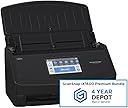
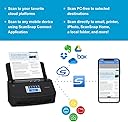
The ScanSnap iX1600 is a premium color duplex document scanner designed for both Mac and PC users. It features a user-friendly 4.3-inch touch screen, customizable profiles for up to 30 users, and Wi-Fi connectivity for scanning directly to smart devices or cloud services. With a 4-year protection plan, this scanner is perfect for individuals and teams looking to enhance their productivity and streamline their document management.


| ASIN | B0B23XVXY2 |
| Best Sellers Rank | #808,054 in Office Products ( See Top 100 in Office Products ) #918 in Document Scanners |
| Brand | ScanSnap |
| Color Depth | 24 bits |
| Connection Type | USB, Wi-Fi |
| Connectivity Technology | USB, Wi-Fi |
| Customer Reviews | 3.5 out of 5 stars 19 Reviews |
| Item Dimensions D x W x H | 6.3"D x 11.5"W x 6"H |
| Item Type Name | Scanner Bundle |
| Item Weight | 7.5 Pounds |
| Manufacturer | PFU Limited |
| Media Type | USB |
| Minimum System Requirements | Windows 11 / 10 (352-bit / 64-bit) and macOS Catalina 10.15 or later |
| Model Name | ScanSnap iX1600 Premium |
| Optical Sensor Technology | CCD |
| Product Dimensions | 6.3"D x 11.5"W x 6"H |
| Resolution | 600 dpi |
| Scanner Type | Business Card; receipt; photo, Document |
| Standard Sheet Capacity | 50 |
| UPC | 097564313660 |
| Unit Count | 1.0 Count |
| Warranty Description | 4 year manufacturer |
| Wattage | 17 watts |
R**B
Dare I say, life changing!
I have a boutique law firm that is pretty much paperless but we still get a lot of mail and have needs to scan! Before buying this amazing machine, I was struggling with so much incoming mail and constant issues with scanning multiple or duplex pages. I have two great copiers but the scanning was causing so many problems and jams etc. and I was thinking of getting another printer! So happy someone told me about this machine. Iโve had it for almost a year snd I have zero complaints! It is outstanding. Very Easy to use. Small footprint. Software is easy to use. You can set up how you want the documents are titled - it isnโt perfect but it will Pick up the date and the top header. Knows and recognizes to scan in duplex. Scans Color. OCR. And it is Super fast. Maybe jams once in a blue moon and that is usually due to the type of paper or sticking to another paper. My only complaint is now everyone around me wants to use it hahaha and I am tempted to have one at home for receipts. In sum, I highly recommend. Worth the money! Will relieve your scanning agonies and stress. Keep you organized. And give you time to focus on other things than fighting with your scanner!
M**Y
The least intuitive, requires its own software for best compression scanner out there.
I have hated this scanner for a while and I finally decided to look into why it wasn't intuitive. Because to get the best scan compression, you have to use the ScanSnap native app. Not the program you want to scan into. So there are extra steps.
T**M
Wow, incredible, a few minor things I miss from prior scanner.
Great for sheet feeding, duplex and color detection. I miss the ability to delete the duplex page if I don't need it... I miss the ability to save a color document in black & white if I don't need / want color..... My old scanner let me adjust saving parameters.....
H**.
DON'T PURCHASE THE EXTENDED WARRANTY with DEPOT
The scanner does a great job of scanner and it was easy to set up. I purchased the scanner with the Depot four year warranty. The warranty was to be emailed to me. I have spent several hours on the phone with Amazon customer service to no avail. So I have a machine with no means to access a warranty for which I paid for. I have also called and emailed Fujitsu to no avail.
N**I
Scan speed/clarity is awesome! but connectivity (esp the wireless connection) is awful
So I got 2 of these scansnap machines, 1 in 2022 & another one in 2023. I have no complaint about the scanning quality/speed. It's fast, clear. I scan documents almost everyday . This machine is quite awesome at scanning documents. But ONE really annoying thing is that on both machines, I would constantly encounter "The ScanSnap Cannot Establish a Connection" to my computers. When checking Fujitsu help documents to solve the connection problem, the solutions they gave all point to problem with the wireless network/ firewall /computer. However I don't think those are problems I have because most times if I just disconnect the power to the scanner and reconnect the power to restart the scanner, then the scanner would connect to the computer again (so this involves no change to the wireless setup or the computer setup at all). Also all my other machines (credit card machine, printers, multiple computers, music system) connected to my wireless routers have no issue at all & the wireless signal is strong. So I think this scanner just have poor connection design. Usually when restarting does not solve the connection problem , I can get it connected to my computer by using the USB connection. However, in the past month or two, I have had connection issue on my 2nd Scansnap using the USB connection. So it's a little tiring to have to try to solve this connection issue everyday.
R**T
This is an amazing scanner - I highly recommend it
I cannot say enough good things about this scanner, I was impressed every time I used it. I had boxes of documents, collected over many years, that I didn't want to destroy but took up way too much space. This scanner was the solution. In very short order, I was able to scan the documents into PDF files and store them on backup hard drives. The scanner never had issues with jamming, unless I forgot to remove a staple, and even then the problem was very easy to resolve. I was especially impressed with how it detects whether it needs to scan one or both sides of the document and gives the user the ability to manually control if you want to print one side (simplex) or both sides (duplex) with a single icon being pressed. This made a monumental task quite easy.
C**.
Changed my thoughts on scanning in a good way
If you have a small business or just a lot of papers to digitize, this scanner is the way to go. I was a bit nervous about purchasing it with the price and worried I wouldnโt get a good ROI, but decided to go for it after reading a couple of reviews. I am so happy I did. It is fast and efficient. When scanning to computer, it suggests a name for the document and lets you edit it. It remembers the folders youโve scanned to already to allow you to select one of them or browse and make a new file folder to save it under. The whole process of scanning a file of 10 double sided pages, renaming it, selecting a file to locate it under, and press save feels faster with this machine than just scanning one page with an all-in-one machine. It is actually making digitizing my photos, memories, and work documents fun and satisfying.
D**D
Difficulty Confirming Extended Depot Warranty
After weeks of waiting for the extended warranty documents I contacted both Amazon and the Manufacturer for help. After diligent work with the manufacturer, I finally received confirmation of the 4-year depot warranty.
Trustpilot
3 weeks ago
2 weeks ago