Desertcart purchases this item on your behalf and handles shipping, customs, and support to Malaysia.
๐จ๏ธ Small footprint, big impactโprint smarter, faster, anywhere.
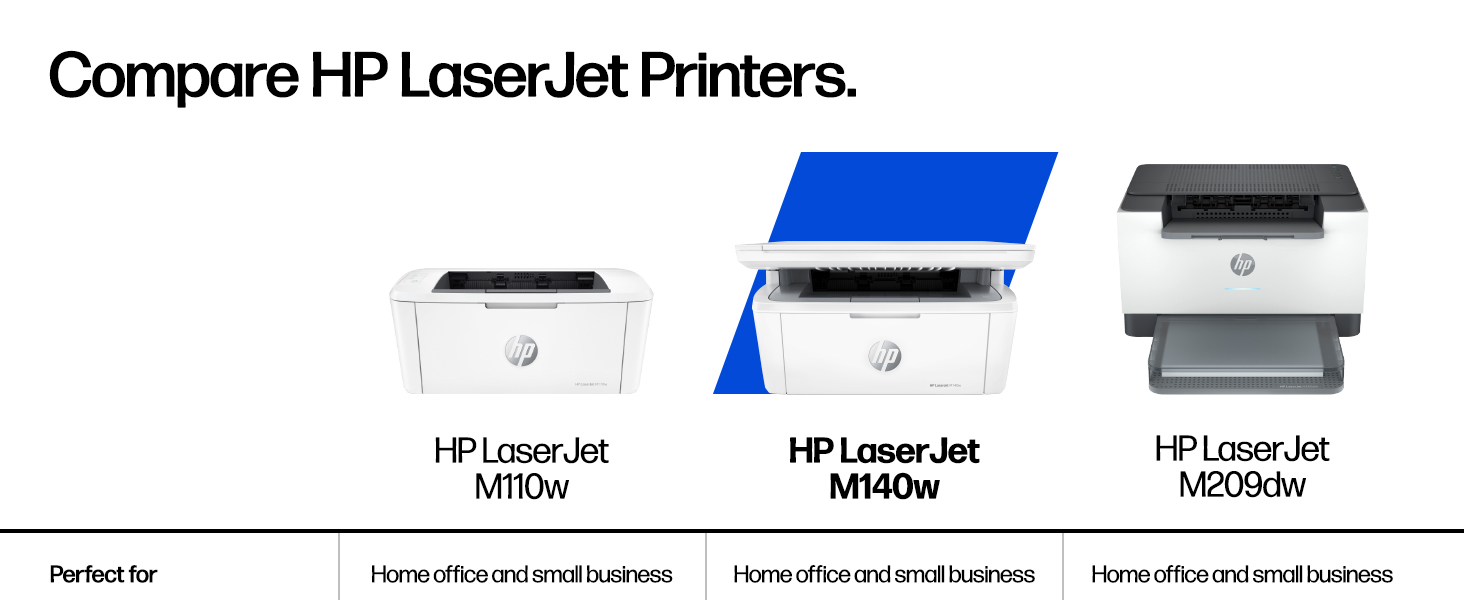
The HP LaserJet MFP M140w is a compact, high-speed monochrome laser printer designed for small teams and professional use. It delivers up to 21 pages per minute with 600x600 dpi resolution, supports wireless printing from any device, and features smart scanning and copying capabilitiesโall packed into the worldโs smallest laser printer in its class for ultimate space efficiency.


| ASIN | B09MSPNYQ2 |
| Additional Printer Functions | All In One |
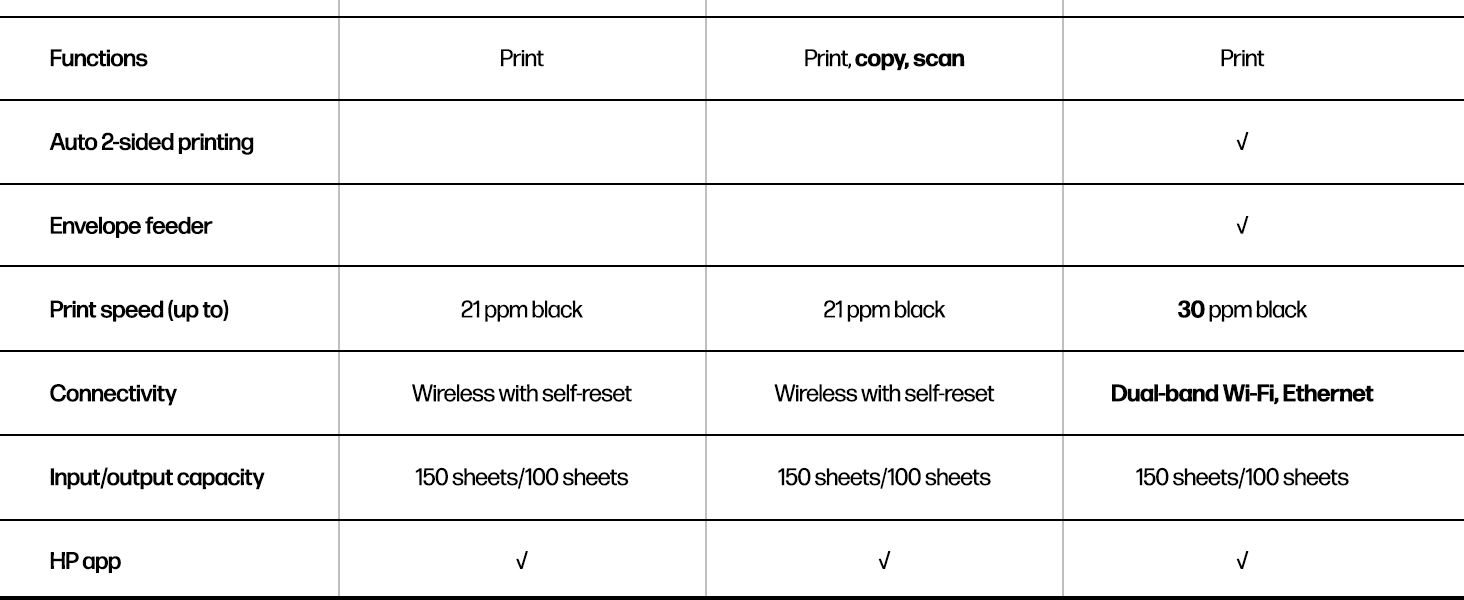
| B&W Pages per Minute | 21 pages_per_minute |
| Best Sellers Rank | #6,947 in Office Products ( See Top 100 in Office Products ) #20 in Laser Computer Printers |
| Brand | HP |
| Built-In Media | HP LaserJet MFP M140w Printer; Preinstalled HP Original Introductory Black LaserJet Toner Cartridge; Getting Started Guide; Setup Poster; Support flyer; Warranty guide; Power cord |
| Color | White |
| Color Depth | 24 bpp |
| Compatible Devices | Laptops, PC, Smartphones, Tablets |
| Connectivity Technology | USB, wireless |
| Control Method | App |
| Controller Type | Apple Airprint, Mopria-certified |
| Customer Reviews | 4.0 out of 5 stars 1,783 Reviews |
| Display Type | LCD |
| Duplex | No |
| Global Trade Identification Number | 00194850677281 |
| Hardware Interface | USB 2.0 |
| Initial Page Print Time | 8.3 seconds |
| Ink Color | Black |
| Item Dimensions D x W x H | 10.4"D x 14.2"W x 7.8"H |
| Item Type Name | Multifunction Printer |
| Item Weight | 11.9 pounds |
| Manufacturer | HP Inc. |
| Maximum Copies Per Run | 99 |
| Maximum Copy Resolution Black and White | 600 dpi |
| Maximum Media Size | 8.5 x 14 |
| Maximum Print Resolution Black and White | 600 x 600 dpi dots_per_inch |
| Maximum Sheet Capacity | 99 |
| Model Name | LaserJet M140W |
| Model Number | 7MD72F#BGJ |
| Model Series | 140 |
| Number of Licenses | 1 |
| Number of Trays | 1 |
| Other Special Features of the Product | Auto Document Feeder, Energy Star |
| Output sheet capacity | 99 |
| Paper Size | 4.13 x 5.83 to 8.5 x 14 inches |
| Power Consumption | 115 watts |
| Print media | Card stock, Envelopes, Labels, Paper (plain) |
| Printer Connectivity Type | USB, wireless |
| Printer Output Type | Monochrome |
| Printer Type | Laser |
| Printing Technology | Laser |
| Processor Count | 1 |
| Resolution | 600 x 600 |
| Scanner Type | Flatbed |
| Series Number | 140 |
| Special Feature | Auto Document Feeder , Energy Star |
| Specific Uses For Product | Office use, small teams, document and form printing, scanning, and copying |
| Total USB 2.0 Ports | 1 |
| Total Usb Ports | 1 |
| UPC | 194850677281 |
| Unit Count | 1 Count |
| Warranty Description | One-year limited hardware warranty |
| Warranty Type | limited warranty |
| Wattage | 140 watts |
O**O
Great workong printer in B/W
Rhis is a workhorse and highly compatible with both android and iOS devices. I do not experince the network frops other buyers had me worried about. Just an all around great value for the price. The scanner feature is a great add on bonus and scans can be sent directly to computers or mobile devices. The app even allows for phone scanning of document which is very handy. Setup was a lttle tricky at first but has been steadily working since.
M**G
HP is hard to beat for quality products.
Prints well. A little bit fussy connecting my phone to the Bluetooth at first. My laptop connects as soon as the computer boots up.
C**N
30 year IT Pro is telling you this is a terrible device
I've been installing printers for 30 years.... this was the most frustrating install ever. 1. They REALLY want you to get the smart app from MS store. You can find an allinone driver online if you look, this is what I did. 2. The printer could not be found in wifi discovery mode using a win10 virtual machine. I tried running the install/discovery over usb with my virtual machine only to end with an "unknown error' in HPs software. 3. I had to dig out a full win 10 laptop for this to find the printer at all.... It did find a printer on the network (i guess step 2 kind of worked when it prompted for wifi / pw). I had to again go through half a dozen questions about sharing info, create accounts etc... 4. With the software finally complete (1hour in) I launch the HP smart app in win10 because I want to scan a document. I am prompted with a "In order to scan, please sign in with your HP account" .... WTF??? No, just no. I am in no way signin into HP services to use my own scanner. That's the last straw. So, I can't scan unless my internet is up and running since scanning is now an HP cloud service???? Every time I launch the HP smart app, Ihave to again answer the same " please share your diagnostic data with HP" over and over and over. I had a Brother all in one.... that is what I should have bought again.... serves me right for going cheap. A printer should plug right in or be wifi configurable from an LCD panel. It should scan to a network location/nas/connected storage without the need of an online cloud service. It should work with a a linux 'generic laser' printer device. This P.O.S. does none of that. Do not buy this. I promise you it is frustration in a box.
C**C
Very Nice Black & White HP Printer/Scanner
So happy I purchased this wonderful H/P printer. It measures 14.25" X 10.25" & I love that. It's very fast to print. Instant print. No waiting @ all...like an ink jet printer. I seldom print anything & hope the ink lasts a lot longer than an ink jet. I don't need a wireless printer & it connected easily w/ a USB cord. (USB-A to USB-B 2.0 Cable with 480 Mbps Transfer Speed for Printer or External Hard Drive, Gold-Plated Connectors, 6 Foot, Black that was less than $1.) It was simple to plug in & was up & running instantly. I downloaded the app to scan...& that was also very easy and it works flawlessly. The longer I have this printer the more I like it. Best printer I've had in several years. I definitely recommend this impressive HP printer & won't go back to an ink jet ever again. Highly recommend this HP printer.
J**F
Print good, scan good, enters cooling mode quickly
Performs good, easy setup. Not designed for 30-40 pages double spaced text. Longer cooling times to go have lunch. A better design would have much better cooling vents. Poor design for air flow. Other than that it scans and prints good. Prints almost worth the purchase price. Remember to order extra cartridges with printer if planning more than 350 page use
S**R
Simple print, copy and scan with a small footprint and a small price.
This is a great little printer. It is inexpensive and does everything I needโprint, copy, and scan. I did NOT install the HP software that is heavily promoted during setup because it is large (450MB+) and includes a lot of extra features I donโt need. Instead, I used the basic Windows 11 drivers (about 54MB), the built-in Windows Scan app, and a simple USB printer cable. Since I use a USB connection, I donโt need the HP app or Wi-Fi features. Wi-Fi may be useful for an office or a large family, but for a simple home setup with the printer next to my PC, this approach gives a much cleaner and more straightforward installation. Everything works well without the extra software. If you prefer a minimal setup, it is worth looking into using Windows built-in tools before installing HPโs full software package.
A**B
Space saving but super powerful. Small Business must have!
Super easy, super fast, and great for small business needs. Doesn't take up too much space so it's perfect for small spaces. Everything is super easy to understand and easy to use. Highly recommend.
A**X
Compact Enough for a Shelf, Fast Enough for Daily Use
Setting up my HP LaserJet MFP M140w was so easy! I connected it using the old USB cable from my previous HP J3680 to my HP Desktop. Getting help from AI for the setup saved me a lot of time and made everything so much smoother and stress-free. Just type "Setup M140w, enter your PC brand," and follow the instructionsโitโs the fastest way to get everything going in just minutes. Overall, I couldnโt be happier with this printer. I've owned two HP printers, and they last a long time. If youโre reading this review, I wholeheartedly recommend this HP printer! Just make sure itโs compatible with your setup, and if youโre unsure, feel free to ask AI for help.
E**E
Alles bestrns
Das kompakte Gerรคt funktioniert einwandfrei, kinderleichte Bedienung und sieht auch noch hรผbsch aus.
R**D
Black and white print
Works fantastic and easy to hook up. Nice and compact.
H**C
Cheap, small footprint MFP laser
Cheap scan\copy\print laser with small footprint and low height, suitable to sit into confined spaces. Also has duplex feature
M**Y
stampante HP
tutto รจ andato bene e funziona perfettamente
G**R
Nice little basic all-in-one
Nice little cheap laser printer. I don't print often, and got tired of inkjet cartridges drying out after almost every use, so decided that a laser printer was cheaper for me in the long run. I needed an all-in-one as I actually use the copy and scan features more than I print. Set up was relatively easy, as I am using it connected via a USB cable as my desktop PC is not wireless capable and is hardwired to the router. I did need to make sure I downloaded the correct software for this direct from the HP site. My Windows 10 computer had no problem recognizing it right away. I have taken a point off as I am not yet sure of the longevity of this cheaper model. I may change this later. Edit: Adding the extra star. This little printer just works, even if I've let it sit for a long period of time. No fussing around trying to get the computer to recognize the printer again if Windows has updated. 2nd Edit: Still working well two years after purchase. I recently bought a new computer running Windows 11 Pro and the computer recognized the printer immediately. A quick software install which I had downloaded from the HP site and it was up and running with no problems. Still connected via USB even although my new computer has wifi as it is generally the easiest install, and I'm the only one using it.
Trustpilot
3 weeks ago
1 month ago