
DOWNLOAD THE APP


Customer Services
Copyright © 2025 Desertcart Holdings Limited
DOWNLOAD THE APP

🚀 Elevate your desk game with the ultimate 18-in-1 Thunderbolt 4 dock — because your workflow deserves the best.
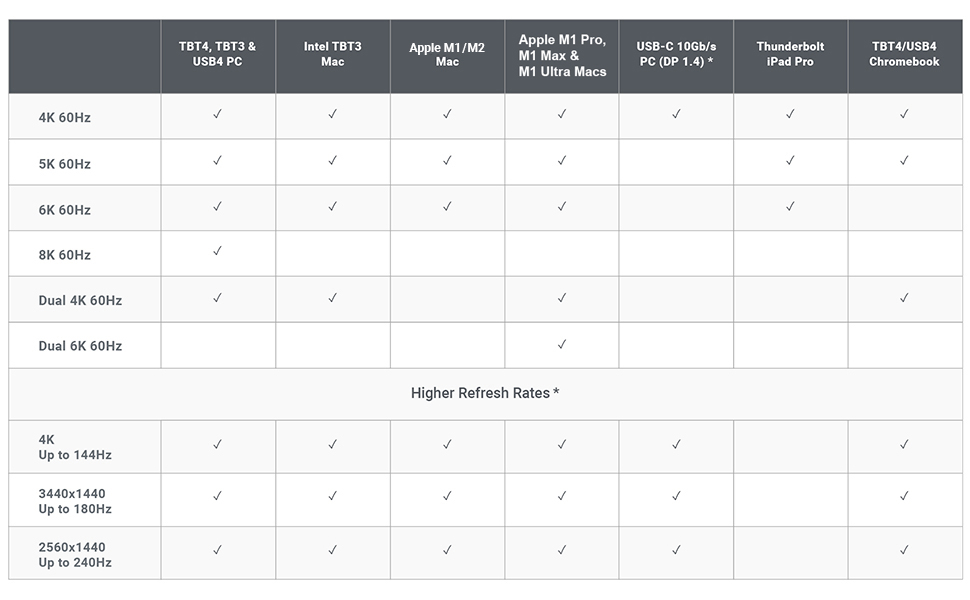
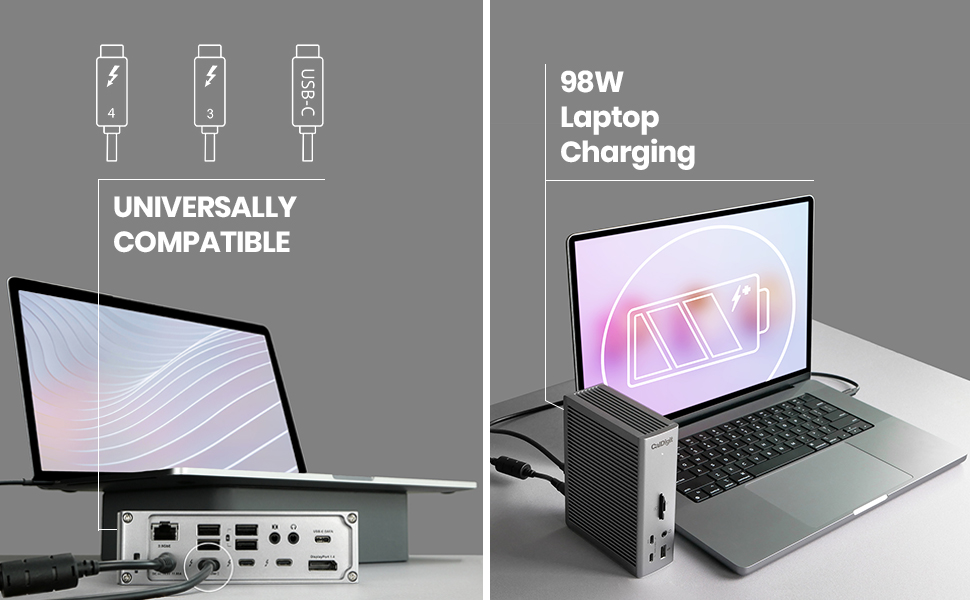
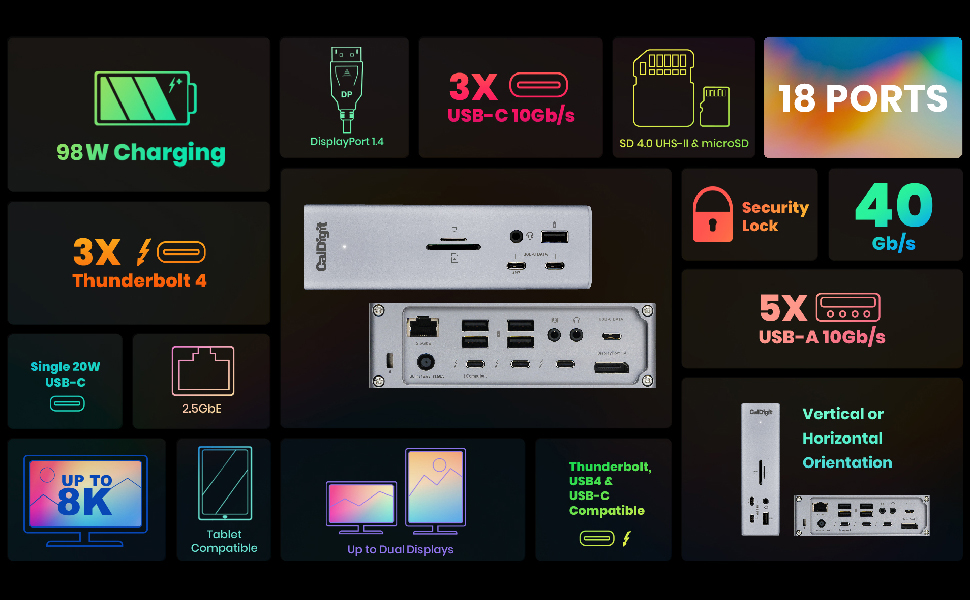
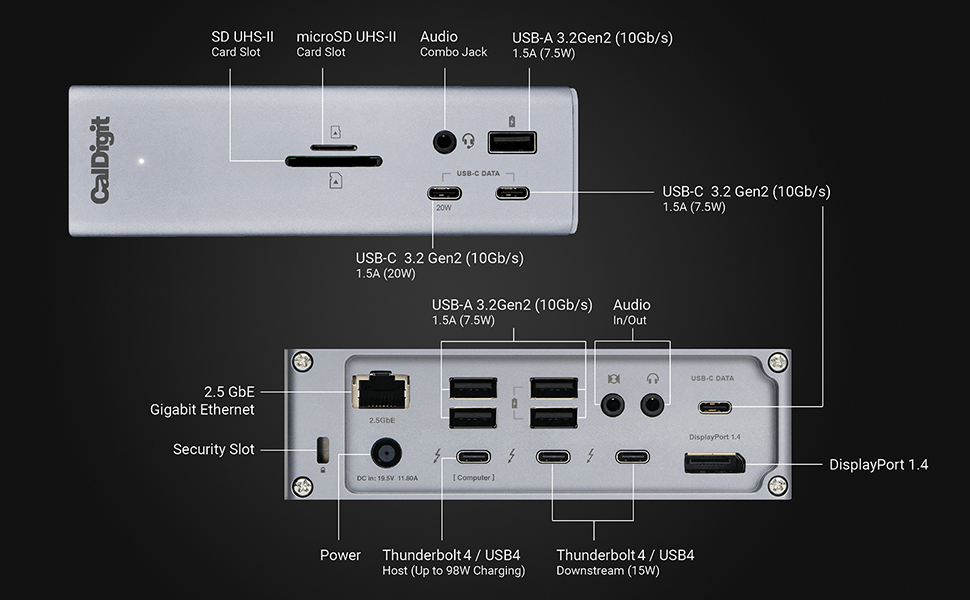
The CalDigit TS4 is a premium 18-in-1 Thunderbolt 4 docking station designed for professionals demanding maximum connectivity and power. Featuring 98W charging, triple Thunderbolt 4 ports, 8 USB ports, 2.5GbE LAN, and support for ultra-high-resolution displays up to 8K, it delivers seamless multi-device integration for Mac, Windows, and Chrome OS. Its certified cable and universal compatibility make it the go-to dock for streamlined, high-performance workspaces.


| ASIN | B09GK8LBWS |
| Best Sellers Rank | #2,590 in Electronics ( See Top 100 in Electronics ) #43 in Laptop Docking Stations |
| Customer Reviews | 4.1 4.1 out of 5 stars (1,688) |
| Date First Available | February 8, 2022 |
| Item Weight | 1.41 pounds |
| Item model number | TS4-US 500971 |
| Manufacturer | CalDigit Inc. |
| Product Dimensions | 4.46 x 1.65 x 5.55 inches |
P**D
Worth the wait! This is a seriously awesome product.
Long story. I recently switched from a 2015 iMac 27" with an extra LG 27" monitor. The new setup is MacBook Pro M1 14" and added a second LG 27" monitor. Both the LG monitors are Thunderbolt 3 connections only. While I can connect the monitors to the laptop direct, I wanted something more unplug and go. The plan was to connect the two monitors via a dock. Then the laptop to the dock via a single cable, and things all work together. I had a dream. Tried one combo dock and a vertical stand. But it only supported HDMI inputs. I thought I would be able to connect the Thunderbolt connections from the monitors to the dock HDMI ports using some connectors. No go. I returned that dock. Then found another brand. It looked promising. I was about to hit the purchase button but then noticed at the bottom of the page a video link to the CalDigit TS4. Watching the video and reading other reviews, this was the one I really wanted. Now the only problem was at the time, Amazon showed it unavailable and no expected date. Checked the CalDigit site and other suppliers. All out of stock. This was either a phantom product or really popular. After a few weeks, I went to purchase something else, and just by chance, I returned to the TS4 product page. It showed as available. Faster than fast, I clicked that purchase button to lock it in. It arrived a few days later (this week). The setup was dead simple. Just unplug the monitor cables connected to my laptop over to the new dock. More the network cable. Then boom, everything works. Dual monitor working. The laptop is off to the side and still have plenty of deskspace for other stuff. And just a single cable to unplug the laptop if I'm going remote. The only a few negative comments. There are two. First, the dock seems to run very warm. Well warmer than I expected. Not hot, like melt your desk, or anything. Just warmer than expected to the touch. The second is the network awake. With the RJ-45 cable connected, when I go in the office in the morning, it doesn't seem to reconnect on wake. I like to have a hard-wire connect over using home WiFi. I know there are some fixes on the CalDigit support site. For me it was easier just to connect the home network direct to the laptop. My only other comment is to CallDigit to maybe drop the memory slots and replace them with another pair of high-speed USB ports. I personally have not had a need to use a card reader in over five years. Seems if someone had that need, there are USB products they could use instead. However, the same can be said of Apple on the latest laptops. Overall 9.5/10.0 Very well-made product. Solid material.
B**S
Expensive, but absolutely worth it
Honestly, this is just the best dock you can buy right now. Yes, it is expensive, and it can be hard to convince yourself it is worth the price. But after dealing with cheaper docks, I would much rather pay once and avoid all the headaches. It just works. No third party display apps, no random disconnects, no overheating issues. Everything stays stable, even under heavy use with multiple monitors and peripherals. If the price is hard to swallow, it is probably worth waiting for a sale or picking one up used, especially now that the TS5 is out. Either way, buying a good dock upfront is worth it to avoid the mess that comes with bad ones.
N**E
Best docking station for MAC Users
All my issues are gone with this docking station. My MacBook pro now recognize all the devices connected with no issue and my desk looks clean. A bit expensive but if you are on your computer for long periods of times I see this as an investment. I've had no issues AT ALL with this docking station. Before I had to be restarting my computer so many times. MAC would not recognize my second monitor, or my mic , CAC, you name it. If you are a MAC user and you have a whole setup on your desk with multiple devices connected to your computer, this is your deal for functionality, otherwise you will always have issues. I've tried many different options and I wish I would have buy this one since the beginning. I kept going from docking station to docking station and trying not to spend this amount of money I ended up spending twice what this docking station cost. So believe me, if you want something that works, that is good quality but that it also looks good this is it. Almost forgot to say that I also use this dock with My Dell 5570, my surface and it is compatible with all of my laptops.
T**G
Fails on MacBook Pro 16” 2019 (Intel-chip); But Works on iMac 24” 2021 (M1-chip)
ADDENDUM, dated 4/21/2023@19:48 EDT: It WORKS Now on BOTH APPLE Laptop & Desktop ========================================================================= WORKS on MacBook Pro 16” 2019 (Intel-chip) & WORKS on iMac 24” 2021 (M1-chip) => Rating of 4 Stars This addendum, dated 4/21/2023, at 19:48 EDT, corrects my PRIOR negative review. Now, the CalDigit Thunderbolt 4 Dock (Model TS4) is working fine on both my Apple laptop and Apple desktop. It now works successfully with all my external hard drives (HDDs), external Solid-State Storage drives (SSDs), my Dell monitor, my Ethernet (wired), and powers the laptop without any problems. The ONLY failure now is that I cannot get my ancient, Anker 13-port, USB2.x, hub to work when plugged into the TS4. My PRIOR negative TS4 review is hereby rescinded. My PRIOR negative rating of it as one (1) star is replaced now with four (4) stars. Here are more details about my recent experiments & testing providing additional details as why my review now is quite positive and I've rated it a lot higher: On Sunday, April 16, and Monday, April 17, I did some more trouble-shooting and experiments to help us debug the problem with the CalDigit TS4 Thunderbolt Dock. The problem in a nutshell was that the TS4 FAILED to mount any drives on my Apple MacBook Pro laptop; BUT it worked SUCCESSFULLY on my Apple iMac desktop! During those experiments, I disconnected the TS4 from my laptop and re-connected it to my desktop being sure (like before) that I used CalDigit’s supplied Thunderbolt 4 cable. However, I took it one step at a time. WORKS. First, I tried connecting it to a different Thunderbolt 3 port on a different side (bus) of the laptop AND leaving the laptop’s Apple power-brick still powering the laptop. To my surprise, it SUCCESSFULLY mounted every external hard-drive (HDD) and solid-state storage (SSD) device that I connected it to. WORKS. Second, I re-connected it into the same Thunderbolt 3 port on the laptop that the TS4 originally failed on. Again, to my surprise, it now worked SUCCESSFULLY and mounted every external drive (HDD & SSD) that I connected it to. WORKS. Third, I dis-connected the Apple power-brick from the laptop. So, now the TS4 was providing the power to the laptop. Yet again, to my amazement, the TS4 continued to work SUCCESSFULL and again mounted every external drive (HDD & SSD) that I connected to it. WORKS. Fourth, I connected the monitor to the TS4’s Display Port 1.4 port. Again, to my pleasant surprise, it worked SUCCESSFULLY. WORKS. Fifth, I connected the Ethernet CAT-5 cable into the TS4’s 2.5 gigabit jack. Yet again, to my wonderment, it worked SUCCESSFULLY without any degradation in speed. FAILS. Finally, I did hit a failure (but not a show stopper). I connected my old, Anker USB2 hub (a self-powered hub with some 12 USB ports on it) into a USB port on the TS4. UNFORTUNATELY, it FAILED to recognize and activate the Anker hub. The peripherals connected into the Anker hub were thus rendered useless. So, some other external HDDs did not spin-up/mount; my wired trackball was useless; USB downstream connections to other devices (webcams, amateur radios, etc.) also failed. BOTTOM-LINE: For some unknown and puzzling reason, the CalDigit Thunderbolt 4 Dock (TS4) is now working fine on my laptop, EXCEPT for that Anker hub problem. If you have any insight on why the Anker hub is not being recognized, activated when plugged into the TS4, then let me know and we’ll try to resolve this Anker hub issue. Of course, this Anker hub works fine when connected directly to the laptop’s Thunderbolt 3 ports. It even works when connected via an un-powered, Anker 7-in-1 hub. It just will NOT work when cabled into the TS4 dock. By the way, this Anker hub problem cannot be a power one because the 13-port Anker USB2.x hub is self-powered with a beefy Anker power-brick. ================================================================================== ORIGINAL Review, dated 4/d?/2023@h?:m? EDT: It FAILED on APPLE Laptop; But WORKED on Desktop =============================================================================== Fails on MacBook Pro 16” 2019 (Intel-chip); But Works on iMac 24” 2021 (M1-chip) => Rating of 1 Star I just purchased this CalDigit TS4 hub device. Despite the glowing reviews, I’m very disappointed in its operation so far!🙁. It fails totally when connected to my Apple laptop. Yet, it works superbly when connected to my Apple iMac. FAILS. The TS4 gets a failing grade when connected to my Apple laptop computer (MacBook Pro, 16”, 2019, Intel-chip). It FAILS to mount any of my external drives (HDDs). It intermittently mounts my external SSDs BUT ONLY if I connect them to the TS4’s Thunderbolt ports; they fail to mount when connected to any other ports (USB-c) on the TS4. I only tried one drive an a time to insure they were getting adequate power from the TS4 and still they failed to mount. All these same drives work fine when connected to this laptop using my older, less capable hubs (by Anker); or when directly connected to the laptops ports. These dismal test results were encountered with the TS4 connected to the laptop using the CalDigit-supplied Thunderbolt 4 cable AND the TS4 was providing power to the laptop. WORKS. The TS4 gets a stellar grade when connected to my Apple desktop computer (iMac, 24”, 2021, M1-chip). It SUCCESSFULLY mounts all of those same external drives (HDDs and SSDs). They work whether connected to the TS4’s Thunderbolt or USB-c ports. This superb test results were obtained with the TS4 connected to the desktop using the CalDigit-supplied Thunderbolt 4 cable BUT the TS4 was NOT providing power to the desktop (instead the Apple power-brick was still plugged-into the iMac). I checked the CalDigit firmware on my TS4 and it’s the latest released by them. It’s version 39.1. So, I’m clueless as to why the disparity in my test results to date. If I cannot resolve the TS4’s failure on the laptop, then the TS4 will be returned to Amazon. I plan to do a NVRAM reset on the laptop and re-test the TS4 connected to the laptop. I also plan to test the TS4 again but with the Apple power-brick still connected to the laptop (to see if it’s a power issue). I will also contact CalDigit support. Has anyone else experienced this disparity? Any suggestions?
C**N
The TS4 arrived earlier than exepected and as was said in other reviews this is.solid piece of electrical equipment. Took all of 5 minutes to setup and get working, downloaded the software from the internet and has worked flawlessly since. I have the Macpro Desktop that should be able to handle a 4k monitor, 2 30 inch Cinema on Dual dvi and one HDMI with 1920x1080.. The Macpro can’t handle the load so I thought I would try hooking the 2 30inch Apple cinemas with dual DVI conveters/USBs and voila it’s cooking with gas. The MacPro had the 4k monitor and HDMI outputs and functions perfectly with the TS4 running the Apple cinemas. Couldn’t for the life of me get the HDMI out[it to function on the Mac-ro after the recent upgrade and change of the display function, OWC used ti be my go to for Mac products, CalDigit is now. Cheers Cliff
E**H
Works well and have had no issues. Very good unit. Works especially well if you have a mac.
M**O
Es excelente periferico TB, lo utilizo con mi Surface y supera por mucho el dock oficial. Suficientes puertos, es usb c para utilizarlo con otros equipos y con energía de sobra para cualquier dispositivo usb o thunderbolt. Solo hay que considerar que no es portátil o lijero.
M**A
يحتر جدا حرارة عالية تقطيع في تشغيل الفيديو بجودة4K
S**I
the box is for the ts4 , and the item inside is the older model ts 3 !!!
Trustpilot
3 weeks ago
1 month ago