Desertcart purchases this item on your behalf and handles shipping, customs, and support to Malaysia.
๐จ Elevate Your Home Security Game with Smart, Sleek, and Unstoppable Surveillance!
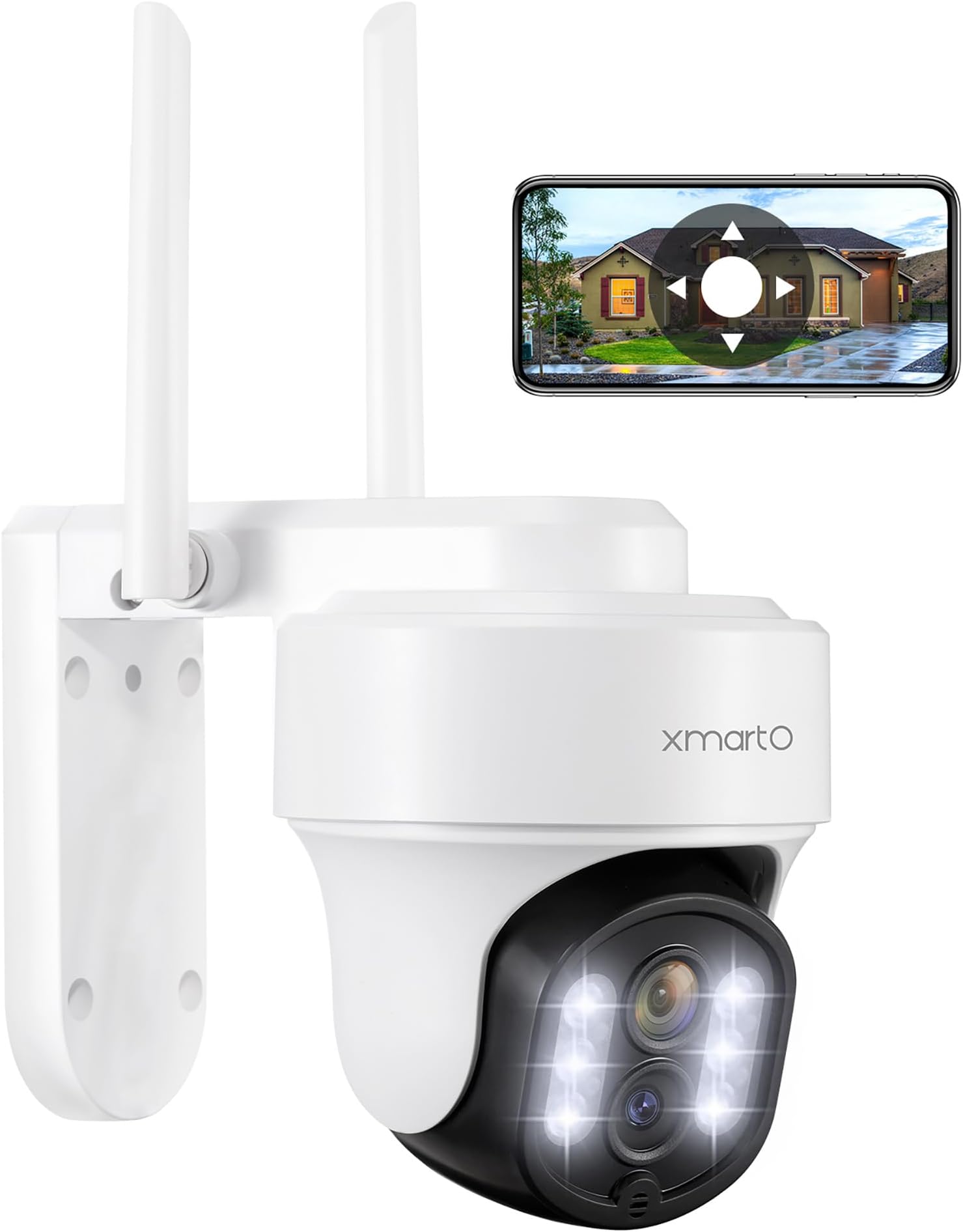
The xmartO 10X Zoom Dual Lens PTZ Home Security Camera delivers professional-grade 6MP ultra HD video with 10X hybrid zoom and AI auto-tracking across a full 360ยฐ pan-tilt range. Equipped with dual night vision modes and enhanced two-way audio, it ensures crystal-clear monitoring day and night. Designed for easy Bluetooth setup and built tough with an IP66 weatherproof rating, it supports flexible local and cloud storage with no monthly fees. Alexa compatible and perfect for indoor/outdoor use, this camera is a smart, reliable guardian for modern homes.


| ASIN | B083JVPGFJ |
| Alert Type | Audio and Motion |
| Antenna Location | Indoor Security, Outdoor Security |
| Best Sellers Rank | #421 in Dome Surveillance Cameras |
| Brand | xmartO |
| Built-In Media | (1) 100-240V AC to 12V DC 1A Power Adapter (10ft wire), (1) Surveillance Sign Sticker, (1) Wall & Ceiling Mount Bracket, (1) WiFi Camera, Instruction Manual |
| Color | 6MP |
| Compatible Devices | Android, Mac, Windows PC, XMARTO WIFI 6 NVR, iPhone, iPad |
| Connectivity Protocol | Bluetooth, Wi-Fi |
| Connectivity Technology | 2.4G/ 5GHz Dual Band Wi-Fi 6, Bluetooth Easy-setup, Wireless |
| Control Method | App |
| Controller Type | Amazon Alexa, Wallpixel |
| Customer Reviews | 4.0 out of 5 stars 639 Reviews |
| Enclosure Material | Acrylonitrile Butadiene Styrene (ABS) |
| Field Of View | 360 degrees |
| Focus Type | Auto Focus |
| Form Factor | Dome |
| Frequency Band Class | Dual-Band |
| Indoor Outdoor Usage | Indoor, Outdoor |
| Indoor/Outdoor Usage | Indoor, Outdoor |
| Installation Type | Screw In |
| Item Dimensions | 4.7 x 4.7 x 6.9 inches |
| Item Highlight | 2K Auto Tracking HD Wireless PTZ Home Security System for Indoor Outdoor, Motion Detection, 24/7 Surveillance, 2-Way Audio |
| Light Source | LED |
| Manufacturer | XMARTO TECHNOLOGY LIMITED |
| Memory Storage Capacity | 128 GB |
| Mfr Part Number | DZ30313 |
| Model Name | DY3034 |
| Model Number | DY3034 |
| Mount Type | Wall Mount |
| Night Vision | Night Color |
| Night Vision Range | 120 feet |
| Number of Channels | 1 |
| Number of Items | 1 |
| Optical Zoom | 10 x |
| Other Special Features of the Product | 256GB SD Card Support | IP66 Weatherproof & Quick Setup, AI Auto Tracking | 360ยฐ Pan Tilt Full-Range Monitoring, Dual Lens 10X Hybrid Zoom | Combined 6MP Ultra HD Video, Dual Night Vision | Motion-Activated Siren Deterrence, Enhanced 2-Way Audio | Hands-Free Alexa Voice Control |
| Photo Sensor Technology | CMOS |
| Power Source | Corded Electric |
| Product Grade | Residential |
| Recommended Uses For Product | Indoor Security, Outdoor Security |
| Room Type | Bedroom, Classroom, Hallway, Kitchen, Living Room, Study Room |
| Special Feature | 256GB SD Card Support | IP66 Weatherproof & Quick Setup, AI Auto Tracking | 360ยฐ Pan Tilt Full-Range Monitoring, Dual Lens 10X Hybrid Zoom | Combined 6MP Ultra HD Video, Dual Night Vision | Motion-Activated Siren Deterrence, Enhanced 2-Way Audio | Hands-Free Alexa Voice Control Special Feature 256GB SD Card Support | IP66 Weatherproof & Quick Setup, AI Auto Tracking | 360ยฐ Pan Tilt Full-Range Monitoring, Dual Lens 10X Hybrid Zoom | Combined 6MP Ultra HD Video, Dual Night Vision | Motion-Activated Siren Deterrence, Enhanced 2-Way Audio | Hands-Free Alexa Voice Control See more |
| Specific Uses For Product | Home Security, Surveillance |
| UPC | 603149208087 |
| Unit Count | 1 Count |
| Video Capture Format | 2304*1296 |
| Video Capture Resolution | 3 MP |
| Video Encoding | H.265 |
| Viewing Angle | 360 degrees |
| Voltage | 12 volts |
| Water Resistance Level | Waterproof |
| Waterproof Rating | IP65 |
| Wattage | 5 watts |
| Wireless Technology | Bluetooth, Wi-Fi |
| Zoom Ratio | 10:1 |
| Zoom Type | Digital Zoom |
B**R
They work good, you just dont get 1300ft like that advertise
When I first bout my xmarto cameras back in 2015, it was only a 4 camera system and those cameras did actually reach 1000ft. I had 4 cameras at my house and 4 cameras 1000ft away at my pond. But the problem I had was I had to switch from HDMI 1 to HDMI 2 to see the different cameras. When I seen they came out with a 8 camera system that was suppose to work better, I wanted that so I could see all 8 cameras on one HDMI cable and not have to switch back and forth, I bought more than one and bout bigger antennas and barely got 200ft. But every camera system they made after that you could no longer detach the antenna and add something bigger so I didn't want to waste my money getting any thing newer. The only thing about these that got my attention was the wifi 6 I knew it was a better wifi connection so I figured Id try them. I have to say I am impressed. I get a little better range than the others but I dont need the long expensive cable and bigger antennas to get a decent signal, I was able to take all that down. So far the longest range camera I am able to try is 230ft and Im getting 2 bars on that. It never cuts off ...the signal is constant. I have a 2 story brick house and im getting signals all around the house, the ptz movement works well on all of them, the audio and speaker works well on all of them. The only thing is they get blurry if there is not enough light. If you connect near a night light and turn off infrared you will see good at night. Or if you do not have a night light and want to see further in dark and it be more clear you need to buy a infrared light to put next to it to light up the area more, again the more light you have the more clear the image will be at night. In a dark area with a good infrared light pointing in same direction as camera I can see about 200ft out, its a little blurry but I know when something is out there moving, again the more light you have the better and further you can see. The human or animal detection works ok, I have most of that turned off but I did have it on for my cows, it followed them some when they got close not the best and not something I use or need. I do wish the antenna on nvr was bigger but I have to say with 10 cameras surrounding a 2 story brick house I get pretty decent signal. Def worth getting, I wish they actually went over 1000 ft like they say but they only happens with the 4 camera system in 2015. Hopefully they come out with something new that does go that far so I can cover my whole property of 7 acres. But for around the house, they are good enough. Not once have they cut off from poor signal even when there is only one or 2 bars it still shows smooth video no skipping around or cutting on and off so they are worth it. It just doesn't go 1300ft, they need to make some that does and actually make a test video proving it goes that far before we waste our money, but for this system..for around the house and less than 300ft they work good
J**W
Great system, easy setup
I install CCTV as a large part of my job, Iโd say this is one of the better residential ones on the market, and you can definitely not beat the quality for the price. I blocked out 5 hours on a Saturday to install the system, it took me an hour and that was only because it was raining, otherwise much quicker. I recommend 1st plugging in the HDR and hook it up to a TV or computer monitor and then installing the cameras I came in to check each one as I installed them. PTZ and all the functions are super acurate. Overall this is a great system and in my location thereโs not really obstructions so I was able to place the cameras beyond the recommendations.
J**R
Don't waste your money
I WAS happy with this system from May, 2023 when I bought it and installed it. It worked fine for 8 months, until the cold months arrived and now, 8 months later, the cameras won't stay connected or keep the settings. I've tried everything and sent messages to help center and no one replied. Some cams come back on line after a day or two, some never come back on line. I've performed resets and had everything checked out by my Internet provider. One tech thinks the NVR is going out. Either way, I am not a happy customer or fan of this product. Waste of time and money. Update: I've contacted product support multiple times and I just get the runaround. They just keep telling me to perform the tasks as I have done. They won't admit that I have 2 bad cameras. One email asked again for my address so they could send new cameras, but I ask and ask for a shipping tracking number and when I can expect them. Again....NO reply, just keep me in limbo. This has gone on too long. I'll find a better security system and report this xmarto company to the better business bureau and FTC. This so called warranty is a scam!!!
J**N
It just works
Great camera system
C**E
Good capabilities for the price
Pro: good picture quality on pan tilt and zoom camera, no network cabling needed, excellent wireless range Cons: powered cameras do not seem to be made for outdoor use, human body detection is poor (Side note โ I have used and installed other DVR/NVR cameras and systems including DPro, Hikvision, and others) I liked this system because it has its own Wireless camera network. When dealing with a large multi building facility, running wires is impossible. You can wire the NVR to your backbone switch or it can be run wirelessly and then the cameras connect to the wireless network on the NVR not your local WiFi. The range, without the repeater, is very impressive. A repeater is available and easily connects to the NVR without manual configuration. There are wireless/solar cameras that you can get for this NVR, but I just got the wireless ones that require line power. The cameras have a changeable wall/ceiling mount which is nice, but this part of the product could use some revision. When you remove the mount and put it on a wall, the camera and mount top both have open areas to collect water. This is problematic in the winter if water freezes in there as it will break the camera enclosure. I used some of that waterproof โflex-tapeโ to try to cover over it. Time will tell if that is successful. On normal outdoor cameras, the wire is routed back into the mount and the camera is usually mounted on a jbox. This keeps the wires inside where they are not exposed to weather and cannot be cut. These wires are draped below the camera and then have to be run through some type of penetration so that the connections are inside the building. This camera has a compound cable with an ethernet jack and power connector, so all of those need to be protected. The cable is pretty short, and you need to be sure to have a drip loop on the cable. For a shed with just siding and no insulation or finished wall thickness, I purchased these little electrical fittings from Ace Hardware. I had to ream the inside of one of the pieces to be able to push the ethernet jack through. I then mounted the fitting on the siding tightened it down. Inside the building, I could plug in the power cord and run to an outlet. Doing this on a building that has a 4โ or 6โ insulated wall is nearly impossible as the cord is very short. I ended up putting a jbox in the wall behind where the camera was mounted. To configure the NVR and cameras, you will need a computer monitor with either an HDMI or standard VGA 15 pin connector and a USB mouse. The local UI is a little clunky when you have to type on the screen computer with your mouse, but for most drop-down fields, it is not difficult and does not take too much time. It finds the cameras instantly without any effort. That said, configuration has some bugs. I tried taking the NVR off DHCP and setting it to a static IP outside the DHCP range. No sequence of setting, saving, and rebooting could get it to change. I gave up and left it on the assigned IP, though I did still disable DHCP. Since it seems to always come up on that same IP, I left it there. The reason that the static IP is important is that I then enabled DDNS. I started with a free name from No-IP, put in the settings and verified it worked. I then contacted my ISP (since I have a managed router) and got port forwarding enabled for port 80 to go to that IP. Once I confirmed it worked, I purchased the DDNS from No-IP. I did try another DDNS (one that was on the drop down, but I donโt remember which) and could not get it to work. I can now use my browser and go to the NVR configuration when not on site. From a security standpoint, I am a little nervous about that, but I did put in a firewall so the NVR is not near anything else. The browser-based configuration is easy, but like the local configuration, does not always work. When asking tech support, they told me not to use the browser-based configuration. Some of the configuration items are counter intuitive, and the names of them donโt make much sense, and there is not much of a manual that explains anything beyond telling you the label on the checkbox on the screen. Remote configuration is one of the primary reasons that I would buy an NVR system, though, so I keep trying. I also set up the PC app and the Android app. The android app is probably the easiest. It installs quickly and did allow me to have several different people create their own accounts and still get access to the camera system. The iPhone app seems to work well, too. The apps are very capable for viewing the cameras live and even has the pan-tilt-zoom ability for those cameras. The app can also get alarms on human body detection. This feature does not work very well. It triggers on everything. I lowered the sensitivity to lowest, and changed it so that it had to see movement for more than 5 seconds. I was still getting hundreds of alarms a day. Next, I removed all areas in the view that had leaves (no more pan and tilting). That helped a lot. I got down to a couple dozen alarms a day. It still seems to trigger on the movement of shadows on the ground from the trees on sunny and windy days and I have not been able to eliminate that. It definitely finds vehicles, humans, and lots of wildlife which I donโt mind at all. I am told there is a firmware update. I have not tried to do that yet, so I cannot tell you how difficult it is and whether it helps any of my issues. The PC app can be used to download the videos from the trigger events along with the time-based videos. Doing it remotely is slow, but I have slow connections on both ends, so that is probably unrelated. You do need to go into the configuration in the app and change where it saves the videos though. The default is in a protected location on your computer hard drive so access to that will be denied. Change it over to โMy Documentsโ or โMy videosโ and you will be fine.
A**R
Great security camera for the price!
Easy to use. Very clear pictures.
M**Z
18 days so far
So far so good performs as expected few things I'm still working on settings. Nothing I'm sure some instructions wouldn't iron out but that's how easy set up was plugs are long enough to reach just bottom of gutter to inside the window and plug in for me no special wiring required cameras paired to serve immediately, well within the hour but it stayed that way even After I unplugged it a few times . Once you download the app I tried to rest cameras and pair them individually not how you do it you pair your Internet with the server and the cameras populate. You adjust the home setting or where its sits at rest, manually I thought you would do it in the settings no you do it by moving the camera by hand where you want it to sit all the time. But it works fantastic so far with the spend. One feature I'm still working on is detecting people not moving wind. It says human but still picks up wind.i was hoping I would be able to move past this at this point but no it rarly record the action I want which is people only maybe some vehicles I think with time it I'll become better but for now it's intimidating enough to provide every one with a comfortable feeling but I don't find this to be reliable enough to stand as a witness in a situation it s records every thing blanketed so there is allot to dig through.
D**E
Works as good as the cameras I already had!
So far, and it's only been a couple of days since I installed this camera, everything is OK. Plugged it in, in the house next to the NVR and added the camera to my system, then mounted it outside, under an eve. Is working fine. I tested the PTZ and it is working also. I do not have notification on as I have six cameras and don't need to hear any of that, we have a monitor and can watch everything from the family room. I checked with the app that I have and it shows up there also. I did not put a SD card in the camera as the NVR has storage of a 4 TB hard disc. I bought the other camera in the system a few years ago and when going to purchase again, they were no longer available but this on showed up and the price was right! I had no problems connecting.
C**N
Quality
Not good as described .
Trustpilot
1 month ago
1 week ago