Desertcart purchases this item on your behalf and handles shipping, customs, and support to Malaysia.
🚀 Elevate your home network—fast, flawless, and future-ready!
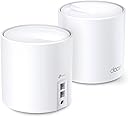
The TP-Link Deco X20 WiFi 6 Mesh System delivers cutting-edge AX1800 dual-band speeds and expansive 4000 sq.ft coverage through a 2-pack mesh setup. Featuring OFDMA and MU-MIMO technologies, it supports simultaneous connections for multiple devices without slowdown. Backward compatible with all Wi-Fi generations and ISPs, it offers easy app-based setup, parental controls, and Alexa voice commands, making it the ultimate solution to eliminate dead zones and upgrade your home internet experience.


| ASIN | B08D5X9GWC |
| Antenna Location | Home |
| Antenna Type | Internal |
| Best Sellers Rank | #2,429 in Computers ( See Top 100 in Computers ) #52 in Routers |
| Brand | TP-Link |
| Built-In Media | 1 RJ45 Ethernet Cable, 2 Deco X20 Units, 2 Power Adapters |
| Color | White |
| Compatible Devices | Personal Computer |
| Compatible devices | Personal Computer |
| Connectivity Protocol | Wi-Fi |
| Connectivity Technology | Ethernet, Wi-Fi |
| Control Method | App, Voice |
| Controller Type | vera |
| Coverage | 3,982.6 ft² |
| Customer Reviews | 4.6 out of 5 stars 1,638 Reviews |
| Data Transfer Rate | 1775 Megabits Per Second |
| Frequency | 5 |
| Frequency Band Class | Dual-Band |
| Frequency band class | Dual-Band |
| Has Internet Connectivity | Yes |
| Has Security Updates | Yes |
| Is Modem Compatible | Yes |
| Item Dimensions L x W x H | 11L x 11W x 11.4H centimeters |
| Item Weight | 2.58 Pounds |
| LAN Port Bandwidth | 1000 Mbps |
| Manufacturer | TP-Link |
| Maximum Upstream Data Transfer Rate | 1775 Megabits Per Second |
| Mfr Part Number | Deco X20(2-pack) |
| Model Name | Deco X20 |
| Model Number | Deco X20(2-pack) |
| Model name | Deco X20 |
| Number of Items | 1 |
| Number of Packs | 2 |
| Number of Ports | 2 |
| Operating System | TP-Link OS |
| Other Special Features of the Product | WPS |
| Router Firewall Security Level | Basic |
| Router Network Type | router |
| Security Protocol | WPA-PSK, WPA2-PSK, WPA3 |
| Special features | WPS |
| UPC | 840030701115 |
| Unit Count | 2 Count |
| Voltage | 12 Volts |
| Warranty Description | 2 year manufacturer |
| Wi-Fi Generation | Wi-Fi 6 |
| Wireless Compability | 802.11ac, 802.11ax, 802.11b, 802.11g, 802.11n |
| Wireless communication standard | 802.11ac, 802.11ax, 802.11b, 802.11g, 802.11n |
C**N
Funciona
Muy bueno, solucionó el problema de rango en la casa, me compraré uno extra para completar el set de 3
J**O
Awesome!!!
Purchased 2 for a total of 4 units. It's overkill but wanted to make sure I have great coverage inside and outside, plus its was on sale. My house is set up with ethernet cables on every floor and in every room on the main floor. This makes it alot easier to set up and very strong signals with no drops or lost. Moving from room to room and different floors too, makes it seamless. You don't notice it at all. At the beginning I did have 1 main, 1 ethernet , and 2 wifi connectioned all in mesh. The wifi signals are good, but speed tests results are not as fast compared to having them all mesh via ethernet cables. But if you aren't able to mesh them via ethernet cables, and your only choice is through wifi, you won't be disappointed. You'll still get great coverage and good speeds. The set up using the app is very easy and fast. You can make all changes to all the settings at your fingertips. You can also see what device is connected and to which deco. Almost forgot, if you have a switch, prefer TP Link switch, use it after your ISP modem, and main Deco. There is diagrams on TP Link website to help you out. This setup eliminates all my multi wifi routers and the manually connecting to them as you move from one room to another, as you lose wifi signals.
R**L
Mesh Excelentes
Buenísimos mejoraron la señal de mi router. Los recomiendo. Fácil de instalar y muy intuitiva la aplicación.
I**N
Decos x20
So far I’ve been using them for 2 years. Pros: they are very easy to set up, great quality, they do not drop connection, very stable internet as long as you set them up right, the app allows you to label them, they work fine for connection up to 1Gb. Make sure you connect your main to your modern near an open space centralized and with an Ethernet cable cat 5 or higher. Each has a duel Internet port in case you want to hardwire into a device instead of wife. Cons: the app sometimes prevents them from working properly so sometimes you simply have to open up the app so it can reboot itself, after a reboot sometimes they don’t automatically start working (so you must unplug the power of those showing red, will quickly reboot and show green), my biggest issue, the app displays usually the wrong speed, sometimes showing mbps or kbps, speed fluctuates a lot, even when you perform a 3rd party speed test, not exactly sure why. Location is a must, you must make sure they are set as close to each other as possible while getting a strong signal ( must play round to find the sweet spot). Over all they are great if you set them up properly, they provide great internet, very easy to use and set up, requires no maintenance but updates, so far I’ve had no issues for the last 2 years. I would recommend the Decos.
A**I
Few Issues, But Great Product Overall
Great product. Works well. Only gripes are: 1. One of the hubs has to be the main hub, which means that it has to be plugged into an Ethernet port or the modem itself. I only got 2 hubs, so it left me with very few placement options, because the 2nd hub has to be placed strategically in the house to avoid dead spots. 2. The second issue I ran into was with devices such as the iPhone, which use a random Wi-Fi address to connect via Wi-Fi. Because of this, the devices often get recorded as “iPhone”, and then need to be manually renamed in the app to keep things tidy. Other than these 2 issues, the mesh network has worked great, and devices have switched between hubs seamlessly. Probably would still buy again when on sale.
Trustpilot
2 months ago
2 weeks ago