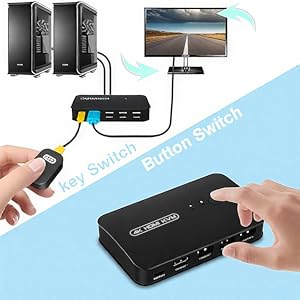
🔄 Master your multi-device setup with seamless 4K switching!
The DGODRT HDMI USB KVM Switch is a compact 2-port selector that enables sharing of one 4K UHD monitor and up to three USB 2.0 devices between two computers. Featuring dual switching modes—panel button and wired remote—it supports Windows, Mac, Unix, and DOS with plug-and-play ease. Designed for office and home use, it includes two KVM cables and delivers vibrant 4K visuals at 30Hz, making multi-device management effortless and visually stunning.


| ASIN | B092Q42VPS |
| Actuator Type | Push Button |
| Best Sellers Rank | #248 in KVM Switches |
| Brand | DGODRT |
| Circuit Type | 2-way |
| Color | Black |
| Compatible Devices | Computers (PC, Laptop), TV Box, HDMI compatible devices |
| Connectivity Protocol | HDMI |
| Connector Type | 'Hdmi' |
| Contact Material | Metal |
| Contact Type | Normally Open |
| Control Method | Remote, Touch |
| Control Type | Manual |
| Controller Type | Push Button |
| Current Rating | 1 Amps |
| Date First Available | April 16, 2021 |
| International Protection Rating | IP54 |
| Item Weight | 4.8 ounces |
| Item dimensions L x W x H | 3.7 x 5.01 x 6.22 inches |
| Item model number | KS602H |
| Manufacturer | DGODRT |
| Number of Items | 1 |
| Number of Positions | 1 |
| Operating Voltage | 5 Volts |
| Operation Mode | ON-ON |
| Product Dimensions | 3.7 x 5.01 x 6.22 inches |
| Terminal | Through Hole |
| UPC | 751031441842 |
| Unit Count | 1 Count |
| Wattage | 5 watts |
J**R
Simple, works great w wired K and M
UPDATE: I've been using this for about 15 months now and, although once in a long while the laptop does does not "recognize the USB device", generally I just change the usb port its plugged into and that solves the issue. As I said in my original review, this KVM is inexpensive and has been doing it's job, so I'm happy with it. I purchased several KVM switches, including one that costs 4 times the price of this one. All had insurmountable issues with the Logitech wireless mouse (M) and keyboard (K) used by my work laptop. In the end I decided the benefits of a KVM switch outweighed those of a wireless K and M. I bought a nice K and a basic M and this KVM is the one I kept. The wired remote is indespensible. I have it velcroed to my keyboard tray by the upper edge on the M side. It's almost as convenient as a dedicated M button. No leaning forward to switch machines, no wirey mess within arm's reach on the desk. I have the K, M and a camera hooked up the the three USB ports. Works perfectly. With the remote in place I can put the KVM out of sight. It has 7 cables going to and from it, so mounting it (with velcro; there are no wall mount features) on the back of my desk's hutch keeps the clutter hidden. Another USB port would be nice, but most KVMs don't have more than this one has (2 for K and M, one for some other device. If it lasts more than a year or two, I'll consider it worth the price. If it works for many years, I'll consider it a fantastic purchase.
S**M
Having intermittent issues
So far it’s working as expected. I use the remote button to switch between the two macs I have. Had to buy an extra USB C to HDMI Multiport Adapter,... https://www.amazon.com/dp/B08TWKNV13?ref=ppx_pop_mob_ap_share to connect 2nd Mac. 1/18/23 Update: Lately having issues with keyboard and mouse not working intermittent. I have to remove the USB dongles for both and put it back to make it work, sometimes multiple times. This AM also having issues with monitor flickering intermittently.
U**R
This thing is ALMOST perfect, suffers from not being independently powered.
(I am reviewing the model with 3 USB ports.) I am impressed by the simple and elegant equipment, but I am disappointed that it doesn't work with my Razer Kraken X USB headset. The fact that the switcher doesn't have its own power supply means you will be limited in terms of which USB devices you can reliably connect to it. I found that my old, uncomfortable Logitech USB headset works fine with this device, but I simply can't get the Razer to work when I switch from my Lenovo laptop to my ASUS laptop. (The Razer works fine when connected directly.) I also tried connecting my Razer headset to a powered USB hub and connecting THAT to the switcher, but it still didn't work. Too bad; if this thing came with its own power supply like most good USB hubs do it would be perfect. Aside from the headset disappointment, switching between my two laptops is fast and seamless.
B**R
I bought two - neither worked right
I bought two KVM's, so I will put the same exact review in both comments sections. First, I ordered the DGOGRT HDMI USB KVM Switch ($23.97). It came with two janky cables - HDMI on one end, and a "Y" of HDMI and USB on the other. Apparently, they used some unused pins on the HDMI plugs to pass the USB signals to the computers, in an effort to save 12 cents in production costs by eliminating two USB cables and two USB plugs on the box. I should have known better, but I said "what the heck". Well, not to my surprise, it passed HDMI video fine, but not USB. I boxed it up and filled out a return order. Next, I bought the ABLEWE Aluminum KVM Switch HDMI USB Switch ($45.99). Ahhhh, USB works fine. But wait - blank screen with my Chromebook? I should tell you that the two computers I have are an older HP Chromebook and a brand new ECOHERO Windows 11 laptop. This switch just did not play nice with the Chromebook. After about two hours, I got it working for about a minute, but then I decided I needed to switch two HDMI cables (one was too short for where it was). After that I could not get it to work again. What to do? Hey, wait -ONE box switches video fine, and the OTHER switches USB fine. Yep, I did it. I hooked up both boxes, one for HDMI and one for USB. Abut $80 dollars later, I have to push TWO buttons now to switch between computers. Not the end of the world, but janky as hell. If anyone can recommend an HDMI USB KVM that actually recognizes the Chromebook spec, I'd love to hear about it.
B**K
I’ve just started working from home more regularly and want to split my gaming peripherals with my work PC. I’d tried a more expensive option from a store and it just wasn’t powerful enough, so I took a punt on this. It’s only been used once but it worked perfectly right out of the box. I use a Razer Deathadder Elite and Cooler Master SK652 keyboard and the switch is more than powerful enough to keep them both illuminated. So far, very impressed! Long may it continue…
R**H
Good but facing issue while switching screen offs for sometimes
D**R
I have a laptop for remote work that I need to use on my large monitor for spreadsheets. It was super annoying having to move the little USB driver for the mouse and keyboard back and forth so found this. It is ridiculously simple. No batteries. No power cord. With the first cord, plug one end (the HDMI and connected USB) into my main computer and the other end - (HDMI) into the little box. With the second cord do the same thing but with my laptop. Move the laptop to the shelf. Hide all the cords away and keep the tiny remote switch on my desk. And boom, I swap back and forth from my work laptop to my personal computer using the same large monitor. It is a perfect solution!
G**L
Funciona muy bien pero sí se siente de baja calidad en cuanto a los acabados. El botón incorporado en el KVM que hace de switch no responde inmediatamente y hay que presionarlo varias veces o más fuerte.
M**E
Pour le prix, ça fait l'affaire. C'est pas non plus le gadget technologique de pointe ultime, mais pour un affichage standard et des périphériques USB à partager entre deux PC, ça rend la vie plus facile.
Trustpilot
4 days ago
2 weeks ago