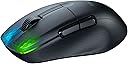
๐ฑ๏ธ Elevate your game with the wireless mouse thatโs as fast and light as your ambition.
The ROCCAT Kone Pro Air is a cutting-edge wireless gaming mouse featuring a 19,000 DPI Owl-Eye optical sensor, ultra-light 75g ergonomic design, and dual wireless connectivity (2.4GHz + Bluetooth). With Rapid Charge technology, it offers over 100 hours of battery life and uses Titan Switch Optical buttons for ultra-fast, durable clicks. Its aluminum scroll wheel and heat-treated PTFE glides ensure smooth, precise control, making it a top-tier choice for professional gamers and productivity enthusiasts alike.


| ASIN | B091BJB6B6 |
| Additional Features | Wireless |
| Antenna Location | Gaming |
| Best Sellers Rank | #66,014 in Video Games ( See Top 100 in Video Games ) #1,950 in PC Gaming Mice #6,157 in Computer Keyboards |
| Brand | ROCCAT |
| Button Quantity | 2 |
| Color | Black |
| Compatible Devices | Windows 7, 8, 10 & 11 (software support) |
| Connectivity Technology | USB 2.0 (or higher) Internet connection (for driver software) |
| Customer Reviews | 4.0 out of 5 stars 456 Reviews |
| Enclosure Material | Aluminum,Ptfe |
| Global Trade Identification Number | 00731855504114 |
| Hand Orientation | Right |
| Included Components | PhantomFlex USB-C charging cable |
| Item Dimensions L x W | 4.94"L x 2.83"W |
| Item Weight | 200 g |
| Manufacturer | Roccat-USA |
| Mfr Part Number | ROC-11-410-01 |
| Minimum Required Operating System Version | Windows 7 |
| Model Number | ROC-11-410-01 |
| Mouse Maximum Sensitivity | 19000 dots_per_inch |
| Movement Detection | Optical |
| Movement Detection Technology | Optical |
| Number of Batteries | 1 Lithium Polymer batteries required. (included) |
| Number of Buttons | 2 |
| Operating System | Windows 10, Windows 11, Windows 7, Windows 8 |
| Power Source | Battery Powered |
| Range | 10.0 meters |
| Special Feature | Wireless |
| Style Name | Ergonomic |
| UPC | 731855504114 731855504107 |
| Unit Count | 1 Count |
A**M
The Perfect Balance Between Comfort and Lightweight
I wish I could be exaggerating with the title, but this mouse is absolutely incredible. I've tried every popular gaming/office mouse under the sun and my by far favorite has been the Logitech G502. However, I was recently introduced to lightweight mice and the Logitech G PRO Superlight had gotten my attention for a bit. However, I always had to swap between these as the superlight was ultimately uncomfortable and had poor skates. The G502 has always been the most comfortable, but its too heavy for quick-flick gaming. Here comes the ROCCAT Kone Pro Air. At only $30 on black friday, I didn't think too much of this mouse initially. Once I received it, I was hooked. There was no "break in" period, it just worked. It was amazing, I still cannot believe a mouse this comfortable and lightweight existed, I thought it was impossible. The build quality is absolutely phenomenal too. I don't think there is any mouse on the market that can beat this level of comfort + lightweight form factor. One issue however, like many reviews have mentioned, is the software. It's dog water. Let me tell you how to get it working though: 1. Set the mouse setting to the center option, non-bluetooth or receiver mode. Plug it in via usb cable 2. Download the software, its called Roccat Swarm. 3. Plug in the receiver as well and update the firmware of the mouse. It might bug out so make sure the USB cable is plugged in first, THEN plug in the wireless transmitter. 4. Once updated, then you can change your DPI. The way I did this is by making sure "auto apply" was selected. This is a slow process. The software is SLOW to update. There are 5 DPI options, uncheck them all except #3, that's the one it used for me. If not, just set them all to the DPI you want, such as 1600. 5. Save settings. That's really it! This mouse is END GAME. If you're trying to find the balance between comfort and lightweight, this is it.
B**E
Too Good
Ergonomics are Excellent: Thumb Shelf, Big Side Buttons Best Scroll Wheel Ever: tactile scroll with perfect resistance, great texture, flat face (is way better than rounded) Fast Optical Switches with Great Clicks. I run with 0-debounce, and never get false double-clicks. (After a couple years of use, a slight rattle developed in one of my switch assemblies.) Forget jitter-clicking, which is probably just for kids cheating anyway. Yes kids, faking extra clicks with low debounce on non-optical switches is cheating. OK Software: The software install is relatively small, especially compared to Logitech or Viper. The software features are not-quite bug- and funk-free, but it works well enough. Best feature: Easy to run the LEDs off. Other best feature: Price, especially compared to over-priced alternatives.
D**W
Scroll wheel dies and software sucks
I've had this mouse for ~10 months (August 22, 2023) and that's when the scroll wheel started skipping. This mouse feels decently ergo, it is a little low, but overall it is fine for my small hands. I am used to the G703 shape and decided to give this mouse a try because of the shape when that started double clicking. But I didn't expect this mouse to essentially die in less than a year. My G703 at least lasted 3 years before defects start to happen. I code all day and night for my job, so the scroll wheel is essential for me. Because of that, I don't think this mouse is worth it unless you want a baby to try it out. The one thing this mouse has going is it has USB-C. That's the only reason why it has 2 stars. The Roccat Swarm software is terrible and adds lag. You can easily test this by opening a text editor and holding down a key. There's a periodic pause/skip every like 8ish seconds that only happens when I have this software open. Even if I close all my other programs down, have a fresh install of windows, it still happens. I play games like OSU! and notice it a lot when I play. Hopefully this only happens to me, but it happens to me on both of my computers. After my computer boots and the software embeds the savings to the mouse, I would close the Roccat Swarm program down. The software is also extremely slow just to save settings. Some extra things: I don't use any of the lights, I put it at the highest polling rate and use it at 3200 DPI. I actually stopped using the wireless feature and just have it connected. I had issues with it being wireless, but the cable is lightweight enough to not even notice it is wired. I forgot the issue I had with it being wireless because it was so long ago. That's not a good thing.
R**D
Thats german engineering
Perfect fit for my style. Its light, quick response, great fit and feel. Now there are 2 side buttons and thats it. Wouldnt recommend for RPGs or games with a lot of commands and hotkeys. But for FPS its fantastic. I run all roccat and never had any issues. Some have problems with the SWARM program but you dont need if you dont want all of the extras. I havent had an issue though with SWARM.
J**K
I loved it until it started skipping on me.
When I first got it I loved it, it's lightweight, and fits in my hand great, but after many months of using it the mouse started to have the mouse cursor skip at certain spots on my mouse pad. I do have a lot of electronics on my desk but I have a cheaper mouse that doesn't skip at all like this mouse did. I did love using it but as soon as it started skipping there was no way to play my games or even search the web when its always skipping the cursor. I went back to my cheaper mouse and that's still working fine with no skips.
C**N
Wireless connectivity was intermittent
I was excited to try this mouse, as I had a Kone Pure Optical years ago and loved it. I finally retired that one after it wore out from several years of use. This mouse was disappointing right out of the box. The material the mouse is made of felt cheap, not as nice as my Kone from years ago. Eh, not a huge deal as long as it works and doesn't get slippery with use... Plugged it in to charge and use it for a little bit, felt nice and seemed to work good (keep in mind, using it WIRED) Installed the software (which was a major pain, because their website's certificate was down, so I had to download thru my phone and send to my PC...) The software is pretty terrible (as expected with most of these gaming companies) but it did seem to work kinda. After fiddling with it for a while and saving multiple times, updating the firmware and driver a few times - I finally got the RGB to turn off (saves battery, after all, wireless is the main attraction) Upon unplugging the mouse and trying it in Wireless mode (2.4ghz, not bluetooth) it was immediately apparent that it was stuttering around my cursor on the desktop... Ok, not great, but I decided to reboot and see if maybe there was just a glitch... Upon reboot, same issue. Tried 2 different usb ports (thought maybe there was some interference) but no, same issue. No software conflicts, just steam and discord running and nothing else... Decided to return the mouse, as it was questionable already even without the wireless issue, but being totally unusable wireless, makes it a deal breaker. Dissapointed in Roccat, seems their quality has dropped just like Razer did years ago. Do companies make anything good anymore?
B**.
Had high hopes for this one...
I chose this one after researching a number of recommended candidates because it seemed like a nice balance between quality and price. The Kone Pro Air does have a number of things going for it: good form factor, multiple connectivity options, decent tactile response, easy to install and use. However, it also didn't last very long (a grand total of five months) before issues began to crop up. The battery life seems to be less than advertised, the mouse wheel is jumpy, and when I'm click-and-dragging, the button-press signal (which should obviously be continuous during this event) interrupts intermittently for no apparent reason. I've already tried thoroughly cleaning the mouse per instructions, but that hasn't helped. I'm not sure if I just happened to get a dud, but I would say be cautious when considering this one.
M**O
Great gaming and office mouse
I've been using this for a couple of years now. You won't find any better products at this price point. Battery life is awesome, quick response, and accurate. I mostly use bluetooth and wireless usb mode, and I never experienced any lagging or signal loss.
S**K
Small, good grip and lightweight are the highligt
Great low latency, good CPI range, it can be used wirelessly or Bluetooth connection, can be used for office and casual browsing as well. The charging cable is flexible and overall, the build quality of the mouse is good. The click sound is mild and the mouse glides well on all surfaces. Using it for almost a year now and overall satisfied. Update: The scroll wheel does not work after 1.5-year use, universal scroll still works though, scroll up and down will work randomly but seems like it has given up scroll up and down function
C**W
Highly recommend for gaming and day to day computer use
I was first very skeptical about buying from ROCCAT a brand I have never heard of before but after making the purchase and receiving my package I was only blown away. The mouse feels great in hand and i love the scroll wheel and the minimal yet cool rgb at the front of the mouse long with coming with a awesome braided charging cable I had to leave a review.
V**.
Gute leichte Maus
Sehr leicht, liegt gut in der Hand. Mausklicks etwas laut und Akkulaufzeit in Ordnung. Hรคlt bei mir ca eine Woche intensive Benutzung aus.
M**D
Poor quality. Worst gaming mouse.
Poor quality from a well known brand. The scroll wheel has problems and the left button automatically starts to click. Many other users facing same issues. Very disappointed. Returning........
D**A
็ดๆญฃใฝใผใซใฎๆปใใใใ
ๅ ้ปใฎใใกใ่ฏใใๅ ้ปใณใผใใๆใใใใณใผใใชใฎใงๅ ้ปใใชใใใงใไธๅฟในใใฌในใฏใชใไฝฟ็จใใงใใพใใ ้็ฅใใใใฎใงๅ ้ปๅฟใใฏใใซใใใงใใ็ดๆญฃใฎใฝใผใซใไฝๆใใชใ่ฏใใๆปใใใใๆญขใพใใฎใงๅไบบ็ใซใฏใใใๆฐใซๅ ฅใฃใฆใใพใใ
Trustpilot
1 month ago
2 months ago