Desertcart purchases this item on your behalf and handles shipping, customs, and support to Malaysia.
⚡ Power Your Home Network Like a Pro—No Dead Zones, Just Seamless Speed!
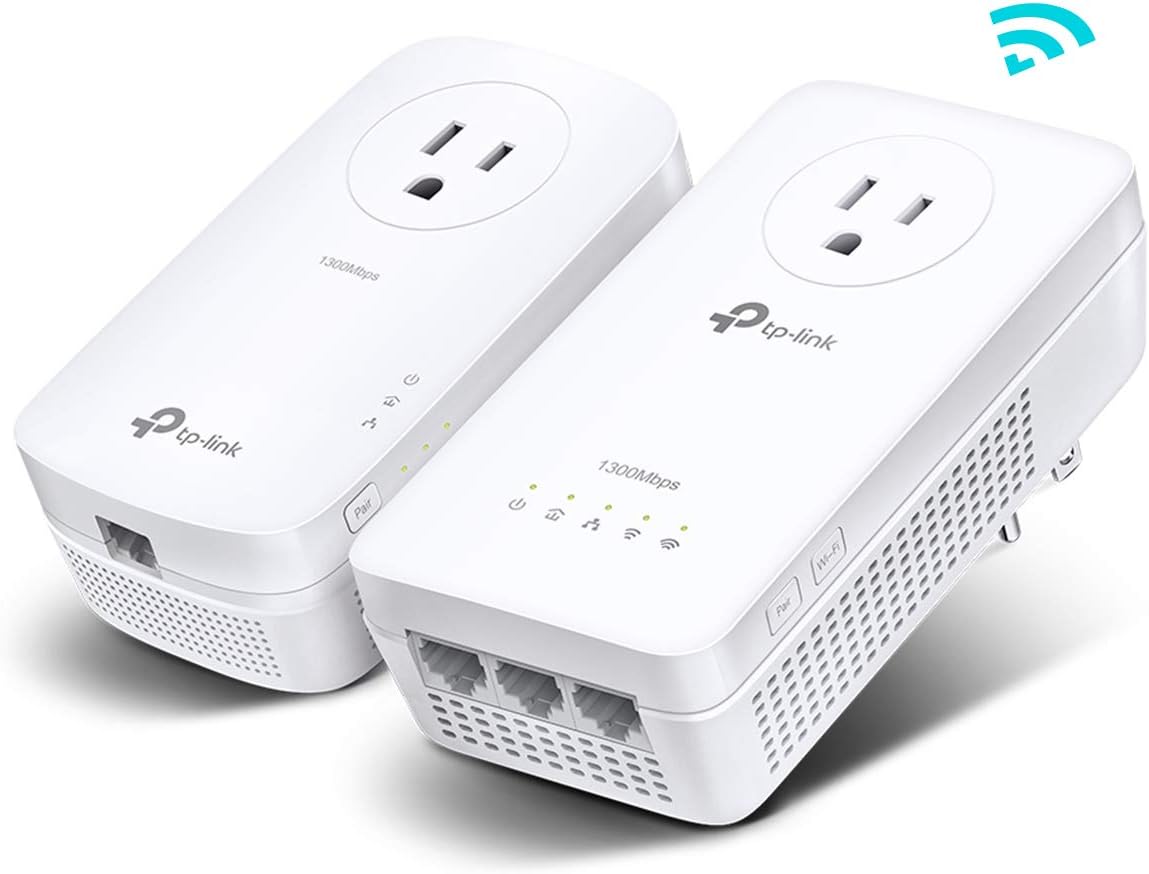
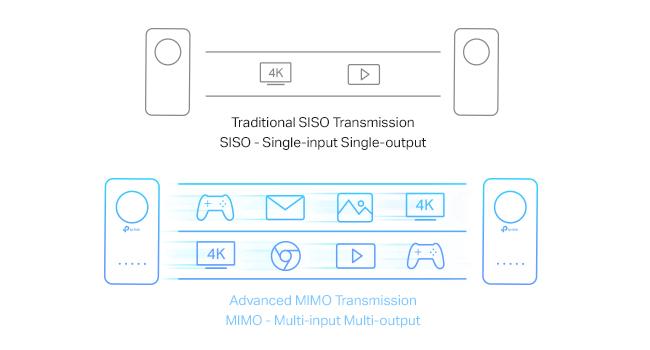
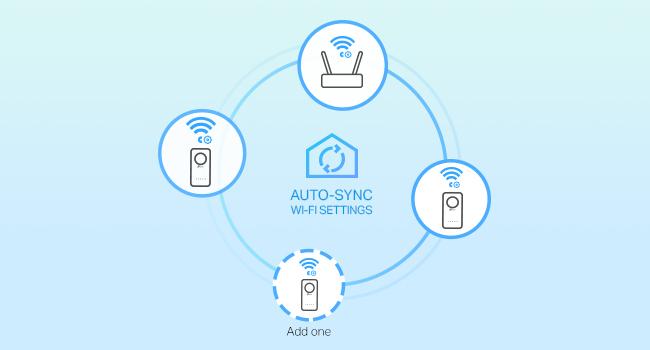
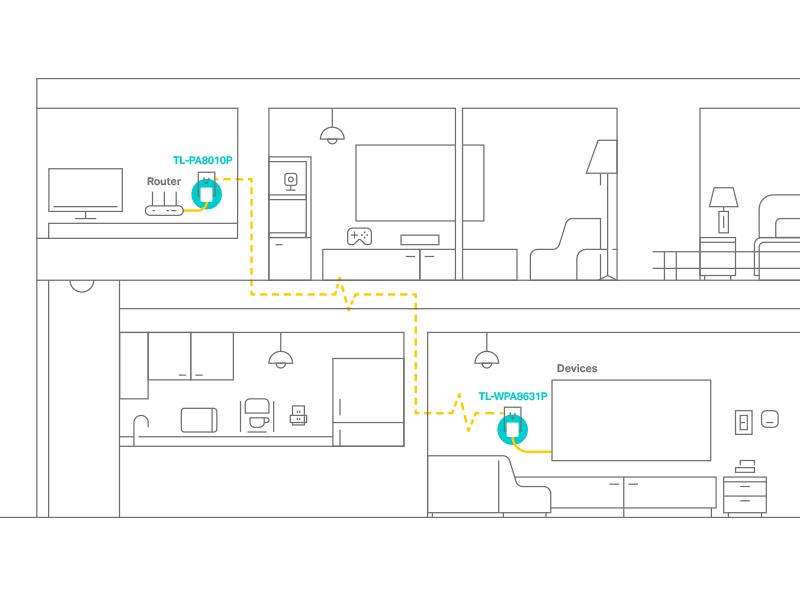
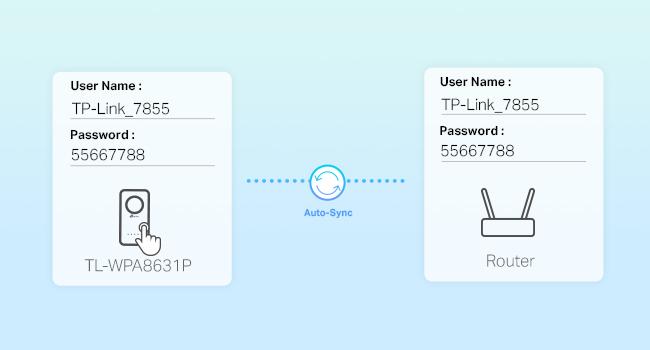
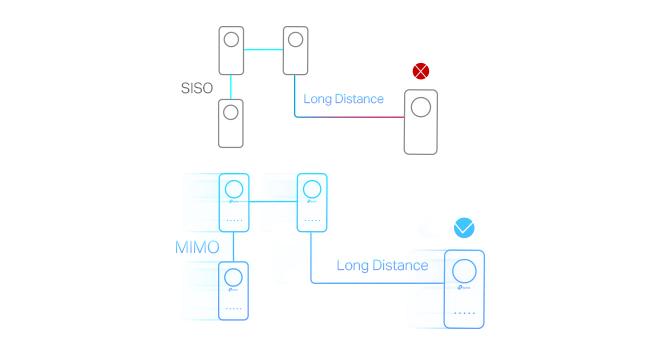
The TP-Link AV1300 Powerline Ethernet Adapter WiFi Extender KIT delivers ultra-fast 1300 Mbps powerline speeds over your home’s electrical wiring, extending wired and dual-band WiFi coverage up to 750ft. Featuring 3 gigabit Ethernet ports, passthrough power sockets, and easy plug-and-play setup, it’s designed for professionals craving reliable, lag-free connectivity in every corner of their home or office. Compatible with EasyMesh routers and built with advanced security, this kit transforms any space into a high-performance network hub.


| ASIN | B08RHZBHTM |
| Best Sellers Rank | #16 in Powerline Network Adapters |
| Brand | TP-Link |
| Built-In Media | 1× Quick Installation Guide, 1× TL-WPA8631P, 1× TL-PA8010P, 2× Ethernet Cables |
| Color | White |
| Compatible Devices | Desktop, Laptop, Smart TV, Printer, Game Console, Projector, Internet Protocol Camera, Headphone, Speaker, Webcam, Tablet, Smartphone, Keyboard, Mouse Compatible Devices Desktop, Laptop, Smart TV, Printer, Game Console, Projector, Internet Protocol Camera, Headphone, Speaker, Webcam, Tablet, Smartphone, Keyboard, Mouse See more |
| Compatible Operating System Family | Android, Windows |
| Customer Reviews | 3.8 out of 5 stars 762 Reviews |
| Data Link Protocol | Gigabit Ethernet |
| Data Transfer Rate | 1300 megabits_per_second |
| External Testing Certification | Não aplicável |
| Global Trade Identification Number | 00845973099770 |
| Hardware Interface | Ethernet |
| Item Dimensions L x W x H | 9.1"L x 7.6"W x 4"H |
| Item Weight | 1.9 pounds |
| Manufacturer | TP-Link |
| Mfr Part Number | TL-WPA8631P KIT |
| Model Number | TL-WPA8631P KIT |
| Number of Items | 1 |
| Number of Packs | 2 |
| Product Dimensions | 9.1"L x 7.6"W x 4"H |
| UPC | 845973099770 840460604765 |
| Unit Count | 2 Count |
| Warranty Description | 2 year manufacturer |
N**L
Reliable Hardwired Internet – Perfect for Working From Home
This TP-Link Powerline WiFi Extender has been a game changer for my work-from-home setup. I needed a stable, hardwired connection, and this delivered exactly that. Using the powerline feature, I was able to get a strong Ethernet connection in a room far from my router without running long cables through the house. My internet connection is now consistent, fast, and reliable—no dropped calls, lag, or interruptions during meetings. Setup was quick and easy, and it worked right out of the box. The WiFi extension is an added bonus, but the real win for me is the solid hardwire connection it provides. If you work from home and need dependable internet in another room, I highly recommend this TP-Link Powerline extender. It’s simple, effective, and does exactly what it’s supposed to do.
D**C
Works perfectly
Got this for my mother to put in her barn so we could mount cameras to the outside of it since we already had house power off her main panel to her house we figured it would work as the features stated. Worked like a champ, it's been running now for a year with no issues, even it power goes out and comes back, it links right back up.
F**G
Useless product - Avoid
First, I have several TP-Link products which have all been easy to setup, use, and maintain. In general, their products are good so far. This product did not meet their past standards for installation and results. Setup The install guide has 4 sets of instructions, all of which are incomplete. None will get the product successful installed correctly on their own if you want to integrate this with One Mesh. You have to use them all or know how to navigate and troubleshoot on your own to get this installed. Verification and Maintenance If you have other TP-Link products and use Tether to manage them, forget it. Tether won't work with the Powerline adapter. You have to download and install tpPLC app to install and maintain this product. And, it doesn't use One Mesh, it uses Easy Mesh which is anything but easy. It appears that this Powerline adapter is not well integrated into the TP-Link product portfolio. Tech Support While you can get to a Tech Support person via Chat, they are absolutely useless and often provided inaccurate information. The tpPLC app for Mac OS was last updated in 2020 for Mac OS 10.15. It would not install on the current Mac OS which is Sonoma 14.4.1. When I inquired about the availability of an updated version, the tech support person kept trying to get me to install a Windows OS version and kept making references to obsolete products that are not even listed on the TP-Link website. After some back and forth, it became obvious the tech support person didn't know the difference between the 2 operating systems nor anything about the product I was trying to install. Results This is what counts. It doesn't work. The tpPLC app says it is installed correctly using my existing SSIDs but when I sit next to the Powerline adapter, the speeds are awful. It doesn't matter if you are using the Powerline adapter wired or wireless, same results. If I disconnect the Powerline adapter and let my device connect to a TP-Link range extender which is 50 feet away, I get 2x the speed that I got using the Powerline adapter. This is a half baked, useless product that is not well integrated into the TP-Link product portfolio. Avoid.
A**Y
Works, but significant degradation when jumping circuits, works great on the same circuit, YMMV
I initially set this up with both on the same power strip to pair them and make sure they worked. Then, just to test and see, I plugged the adapter into an office outlet, with a direct 25’ CAT6 to the router, then put the extender out in the pool house. The office outlet on a branch on a circuit, then the pool house on a separate 80A circuit feeding a subpanel that has a 20A going to the outlet where the extender was plugged in. We have 1Gb fiber to the house, typically get about 900Mb to the router. I knew the signal would be degraded, but wondered if the connection was enough to still be usable; short answer, no. I’d get 1-3Mb over the Powerline setup, but it was dropping occasionally. Maybe with fewer jumps it would have been better, but we have a lot of electrical, old house, jumping between panels, etc. But, the concept was proved that it could work. The pool house used to have two 20A lines, but put in the subpanel a couple years ago. Left the old lines going to an empty outlet box with a flat cover, just in case, and glad I did. Installed an outlet on one of those lines, then the other end (inside the house) installed an outlet as well, right next to the inside panel, then ran a short cable from an empty breaker to that outlet. This gave me about a 40’ electrical line, on a dedicated breaker, with only two outlets on it, one for the adapter and one for the extender. Then I ran a new CAT6 from the router to the adapter, probably 25’ long. With a direct connection to the router and a dedicated circuit with only the two outlets, not super long, the connection is great; I’m getting 250-350Mb on Wi-Fi on my cell phone standing outside the pool house, about the same as I get inside the house. The first purchase was a refurb and pretty sure it was defective, the adapter kept shutting off after a few minutes. I disabled power saving (enabled by default and not sure why, have to unplug it to exit power saving) and it continued, returned that one, got a new one, and it’s been on, stable, and reliable since plugging it in. I also initially had trouble getting them on the network by using the buttons, but got on the router UI and went to OneMesh and it showed the device and I was able to easily add it and set it up from there. It’s cool technology and on short dedicated run works just as well as other equipment, but some minor complaints that resulted in 4 stars: - The power saving mode and issues with the first device; whole point of mesh is to be available when needed - The Wi-Fi doesn’t seem to extend as far as other devices; it’s great close by, but move 40’ away and it drops quite a bit - Other devices are managed through the Tether app but this requires a separate tpPLC app; why a separate app? - Have to find and download firmware files, can’t search or auto-update/install through the app or web interface - Both wall units are relatively large, say they need to be installed upright, and the network plug is at the bottom (need clearance) Again, per the title and I saw others say as well, YMMV (your mileage may vary). Due to a wide range of home wiring and equipment/power consumption, there's not going to be a consistent experience for everybody, just need to try it and see how it works for you. I'll add that I view this as a specialty device with unique use-cases. Running a new CAT6 is going to be easier than running new electrical lines, and using Wi-Fi extenders is going to be way easier than setting this up, but if you have electrical lines that will work, then this may be a good option.
L**R
Works on circuit greater than 100 yards
This product far exceeded my expectations. First the description indicates the use the adapter and extender on the same circuit. Most people would take that to mean outlets isolated by the same circuit breaker. I contacted customer service and they indicated it should also work across circuit breakers. The customer service response was quick and accurate. My ‘circuit’ includes 4 circuit breakers, and two junction boxes. The kit contains an adapter, plugged into an outlet in one building, which is separated by 110 yards from the extender, plugged into an outlet inside a shipping container. I now have a strong WiFi signal inside that shipping container. Also this DOES work with Starlink, I only needed to buy and Ethernet cable adapter which plugged into my Starlink router and had two ports, one of which connected the ‘Adapter’ in the kit (the unit that receives the WiFi signal) via one of the two Ethernet cables that came in the kit. There was one minor negative, the instruction/information sheet could have been more clear. It offers instructions that in my case were not needed (related to alternative steps to pair up the adapters) since the adapters paired with no problem,,, but it was not clear to me initially that the alternate steps were in case the initial pairing did not work.
J**M
The latency made it ineffective for me
I used this to connect an Ethernet camera to my network. The 'upload' latency meant the camera would constantly lose sync. It became completely unusable. I wanted to like this a lot - it would have been perfect for my situation... A wired video camera, plus a WiFi extender to pick up another camera that is even further away. But there was no way I could make this work, even when switching the 'transmit' device connected to my lan into other outlets in my house.
I**L
Waste of money for me personally
Not good for gaming unless your outlet is right next to the router, but at that point just buy a Ethernet. Not good for gaming. I got about 5 MB/s, about 20 feet away from my router. Though it was consistent, it’s not that good. Speed not that good. Signal strength not that good. Size is bulky so it makes the other outlet not usable.
D**R
You Need Some Specific Knowledge to Make This Work!
I needed a wireless signal in my detached garage to service a Rain Bird LNK2 WiFi Module. The wireless signal from the house was uselessly weak so an alternative was needed. Since there was electricity from the house, going to the garage, I decided the TP-Link Powerline WiFi Extender(TL-WPA8631P KIT) might work. Although it took two days to discover a setup that worked, it is now working flawlessly, I'm happy to say. I paired the Adapter and the Extender in my home office and placed the Adapter in an outlet closest to the garage that had an Ethernet extension available and plugged the Extender into an outlet in the garage. When I tried to program the Rain Bird Controller, using my iPhone XS I found a drop down list of available networks from which to choose. After some trial and error, I discovered the network that I needed was labeled TP-Link_DOCC; that was the Extender's WiFi output and it had a very strong signal. The network required a Password which can be found on the label on the back of the Extender. On my iPhone, I selected that network and inserted the Password I found on the Extender and it worked perfectly.
R**.
muy buen producto - estoy muy satisfecho con él
Esta es una reseña del modelo TL-WPA8631P Kit. Compre este modelo en Nov. 2021 asi que llevo casi dos años usandolo del diario. Es un excelente producto y lo recomiendo a todos mis amigos. La instalacion es super facil; en menos de 15 minutos ya estaba listo. El apareamiento (pairing) funciono muy bien. En mi colonia hay apagones frecuentes, casi uno por mes, y el tp-link responde muy bien; apenas llega la luz y se sincroniza y empieza a funcionar como si nada hubiera pasado. El extensor tiene tres puertos de ethernet, lo cual es muy generoso. Uso un puerto para mi TV, otro puerto para otra computadora, y el tercer puerto es muy util para hacer pruebas o conectar otro aparato si es necesario. La velocidad de transmision por la red electrica no es tan rapida (TX = 700 Mbps y RX = 560 Mbps); esto es probablemente porque mi instalacion de la red electrica en casa ya es muy vieja (mas de 30 años). Pero no noto ninguna lentitud en mis conexiones. Una prueba con Internet Speedtest de Ookla me da justo lo que mi proveedor de internet me da. La interfase web para configurar las unidades es muy buena. Es muy configurable y facil de usar (version para MacBook Pro). Incluso puedes configurar una direccion de IP statica con un solo click y muchas otras funciones mas. La aplicacion tpPLC para iPad tambien es muy buena. Yo casi no uso las redes de Wi-Fi, pero mis pruebas resultaron que la señal es muy buena (144 Mbps en la banda de 2.4 GHz y 243 Mbps en la banda de 5 GHz, estando a 5 metros de la unidad emisora). En mi parecer, la banda de 2.4 GHz es mejor porque la señal parece ser mas estable y atraviesa mejor las paredes. Pero si estas cerca de la unidad emisora, las dos bandas funcionan muy bien. Y la seguridad de la red es muy buena, de WPA2/WPA3 - Personal. Que mas les puedo decir? Que estoy muy satisfecho con este producto y lo volveria a comprar si lo necesitara. La calidad del servicio tecnico es buena tambien, pues han contestado a todas mis preguntas con amabilidad, prontitud y exactitud. Nota: uso este producto para darme conexion de internet via cable de ethernet entre mi cuarto donde tengo el router hasta mi estudio donde tengo mi TV y una computadora. No sabria decirles la distancia exacta, pero creo que es de mas o menos 12 metros.
A**O
Llego a tiempo
Es importante que verifique que sea una sola línea eléctrica y no haya otra red eléctrica suministrada o esté separada de piso en piso ya que se comunican usando el cable eléctrico de un enchufe a otro para que funcionen correctamente
A**O
Lo que promete no es lo que obtienes
El producto es bueno en casi todos los aspectos ya que es fácil de usar estable y confiable solo tiene un problema lo compre para extender a las recamaras del segundo piso la red que es de 150 mbits es lo que el proveedor me entrega son embargo en las conexiones tanto alambricas como inalámbricas lo más que puedo obtener son 20 mbits, el fabricante justifica esas velocidades tan lentas diciendo que en su caja lo específica para la conexión wireless y que la velocidad de 1200 es para la comunicacion interna de los aparatos sin embargo no justifican porque por red cableada no pasa de los 20mbits
C**N
Muy baja velocidad
No lo compren, tengo 300mb contratados y mi módem si me los da, este plc solo me da 30mb, lo devolveré
E**.
No cumple con las especificaciones en cuanto a velocidad. Poco rango WiFi 5 Ghz
No entrega más de 20Mbits por segundo aún teniendo los aparatos uno al lado de otro. Además la red 5G tiene pocos metros de alcance. Para lo que ofrece recomiendo mejor otro de los dispositivos de la marca que son mucho más económicos.
Trustpilot
3 weeks ago
3 days ago