

Desertcart purchases this item on your behalf and handles shipping, customs, and support to Malaysia.
🔔 Stay ahead of PC issues with every beep—because downtime is not an option!
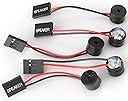
This 5-piece set of 2.3-inch internal motherboard speakers provides clear BIOS beep codes to instantly communicate your PC’s operational status. Featuring a universal 4-pin plug-and-play design, these buzzers make installation seamless while delivering reliable diagnostic alerts for quick troubleshooting. Ideal for professionals who demand uninterrupted performance and precise hardware monitoring.
| ASIN | B088KN6B9Q |
| Best Sellers Rank | #158 in Computer Motherboards |
| Brand | WEICHUANG |
| CPU Model | Pentium |
| CPU Socket | DIP |
| Chipset Type | Intel H61 Express, Intel H81 |
| Compatible Devices | Personal Computer |
| Compatible Processors | Pentium |
| Customer Reviews | 4.5 out of 5 stars 292 Reviews |
| Graphics Card Interface | PCI Express |
| Main Power Connector Type | 4-pin |
| Manufacturer | WEICHUANGJING |
| Memory Slots Available | 4 |
| Memory Storage Capacity | 8 GB |
| Model Name | [WC-string] |
| Model Number | [WC-string] |
| Number of Ports | 4 |
| Processor Socket | DIP |
| RAM Memory Technology | DDR3 |
| System Bus Standard Supported | SATA 3 |
| Total PCIe Ports | 1 |
| Total SATA Ports | 1 |
| Total Usb Ports | 4 |
| UPC | 782940114466 |
| USB 2.0 | 4 |
M**N
Perfect
Sounds exactly like the computers I remember from the 80's with a boot speaker. Also, much easier than trying to decipher blinking lights if there's a boot error.
M**4
Stays together
The extra glue over the connection stops them from coming off
A**C
It's not the 80s/90's anymore, but ...
These tiny speakers are helpful to use on a motherboard for getting the sound beeps needed to troubleshoot a boot problem. I've not heard anything but beeps -- these speakers could not produce full audio. Bulk pack helped me install on several new PC builds.
T**T
Perfect PC motherboard beeper thngies
Purchased these so I could here the computers post code beeping when booting. Not really a speaker since these things are only good for beeping noises. Also, quality control is terrible. Two of them came with the black wire disconnected due to poor soldering. Easy to fix if you know how to solder. So you might have to deal with that. Otherwise, they work just fine.
I**Y
The “Why Won’t My PC Post?” Lifesavers
Let’s be real: modern boards have LEDs and OLED displays, but when you’re working on older systems, building test benches, or troubleshooting mystery no-boot rigs? These little plug-in buzzers are invaluable. You just plug one into your mobo’s speaker header, and it’ll beep out BIOS codes that tell you what’s wrong—RAM, CPU, GPU, you name it. I keep a few of these in my tool bag for building or diagnosing budget systems and headless servers. I’ve caught DOA RAM sticks and misseated CPUs thanks to a single angry beep.
T**.
What are these you ask?
Most computer motherboard DO NOT come with these speakers and for a troubleshooter and computer builder, they are something that is really used. When the computer is first started up, it emits beeps that tell you if there are any problems with many of the components, CPU, memory, ext. These are definitely needed and SHOULD come with ALL motherboards, as well as some other parts I won't mention. You only need 1 in your computer. It's mounted on the motherboard where the 2-pin speaker should go. Why buy 1 at $4.99 when you can have 5 for $4.99? You don't get extra quality when you buy only one and with 5 you have backups.
B**Y
Fragile wires
Wires break off easily but I could solder them back on.
O**R
As described. good speaker
I needed these for motherboards and they sounds fine. Be aware that the back of the speaker has two solder points that are too exposed, so I just put electric tape on the back of the speakers for insulation. Cable connector fits the speaker connectors on the two ASUS motherboards I tried these on very easily. the PLUS cable is marked I think on the back of the unit. I don't have it in front of me. I am very careful that cables connect as marked. If it was not indicated, I would not use it. Or I would look up if red is the + usually online. I had no problems connecting and using this.
Trustpilot
1 month ago
1 month ago