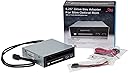
🔧 Upgrade Your Tech Game!
The Syba 5.25" Bay Adapter is a versatile solution for mounting slim optical drives and 2.5" SATA HDD/SSDs in a single 5.25" bay. With a data transfer rate of up to 6Gbps, tool-less installation, and dual USB 3.0 ports, this adapter is designed for efficiency and ease of use, making it an essential addition to any professional's tech arsenal.


| Compatible Devices | Laptop |
| Max Number of Supported Devices | 1 |
| Data Transfer Rate | 6 Megabits Per Second |
| Global Trade Identification Number | 08101540164190 |
| Manufacturer | Syba |
| UPC | 810154016419 796594140894 191120013619 |
| Hard Drive | Desktop |
| Number of USB 3.0 Ports | 2 |
| Series | SYBA MULTIMEDIA INC |
| Item model number | SY-MRA55005 |
| Item Weight | 1.4 pounds |
| Product Dimensions | 6.4 x 5.6 x 2.4 inches |
| Item Dimensions LxWxH | 6.4 x 5.6 x 2.4 inches |
| ASIN | B0081IOSOW |
| Is Discontinued By Manufacturer | No |
| Date First Available | May 8, 2012 |
B**N
Great product, works as intended.
So one more update, with original and first update below... After several months of random problems with hard drives failing, I was able to solve the problem with a higher powered power supply. This 5 bay housing was not the issue at all. Though I had no real help from Syba, I was able to determine that my problems started when I added an additional drive to the system, thus apparently surpassing the capabilities of the power supply. I'm not really sure why the problems only manifested with the drives in this enclosure vs the drives mounted in the case, but the bottom line is that this device works flawlessly now that power is sufficient. ----------------------------------- Below is my original review. I am updating the review just over a year later because the device is failing. For a few months, I have had issues with drives failing in the unit. After replacing the drive, things would appear to work for a while. Now, replacing a drive will not work. Taking the drive out of this enclosure and directly attaching it works perfectly fine. So as nice as the hot-swap enclosure was, I feel it should last much longer than a year, thus I am reducing the rating of this product. It is virtually unusable at this point. ----------------------------- Wonderful addition to my system! I run my old desktop as a backup server, and this allows me to have hot-swappable RAID drives. Only problem I had was not reading the manual thus not realizing there were power buttons under each drive which needed pushed after inserting the drive. So much easier than powering down a system and removing screws to replace a failed drive. Nice solid aluminum construction, no worries about breaking flimsy parts.
C**N
Well built, compact RAID storage answer
This is likely the best built multi-full-height-2.5" drive mounting solution on Amazon. There are others, if you're using nothing but SSDs, but at the price of SAS SSDs versus spinning rust SAS drives, as well as the diminishing redundancy caused by larger capacity drives, this makes a perfect solution for a decent RAID enclosure for one's desktop tower computer. Much less expensive than even many of the 8-drive SAS enclosures meant for smaller SSDs, and made of mostly metal construction versus the other ones out there. Throw in eight enterprise SAS drives of modest (~1.5-2TB) size and you've got a great solution for a RAID 5+0, 6+0 or 1+0 ultra-reliable or ultra-fast large-ish storage bin. Offload all those important files to a 10 or 20TB external drive that you take to off-site locations and you're pretty much covered for data integrity. As you grow and upgrade (who wants to spend $500+ each - that's $4000!!! - on eight 8TB SSDs today?) to large SSDs at a later date when they become more affordable, this enclosure will still work. One can have quite a large, reliable, fast storage bin with eight 4-8TB SSDs - all of which this hardware will accommodate. So far, so good, it looks nice and stays cool. If it continues to work well, I will grab a SAS extender and another one of these enclosures in the near future, as my old tower case has room for exactly one more.
E**T
No ventilation! My 3.5 HDD runs hotter than I like.
Works OK so far. No ventilation up there so 3.5 HDD runs a bit hot! I want to add a small fan asap.
C**N
The front doors are pretty good, compared to alternatives
Have a pair of these in a 4U enclosure. Disassembled both, removed the backs, drilled out the holes slightly and fit through the back rubber mounts to replace the stock fan (Young Lin Tech Co., Ltd. DEC802012M 80x80x20mm) with Noctua fans (NF-A8 FLX 80x80x25mm). Had to clip the wires off the original fans, as the connector is smaller than typical. I expect the original fans to be around ~2.5mm H20 @ ~40CFM @ ~38 dBA @ 2 watts, Noctua fans are 2.0mm H20, 30 CFM, 16.1 dBA @ 0.9 watts, so lower performance (particularly airflow), but a lot quieter and lower power usage. Some notes on the fan operation: there is an internal, red, power light on the left side of the lower drive bay (it's not an error light! :) ). On applying power, the fans first go maximum speed for 10 seconds, then will stop until internal temperatures exceed 30C (in either auto or high mode). Auto mode ramps up from 30c to 40c. I had emailed tech support for clarification on these points, and received a prompt reply which neatly explained in detail the fan operations - so 5 stars for their support folks also. The ventilation holes on the back are a bit small relative to similar drive caddys, consisting of 3 slots around the middle 3 drives. The front doors are pretty good, compared to alternatives. It could be a bit less restrictive, but in practice have not had any problems, even with 5 drives full-swing. Have not had any issues hot-swapping drives with this either. The case itself is nicely weighted, metal, well made with a nice brushed finish. The drives slide in and out smoothly. Each bay has an individual illuminated power button, hold down for a few seconds to power up the drives and good to go. I have a mix of 15k SAS and 3-4Tb SATA drives fed through a combination of an intel SAS expander (RES2SV240) and an LSI HBA (9300-8i). This has been active 24/7 for ~4 months at this point without issue for me. Oh, also, there is an internal temperature alarm with multiple setpoints, I did test it, will be heard over the noise of a modest rack but might be difficult to pick out in a high-density operation. 5 stars! :)
D**R
Ordered this from Amazon.co.uk, and this was shipped from Amazon.com via the Amazon Global service, I wish more products did this, it was well worth it! I bought an HP Prodesk 600 G1 SFF and wanted to turn it into a budget gaming PC. After building it into a Coolermaster M-ATX case (using the necessary adapters to allow for use with a standard ATX PSU) I wanted to make use of as many components from the original HP case as possible, including the Laptop DVD drive. This was PERFECT for what I wanted, not only does it let you use a slim laptop drive in a desktop (and it mounts firmly), but the 2.5" HDD Rack makes access to my SSD effortless. And the button/catch to release the HDD is nice and firm too, so accidently bumping it isn't a problem. Of course, the two USB 3.0 ports are just gravy. It also has blue LED's on the front, when there's a HDD in it, its lit up blue, and when that HDD is accessed, it flashes purple (probably a red LED mixing with the blue light). All in all, very pleased with this, does everything it says it does, and does it well with great build quality. If you need to use a laptop dvd drive in a desktop, and want some extra addons like a HDD tray and some usb ports, you can't go wrong with this!
G**0
Easy install. Convenient hot swapping for 3.5 and 2.5 HDD. Working without errors for 3 months. Wish it had lock system.
J**L
Very well built. Non-standard 80x80x10mm and non-standard 2-pin connector, powerfull but noisy fan - still looking for replacement. I think with 2.5" HDDs prices falling I will switch to cages for 2.5" drives like this: https://www.amazon.de/Icy-Dock-Wechselrahmen-Zoll-SATA/dp/B01MSFEAQI/
M**)
Used in the computer. Good Stuff.
C**R
Sembrava fosse DEFUNTO !!! in realtà il bottoncino del led preme un microinterruttore che riattiva gli HDD; questo significa che se dovete togliere l'HDD, ricordatevi che il case potrebbe non riaccenderlo !!! quindi, economico si ma di buona fattura e con questa accortezza da ricordare.
Trustpilot
2 months ago
1 month ago