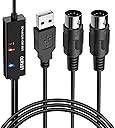
Desertcart purchases this item on your behalf and handles shipping, customs, and support to Malaysia.
🎹 Elevate your studio setup with pro-grade MIDI precision!
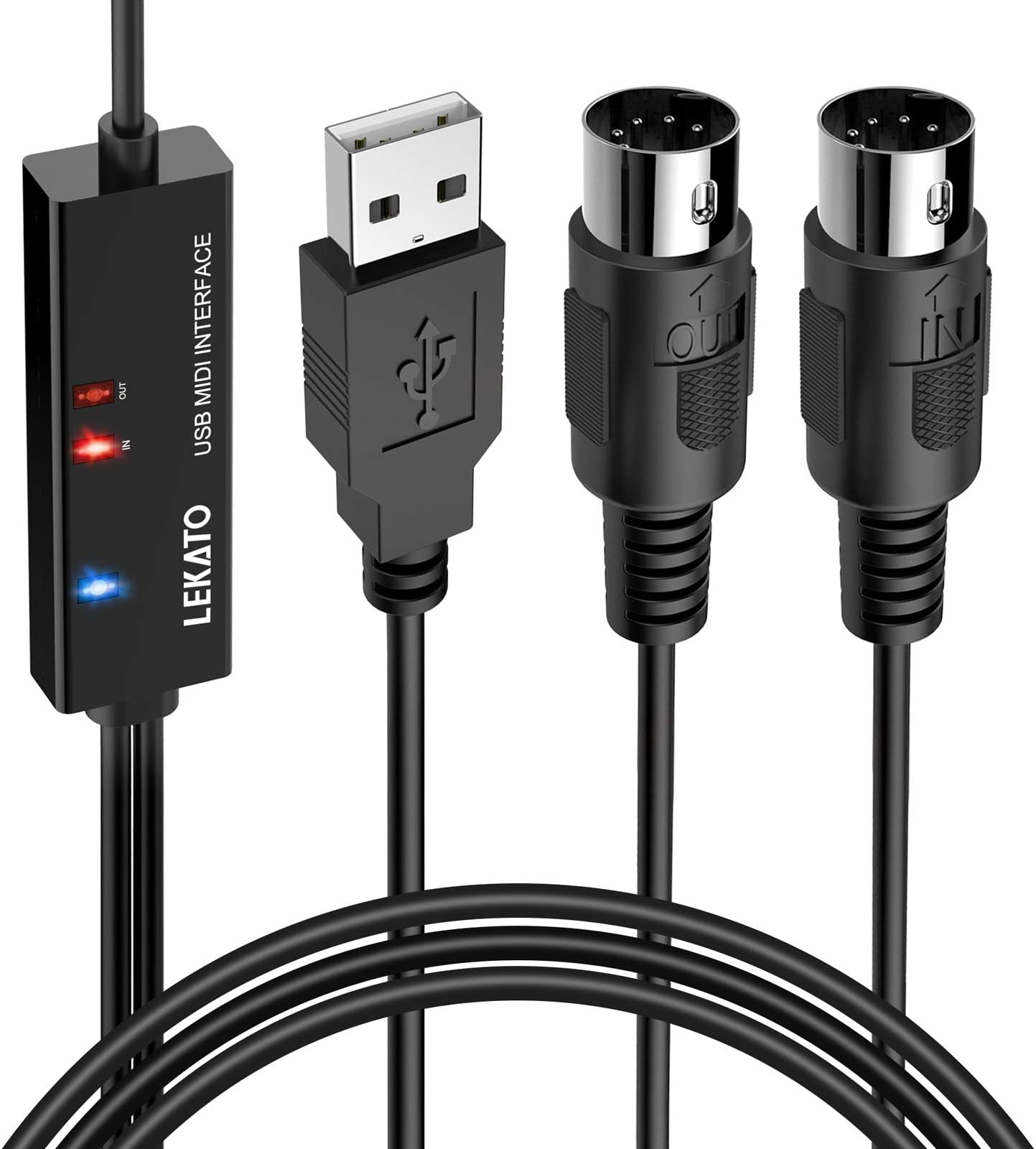
The LEKATO USB MIDI Cable offers a 6.5ft high-quality connection supporting up to 16 MIDI channels with ultra-low latency. Featuring plug-and-play compatibility for Windows and Mac, it includes intelligent LED indicators for easy monitoring and is engineered with interference-resistant copper wiring to ensure stable, true audio transmission between your keyboard, synthesizer, and computer.


| Asin | B08HMWJWDW |
| Audio Input | USB |
| Best Sellers Rank | #737 in Musical Instruments (See Top 100 in Musical Instruments) #2 in Computer Recording MIDI Interfaces |
| Brand Name | LEKATO |
| Compatible Devices | Laptop, Monitor, Personal Computer |
| Connectivity Technology | USB |
| Customer Reviews | 4.5 4.5 out of 5 stars (1,192) 4.5 out of 5 stars |
| Item Weight | 100 g |
| Manufacturer | LEKATO |
| Manufacturer Part Number | DH112257 |
| Model Number | DH112257 |
| Number Of Channels | 16 |
| Operating System | Windows, macOS |
| Unit Count | 1 Count |
| Upc | 793811871692 |
User
Good for MIDI recording
I ordered this device in order to record a MIDI instrument located in one room, while my DAW is in another.For reference, the MIDI instrument used is a Simmons Titan-75 electronic drum kit, and I used Reaper with EZ Drummer on Windows 11 as well as Ardour with DrumGizmo on Ubuntu Studio (Linux).This device was detected as a directly plugged in MIDI device on both systems, which made it very "plug and play" as I didn't have to mess with drivers etc.I used wireless in-ear monitors to play drums that were recorded on one midi track while listening to something already recorded on another track. This is the sort of thing that is very sensitive to latency.I am happy to report that there was essentially no detectable latency, proper midi notes were transferred for value, duration and intensity.I only tested this on drums, and did not test it on (for example) a keyboard. But for what I used this for, it worked well.So I can report this device is compatible with Reaper, Ardour, Drum Gizmo, EZ Drummer, Windows and Linux. I can also report that it is properly sized to connect with even small devices (using a standard midi port), and that the rechargeable internal battery worked for at least two hours (the time I used it before recharging). This device offers good value for the money.
User
Great, inexpensive option!
This is in light of reading other reviews here.One quick thing up front: I've seen conflicting info here about which MIDI plug (in/out) goes where. And yes, for dozens of years you'd plug a MIDI OUT cord into your MIDI IN socket on the instrument (and vice versa - that was the standard.Not sure if standards or changing or if this is just a single example, but their instructions are true to what worked for me: OUT goes into OUT sockets, IN to IN, not the old IN/OUT way I'm used to. For me it worked with the OUTS and INS being coupled respectively.First, I've used MIDI since the 90's and this wasn't particularly intuitive. The instructions are only a bit helpful (plus the printing is microscopic, not kidding, I had to use a magnifying glass to read them!). It took a few hours to get it going, mostly because only the sparest info is given. It was hard to tell if you needed the 2nd part (the dongle, not the tethered pair), didn't need it, or what. Eventually after seeing a good video that the company included in its order listing, I made progress. My overall goal is to use this so I can move my keyboard far from my audio interface box, yet still input into a DAW (I use the Apple two mostly), and then Airplay it across my house (or whatever space I'm at); the idea is not only to have MIDI control but actually use an onboard instrument in my DAW to sound back to my home pods - all without needing cables.Eventually I found that I do need the dongle plugged into my desktop Mac (I used a A-to-C USB adapter I had), and then plug in the two MIDI sockets to my keyboard, i.e. I needed all 3. 2) It took a little figuring out exactly how to GET Logic and Garageband to respond - and sound. Turns out yes it was simple, but too simple, and wasn't intuitive. First, I didn't need to do anything that the instructions said (i.e. go to Finder and Audio Setup blah blah, all that happened automatically, so that was a waste of time). Second, after perusing several internet explanations, I finally realized all I had to so was simply to make a new *software instrument* track (not MIDI instrument for my purposes), hit "R" or "I" in the DAW to hear real-time input, and it was automatically responding to the MIDI signal - but more importantly, playing the sound of the digital instrument I selected! All I had to do then is to go into the instrument library and select the one I wanted, and bingo, I was in business.So yeah, this little device works GREAT (very little latency when hearing your playback) and I'm happy with it. I just think it's simpler than the instructions made out. I think after a small learning curve, I'll find I use this thing a lot and with increased time and hassle saving. So far I'd recommend it... just know how your individual programs or hardware might need to be tweaked.
User
Excellent MIDI interface device to keyboards and drum modules with 5-pin DIN
This item works great and is less expensive than the Roland equivalent. I use it to transmit MIDI from a Windows PC to a drum module, and it performs flawlessly. I have purchased several items from Lekato and found them to be well-made, affordable and suitable for my needs as an electronic drummer. This includes the Lekato drum set (CPD-1000) and wireless microphone and other useful gadgets.
User
Solid for the Price, Works as Expected
I picked up the LEKATO MIDI to USB-C interface for my studio and it has been a solid choice overall. Setup was mostly plug and play on both Windows and macOS with no extra drivers needed, though figuring out the “IN” and “OUT” labeling can be confusing since it depends on whether you follow traditional MIDI standards or the way LEKATO describes it. Once I swapped them correctly, everything worked without a hitch.Latency is impressively low and the signal has been stable in Logic, GarageBand, and even with apps like Simply Piano. Build quality feels sturdy, and the indicator lights are a nice touch when troubleshooting connections. It even doubles as a USB to wireless bridge in some setups, which turned out to be surprisingly useful.That said, the documentation leaves a lot to be desired. The text is tiny and not especially helpful. If you are new to MIDI, expect a bit of trial and error or hunting for tutorials before it clicks. Also, while most users report great reliability, there are a few who have had units fail after extended use, so longevity may vary.For the price, this interface punches well above its weight. Whether you are recording on a Yamaha, Roland, or an older keyboard without USB, it is an affordable and effective solution that just works once set up properly. Recommended for hobbyists and serious musicians alike.
User
It's very easy to use.
Yes, this item works very well. I needed it for a particular project and it works fine. The only issue I have with it is that I wish the manufacturer would mark on the cable either the 'in' or 'out' plug to identify it easier.
User
Works out of the box! Doubles as USB MIDI to Wireless!
I was impressed with how it worked without any issue so far. I had purchased the CME WIDI Master and CME Bud Pro at the same time as this. The CME works just fine, although, I had some issues and still continue to struggle with certain things due to it's many configurations. I intended to use the CME with a "Rock Band 3 Keyboard for PlayStation 3". For some unknown reason the CME will not work and the LEKATO does. My only gripe is the MIDI IN jack does not detach when it's not needed. The CME does. The keyboard has only one MIDI OUT jack and the IN jack just dangles. I'm trying double sided tape it to the back side. I'm tempted to just cut it off. My favorite feature of this device is how the USB acts as an adapter for USB to Wireless. That comes in really handy with my Yamaha PSR which only has USB.
User
A lot of bang for the buck - works great!
The M02045N Wireless MIDI with the USB dongle provides a lot of bang for the buck! I use it to wirelessly connect my Korg Triton Extreme keyboard to my PC laptop running a standalone piano VST. "MIDI A" plugs into the keyboard's MIDI IN and MIDI OUT. The "MIDI B" USB dongle plugs into the laptop. My laptop doesn't even have a built-in Bluetooth receiver - it's in the supplied dongle. Works great! No device firmware or Windows 10 driver installations needed.I also use this with my Triton Extreme using only "MIDI A" to connect wirelessly to an iPhone which has MIDI Bluetooth. There are some good iOS piano apps available, and this Wireless MIDI device allow my dinosaur keyboard (with an action I still like) to act as a MIDI controller for those iOS pianos.As for the LED colors, flashing blue means no Bluetooth connection has been made. Solid blue means Bluetooth connection has been made. Solid red means internal battery is charging. Red and Blue both illuminate (looks purple) when in use and charging at the same time.MIDI A has two 5-pin DIN connectors, one labeled OUT you plug into your keyboard's MIDI OUT jack. The other labeled IN you plug into your keyboard's MIDI IN jack. Easy peasy. Note these two connectors have a thin black insulated wire connecting them, but it's not connecting MIDI IN to MIDI OUT like an old style MIDI cable - that would create an ugly MIDI loop! The processor and radio of this wireless Bluetooth MIDI interface are probably in the larger MIDI OUT connector, and it sends over the black wire the data and power appropriate for the smaller MIDI IN connector.
User
Saved the Day!
Works like a charm!
User
FUNCIONOU PERFEITAMENTE
Tenho uma Bateria eletrônica Roland HD-1... Comprei esse cabo para ligar no módulo da bateria e utilizar o Garageband no Ipad como instrumento virtual... Funcionou perfeitamente. Não tem latência e nem corta o som! Recomendo a compra caso essa seja a sua necessidade.
User
Excellent
Fonctionne bien
User
Wonderful
Just what I was looking for, now my piano works with my computer
User
Stopped working after just 2 uses
Don't buy, it's absolute trash
User
Amazing for the price - virtually no latency.
Top tier - works out of the box, and the latency is practically identical to a wired connection (I was shocked!) at least when I tested it with a midi drumkit. Great way to essentially always have a wired up drumkit ready to go for a quick session on your iPhone using Garageband.
Trustpilot
1 month ago
1 week ago