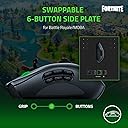
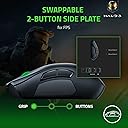
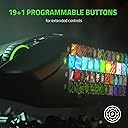
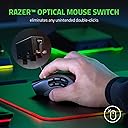
TL;DR - I've been waiting for a new wireless version of the Naga for some time now. As a multi-genre gamer that mainly plays MMOs but occasionally dabbles in other genres like shooters, the Trinity concept is perfect. The Naga Pro feels like slightly upgraded and wireless available version of an already great mouse. If you're a fan of the original Naga Trinity or looking for a great all-around wireless gaming mouse with a large number of buttons, the Naga Pro comes as a strong recommendation. Longer version: I've always liked the general feel of the Naga mouse - not too big, not too small, relatively ergonomic to my average if not slightly smaller hand size for a guy. I've been using the mouse and its different versions since the OG back in 2009, and my favorite version was the 2014 Epic Chroma that also had a wireless option. Since then, Naga mice haven't supported wireless. That's unfortunate as I like the clean desk look of a wireless mouse, and get annoyed by the "tug" of the cable despite trying some gadgets that try to wrangle cables in the ideal positions. The downside for wireless, purportedly, is the delay versus wired mouse. Honestly, I cannot tell the difference. It feels instantaneous to me. Wired vs Wireless is only something that matters to professional gamers, when every tiny detail gives an edge over the competition. But for 99% of gamers out there, your skill is going to define your performance/ranking far more than something like a minuscule amount of delay on your mouse. Suffice to say, it's not going to turn your game around enough to choose wired over wireless if you generally prefer wireless. Razer touts its "Hyperspeed" wireless - I don't know how much of that is just marketing nonsense. To my feeling, the responsiveness at least compares to my Logitech G305, which I use for my setup in my living room with my nVIDIA Shield. Now I'll ramble a bit about Naga as a product line. I've gone through like 6 different Naga mouse over the years - none of them broke; they've all performed great. I only upgraded them because of wanting features, or because they were getting too grimy after many hours of use (which as an MMO gamer, they have gotten many hundreds of hours of mileage). Firstly, if you're generally in the market for a MMO mouse and looking at the different options out there, I think the Naga has always been the best. I've tried some of the others out there from Corsair and Logitech. They're decent products, but ultimately the thing that has me coming back is the physical ergonomics of the Naga. I love the shape of the mouse, and the 12 buttons are easy to differentiate from each other by the individual button contours. It doesn't even need "bumps" to help you train your muscle memory (which would eventually erode over time, trust me). The only downside is that I feel like the last three buttons (10, 11, and 12) are difficult to hit without hand strain, but this may be because of my smaller sized hand and getting older. That being said, 1 through 9 is still some great button real estate. As far as playing MMOs, I consider the Naga (or a similar mouse) essential. I honestly don't know how I used to play without them. You can use them as additional button binds, or you can replicate your number keys to give your hands some different options to hit the same keys (which I do to overcome hand strain from long hours of play). If you've never tried a mouse like this and aren't sure if it's worth it - it is. The only challenge is the initial learning curve. It took me several weeks to really get used to using the mouse, but once I did, there was no going back. It helps so much in raiding, for example, when you might need to be running around with WASD while also hitting a complex button rotation. Doing this is night and day between having a Naga and not having a Naga. Now, I'll zero in on the Naga Pro. This only just came out, so I can't review it for things like battery longevity. That being said, Razer's not new to the PC product game, so I have nor reason to doubt in its technical specifications for the charge time. Out of the box, the mouse does feel very similar to the Trinity, if not exactly the same. The shape is the same, the side button contours are the same, and the materials seem the same. The materials I think are perhaps the only slight downfall of the product - it has a bit of a plasticy feel to it; I wish the product felt more solid. That being said, the light weight does help in situations like FPS gaming, when you need to move the mouse quickly. For a chunkier sized mouse, it's not a bad weight. But if you solely game FPS, the Naga would be hard to recommend. There are lighter mice out there, and you might want to consider something wired. That being said, if you are just a casual FPS gamer, or playing something like Borderlands, the Naga works just fine, if not outstanding with the additional button potential. The hot-swappable left panel is one of the coolest innovations in gaming mice tech I've seen in years. It works instantly and without a hitch. It snaps in place magnetically - it feels solid and never like it's a weird attachment. Speaking about the additional buttons, that's another thing that's changed over the Trinity. The hot-swappable left panel has gotten rid of one panel in exchange for another. Instead of the "circular" button layout designed for MOBAs (which tbh I never used, even as someone who occasionally plays MOBAs), there is a more condensed 1-6 button layout. It's kind of a nice option for people who play MMOs with fewer keybinds like Guild Wars 2, or someone who can't reach all 12 buttons. I see this as an improvement over the Trinity, as I never used the circular button layout and could potentially use the 1-6 grid layout. Long story short (too late), so far, I think the Naga Pro is great. It maintains the greatness of the Trinity product and brings in to a wireless version. If you liked the Trinity, you will like the Naga Pro. If you did not like the Trinity, you will not like the Naga Pro. If you're new in the market for a MMO mouse, I recommend trying it out. Be gentle with it though and leave yourself the option to return if you don't like it. Some people complain about the scroll wheel, but I've never had an issue there. Suffice to say, mice are personal and subjective peripherals, and things like shape and ergonomics differ in preference from person to person. This might not be the mouse for you. But as a concept, it's executed well and one of the best on market. The final downside is the price - it's on the expensive side. But for me, input is how you interact with your game - it's the connection between you and what's happening in-game. It's worth investing in as a core part of your setup.