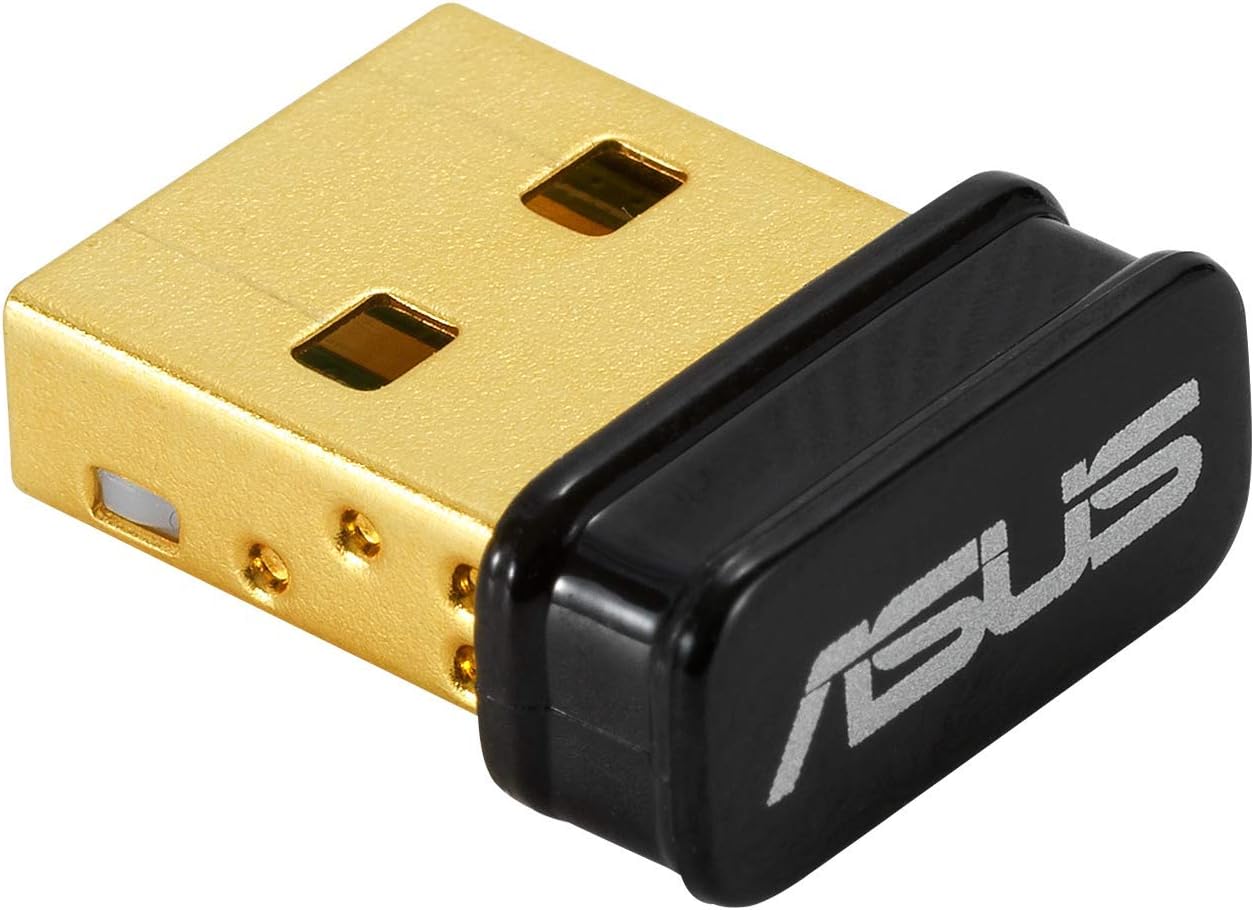
🚀 Elevate your wireless game with ASUS USB-BT500 — small size, massive reach!
The ASUS USB-BT500 is a compact, TAA-compliant USB Bluetooth adapter featuring Bluetooth 5.0 technology. It delivers up to twice the data transfer speed and four times the wireless range compared to older versions, while maintaining backward compatibility with Bluetooth 2.1/3.x/4.x devices. Designed for professionals seeking reliable, energy-efficient wireless connectivity, its ultra-small form factor ensures portability without compromising performance.


| Data Link Protocol | Bluetooth |
| Compatible Devices | Laptop, Desktop, Headphone, Speaker |
| Hardware Connectivity | Bluetooth, USB |
| Item Weight | 0.01 Pounds |
| Item Dimensions L x W x H | 0.59"L x 0.28"W x 0.69"H |
| Color | Black |
S**N
Seamless Connectivity for Your PC
The ASUS USB-BT400 Bluetooth Adapter is a versatile and reliable solution to upgrade your PC or laptop with Bluetooth connectivity. Whether you want to connect wireless peripherals, transfer files, or simply enjoy the convenience of Bluetooth, this tiny dongle has you covered. One of the standout features of this Bluetooth adapter is its ease of use. It's a 'plug and play' device, which means that it's incredibly simple to set up on Windows 10/8/7/XP. You just plug it into an available USB port, and your computer recognizes it automatically. This quick and hassle-free installation is a big plus for users who want to avoid complicated setups. The adapter supports a wide range of Bluetooth devices, including printers, phones, headsets, speakers, keyboards, and controllers. This versatility makes it a valuable addition to your PC, enabling you to connect various peripherals and accessories without the need for multiple adapters. Despite its compact size, the ASUS USB-BT400 delivers reliable and stable Bluetooth connections. Whether you're streaming audio to wireless speakers or enjoying lag-free gaming with a Bluetooth controller, this dongle ensures a seamless experience. ASUS is known for its quality and durability, and this adapter is no exception. It's built to last, and you can trust it to provide long-term Bluetooth connectivity without issues. The sleek black design of the dongle blends well with most computer setups, and its small size means it won't block adjacent USB ports or get in the way. In conclusion, the ASUS USB-BT400 Bluetooth Adapter is a cost-effective and efficient solution for adding Bluetooth connectivity to your PC or laptop. Its 'plug and play' setup, compatibility with various devices, and reliable performance make it an excellent choice for users who want to enjoy the benefits of Bluetooth without the fuss."
C**T
Installed easy with some instruction confusion.
I downloaded the current drivers and user manual for this device while awaiting delivery. The instructions were clear with an exception, you are instructed not to attach the adapter until instructed to. Well you are never instructed to insert the adapter, instead a pop up says there isn't an adapter installed. After the second time I attempted installation I finally understood that was the instruction to install the adapter. Installation went smoothly after that. I was able to pair my headset and phone. But the sound quality is not good. Another person commented it sounded like being in a paper bag. Indeed it does. The adapter is not routed through my Realtek audio on the computer. I searched but did not find a way to route it there nor did I see any instructions that the adapter had any audio controls to effect the sound quality. This adapter was not expensive and I knew from comments that there could be issues. I'll keep it connected for use with my phone for now. However, for audio I purchased a BT external adapter that has a 3.5 plug to use with the headphone output on my computer. I can adjust the sound quality in the RealTek application and just deal with the audio delay. Update: I paired a different earbud set and the sound quality is much better and allows for some adjustment. I increased the rating to 4 because the adapter is not the sound quality problem, the earbuds are issue. Update 2: Increased rating to 5 stars. Sound quality issue is not caused by this adapter but by earbuds. I paired an Aluratek ABC01F Bluetooth transceiver using my Koss KSC75 headphones and now have perfect fidelity from the computer. All audio controls work.
F**C
Works good in Linux with some effort
I bought this to interact specifically with ble 5.0 devices from my PC and possibly some SBCs. This was a huge pain to install but here's what I did which will hopefully spare someone else the agony. The documentation on the Asus site is pretty abhorrent. It's mostly Windows oriented, and even for Windows the documentation is awful and you are pretty much on your own. It's a "plug and pray" situation with this thing until you get it setup correctly. Yes, it's supported in Linux so should work on Raspberry Pi as well. Once it's running it's actually really nice so far. Also the drivers include the source which is a win. How I got it working (old Ubuntu 18.04 with kernel version 5.4.0): First, download the driver from the Asus website. Second, blacklist all default bt drivers by creating the file /etc/modprobe.d/bluetooth-blacklist.conf then add this to it: blacklist btrtl blacklist btusb blacklist btintel blacklist btbcm This was necessary for me as the two devices were fighting for attention so to speak. It may not be needed for you (you can skip this and try it later if needed). Third, reload the kernel module settings (part of the above step): sudo systemctl restart systemd-modules-load.service Note that you will probably lose your bluetooth control panel, but you can undo this later by deleting the conf file then reloading the settings again. Fourth, install the driver after unzipping it and cd'ing to the folder: sudo make install INTERFACE=usb Fifth, you must copy the firmware to the correct location. Go into the folder /rtkbt-firmware/lib/firmware inside the driver folder and copy these two files to /lib/firmware/ on your system: rtl8761bu_config rtl8761bu_fw Now see if the device is listed: hciconfig -a the device should appear there. If not, unplug the device then turn bluetooth off then on. Depending on your distro, it could one of these (Deb/Ubuntu/fedora): sudo service bluetooth stop sudo systemctl stop bluetooth Plug it back in, run hciconfig -a again and it should be working. If still nothing, run: lsmod | grep bluetooth and see if 'rtk_btusb' is listed next to bluetooth (with some others, probably). If so then the driver is probably installed. Now let's see if your firmware is correct: Type dmesg and see if there are any errors there. If you are seeing a cryptic message in dmesg like: rtk_btusb: fw name is rtl8761bu_fw rtk_btusb: This is not 8723a, use new patch style! then the firmware has not been copied to the correct folder which will prevent it from working. Locate the correct firmware folder for your distro then redo the steps from that point again. Hopefully it should be running now. Now you can play with it in bluetoothctl. Type bluetoothctl then type scan on and see if there are any devices. Type help for a list of commands... have fun! If all else has failed, remember to register your device on the Asus website then you should be eligible for support (didn't try this, your mileage may vary).
A**R
Honest review from a gamer
I rarely do these reviews, and I am going from a competitive gaming view so take it as you will. Now, I am a huge critic of reaction time and while this little ASUS usb isn't bad, however it's not 1:1 instant. Yes, by all other functionalities it works just fine. It is easy to use, most equipment I have attached it to has been compatible. By the layman user it is the perfect tool, however if you think about using it for gaming on high tier level, I'd just stick to cable. Would do 4.5/5 but that isn't an option, great product overall though!
L**N
If you're using an Xbox controller on PC...
If you're using an Xbox controller on PC and your controller keeps disconnecting, this is the product you need. No longer disconnects.
J**S
Worked with PSVR2 adapter for PC
My existing Bluetooth adapters did not work properly with the PSVR2 adapter for PC. (The sense controllers would pair fine, and the buttons worked, but the tracking didn’t work at all). After spending 5 hours on this, I ordered this ASUS adapter, which was on the Sony recommended list. It solved my tracking issues. Be aware, though, that I also connected it to a USB extension cable to be away from the PC and closer to the controllers. I don’t know if this is necessary, but that was the last thing I tried with my previous adapter (per Sony recommendation), and I didn’t feel like messing with it forever, so I just installed this new adapter on the extension cable (which I run up between my monitors). So I can’t vouch for this dongle working with PSVR2 if you plug it directly in the PC because I didn’t try it, but it is working for me well with the extension cable, and the tracking is working fine.
J**H
Works with ASUS motherboard and Linux Mint 22.2
I don't know what I did to my ASUS motherboard, BIOS, or operating system - but the bluetooth has died, died, died. This little ASUS USB-BT500 adapter brought bluetooth back to my OS (Linux Mint 22.2).
K**R
When it works it's great
Plug and play and works as designed. When it works it's great. However I do have an issue where it randomly disconnects at the most inopportune times. Makes gaming difficult when I'm in the middle of a boss fight and I lose connectivity. Something might be broken on the inside cuz when I shake it something's rattling inside. Size and Design are nice though small and doesn't take up a lot of space
Trustpilot
1 month ago
2 months ago